There are two ways to access the WhatsApp Business API: directly through the WhatsApp Business Platform or through a WhatsApp Business API provider. The right option depends on your business needs, technical resources, and the features you require. Many businesses and developers choose a WhatsApp Business API provider because it offers additional features and simplifies integration.
In this guide, you'll learn how to access the WhatsApp Business API using both methods, understand the key differences between them, and determine which option is the best fit for your business.
Let's begin.
What is the WhatsApp Business API?
The WhatsApp Business API lets businesses send and manage WhatsApp conversations programmatically. It is designed for medium and large businesses that need to automate customer communication, integrate WhatsApp with existing systems, and manage conversations at scale.
Unlike the WhatsApp Business App, which has limitations on broadcast messaging, automation, analytics, and multi-user access, the WhatsApp Business API provides much greater flexibility. It supports messaging unlimited contacts with approved message templates, detailed analytics, multi-agent access through API integrations, chatbots, AI agents, and workflow automation.
Read more: WhatsApp Business API vs WhatsApp Business App
Key Features of the WhatsApp Business API
The WhatsApp Business API provides a range of features that enable businesses to communicate with customers at scale while maintaining a personalised experience.
Some of its features include:
1. Messaging
The WhatsApp Business API allows businesses to send and receive messages from customers using approved message templates, and every message template belongs to a specific category based on its purpose. Choosing the correct category is important because it determines how Meta reviews the template and how it can be used.
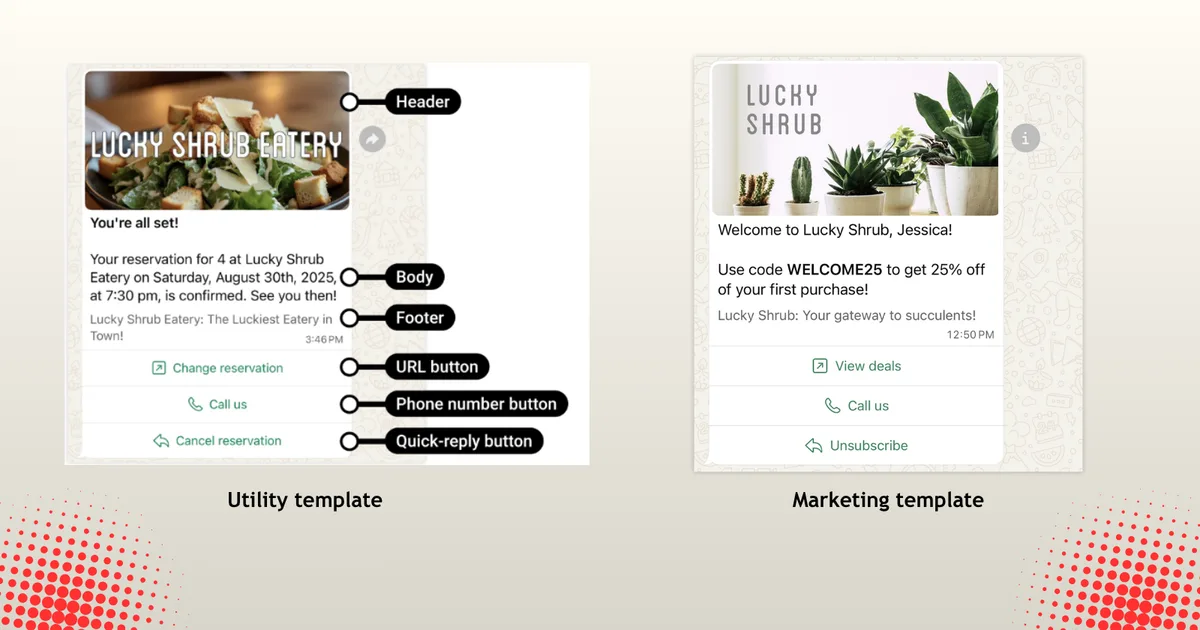
Source: WhatsApp Business API Documentation
Message templates are categorised into three:
- Marketing templates for promotional messages, product announcements, and customer engagement campaigns.
- Utility templates for transactional notifications such as order confirmations, delivery updates, appointment reminders, and account alerts.
- Authentication templates for sending one-time passwords (OTPs) and other time-sensitive verification codes.
It is important to note that Meta must approve all message templates before they can be used in production.
2. Calling
The WhatsApp Business Calling API allows businesses to make and receive calls from customers using Voice over Internet Protocol (VoIP). When businesses use the same number for both messaging and calling, they can provide a seamless customer experience within a single communication channel.
Advanced features such as configurable calling hours, call permissions, call buttons, and business-initiated calling help businesses deliver a more seamless customer support and sales experience. However, it is worth noting that business-initiated calling requires user consent and is only available in supported regions.
3. Group messaging and management
The WhatsApp Business API supports group creation and management, enabling businesses to create invite-only groups for communication and collaboration. Users can join groups through invite links, allowing businesses to share updates and facilitate conversations among multiple participants. Group settings such as the title, description, permissions, and membership controls can be managed through the API.
However, access to group functionality is currently limited to businesses with an Official Business Account (OBA). Features such as authentication messages, disappearing messages, view-once messages, message editing, message deletion, and group calling are not currently supported through the Groups API.
4. Analytics
Through the WhatsApp Business API, businesses can access metrics such as messages sent and delivered, conversation volumes and associated costs, template usage and read rates, group activity metrics, and performance data for business phone numbers linked to a WhatsApp Business Account (WABA).
Getting WhatsApp Business API Access through the WhatsApp Business Platform
The WhatsApp Business Platform is Meta's official platform for building applications with the WhatsApp Business API. It provides access to the WhatsApp messaging and marketing APIs, as well as other Meta APIs for social platforms such as Instagram, Facebook, and Threads.
In this section, you'll learn how to access the WhatsApp Business API directly through the WhatsApp Business Platform.
To get started, visit Meta for Developers, sign in, and click the My Apps button at the top of the page.
Next, enter your app details and select "Connect with customers through WhatsApp" as the use case.
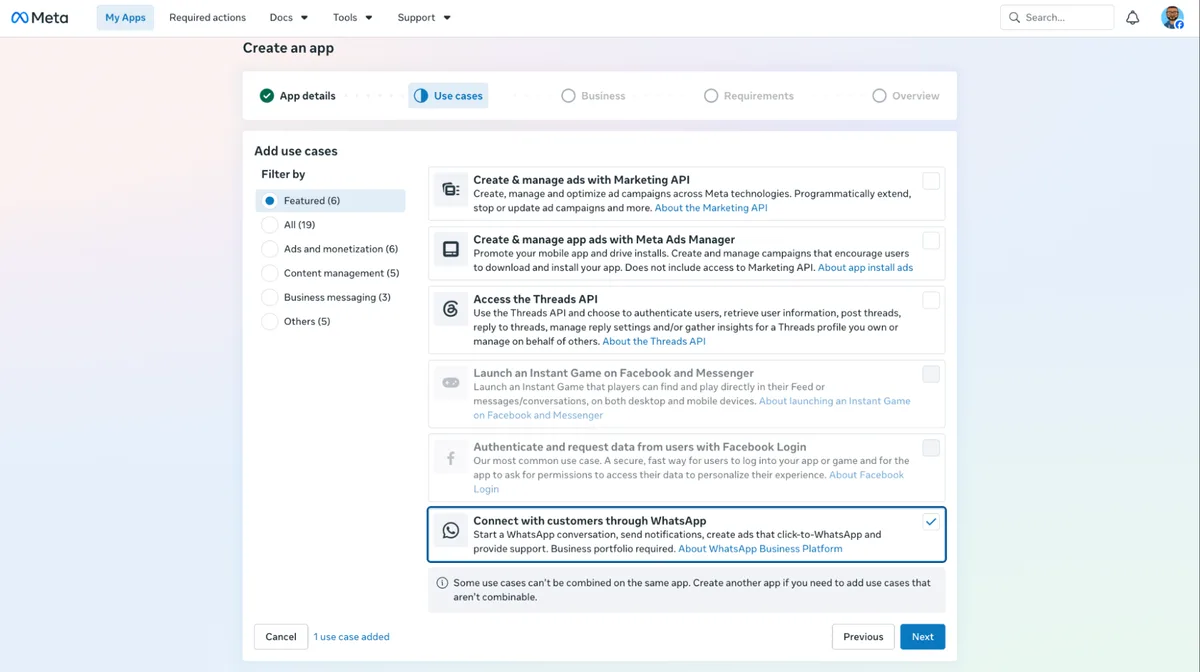
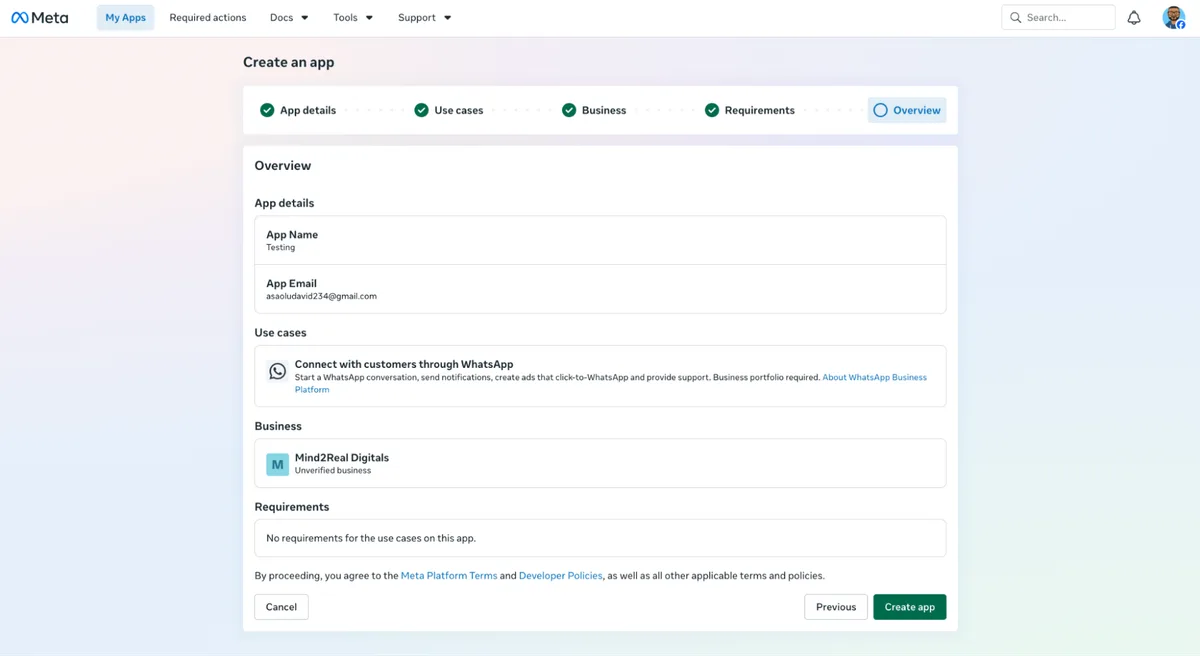
Verify the app details and create a new app.
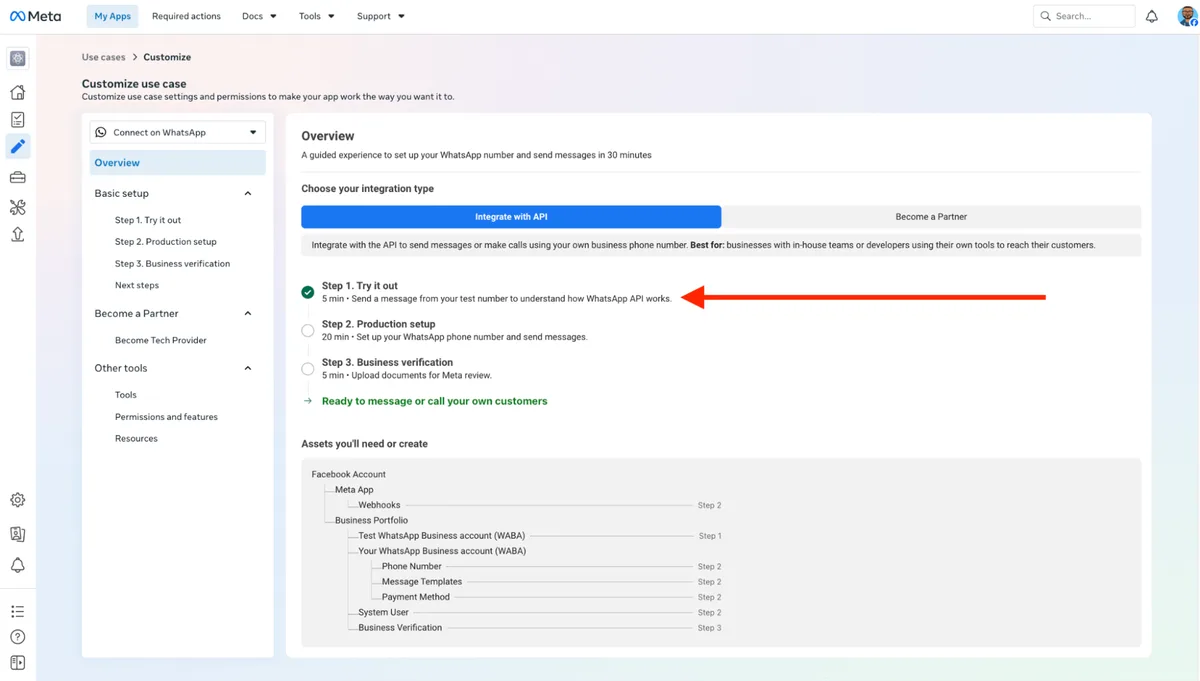
After creating the app, configure it based on your use case. From your dashboard, select Step 1: Try It Out to send your first WhatsApp message using the WhatsApp Business Platform.
Next, click Generate Token to create a temporary access token. Then, add a recipient phone number and click Send Message to send your first WhatsApp message directly from the dashboard.

Congratulations! You've successfully sent your first WhatsApp message using the WhatsApp Business Platform.
Next, proceed to Step 2: Production setup to configure the WhatsApp Business API for production use.
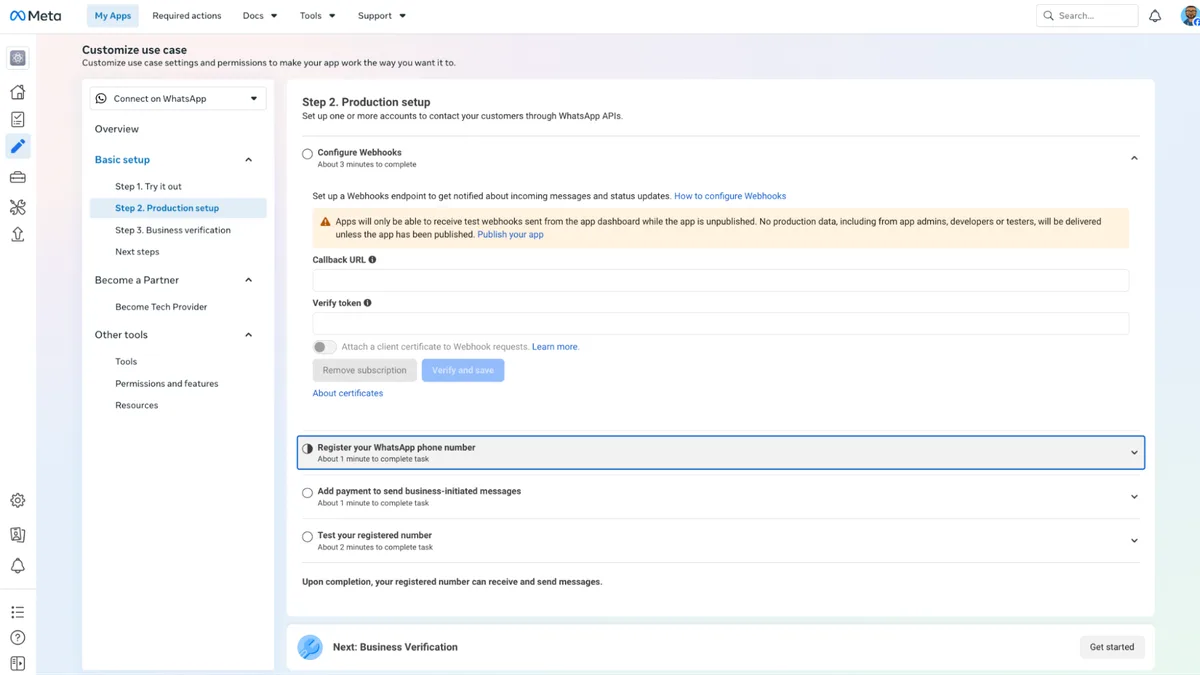
In this step, you can configure your webhook URL to receive notifications for incoming messages and message status updates, register your business phone number, and add a payment method for business-initiated messages.
To register your business phone number, enter your business profile information and ensure that the phone number is not already associated with an existing WhatsApp account.
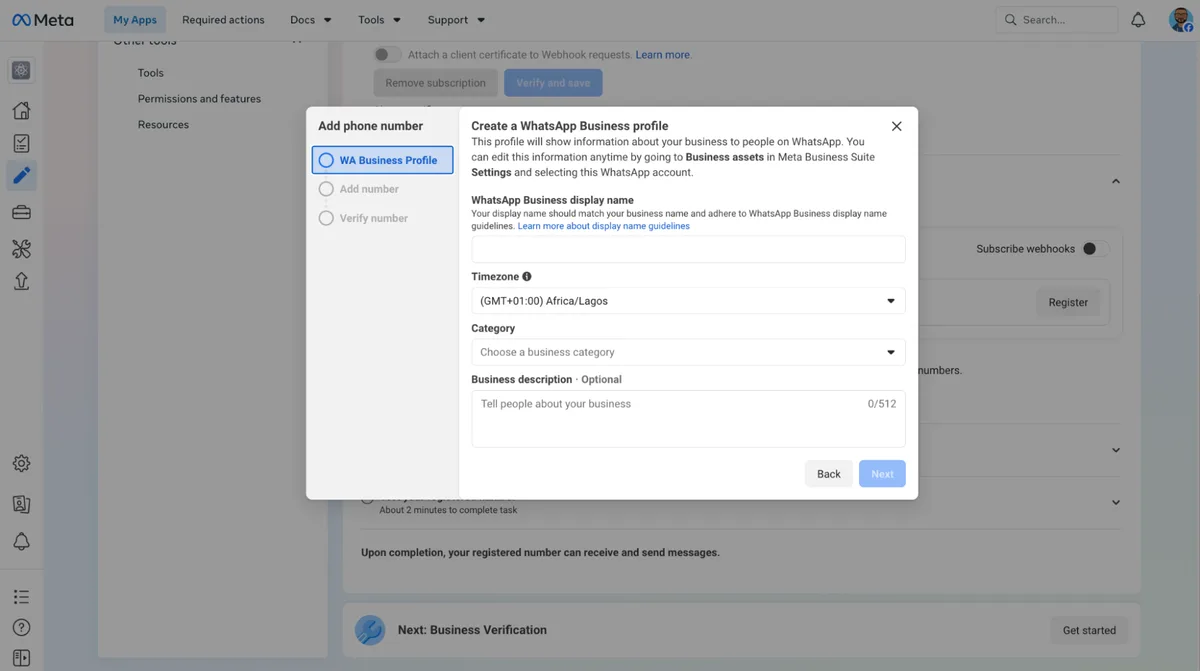
After adding and verifying your business phone number, proceed to Step 3: Business verification and verify your business using one of the supported business verification documents.
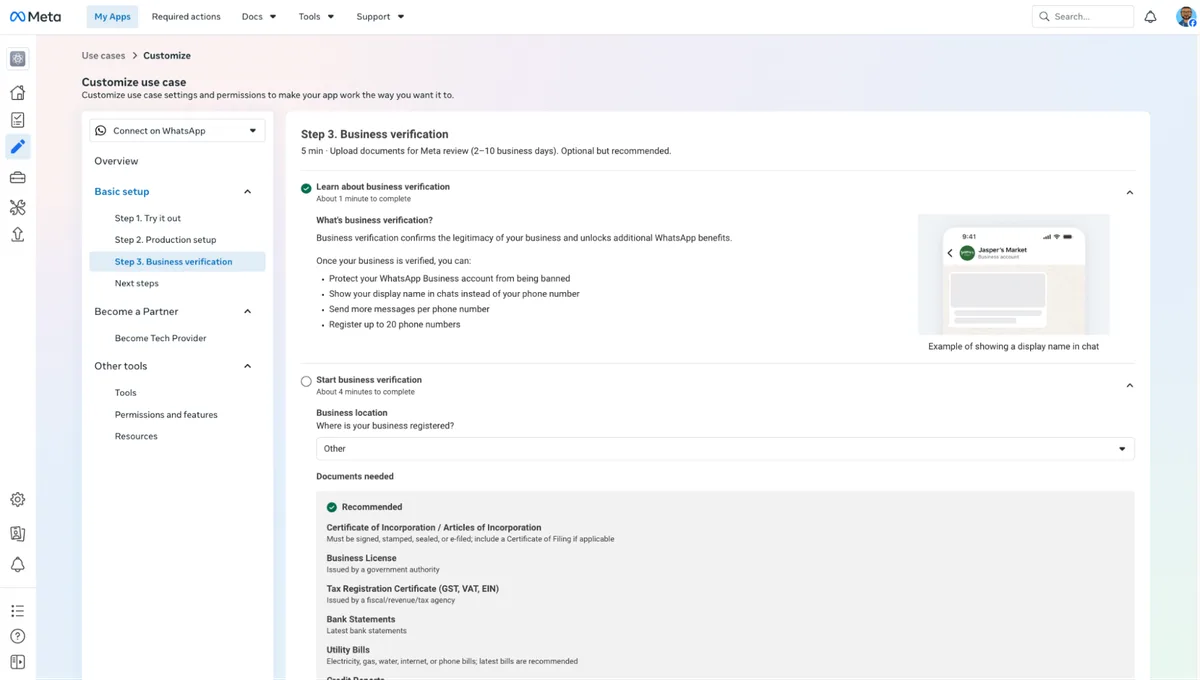
Once the verification process is complete, you can start using the WhatsApp Business APIs to send messages and make calls via the available endpoints.
Direct WhatsApp Business API Access vs Using a WhatsApp Business API Provider
Direct access through the WhatsApp Business Platform gives developers full control over the integration, while a WhatsApp Business API provider simplifies deployment and adds business-ready tools such as a shared inbox, analytics, automation, and CRM integrations.
Both methods provide access to the same WhatsApp Business API. The main differences are the level of control, the technical effort required, and the additional features each option provides.
| Feature | Direct via WhatsApp Business Platform (Cloud API) | Through a WhatsApp Business API Provider |
|---|---|---|
| API access | Direct access to Meta's official WhatsApp Business API. | Access to the same official WhatsApp Business API through a provider. |
| Setup and onboarding | Manual setup through the WhatsApp Business Platform, including app configuration, webhooks, phone number registration, and message templates. | Guided onboarding, Embedded Signup, and automated configuration to accelerate deployment. |
| Shared team inbox | Not included. You must build or integrate your own inbox. | Typically included with conversation assignment, notes, tags, and team collaboration features. |
| Automation and AI support | Must be built or integrated separately. | Often includes workflow automation, chatbots, AI agents, and no-code automation tools. |
| Webhook retries and recovery | Automatically retries failed webhook deliveries using exponential backoff for up to 7 days. After the retry period expires, undelivered events are permanently discarded. Meta does not provide built-in webhook logs, a dead-letter queue (DLQ), or manual event replay. | Most providers simplify webhook management by offering built-in webhook logs, automatic retries, dead-letter queues (DLQs), manual event replay, and additional platform-specific events, making it easier to monitor and troubleshoot webhook deliveries. |
| CRM and third-party integrations | You build and maintain integrations yourself. | Common integrations with CRMs, help desks, e-commerce platforms, and other business tools are often available. |
| Multi-channel communication | WhatsApp only. | Many providers support multiple channels such as Facebook Messenger, Instagram, and Telegram through a unified API. |
| Technical expertise required | Your team manages the integration, webhooks, monitoring, maintenance, and application logic. | The provider abstracts most of the technical complexities. |
| Pricing | You pay Meta's messaging charges. Development and infrastructure costs are your responsibility. | You pay Meta's messaging charges, and most providers also charge platform or subscription fees for their additional services. |
| Best suited for | Businesses with experienced development teams that want full control over their integration. | Businesses that want to deploy quickly with minimal engineering effort. |
Ready to integrate WhatsApp into your product?
Get full WhatsApp API access, number provisioning across 54 countries, calling, broadcasts, and Flows — all in one platform, no markup on Meta fees.
Why Businesses Choose WhatsApp Business API Providers
Many businesses choose a WhatsApp Business API provider instead of direct access to Meta's Cloud API to simplify onboarding, speed up deployment, and access additional functionalities that are not available through the API alone. Some other reasons include:
1. Faster API setup and onboarding
Setting up the WhatsApp Business API involves creating and configuring a WhatsApp Business Account, connecting a phone number, configuring webhooks, and creating message templates for business-initiated conversations. Many API providers simplify this process through Embedded Signup, guided onboarding, and prebuilt integrations, allowing businesses to go live in minutes instead of days.
2. Access to virtual and international phone numbers
WhatsApp Business API providers help businesses acquire and manage phone numbers across different countries and regions, making it easier to expand internationally and engage customers locally. However, availability varies by provider and supported regions, so businesses should always confirm country coverage and number availability before choosing a solution. For example, Zernio supports number provisioning in 54 countries.
3. Shared inbox for contacts and conversation management
The WhatsApp Business API does not include a full interface for managing conversations across chats. As a result, many providers offer a shared inbox, where team members and AI agents can manage chats from a single WhatsApp number. Common features include conversation assignment, internal notes, tagging, routing rules, and performance tracking.
4. Multi-channel communication and integrations
Businesses often communicate with customers across multiple channels, not just WhatsApp. Many API providers support additional platforms, such as Instagram, Facebook Messenger, Telegram, email, and SMS, as a unified inbox. They may also offer integrations with CRMs, help desks, e-commerce platforms, and custom applications, enabling businesses to manage all customer interactions from a unified interface.
5. Reduced API maintenance
Working directly with the WhatsApp Business API often requires businesses to own webhook reliability configuration, API updates, security, and troubleshooting. WhatsApp API providers reduce this technical burden by managing much of the underlying infrastructure, allowing businesses to focus on customer communication and product development instead of maintaining messaging systems.
6. AI-powered automation and chatbots
Many providers extend the core WhatsApp business API with automation tools that help businesses handle customer interactions at scale. These tools can automate lead qualification, answer frequently asked questions, provide order updates, schedule appointments, and route conversations to human agents when necessary. Modern providers also support the infrastructure to build WhatsApp workflows and automations that interact with customers and connect to business systems to retrieve real-time information.
How to Get WhatsApp Business API Access with Zernio
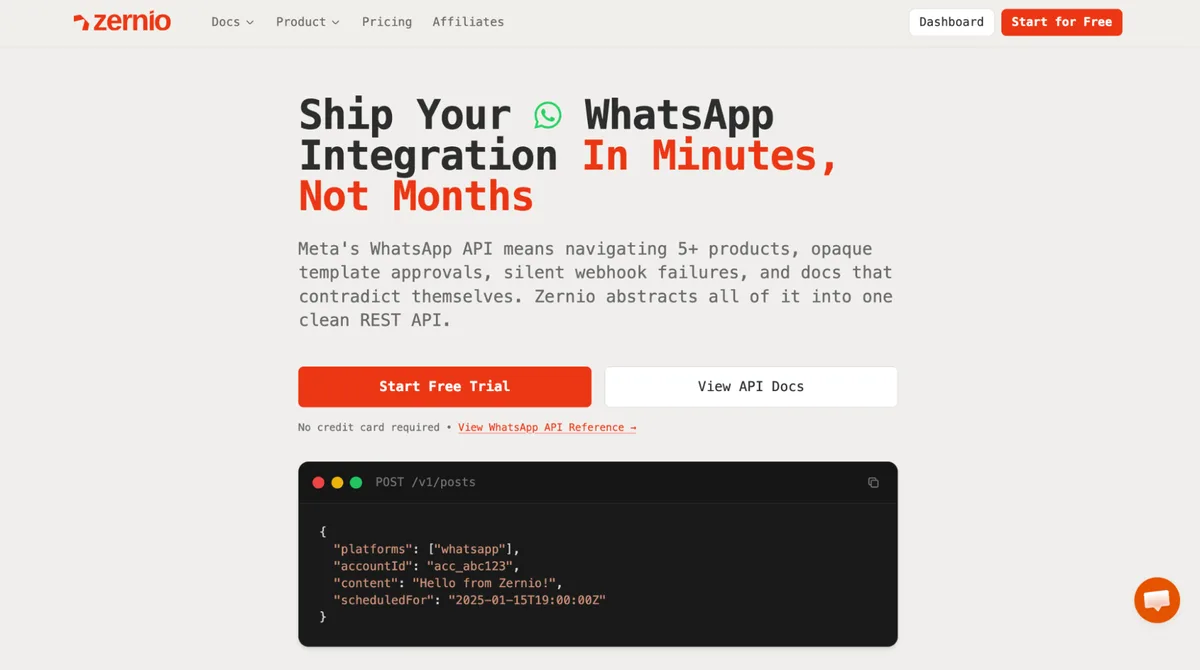
Zernio is a complete WhatsApp Business API provider that gives you everything you need to build and scale on WhatsApp. From API access and instant WhatsApp number provisioning (across 50+ countries) to messaging and calling API support, CLI tool and MCP support for managing and deploying WhatsApp agents.
It eliminates the complexity of configuring and maintaining the WhatsApp Business API and handles rate limits automatically with built-in smart queuing and retry mechanisms to ensure reliable message delivery at scale.
What Zernio Offers
Many businesses choose Zernio over using the WhatsApp Business API directly because it removes the complexity of building, configuring, and maintaining WhatsApp infrastructure from scratch. Zernio also offers other features, such as:
1. Dedicated WhatsApp Business Numbers in multiple countries

Zernio lets you purchase and set up a dedicated WhatsApp Business number in 54 countries directly within the platform. You can select a country, and Zernio handles number provisioning, verification, and WhatsApp connection for both messaging and calling, allowing businesses to establish a local presence with improved response rates and customer engagement in their target regions.
2. Quick WhatsApp API setup with no approval delays
Zernio is designed to help developers and businesses get started quickly, without the delays associated with the WhatsApp Business platform. With Zernio, you don't need to go through multiple approval steps, business verification flows, or Meta app review processes before integrating WhatsApp into your application, so the move from development to production happens in minutes, not weeks.
3. Unified social inbox for multi-platform messaging
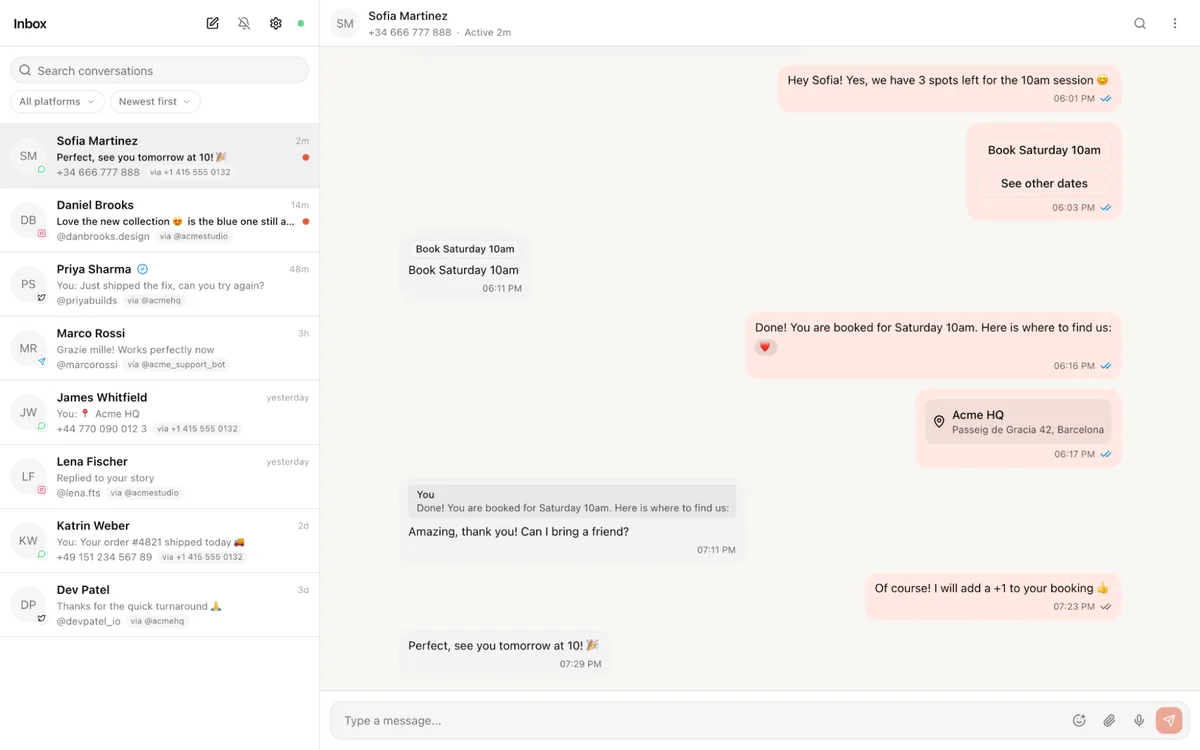
Managing customer conversations across different channels can quickly become fragmented when using multiple social media tools or APIs. Zernio brings all WhatsApp conversations into a single unified inbox, together with messages from other social media platforms (Telegram, Instagram, Facebook, X, Bluesky, Reddit), enabling teams to view, respond to, and manage messages in one place.
For developers, Zernio also provides an open-source unified inbox with a WhatsApp Web-style chat interface built on the Zernio API. It supports rich messaging, message templates, WhatsApp Flows, voice notes, read receipts, and optional WhatsApp Business Calling, making it easy to customise and deploy a multi-channel messaging solution.
4. Built-in message template management
The WhatsApp Business API requires approved templates for sending structured messages. Zernio simplifies this by providing built-in support for template messages, making it easier to send OTPs, order updates, reminders, and marketing messages. Once you create a template, Zernio handles the approval process and notifies you when it is ready for use.
5. WhatsApp calling support (Inbound & Outbound)
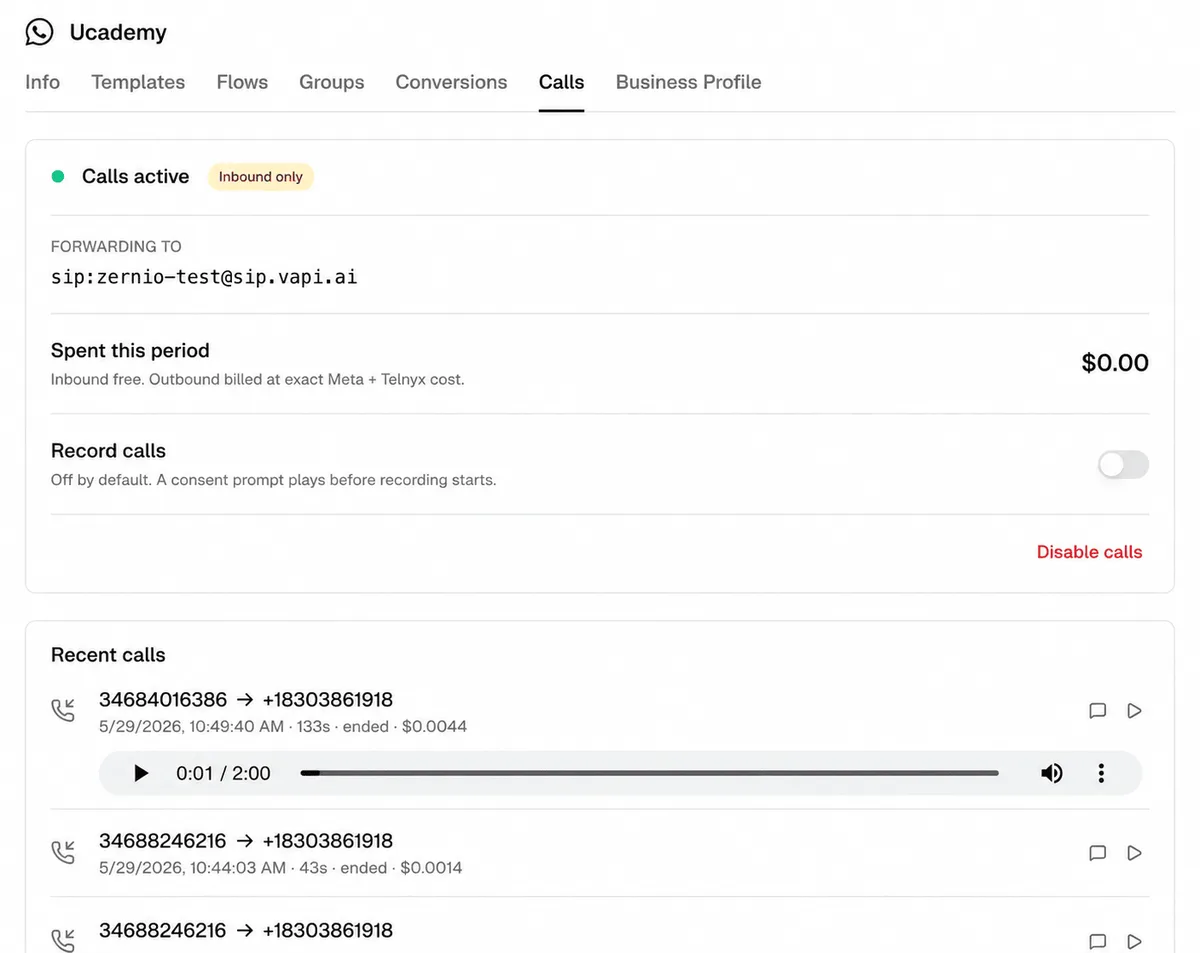
Zernio supports WhatsApp voice calls, allowing you to place and receive calls and route them to phone numbers, SIP endpoints, or AI voice agents. You can also enable or disable calling and call recording, configure forwarding destinations, initiate outbound calls, and view call history directly via its Calling API endpoint. WhatsApp voice calls are supported by default on Zernio's pricing plan, and Meta bills outbound calls separately at per-minute rates based on the recipient's country and volume tier.
6. Reliable webhook delivery with automatic retries
Zernio improves reliability by handling webhook delivery with built-in retry logic and failure recovery mechanisms, ensuring that events are still delivered even during temporary network or service interruptions. It also provides an activity log that monitors your API activity, enabling you to debug errors faster.
7. Multi-platform support for AI agents and business automation workflows
Zernio supports communication across 15 social media channels, including WhatsApp, Facebook, Instagram, Threads, LinkedIn, X (Twitter), TikTok, YouTube, Pinterest, Telegram, Reddit, Bluesky, Google Business, Snapchat, and Discord. This makes it possible to build AI agents for social media and automation systems that handle tasks such as content scheduling and publishing, direct messaging, and ad management across multiple platforms using a single unified API integration.
8. Messaging automation and trigger-based workflows
Zernio supports workflow automation that responds to incoming messages, enabling businesses to build trigger-based workflows that automatically send WhatsApp messages in response to user actions or system events. These workflows can be used for onboarding, engagement campaigns, transactional notifications, and customer lifecycle communication without requiring heavy backend engineering.

Setting Up the WhatsApp Business API with Zernio
Zernio is an API-first platform that provides access to the official WhatsApp Business API, enabling developers to build, automate, and scale WhatsApp messaging programmatically using its SDKs or REST API.
Here, you'll learn how to access the WhatsApp Business API with Zernio.
Follow the steps below:
- Connect your WhatsApp Business Account to Zernio.
- Create and get your message template approved.
- Send a message using the approved template.
Step 1: Connect your WhatsApp account to Zernio
To get started, log in to your Zernio account and navigate to Connections from the sidebar menu. From there, you can connect your WhatsApp Business Account to Zernio.
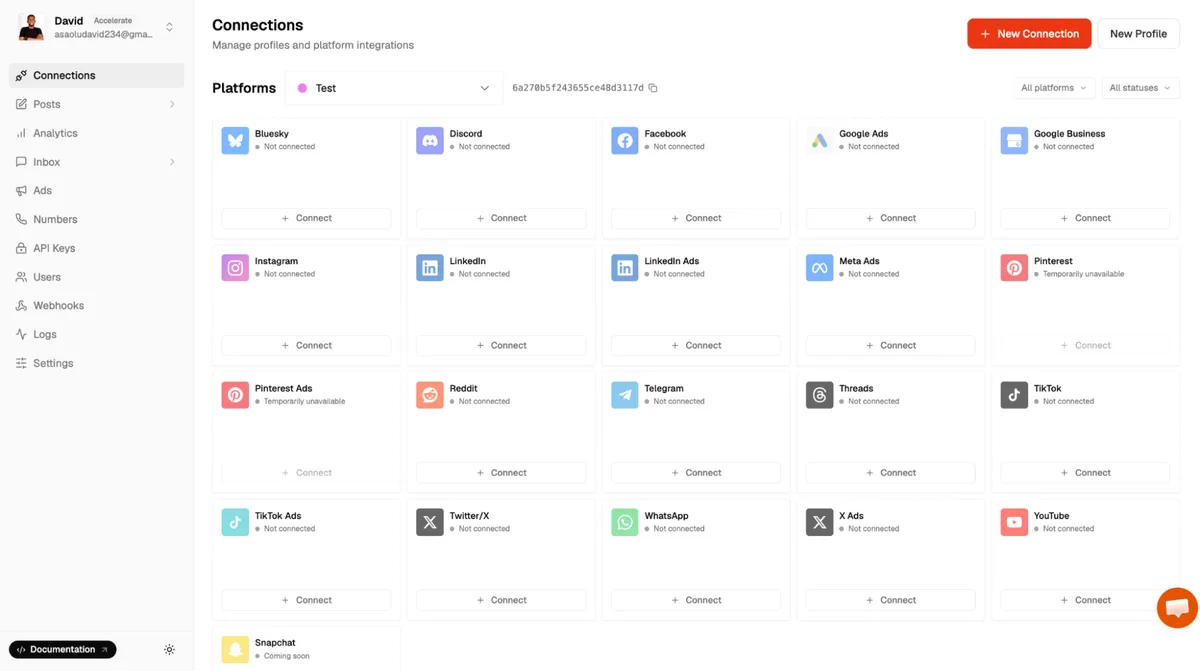
With Zernio, you can either purchase an international phone number or connect an existing WhatsApp Business phone number.
Once your account has been successfully connected, it will appear in the list of connected accounts, where you can view its connection status and manage it from the dashboard.
Step 2: Create a Message Template
Click the Settings button for your connected WhatsApp account, then navigate to the Templates section to create a new message template.
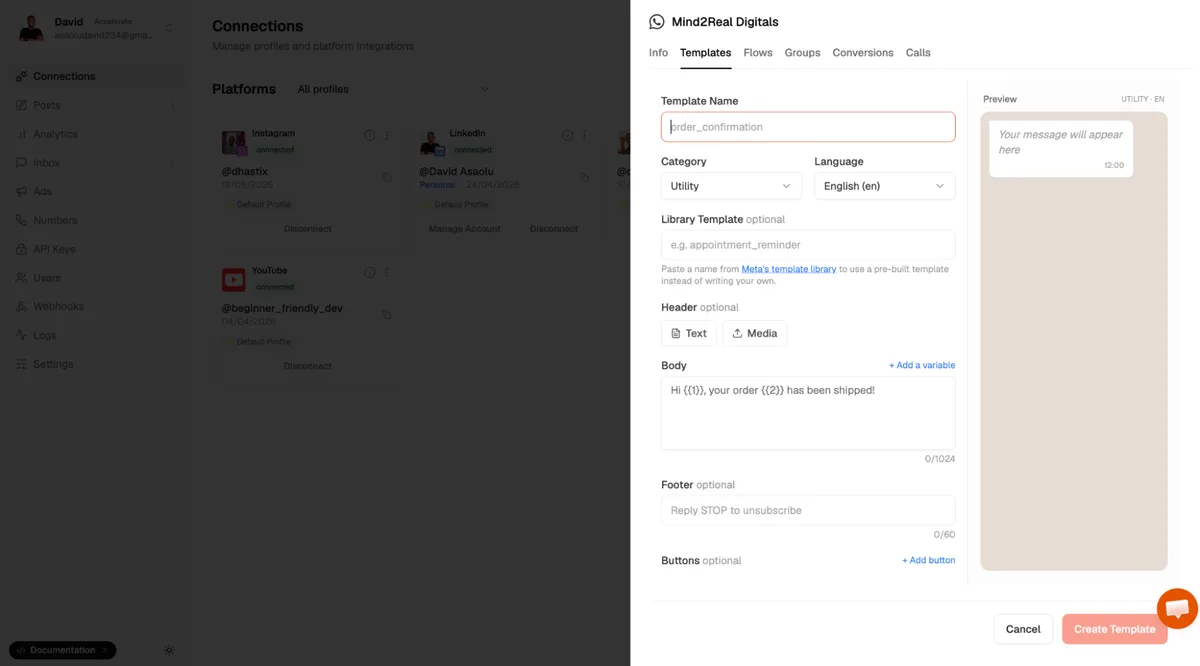
Enter a template name, select the appropriate template category, write the message content, and add buttons if required. Once you're done, click Create Template to submit the template for approval.
Message templates must be approved before they can be used to send broadcast messages. Approval typically takes up to 24 hours, although it may be faster depending on the review process.
Instead of writing a template, you can create one from Meta's pre-approved Template Library. This skips the review wait.
Step 3: Send a Message using the Approved Template
Zernio allows businesses to send WhatsApp messages either through its web dashboard or API.
To use the dashboard, navigate to Inbox > Messages, then click the Edit icon to start a new conversation.
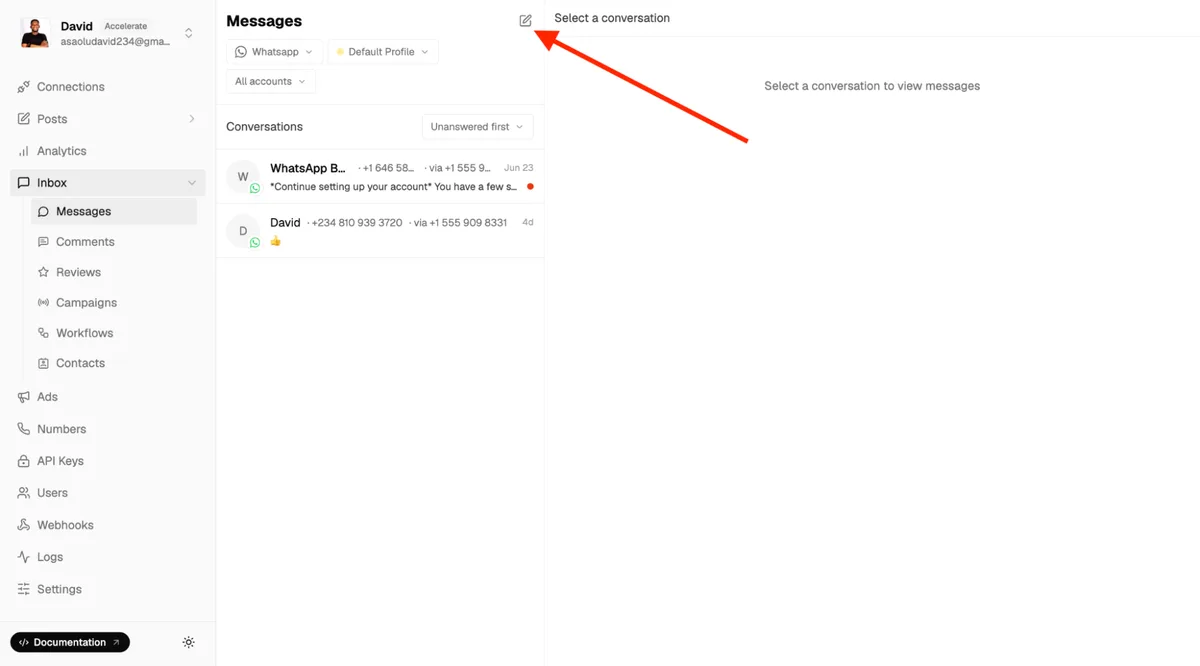
Enter the recipient's phone number, select the approved template, provide values for the template variables, and click Send to deliver the template message to the recipient.
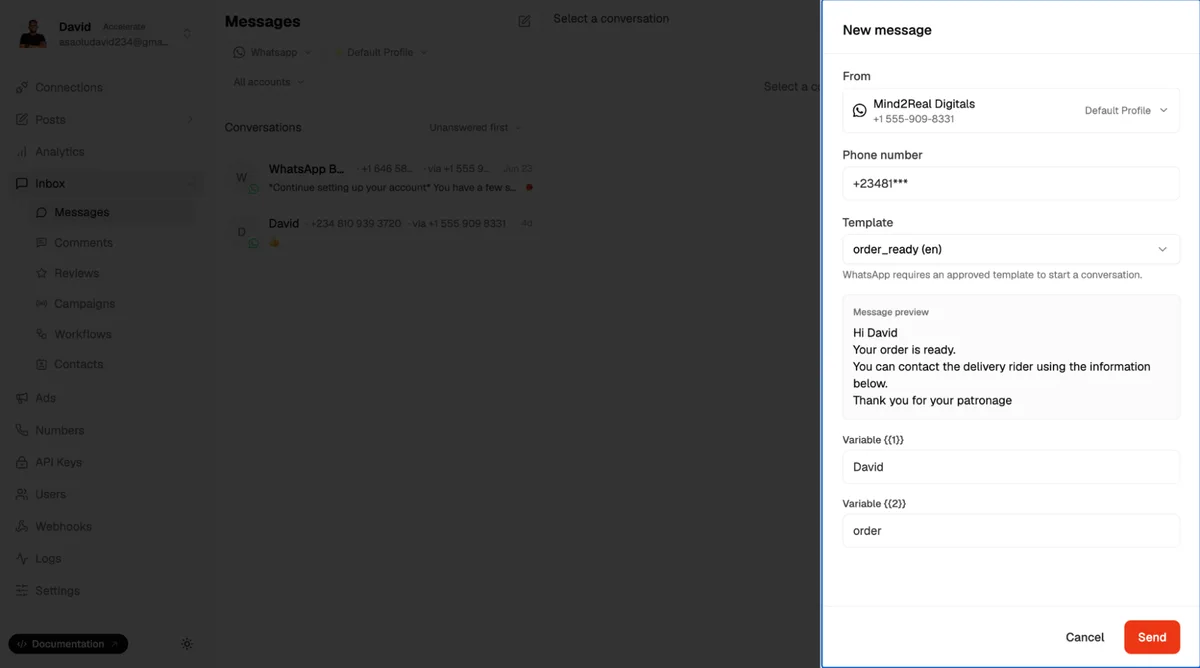
Congratulations! You've successfully sent your first WhatsApp message template using the Zernio Dashboard.
To send messages using the Zernio API, install the Zernio Node.js SDK.
npm install @zernio/nodeCreate an index.js file and initialise the Zernio client using your API key:
const Zernio = require("@zernio/node").default;
const zernio = new Zernio({ apiKey: process.env.ZERNIO_API_KEY });
Use the following code snippet to create a WhatsApp message template:
const { data } = await zernio.whatsapp.createWhatsAppTemplate({
  body: {
    accountId: 'YOUR_ZERNIO_ACCOUNT_ID',
    name: 'TEMPLATE_NAME',
    category: 'TEMPLATE_CATEGORY',
    language: 'en',
    components: [{ type: 'BODY', text: 'Hi {{1}}, your order {{2}} has been confirmed!' }]
  }
});
console.log(`Template created: ${data.template.name} (${data.template.status})`);
Once Meta approves your message template, you can send WhatsApp template messages to your users using the code snippet below:
const { data } = await zernio.whatsapp.sendWhatsAppBulk({
  body: {
    accountId: process.env.ZERNIO_WHATSAPP_ACCOUNT_ID,
    recipients: [
      {
        phone: `${process.env.WHATSAPP_RECIPIENT_PHONE_NUMBER}`,
        variables: { 1: "David", 2: "#0012" },
      },
    ],
    template: {
      name: "order_ready",
      language: "en",
    },
  },
});
console.log(`Sent: ${data.summary.sent}, Failed: ${data.summary.failed}`);
If you prefer using the REST API or one of our other programming SDKs, refer to the complete guide.
Summary: Getting WhatsApp Business API Access
In this guide, you've learnt how to access the WhatsApp Business API through the WhatsApp Business Platform and through a WhatsApp Business API provider. Zernio simplifies onboarding and provides features, such as an intuitive dashboard, analytics, REST APIs, SDKs, AI agent support, WhatsApp calling, and interactive customer experiences using WhatsApp Flows. These capabilities enable businesses to create message templates, send template messages, automate customer communication, and build scalable WhatsApp solutions from a single platform.
When you use the WhatsApp Business API through a provider like Zernio, your teams can manage broadcast campaigns, message templates, and customer conversations from a shared workspace or integrate the WhatsApp Business API directly into your applications without managing the underlying infrastructure or worrying about ongoing maintenance.
Whichever approach you choose, the WhatsApp Business API provides the foundation for building scalable messaging and calling experiences that help businesses communicate with customers more effectively.
FAQs
1. Why should I choose a WhatsApp Business API provider?
A WhatsApp Business API provider like Zernio simplifies deployment and management while offering features beyond the core WhatsApp Business API. These include WhatsApp calling, workflow automation with chatbots and AI agents, message scheduling, broadcast messaging, interactive customer experiences using WhatsApp Flows, international phone number purchase and verification, group chat management, Meta Ads integration, and content publishing and scheduling across 15 social media platforms — all accessible through a single dashboard or API integration.
2. Which option should I choose: direct access or a WhatsApp Business API provider?
If you have a dedicated engineering team and want complete control over your integration, direct access through the WhatsApp Business Platform may be the right choice. If you want faster onboarding, less infrastructure to manage, and built-in features such as analytics, automation, and a shared inbox, a WhatsApp Business API provider like Zernio is the better option.
3. Can I schedule WhatsApp messages?
Yes. With Zernio, you can schedule WhatsApp messages for a specific date and time directly from the dashboard or API endpoint.
4. How can I send multiple WhatsApp messages at once?
You can send multiple WhatsApp messages simultaneously using WhatsApp broadcast messaging. With Zernio, you can send approved template messages to thousands of recipients at scale, personalise each message using template variables, schedule campaigns, segment audiences, and track delivery and engagement.
5. Do I need Meta to approve my message templates?
Yes. All message templates must be reviewed and approved by Meta before they can be used to send business-initiated template messages.