Bulk messaging is one of the simplest ways for businesses to reach all their customers at once. However, being able to send broadcast messages on WhatsApp safely without risking account restrictions or bans is just as important.
With WhatsApp's open rates reaching up to 98%, it remains one of the most effective channels for announcing product launches, running promotional campaigns, sharing updates, and sending event reminders.
In this guide, I'll walk you through how to send broadcast messages using both the WhatsApp Business App and the WhatsApp Business API. You'll also learn the limitations of using the WhatsApp Business App and the best practices for running effective broadcast campaigns via the WhatsApp Business API.
Let's begin.
Table of Contents
- What is a WhatsApp Broadcast Message?
- How to Send Broadcast Messages Using the WhatsApp Business App
- Why Businesses Choose the WhatsApp Business API for Broadcast Campaigns
- How to Send Broadcast Messages Using the WhatsApp Business API
- Best Practices for Sending WhatsApp Broadcast Messages
- Summary: How to Send WhatsApp Broadcast Messages
- FAQs
What is a WhatsApp Broadcast Message?
A WhatsApp broadcast message allows you to send a single message to multiple recipients at once. Although the message is sent only once by the sender, each recipient receives it as a private message, making the interaction feel more personal than a group conversation.
A WhatsApp broadcast list is a collection of contacts grouped to receive the same message from the sender. By organising contacts into broadcast lists, businesses can manage customer communications more effectively and deliver relevant messages to specific audiences.
For example, a business may create separate broadcast lists for prospects, first-time customers, and recurring customers, and tailor its messaging based on the customer's relationship with the brand. Prospects might receive introductory offers or product information; first-time customers might receive onboarding tips or follow-up messages; and recurring customers might receive loyalty rewards, exclusive promotions, or early access to new products.
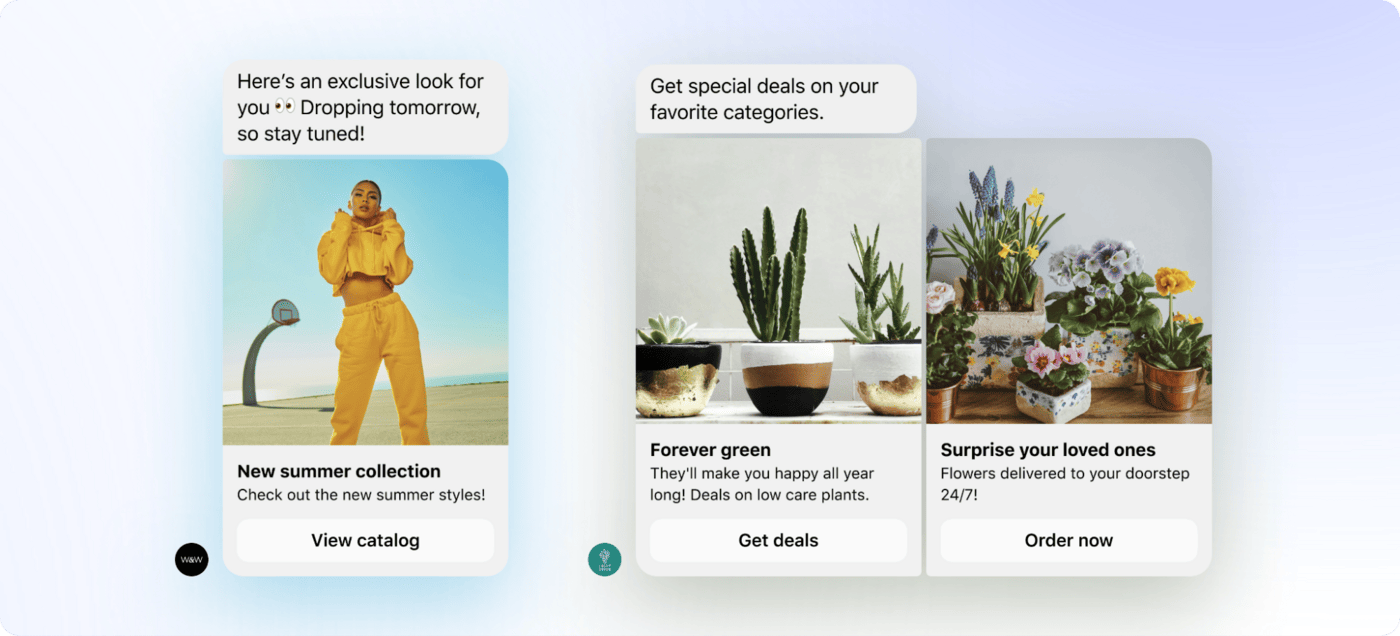
Source: WhatsApp Business Messaging Platform
How WhatsApp Broadcast Messages Differ from Group Chats
Both WhatsApp broadcast messages and group chats allow you to send messages to multiple people at once. However, they serve different purposes and offer different user experiences.
The key differences between WhatsApp broadcast messages and group chats are:
- Broadcast messages are delivered as individual private messages, while group messages are sent to a shared group conversation.
- Recipients of a broadcast message cannot see who else received the message. In a group chat, all members can see the other participants.
- Replies to a broadcast message are sent privately to the sender. In a group chat, replies are visible to all group members.
- Broadcast messaging provides a more private communication experience, whereas group chats are designed for open discussions among participants.
- Businesses can create multiple broadcast lists to target different customer segments, while group chats bring all participants into a single conversation.
The table below shows a quick comparison between WhatsApp broadcast messages and group chats.
| Feature | Broadcast Messages | Group Chats |
|---|---|---|
| Delivered as a private message | Yes | No |
| Recipients can see and interact with one another | No | Yes |
| Replies visible to everyone | No | Yes |
| Suitable for marketing campaigns and announcements | Yes | No |
| Suitable for collaboration, discussions, and community engagements | No | Yes |
| Audience segmentation | Yes | No |
| Privacy | High | Lower |
| Participant Limit | 256 recipients per broadcast list (WhatsApp Business App) or unlimited via the WhatsApp Business API | Up to 1,024 contacts per group |
How to Send Broadcast Messages Using the WhatsApp Business App
WhatsApp broadcast messages can be sent using either the WhatsApp Business App or the WhatsApp Business API. In this section, you'll learn the requirements for sending broadcast messages through the WhatsApp Business App, how to create and send a broadcast message, and the limitations of using the app for broadcast messaging.
Before sending your first broadcast message, there are two important requirements to keep in mind:
- Recipients must have your number saved. For a broadcast message to be delivered, each recipient must have your phone number saved in their contacts. Similarly, you should have their phone numbers saved in your contact list.
- Broadcast lists are limited to 256 contacts. Each broadcast list can contain up to 256 recipients. If you need to message more people, you'll have to create and manage multiple broadcast lists.
Sending Broadcast Messages Using the WhatsApp Business App
Step 1: Open the WhatsApp Business App
Open the WhatsApp Business app and navigate to Settings > Broadcast Messages.
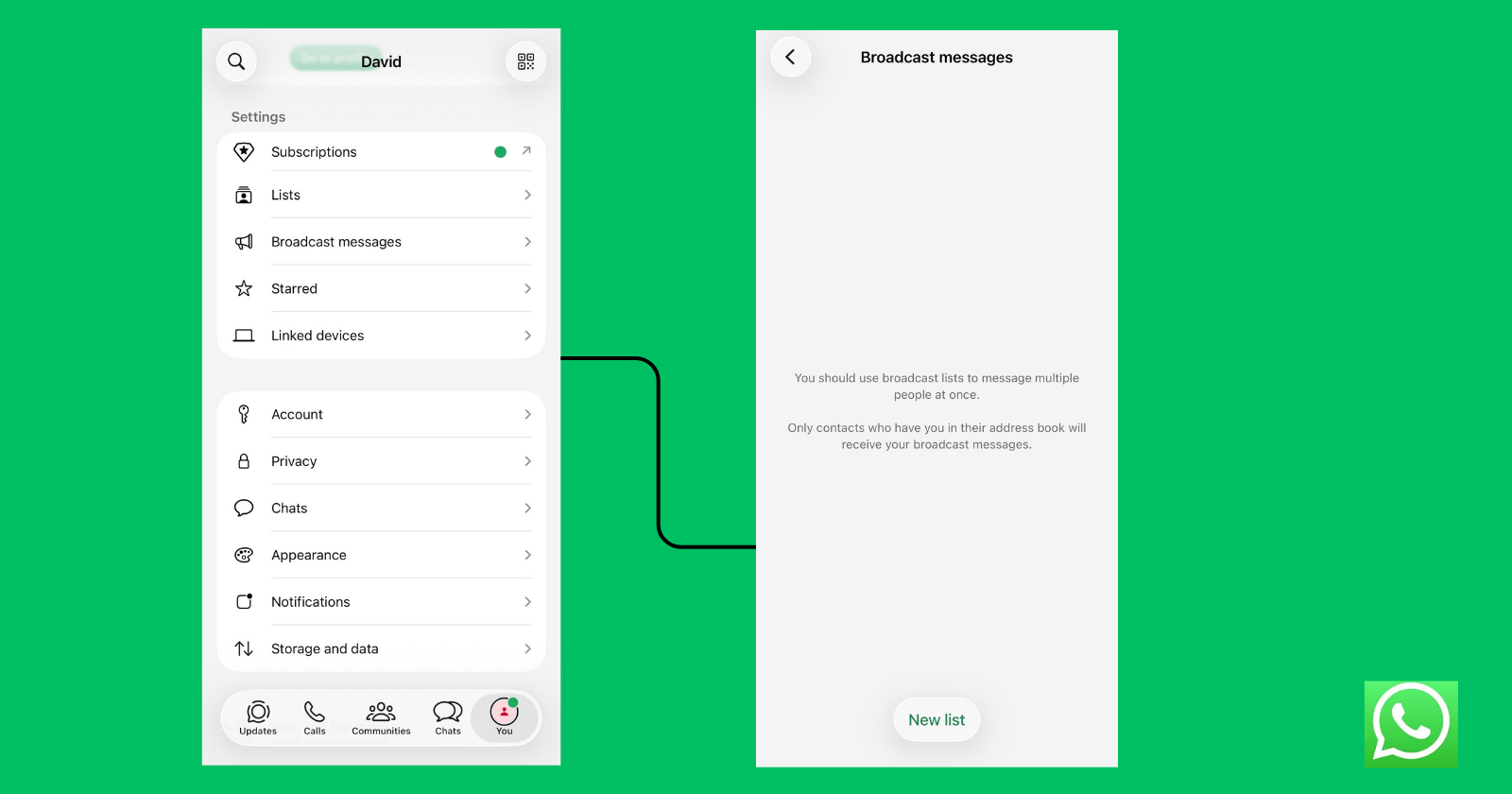
Step 2: Create a broadcast list
Tap New List to create a broadcast list. This will open your contact list, allowing you to select up to 256 contacts for the broadcast.
Step 3: Send Your Broadcast Message
After selecting your contacts, tap Create to create the broadcast list. You can then give the list a name, add or remove contacts, and create additional broadcast lists as needed to organise different customer segments.
Once your broadcast list is ready, open it, type your message, and tap Send. The message will be delivered individually to each recipient in the list, appearing as a private chat rather than a group message.
Limitations of WhatsApp Business App Broadcast Messages
1. No Analytics or Performance Tracking
The WhatsApp Business App does not provide detailed analytics, such as delivery, read, and response rates, for broadcast campaigns. You can only see whether individual messages were sent, delivered, or read. If a broadcast message fails to reach some contacts, WhatsApp does not notify you or provide a campaign-level report explaining why. This makes it difficult to measure the effectiveness of your broadcasts and optimise future campaigns.
2. Manual Contact Management and Segmentation
Broadcast lists must be created and maintained manually, and the WhatsApp Business App does not automatically segment contacts based on attributes such as purchase history, location, or interests. As your customer base grows, organising contacts into different audience segments becomes increasingly time-consuming.
3. Reliance on Device-Based Contact Storage
Broadcast lists and contacts are closely tied to the device and WhatsApp account being used. If contacts are not properly backed up or synchronised, device changes, loss of a phone, or data issues can disrupt customer communications and potentially result in the loss of broadcast lists.
4. Difficult to Scale for Large Audiences
The WhatsApp Business App is designed primarily for small businesses and has a broadcast list limit of 256 contacts per list. Managing multiple broadcast lists and sending messages manually becomes increasingly difficult as your audience grows, making the app unsuitable for large-scale marketing and customer engagement campaigns.
5. Limited Automation Capabilities
The WhatsApp Business App does not support advanced automation that enables businesses to automatically trigger broadcasts based on customer actions or schedule large-scale campaigns.
Stop building WhatsApp from scratch.
One API for numbers, messaging, calling, and automation on the official WhatsApp Business API.
Why Businesses Choose the WhatsApp Business API for Broadcast Campaigns
The WhatsApp Business API removes many of the limitations of the WhatsApp Business App, making it easier for businesses to run and manage broadcast campaigns at scale.
Some of the reasons businesses choose the API for broadcast messaging are to:
- Reach customers at scale
Unlike the WhatsApp Business App, which limits broadcast lists to 256 contacts and requires recipients to save your number, the WhatsApp Business API supports unlimited contacts and enables businesses to reach a much larger audience through opt-in messaging. Customers only need to provide consent to receive messages, making it easier for businesses to communicate with customers at scale. - Schedule campaigns in advance
The WhatsApp Business API allows businesses to schedule broadcast campaigns. Instead of sending messages manually, businesses can plan and automate broadcasts to be delivered at the most appropriate time for their audience. - Personalise broadcast messages
Broadcast messages can be personalised using dynamic variables such as a customer's name and order details, to help businesses deliver more relevant and engaging messages to each recipient. - Segment audiences more effectively
Businesses can organise contacts into different audience segments based on attributes such as purchase history, location, interests, and customer status, making it easier to send targeted messages to the right customers. - Track campaign performance
The WhatsApp Business API provides access to delivery statuses and campaign insights that help businesses understand how their broadcasts are performing, measure results, and optimise future campaigns. - Integrate with existing business systems
The WhatsApp Business API can be integrated with CRM platforms, e-commerce systems, customer support tools, and other business applications to help automate workflows, synchronise customer data, and manage communications more efficiently.
WhatsApp Business App vs WhatsApp Business API for Broadcast Messaging
The WhatsApp Business App supports small businesses that manage conversations manually, and the WhatsApp Business API is built for businesses that need automation, integrations, and the ability to communicate at scale.
The table below highlights the key differences when sending broadcast messages using each platform.
| Feature | WhatsApp Business App | WhatsApp Business API |
|---|---|---|
| Broadcast audience size | Up to 256 contacts per broadcast list | Unlimited, depending on your messaging limits (Scaled up to 100k/day based on tier) |
| Customer must save your number | Yes | No |
| Customer opt-in required | No | Yes |
| Broadcast delivery | Only to contacts who have saved your number | To customers who have provided opt-in |
| Message personalisation | Not supported | Supported through template variables |
| Automation | Limited to away or greeting messages | Supports complex workflows, sequences and AI chatbots. |
| Scheduling | No | Yes |
| Analytics | Limited to sent, delivered, and read | Includes delivery rates, read rates, conversion metrics, and return on investment |
| CRM integration | Not supported | Supported via REST API and webhooks. |
| Cost | 100% Free | Paid per delivered template message. |
Read more: WhatsApp Business API vs WhatsApp Business App: Key Differences
How to Send Broadcast Messages Using the WhatsApp Business API
While the WhatsApp Business API offers powerful features for broadcast messaging, setting it up and managing it directly can be complex. This is why we'll use Zernio, a complete WhatsApp Business API provider that simplifies onboarding, messaging, and campaign management.
Zernio gives you everything you need to build and scale on WhatsApp. From API access and instant WhatsApp number provisioning (across 50+ countries) to messaging workflows, approved templates, a unified conversation inbox, CLI tool and MCP support for managing and deploying WhatsApp agents. It eliminates the complexity of configuring and maintaining the WhatsApp Business API and handles rate limits automatically to ensure reliable message delivery at scale.
Here, you'll learn how to send WhatsApp broadcast messages using the WhatsApp Business API with Zernio.
I Built a WhatsApp API So You Don't Have To
Send WhatsApp Broadcast Messages Using the Zernio Dashboard
Zernio allows businesses to send WhatsApp broadcast messages either through its web dashboard or API. In this section, we'll focus on sending broadcast messages using the Zernio dashboard.
Before you can send your first broadcast message, you need to:
- Connect your WhatsApp Business Account to Zernio.
- Create and get your message template approved.
- Create a broadcast list and send your broadcast campaign using the approved message template.
Step 1: Connect your WhatsApp account to Zernio
To get started, log in to your Zernio account and navigate to Connections from the sidebar menu. From there, you can connect your WhatsApp Business Account to Zernio.
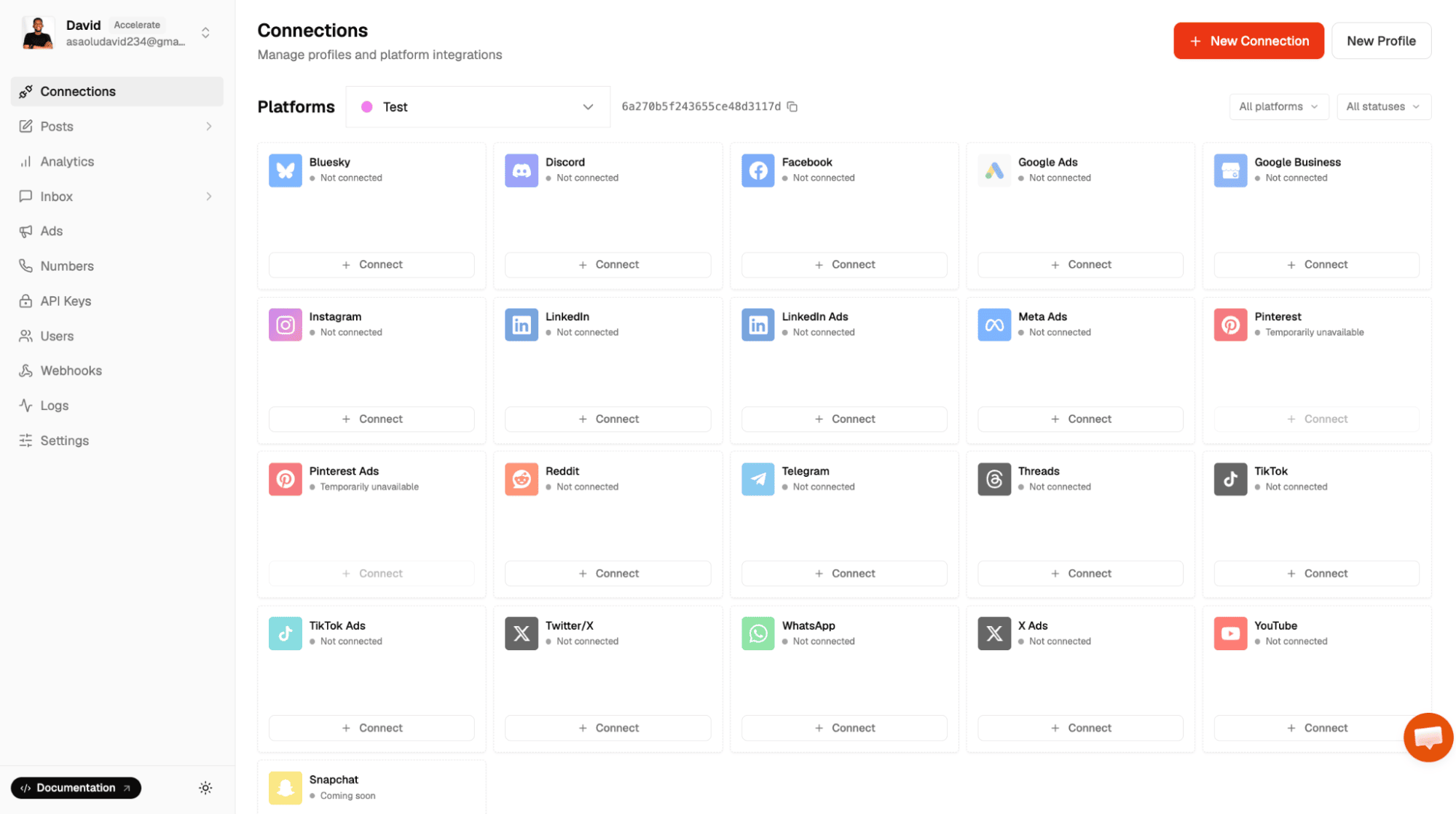
With Zernio, you can either purchase an international phone number or connect an existing WhatsApp Business phone number.
Once your account has been successfully connected, it will appear in the list of connected accounts, where you can view its connection status and manage it from the dashboard.
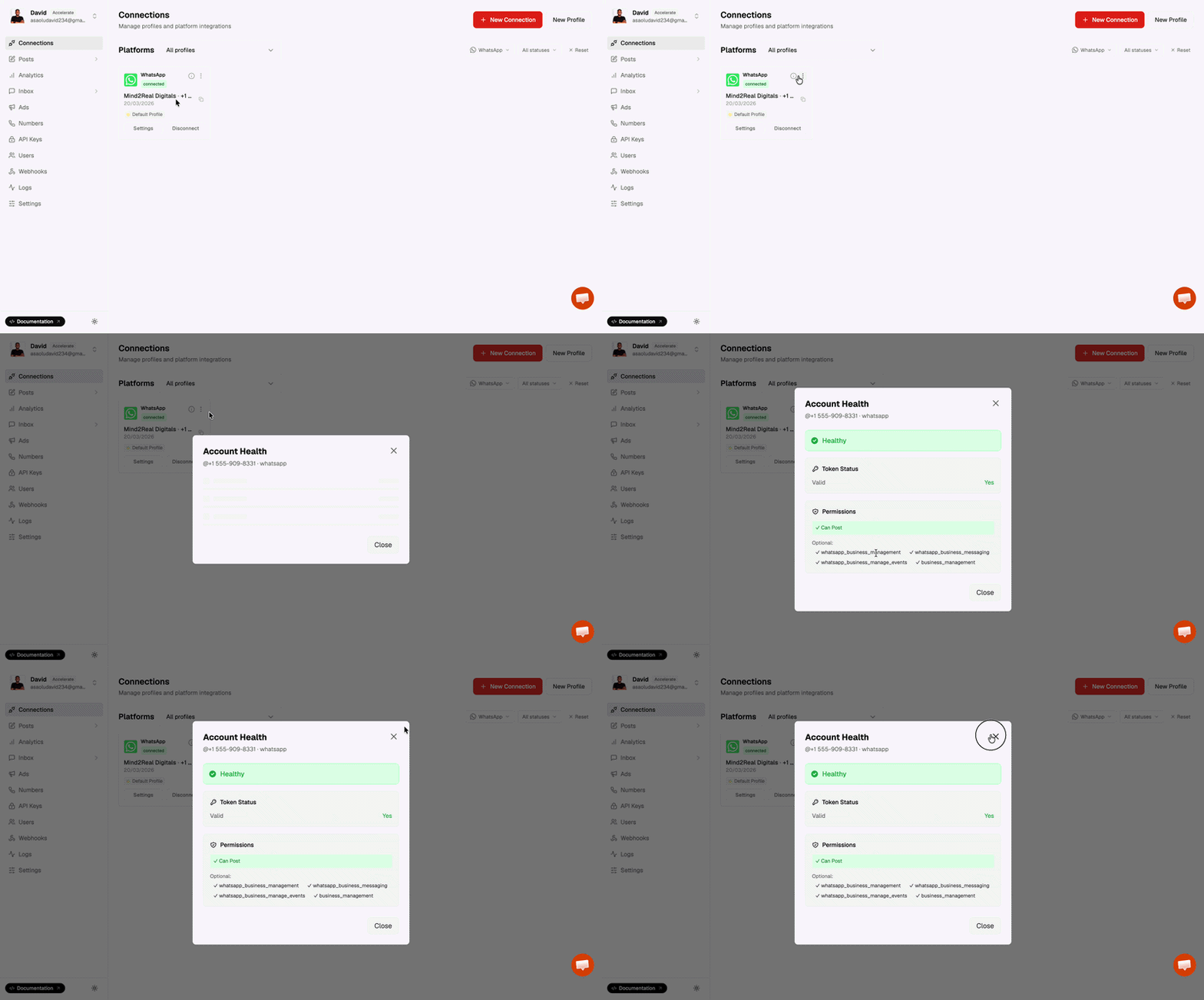
Step 2: Create a Message Template
Click the Settings button for your connected WhatsApp account, then navigate to the Templates section to create a new message template.
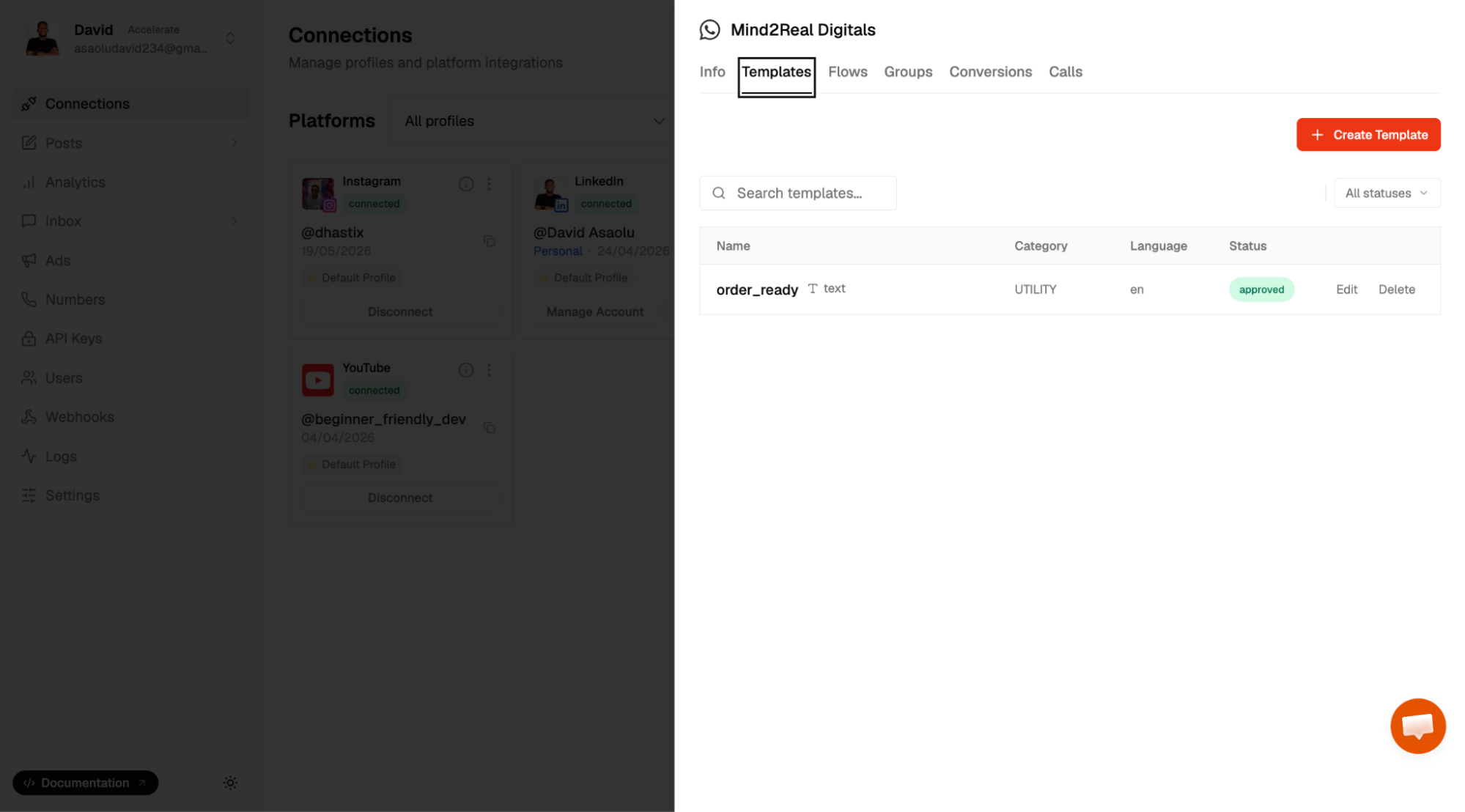
Enter a template name, select the appropriate template category, write the message content, and add buttons if required. Once you're done, click Create Template to submit the template for approval.
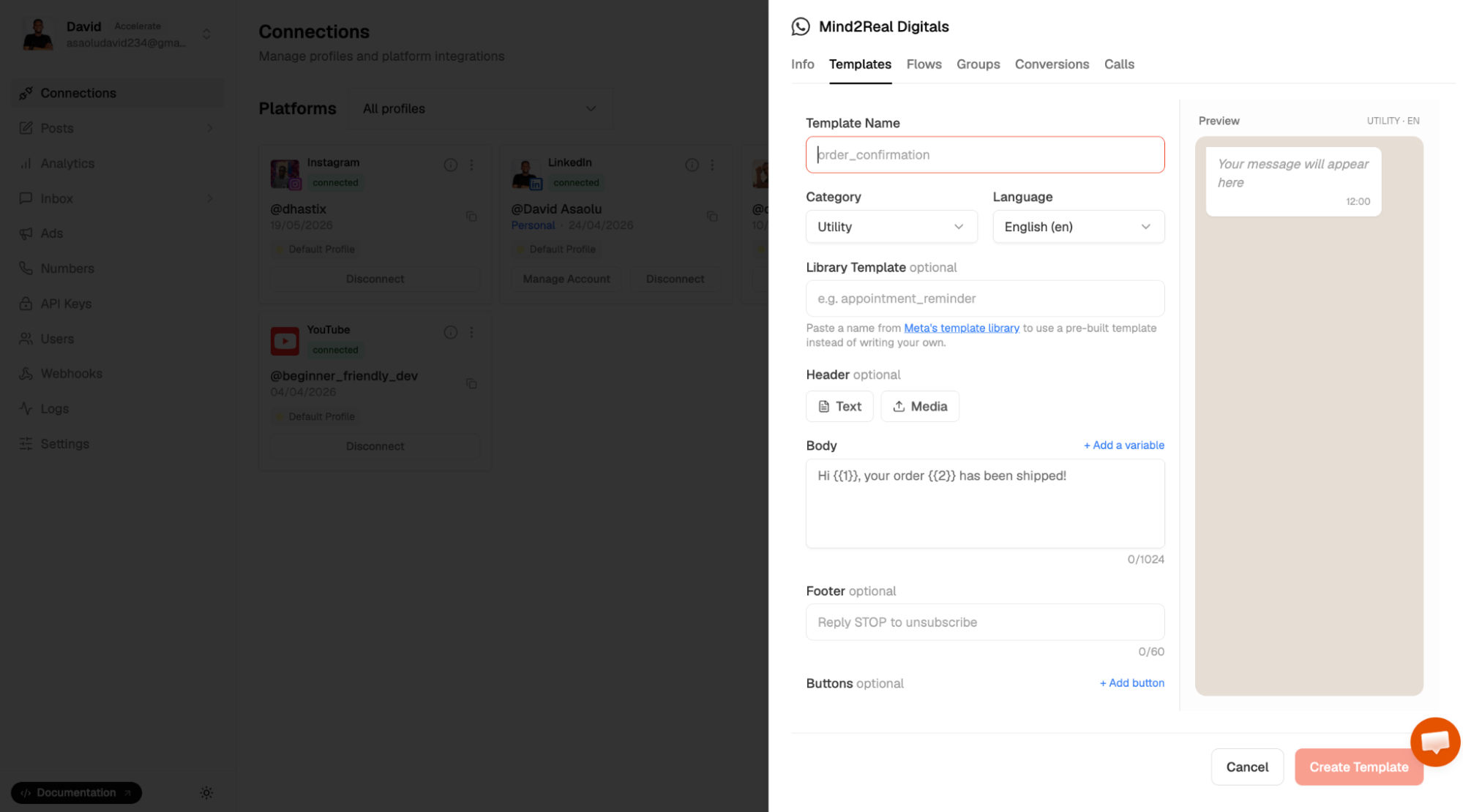
Message templates must be approved before they can be used to send broadcast messages. Approval typically takes up to 24 hours, although it may be faster depending on the review process.
Step 3: Create and Send a Broadcast Campaign
From the sidebar, navigate to Inbox > Campaigns, then click New Broadcast to create a new broadcast campaign.
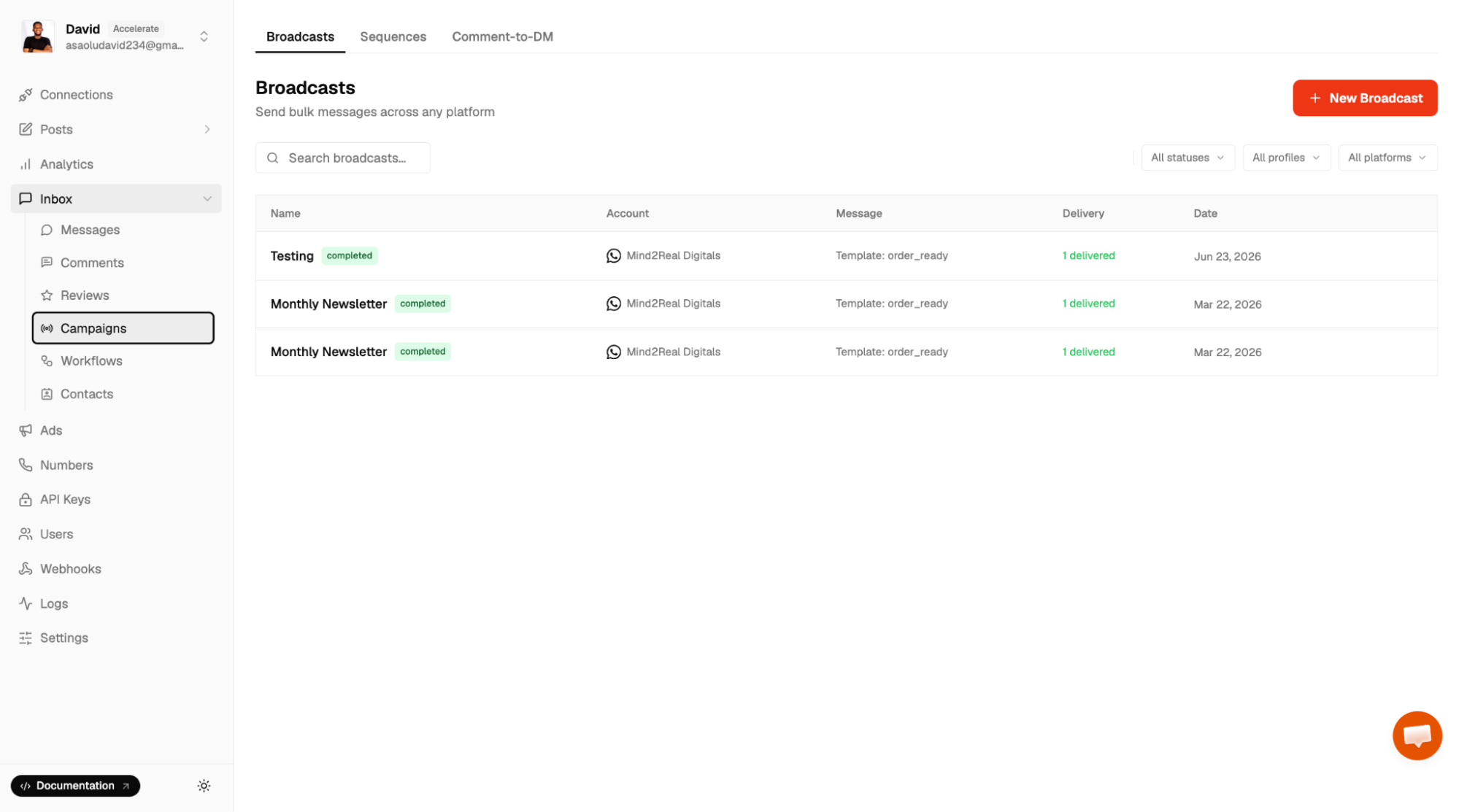
Enter a name and description for the broadcast, then select the approved message template you want to use. If your template contains variables, provide the required values to personalise the message for each recipient.
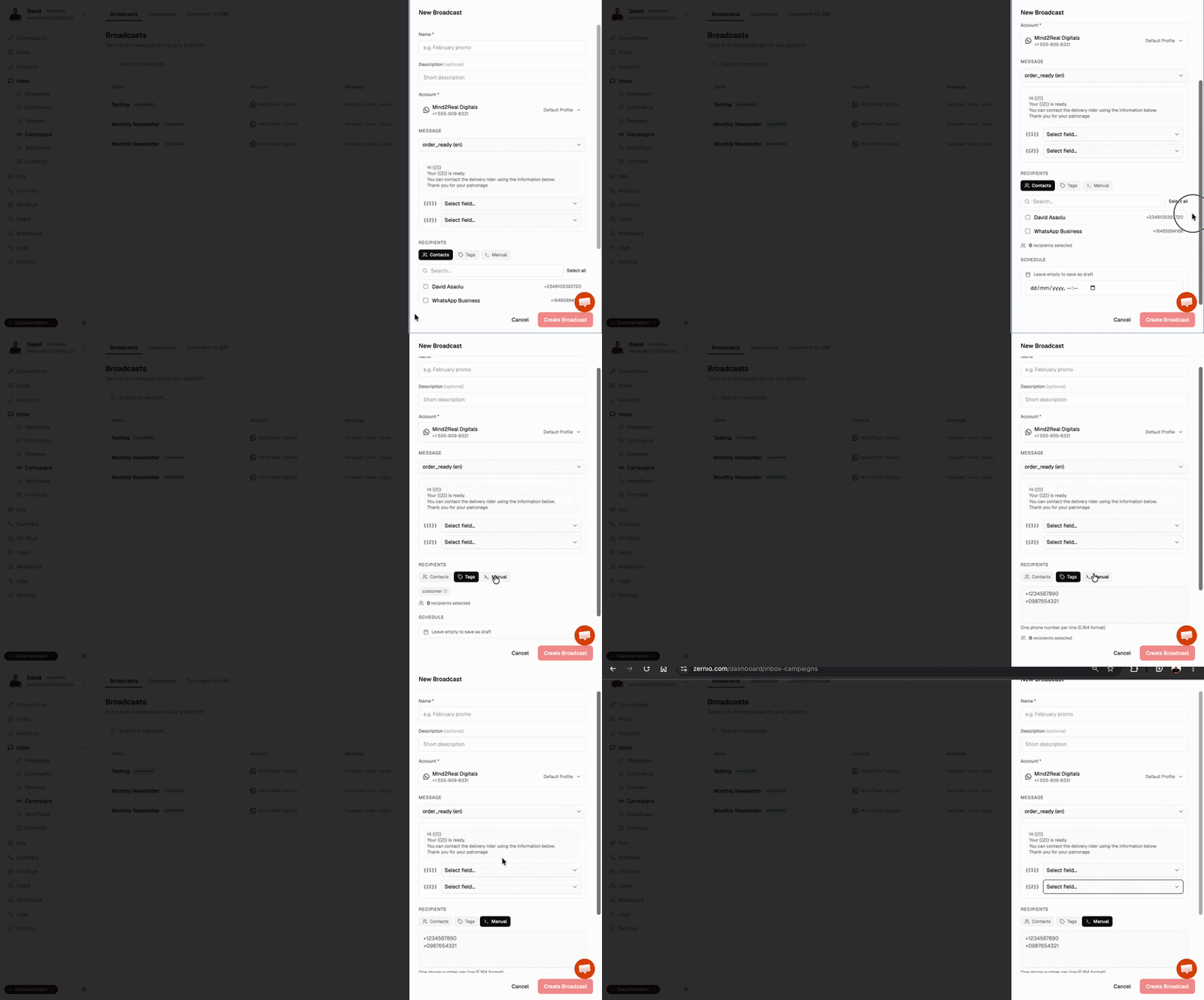
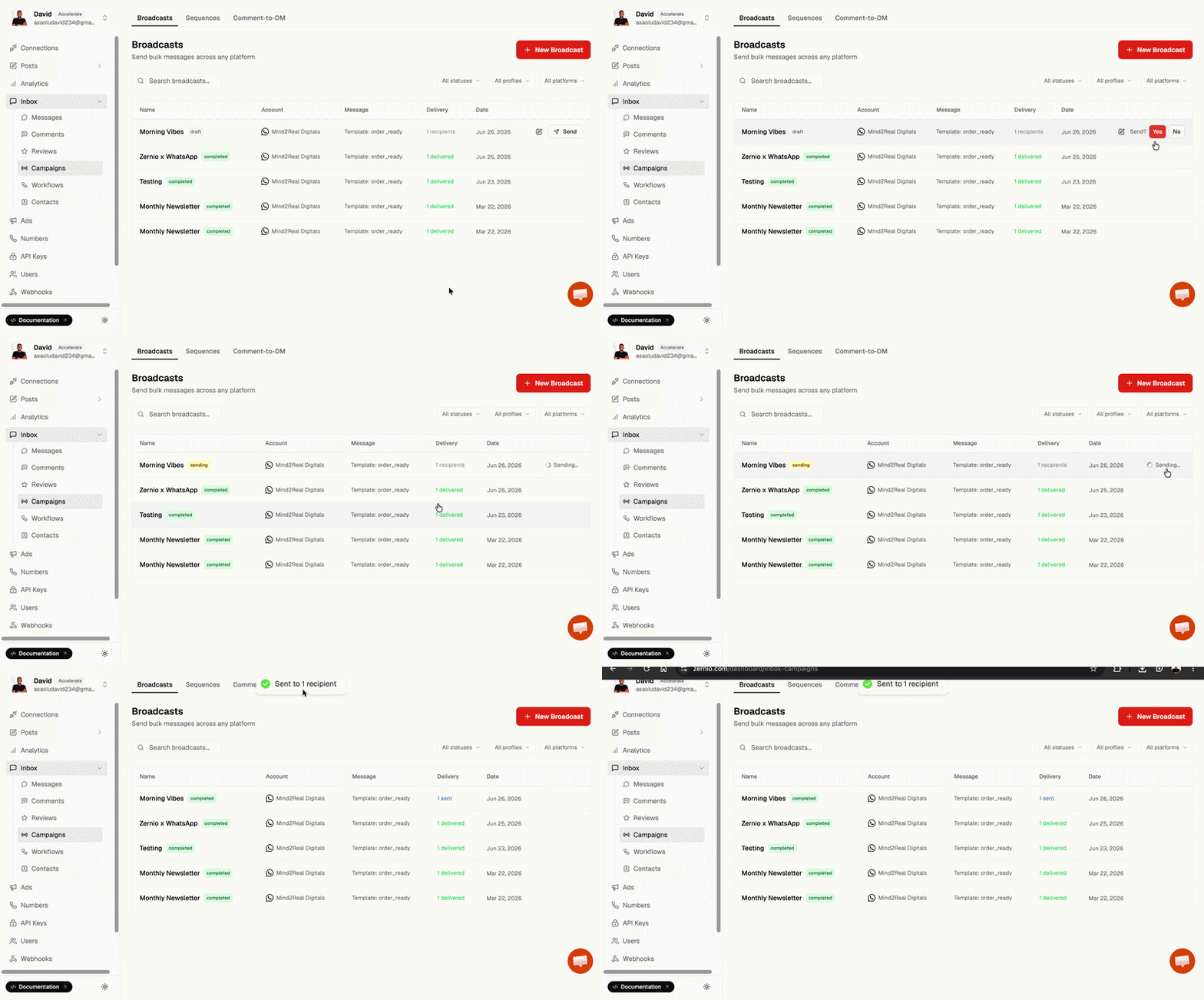
Next, add recipients to your broadcast. You can select contacts already saved in Zernio, add phone numbers manually, or import contacts from a CSV file. Once your recipients have been added, choose whether to send the broadcast immediately or schedule it for a later date and time.
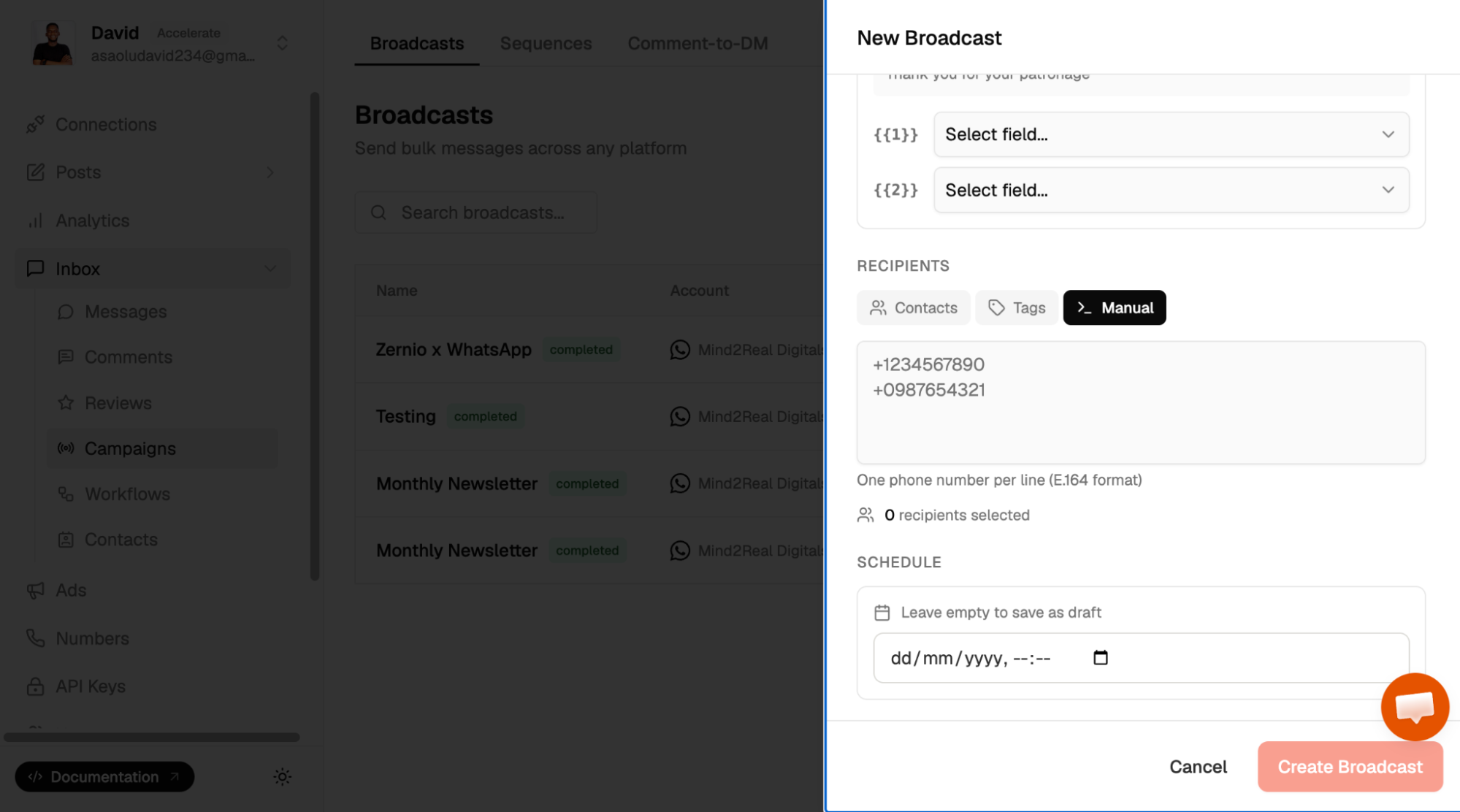
Finally, click Send to send your broadcast campaign.
Send WhatsApp Broadcast Messages Using the Zernio API
Zernio is an API-first platform that provides access to the official WhatsApp Business API, enabling developers to build, automate, and scale WhatsApp messaging programmatically using its SDKs or REST API.
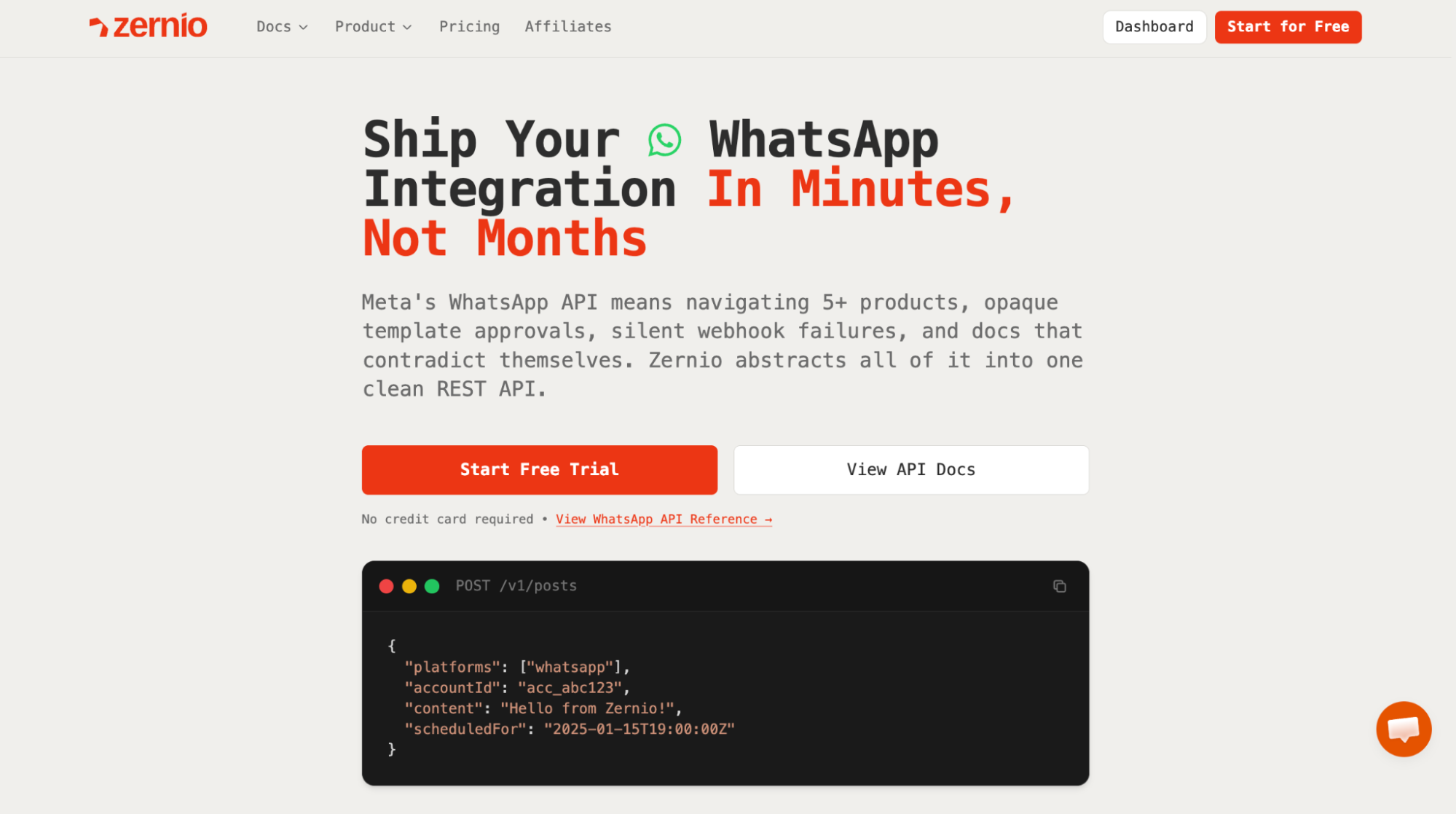
The example below demonstrates the complete workflow: creating a broadcast campaign, adding recipients, and sending the broadcast.
First, create a WhatsApp broadcast campaign using the following code snippet:
import Zernio from "@zernio/node";

const zernio = new Zernio();

const { data } = await zernio.broadcasts.createBroadcast({
  body: {
    profileId: "YOUR_PROFILE_ID_FROM_ZERNIO_DASHBOARD",
    accountId: "YOUR_WHATSAPP_ACCOUNT_ID_FROM_ZERNIO_DASHBOARD",
    platform: "whatsapp",
    name: "BROADCAST_LIST_NAME",
    template: {
      name: "MESSAGE_TEMPLATE_NAME",
      language: "en",
      components: [
        {
          type: "body",
          parameters: [{ type: "text", text: "{{1}}" }],
        },
      ],
    },
  },
});

console.log("Broadcast created:", data.broadcast.id);
The code snippet above creates a new WhatsApp broadcast campaign using an approved message template. It specifies the IDs for the WhatsApp profile and connected account, broadcast name, and the approved message template name.
If your template contains variables, you can pass their values through the components field. Once your request is successful, Zernio returns the broadcast ID, which you'll use to add recipients and send or schedule the broadcast.
Next, add recipients to the broadcast campaign using the following code snippet:
const { data } = await zernio.broadcasts.addBroadcastRecipients({
  path: { broadcastId: "BROADCAST_ID" },
  body: {
    phones: ["+1555000111", "+1555000222"],
  },
});

console.log(`Added: ${data.added}, Skipped: ${data.skipped}`);
Finally, you can send or schedule your broadcasts using the following code snippet.
// Send broadcast message
const { data } = await zernio.broadcasts.sendBroadcast({
  path: { broadcastId: "BROADCAST_ID" },
});

console.log(`Sent: ${data.sent}, Failed: ${data.failed}`);

// Schedule broadcast message
await zernio.broadcasts.scheduleBroadcast({
  path: { broadcastId: "BROADCAST_ID" },
  body: { scheduledAt: "2025-02-01T10:00:00.000Z" },
});
If you prefer using the REST API directly, refer to the complete broadcast documentation.
Best Practices for Sending WhatsApp Broadcast Messages
Following best practices helps improve message delivery, increase customer engagement, and ensure your broadcast campaigns comply with WhatsApp's messaging policies.
Here are some recommendations to keep in mind.
1. Obtain Customer Opt-In Before Sending Messages
Always obtain explicit customer consent before sending proactive WhatsApp messages through the WhatsApp Business API. A customer's phone number alone does not qualify as valid consent. Customers should clearly agree to receive messages from your business through any of the approved opt-in methods.
2. Personalise Messages with Template Variables
Avoid sending the same generic message to every customer. Use template variables to personalise broadcasts with details such as the customer's name, appointment date, order number, or other relevant information. Personalised messages are more engaging and often receive better response rates.
3. Segment Your Audience
Group customers based on attributes such as purchase history, location, interests, or customer lifecycle stage. Sending relevant messages to the right audience improves engagement and reduces the chances of your messages being ignored or reported as spam.
4. Avoid Over-Messaging and Include a Clear Call to Action
Only send broadcast messages when they provide value to your customers. Sending too many promotional messages can reduce engagement and increase spam reports, which may negatively affect your messaging quality. Every broadcast should also include a clear call to action, such as visiting your website, completing a purchase, or contacting your support team.
5. Choose the Right Message Template Category
Use the appropriate message template category for your broadcast. Marketing templates are suitable for promotions and product announcements, utility templates for transactional updates such as order confirmations and appointment reminders, and authentication templates for one-time passwords and verification codes. Choosing the correct category helps ensure compliance with WhatsApp's messaging policies and pricing model.
6. Monitor Campaign Performance and Optimise
Track delivery rates, read rates, and customer responses to understand how your broadcast campaigns perform. Review these metrics regularly to identify what works, refine your messaging strategy, and improve future campaigns. Using a WhatsApp Business API provider such as Zernio makes it easier to monitor campaign performance, automate broadcasts, and manage customer communications at scale.
7. Maintain a High Message Quality Rating
The WhatsApp Business API uses messaging limits to determine how many unique customers your business can message within a rolling 24-hour period. New business portfolios typically start with a messaging limit of 250 unique recipients. As your business verifies its account, maintains a high message quality rating, and consistently sends valuable messages to opted-in customers, Meta can automatically increase this limit over time. Maintaining strong engagement and minimising spam reports are key to successfully scaling your broadcast campaigns.
Summary: How to Send WhatsApp Broadcast Messages
WhatsApp broadcast messaging is a one-to-many communication method that allows businesses to send a single message to multiple customers simultaneously. Although the message is sent only once, each recipient receives it as a private conversation, making broadcast messaging ideal for promotions, announcements, reminders, and customer updates.
If you're a small business with a limited customer base, the WhatsApp Business App provides a simple way to send broadcast messages. However, as your audience grows, its limitations, such as the 256-contact limit, manual contact management, and lack of automation and analytics, make it less suitable for large-scale campaigns.
The WhatsApp Business API overcomes these limitations by supporting scalable broadcast messaging, audience segmentation, message personalisation, campaign scheduling, analytics, and integrations with existing business systems. When you use the WhatsApp Business API through a provider like Zernio, your teams can manage broadcast campaigns, message templates, and customer conversations from a shared workspace or integrate the WhatsApp Business API directly into your applications without managing the underlying infrastructure or worrying about ongoing maintenance.
To get the best results from your broadcast campaigns, always obtain customer opt-ins, use the appropriate message template category, personalise your messages, and segment your audience to maintain a high message quality rating.
FAQs
1. What is the difference between a WhatsApp broadcast message and a group chat?
A WhatsApp broadcast message lets you send the same message to multiple recipients, but each person receives it as a private conversation. In contrast, messages sent in a WhatsApp group are visible to every member, and participants can interact with one another.
2. Do customers need to save my number to receive WhatsApp broadcast messages?
With the WhatsApp Business App, recipients must save your phone number in their contacts before they can receive broadcast messages. With the WhatsApp Business API, customers do not need to save your number, but they must provide a valid opt-in before you can receive proactive messages.
3. How many contacts can I send a WhatsApp broadcast message to?
The WhatsApp Business App supports up to 256 contacts per broadcast list. The WhatsApp Business API supports much higher messaging limits, from 250 to unlimited unique recipients, as your business maintains a high message quality rating and meets Meta's scaling requirements.
4. Can I schedule WhatsApp broadcast messages?
Yes. With Zernio, you can schedule WhatsApp broadcast messages for a specific date and time directly from the dashboard or API endpoint.
5. Do I need an approved message template to send broadcast messages?
If you're using the WhatsApp Business API, yes. The WhatsApp Business App does not require message templates for broadcasts.
6. Can I personalise WhatsApp broadcast messages?
Yes. The WhatsApp Business API supports template variables that allow you to personalise messages with customer-specific information.
7. Why should I use the WhatsApp Business API instead of the WhatsApp Business App?
The WhatsApp Business API offers features such as audience segmentation, message personalisation, campaign scheduling, analytics, automation, CRM integrations, and team collaboration, making it an excellent choice for growing businesses.
8. How can I send multiple WhatsApp messages without using a broadcast list?
You can send messages to each contact individually or create a WhatsApp group. For businesses that need to send the same message to many customers while keeping conversations private, WhatsApp broadcast messaging is the better option. You can use Cloud API or Zernio API to send WhatsApp broadcast messages at scale.