Today we're launching WhatsApp Business Calling on Zernio. Customers can place a voice call to your business from inside the WhatsApp chat, and Zernio routes that call wherever you want it to go: a phone line, a SIP endpoint, or an AI voice agent.
This is the next piece of a bigger picture. Zernio is building the full conversation layer on WhatsApp, one API that handles how a business talks to its customers there.
Messaging came first: templates, free-form replies, media, interactive menus. Last release added WhatsApp Business numbers in 54 countries, so the conversation could start on a local number anywhere. Calling adds voice on top of that same number. The line you bought to send messages can now take and place calls.
What WhatsApp Calling lets you do
WhatsApp Calling adds voice to your WhatsApp number in both directions. Here's the full surface at launch.
| Capability | What it means |
|---|---|
| Inbound calls | Customers tap the call button in the chat and reach your business. Works on every supported number. |
| Outbound calls | Your business calls the customer after they opt in. Available where Meta permits it. |
| Route to a phone line | Bridge the call to any phone number with tel:+E.164. Calls land on your existing support line. |
| Route to SIP | Send the call to a SIP endpoint (sip:) and plug WhatsApp into your contact center. |
| Route to an AI voice agent | Connect a WebSocket media server (wss:) so Vapi, Retell, or any voice agent answers the call. |
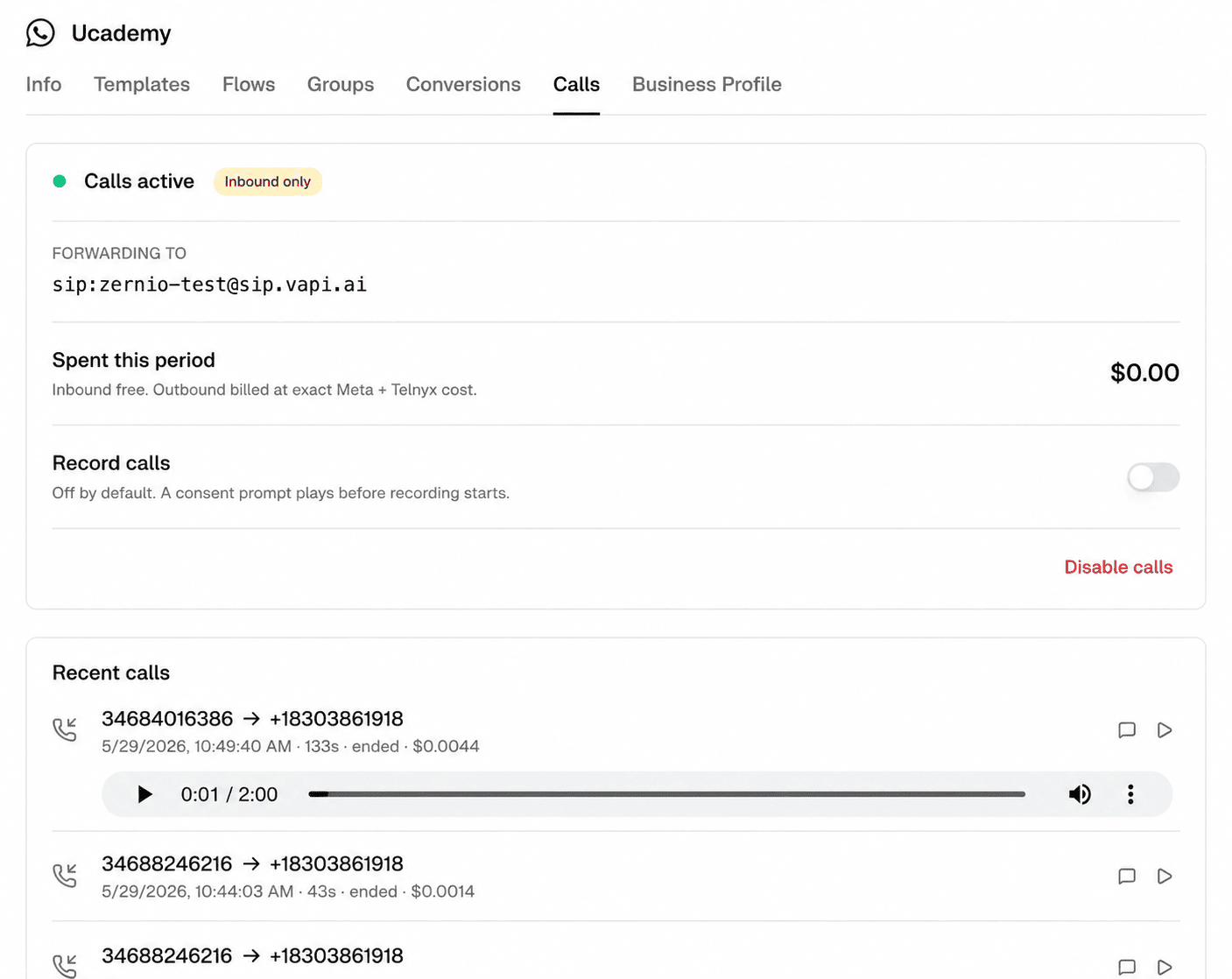
| Call recording | Off by default. Turn it on per number, with a consent prompt played to the caller. |
| Permission checks | Confirm a customer has opted in before you place an outbound call. |
| Call history and billing | Pull past calls with duration, end reason, recording link, and a cost breakdown. |
Every call runs over WhatsApp's encrypted voice, so the customer stays in the app they already trust and never installs anything new.
Zernio is the routing layer, you bring the destination
Zernio connects the WhatsApp call to wherever you point it. The intelligence on the other end is yours.
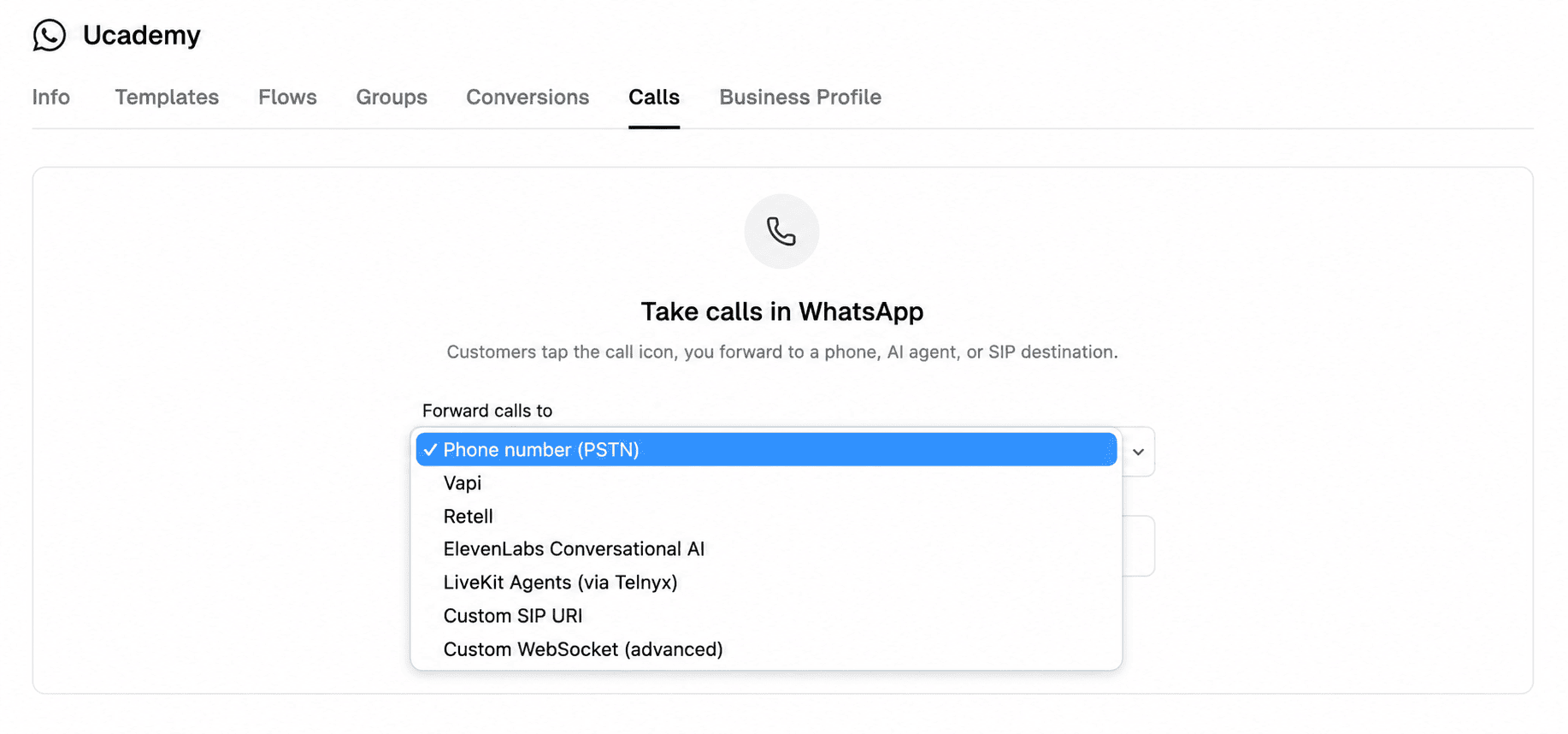
Point forwardTo at a phone number and the call rings a human. Point it at a SIP endpoint and it enters your call center's existing routing. Point it at a WebSocket media server and an AI voice agent picks up, listens, and talks back in real time.
const { data } = await zernio.whatsappcalling.enableWhatsAppCalling({
  path: { id: 'PHONE_NUMBER_DOC_ID' },
  body: {
    accountId: 'YOUR_ACCOUNT_ID',
    forwardTo: 'tel:+13105551234',
    recordingEnabled: false,
  }
});
console.log('Calling enabled:', data.callingEnabled);
Inbound and outbound calls work differently
The two directions follow different rules, because Meta protects customers from unwanted business calls.
Inbound is open. Any customer can tap the call button in your chat and reach you, on every number Zernio supports. This covers most support use cases out of the box.
Outbound needs consent. Before your business can call a customer, that customer has to opt in, and WhatsApp tracks the permission. You check it before dialing, and the status comes back:
const { data } = await zernio.whatsappcalling.getWhatsAppCallPermissions({
  query: { accountId: 'YOUR_ACCOUNT_ID', to: '+13105551234' }
});
console.log(data.permission.status); // 'permanent' | 'temporary' | 'no_permission'
Zernio sells WhatsApp Business numbers in 54 countries, and each one is labeled with its inbound and outbound calling support in the purchase flow. You see exactly which directions a country allows before you buy, so you can pick a number that matches how you plan to use it.
What you can build with WhatsApp Calling API
Voice on WhatsApp opens a few patterns that messaging alone couldn't cover.
AI voice support that answers instantly. Route inbound calls to a voice agent that handles tier-one questions day or night, then hands off to a human when the caller needs one.
Sales calls that close warmer. Start in chat, get consent, then call the lead back inside WhatsApp where they already know your brand. No unknown number, no separate dialer.
Escalation from chat to voice. A stuck text conversation becomes a phone call without leaving the thread, so the customer never repeats themselves.
Each one runs on a number you already own in Zernio, alongside your messaging and any WhatsApp Workflows you've built.
How to integrate WhatsApp calling into your product
We built Zernio's WhatsApp integration to be developer-first, so the whole calling flow runs through the API. Wire it into your own app and your users get WhatsApp voice without touching a Zernio dashboard. Here's the end-to-end flow.
1. Read the calling config. Start from a connected number to get the phoneNumberDocId you'll need for every following call, plus the current state.
const { data } = await zernio.whatsappcalling.getWhatsAppCallingConfig({
  query: { accountId: 'YOUR_ACCOUNT_ID' }
});
console.log(data.phoneNumberDocId, data.callingEnabled, data.forwardTo);
2. Enable calling and set the destination. Turn calling on and point forwardTo at where calls should land: a phone line (tel:+E164), a SIP endpoint (sip:), or your AI voice agent over WebSocket (wss:).
const { data } = await zernio.whatsappcalling.enableWhatsAppCalling({
  path: { id: 'PHONE_NUMBER_DOC_ID' },
  body: {
    accountId: 'YOUR_ACCOUNT_ID',
    forwardTo: 'tel:+13105551234',
    recordingEnabled: false,
  }
});
console.log('Calling enabled:', data.callingEnabled);
Inbound calls now route to that destination automatically. For support, you're done at this step.
3. Place outbound calls (after consent). To call a customer, first confirm they've opted in, then dial. The call bridges to the number's forwardTo destination unless you override it.
const { data } = await zernio.whatsappcalling.initiateWhatsAppCall({
  body: { accountId: 'YOUR_ACCOUNT_ID', to: '+13105551234' }
});
console.log(data.callId, data.status); // '...', 'dialing'
4. Read call history. Pull past calls for reporting, billing, or your own dashboard, filtered by status, direction, or date.
const { data } = await zernio.whatsappcalling.listWhatsAppCalls({
  query: { accountId: 'YOUR_ACCOUNT_ID', direction: 'inbound', limit: 50 }
});
// billing.billableCostUSD is what Zernio charges (carrier connection +
// recording). Meta's per-minute outbound rate is billed by Meta directly to
// your WABA and is reported separately as billing.metaCostUSD (display only).
data.calls.forEach(c => console.log(c.direction, c.status, c.durationSeconds, c.billing?.billableCostUSD));
The same calls are available through the Zernio SDKs, the MCP server, and the CLI.
How calling is billed: Zernio has zero markup on usage
Zernio takes zero markup on WhatsApp usage. The carrier and Meta costs that calling and messaging incur pass through to you at cost, with nothing added on top.
Calling runs on Zernio's Usage plan, which already includes every WhatsApp feature (broadcasts, sequences, DM conversations, etc.).
| Item | Who bills it | What you pay |
|---|---|---|
| Dedicated number | Zernio (unless you connect your own number) | From $3/mo per active number, which Zernio provisions for you |
| Inbound calls | — | Free |
| Outbound carrier connection | Zernio | At cost, zero markup |
| Meta per-minute outbound calls | Meta, direct to your WABA | Meta's rate (~$0.015/min in the US), varies by country |
| AI Voice Agent | Your provider, direct | Vapi, Retell, or whichever agent you connect, billed at their rates |
| Call recording (optional) | Zernio | At cost, $0.002 per minute |
The split is the same one as Zernio uses for messaging. Meta charges its per-minute outbound calling rate directly to your WhatsApp Business Account. Zernio never sits in the middle of that fee or marks it up.
Get started today
WhatsApp Calling brings voice to the WhatsApp number you already use for messaging, with routing to a phone line, SIP, or an AI voice agent.
Calling runs on Zernio's Usage plan, and the carrier connection is billed at cost with zero markup. Visit the WhatsApp page or read the calling docs to route your first call.
Stop building WhatsApp from scratch.
One API for numbers, messaging, calling, and automation on the official WhatsApp Business API.