The WhatsApp Business API lets developers send messages, run customer support, and trigger notifications at scale. The catch: Meta's setup involves Business Manager, app review, WABA verification, template approval, and BSP onboarding before you can send a single message. This guide covers what the API does, what it costs, how to set it up, and how to skip the setup entirely with Zernio's WhatsApp API.
Let's begin!
Table of contents
- Key Features of the WhatsApp Business API
- What's the difference between WhatsApp Business app and the API?
- How do you set up the WhatsApp Business API?
- Zernio: How do you skip Meta's approval process and ship WhatsApp faster?
- Zernio vs WhatsApp Business API: Pros and Cons
- Conclusion
Key Features of the WhatsApp Business API
The WhatsApp Business API provides a range of features that enable businesses to communicate with customers at scale while maintaining a personalised experience.
Some of its features include:
Messaging
The WhatsApp Business API allows businesses to send and receive messages from customers using approved message templates and interactive messaging capabilities.
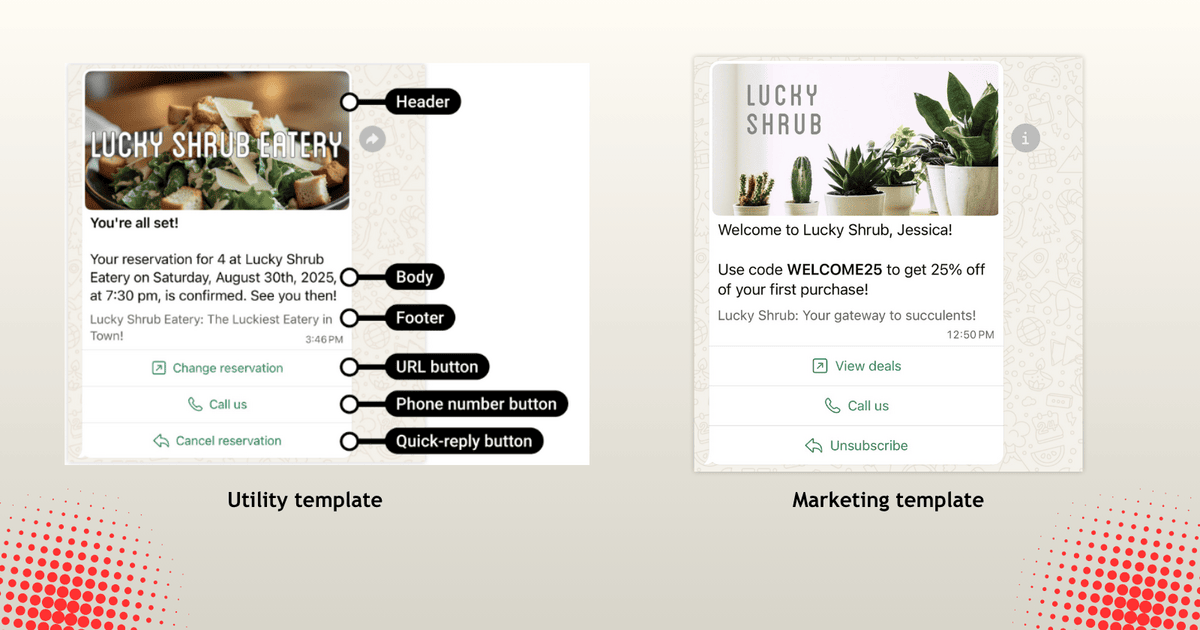
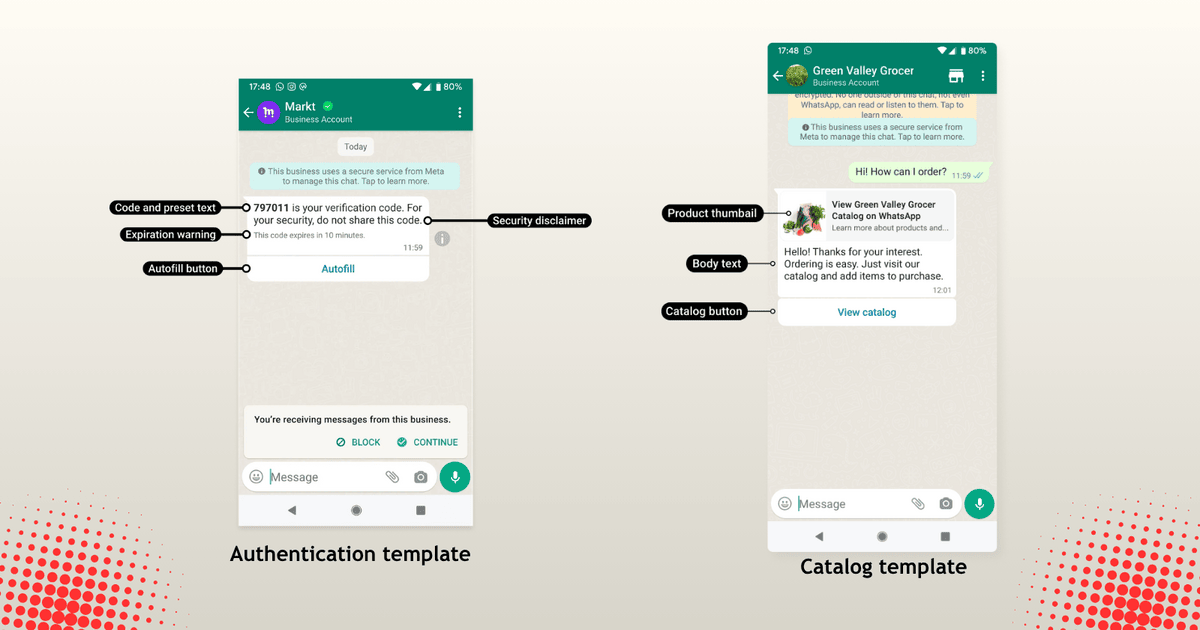
Meta currently supports four template categories:
- Marketing templates for promotional messages, product announcements, and customer engagement campaigns.
- Utility templates for transactional notifications such as order confirmations, delivery updates, appointment reminders, and account alerts.
- Authentication templates for sending one-time passwords (OTPs) and other time-sensitive verification codes.
- Catalog templates for showcasing products directly within WhatsApp, allowing customers to browse items and interact with your business without leaving the app.
It is important to note that Meta must approve all message templates before they can be used in production.
Calling
The WhatsApp Business Calling API allows businesses to make and receive calls from customers using Voice over Internet Protocol (VoIP). When businesses use the same number for both messaging and calling, they can provide a seamless customer experience within a single communication channel.
Advanced features such as configurable calling hours, call permissions, call buttons, and business-initiated calling help businesses deliver a more seamless customer support and sales experience. However, it is worth noting that business-initiated calling requires user consent and is only available in supported regions.
Group Messaging and Management
The WhatsApp Business API supports group creation and management, enabling businesses to create invite-only groups for communication and collaboration.
Users can join groups through invite links, allowing businesses to share updates and facilitate conversations among multiple participants. Group settings such as the title, description, permissions, and membership controls can be managed through the API.
However, access to group functionality is currently limited to businesses with an Official Business Account (OBA). Features such as authentication messages, disappearing messages, view-once messages, message editing, message deletion, and group calling are not currently supported through the Groups API.
Analytics
Analytics help businesses measure WhatsApp messaging performance, monitor customer engagement, and optimise customer communication strategies. Through the WhatsApp Business API, businesses can access metrics such as messages sent and delivered, conversation volumes and associated costs, template usage and read rates, group activity metrics, and performance data for business phone numbers linked to a WhatsApp Business Account (WABA).
What's the difference between WhatsApp Business app and the API?
The WhatsApp Business App and WhatsApp Business API enable businesses to communicate with customers on WhatsApp, but they are designed for different use cases. The WhatsApp Business App supports small businesses that manage conversations manually, and the WhatsApp Business API is built for businesses that need automation, integrations, and the ability to communicate at scale.
The table below highlights the key differences between them:
| Feature | WhatsApp Business App | WhatsApp Business API |
|---|---|---|
| Best For | Small businesses and sole proprietors | Growing businesses, enterprises, SaaS platforms, and support teams |
| Device Access | Limited to your primary phone and up to 4 additional devices (5 total devices) | Supports multi-agent access through API integrations and shared inbox solutions |
| Setup | Install the app and verify a phone number | Requires a WhatsApp Business Account (WABA) and API setup |
| Automation | Greeting messages, away messages, and quick replies | Advanced automation, chatbots, AI agents, and workflow automation |
| Broadcast Messages | Supports up to 256 saved contacts per list | Approved templates for unlimited contacts |
| API Access | Not available | Full API access for custom integrations |
| Message Templates | Not supported for large-scale messaging | Supports approved marketing, utility, authentication, and catalog templates |
| Analytics | Basic messaging insights | Detailed messaging, conversation, template, and engagement analytics |
| Cost | Free to use | Pay-as-you-go pricing based on message volume and the services used |
Stop building social integrations from scratch.
One API call to publish, schedule, and manage posts across 15+ platforms.
How do you set up the WhatsApp Business API?
In this section, you'll learn how to set up the WhatsApp Business API and send your first WhatsApp message using Meta's developer platform.
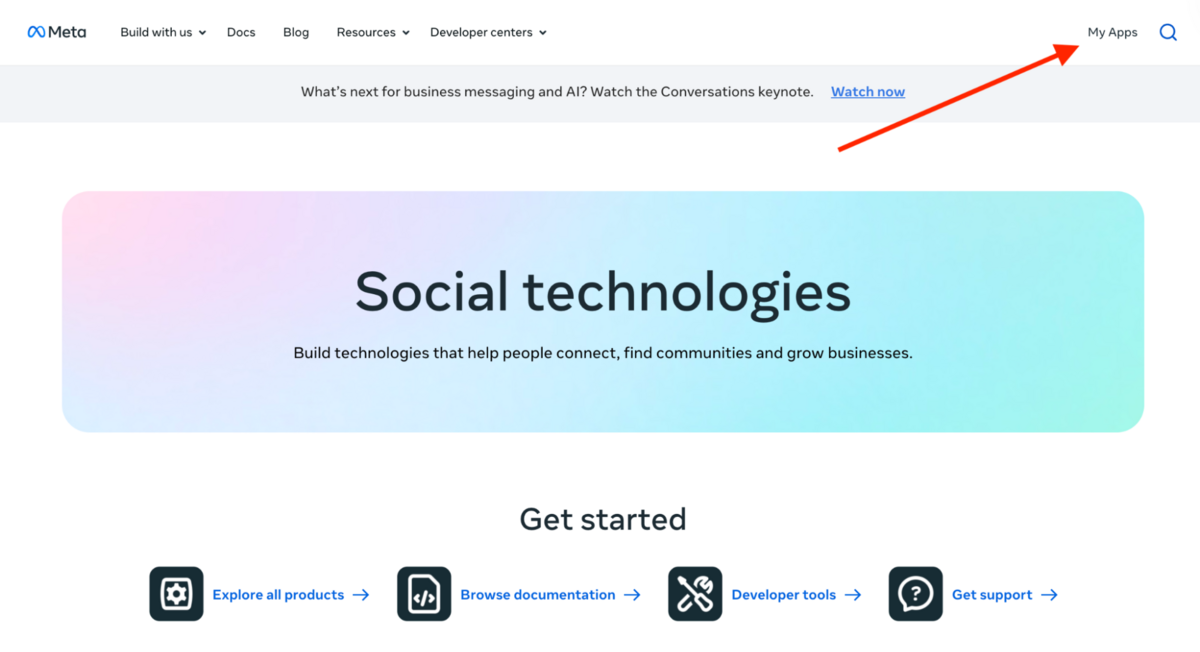
To get started, visit the Meta Developers portal and click My Apps to create a new application.
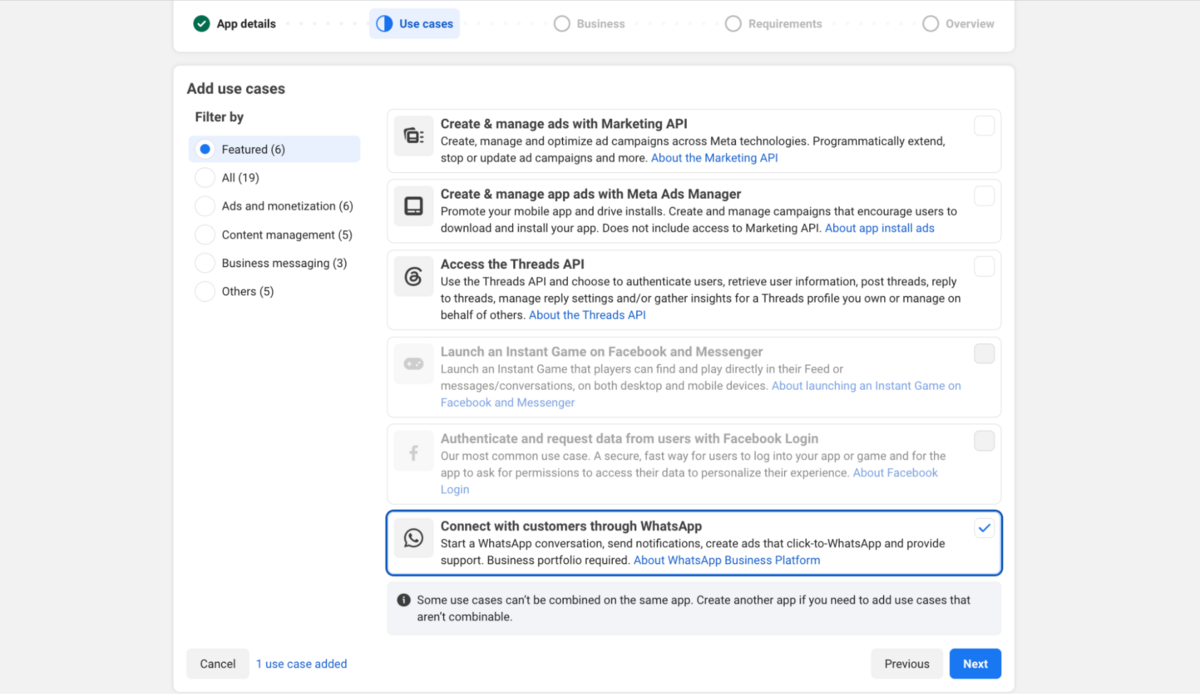
Enter an app name and select the use case that best fits your needs.
Next, select the Facebook page that you want to associate with the app and create the application.
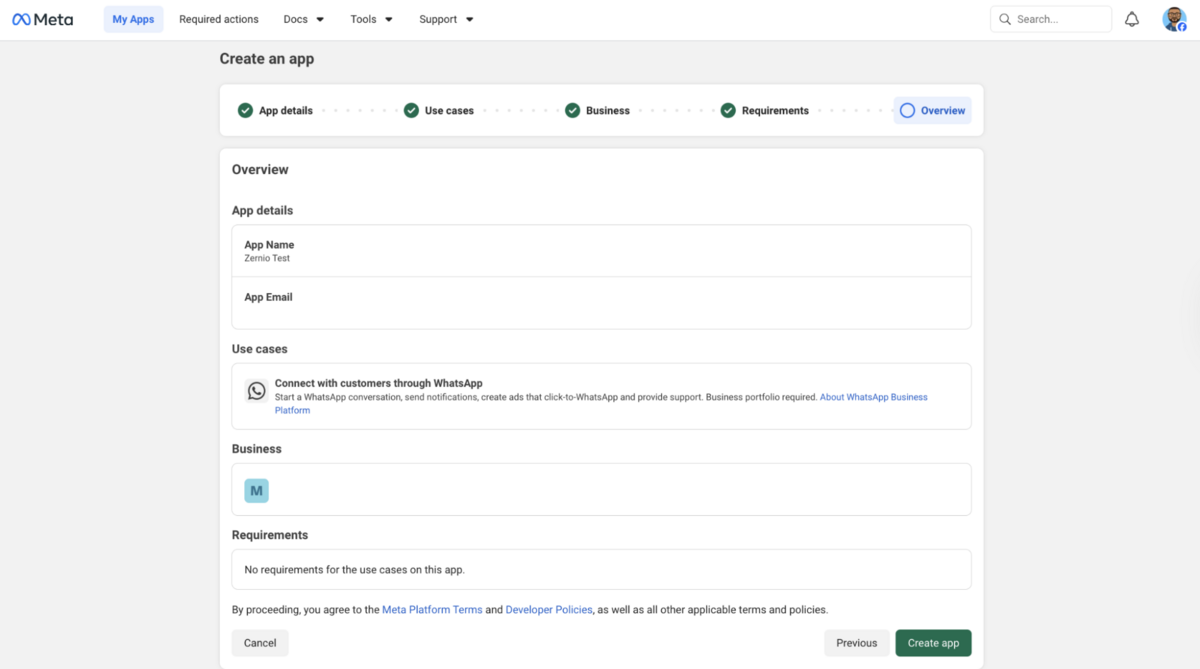
After the application is created, Meta will automatically generate a WhatsApp Business Account (WABA) ID and a phone number for testing. Then, create a temporary access token to send a request via the API.
Add a phone number to the recipients list. Meta will send a verification code to the number to confirm ownership.
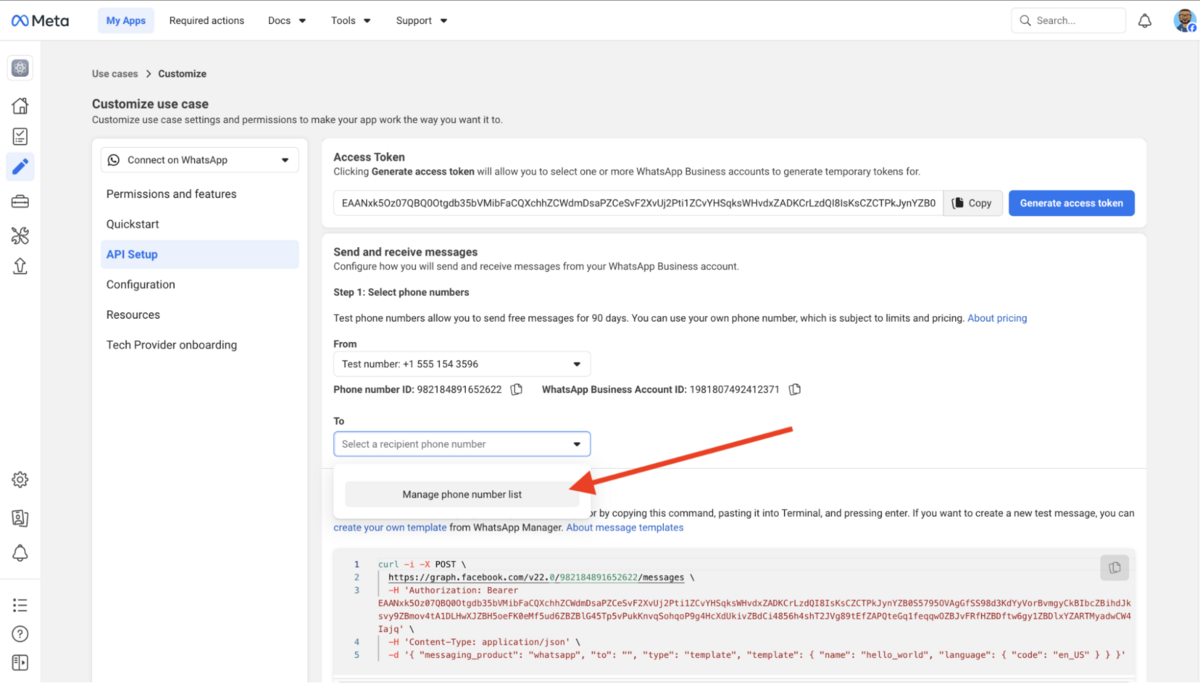
Once the phone number has been verified, click Send Message to test the API. You should receive a WhatsApp message on the test device within a few seconds.
Congratulations! You have successfully configured the WhatsApp Business API and sent your first message.
Read more: How to Send Messages and Templates via the WhatsApp Business API
How much does the WhatsApp Business API cost?
Meta uses a per-message pricing model for the WhatsApp Business Platform. The amount you pay depends on the message template category, message volume tier, and the recipient's country or region. Whenever you send a template message, the applicable rate is determined by the template category and the recipient's phone number country at the time the message is delivered.
For example, as of April 1, 2026, Marketing templates sent to recipients in Argentina cost $0.0618 per message, while Utility and Authentication templates cost $0.0260 per message. In Turkey, Marketing templates cost $0.0109 per message, while Utility and Authentication templates cost $0.0009 per message.
Because pricing varies across countries, message categories, and volume tiers, and Meta updates its rates at the beginning of each quarter, you should review Meta's rate cards before integrating the WhatsApp Business API into your applications or business workflows and periodically check the official pricing documentation for any changes.
Note: Not all messages sent through the WhatsApp Business Platform are billable. For example:
- Utility template messages and free-form (non-template) messages sent within an open customer service window are free. A customer service window opens when a user messages your business and remains active for 24 hours from the user's last message.
- Messages sent during a free entry point window are also free. A free entry point window lasts for 72 hours after a user contacts your business via a Click-to-WhatsApp Ad or a Facebook Page call-to-action button, provided the conversation is handled through the WhatsApp Android or iOS app.
Zernio: How do you skip Meta's approval process and ship WhatsApp faster?
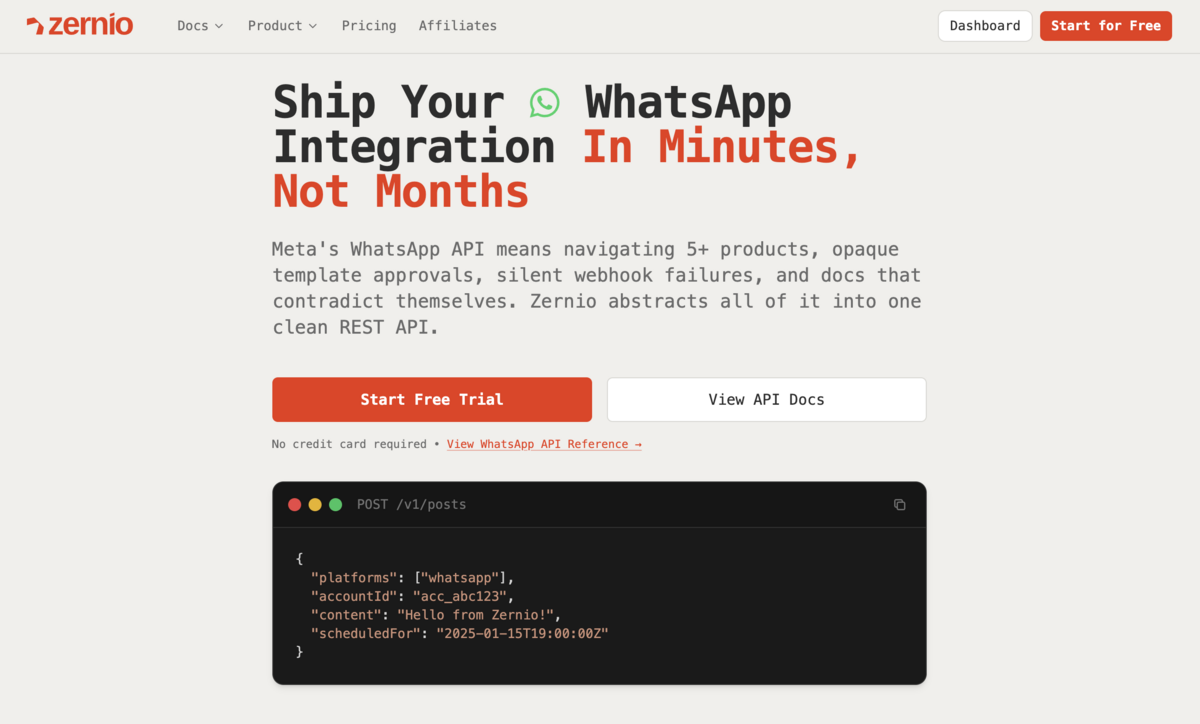
Zernio is a unified social media and messaging API that enables you to integrate WhatsApp and 14 other social media platforms into your SaaS applications and business automation workflows. It handles rate limits automatically with smart queuing and retry mechanisms, and removes the complexity and limitations of configuring and maintaining the WhatsApp Business API.
With Zernio, you can publish content, schedule posts, manage comments and direct messages, run promotions, and access analytics across 15 platforms (including WhatsApp, Facebook, Telegram, and Discord) from a single dashboard and API endpoint.
What does Zernio do for WhatsApp API integration?
- Quick setup with no approval delays
Zernio is designed to help developers and businesses get started quickly, without the delays associated with the WhatsApp Business platform. With Zernio, you don't need to go through multiple approval steps, business verification flows, or Meta app review processes before integrating WhatsApp messaging into your application, making the move from development to production happen in minutes and not weeks. - Dedicated WhatsApp Business number in multiple countries
Zernio lets you purchase and set up a dedicated WhatsApp Business number in 54 countries directly within the platform. You can select a country, and Zernio handles number provisioning, verification, and WhatsApp connection for both messaging and calling, allowing businesses to establish a local presence with improved response rates and customer engagement in their target regions. - Unified social inbox for multi-platform messaging
Managing customer conversations across different channels can quickly become fragmented when using multiple social media tools or APIs. Zernio brings all WhatsApp conversations into a single unified inbox, together with messages from other social media platforms (Telegram, Instagram, Facebook, X, Bluesky, Reddit), enabling teams to view, respond to, and manage messages in one place. - Built-in WhatsApp template message support
The WhatsApp Business API requires approved templates for sending structured messages. Zernio simplifies this by providing built-in support for template messages, making it easier to send OTPs, order updates, reminders, and marketing messages. Once you create a template, Zernio handles the approval process and notifies you when it is ready for use. - Messaging automation and trigger-based workflows
Zernio supports workflow automation that responds to incoming messages, enabling businesses to build trigger-based workflows that automatically send WhatsApp messages in response to user actions or system events. These workflows can be used for onboarding, engagement campaigns, transactional notifications, and customer lifecycle communication without requiring heavy backend engineering. - Reliable webhook delivery with automatic retries
Zernio improves reliability by handling webhook delivery with built-in retry logic and failure recovery mechanisms, ensuring that events are still delivered even during temporary network or service interruptions. It also provides an activity log that monitors your API activity, enabling you to debug errors faster. - Multi-platform support for AI agents and business automation workflows
Zernio supports communication across 15 social media channels, including WhatsApp, Facebook, Instagram, Threads, LinkedIn, X (Twitter), TikTok, YouTube, Pinterest, Telegram, Reddit, Bluesky, Google Business, Snapchat, and Discord. This makes it possible to build AI agents and automation systems that handle tasks, such as content scheduling and publishing, direct messaging, and ad management across multiple platforms through a single unified API integration.
| Zernio API | WhatsApp Business API |
|---|---|
| One API key. No Meta Business verification maze. Start sending in 30 seconds | Navigate 5+ Meta products just to send one message (Business Manager, App Dashboard, WABA, phone setup, verification) |
| Full template CRUD via API. We handle submission to Meta and category tracking | Template approval is slow and opaque. "Utility" templates silently reclassified as "marketing" (the most expensive tier) |
| Reliable webhook delivery with built-in retry logic. Same format across all platforms | Webhooks silently fail with no replay, no logs, and minimal error feedback. You build retry infrastructure from scratch |
| 24hr window, rate limits, messaging tiers: all handled automatically. You just call POST | New accounts start at 250 messages/day. Phone numbers are permanently locked to the API. Breaking changes ship without warning. |
| Same REST API for WhatsApp + 14 other platforms. Learn once, ship everywhere | Pay Twilio 3-5x markup for a usable DX, or suffer Meta's broken docs and zero developer tooling yourself |
How do you send a WhatsApp message with Zernio?
Zernio gives you one API for WhatsApp and 14 other platforms. Instead of managing multiple APIs and authentication flows, you get to interact with all platforms through a single interface.
In this section, you will configure Zernio for WhatsApp messaging and learn how to create, schedule, and send messages directly from your dashboard.
First, sign in to your Zernio account.
Select Connections from the sidebar menu and connect your WhatsApp account to Zernio.
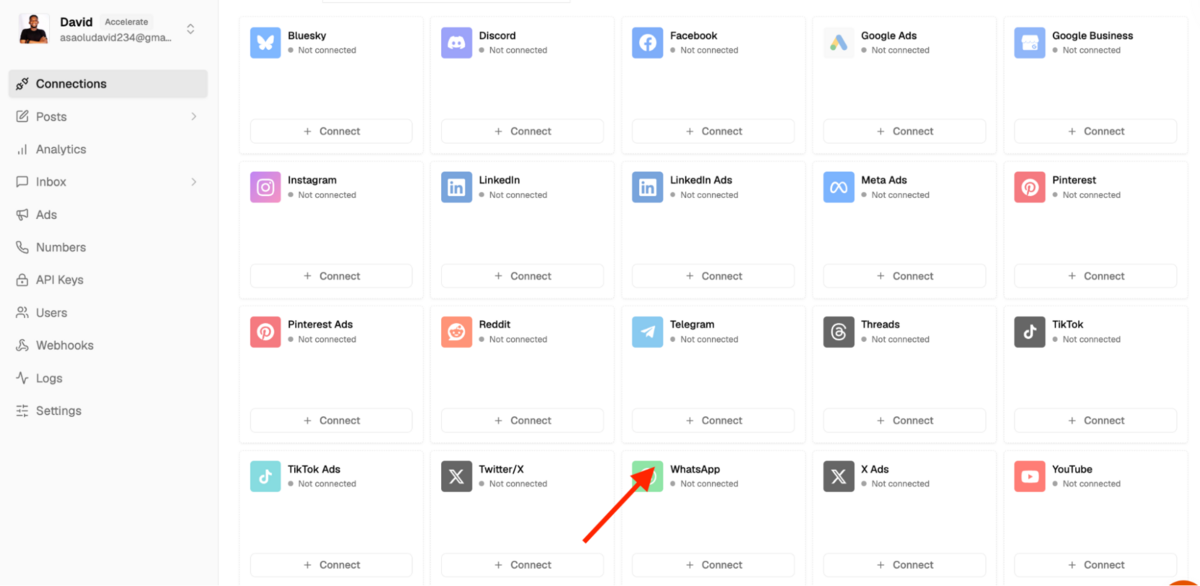
After clicking the WhatsApp Connect button, a pop-up appears where you can choose either to get a US number at a flat rate of $3 per month or to connect an existing WhatsApp Business account.
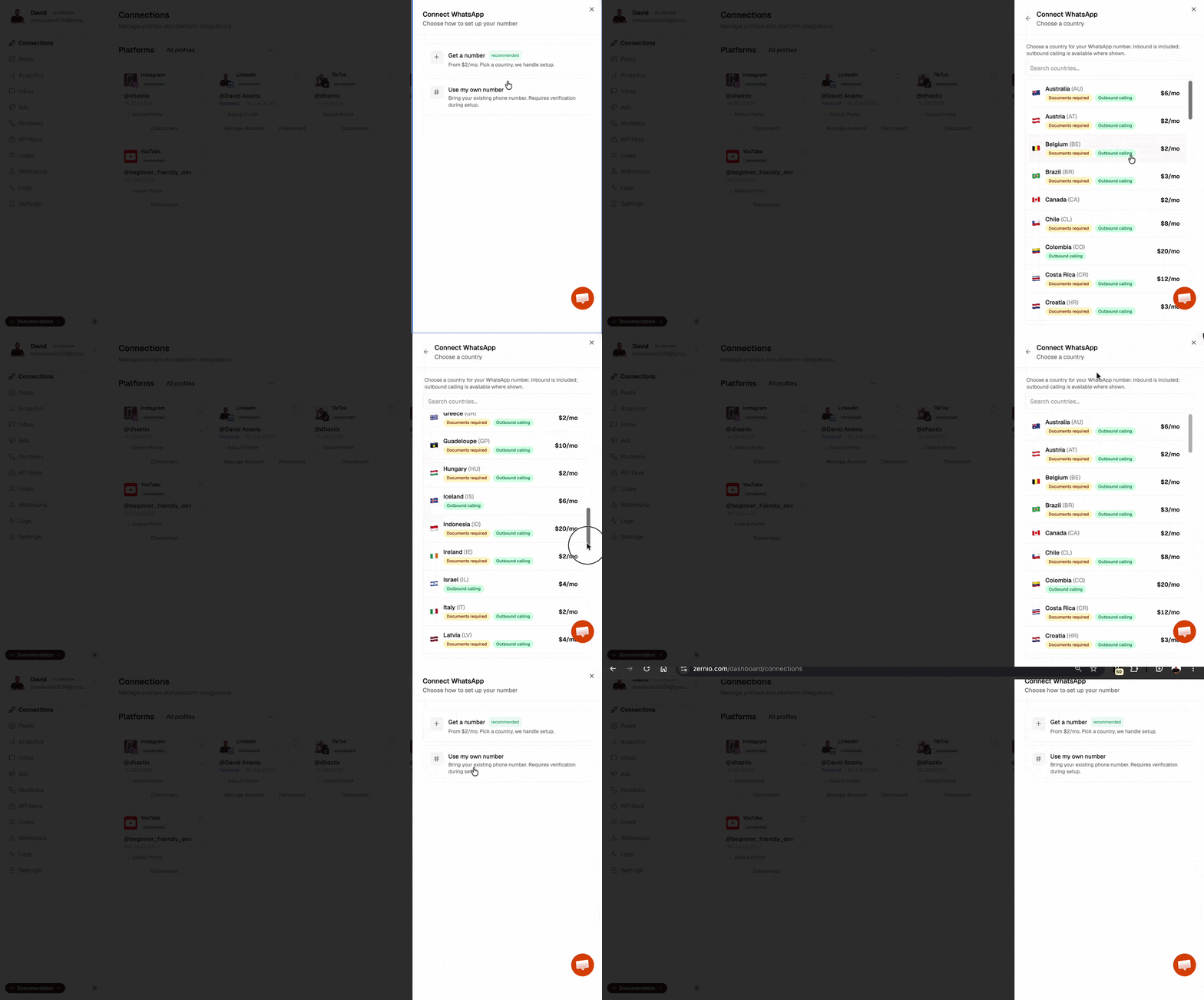
Select your preferred option and connect a WhatsApp number to Zernio.
To create WhatsApp message templates, click the Settings button on your WhatsApp connection profile to add one.
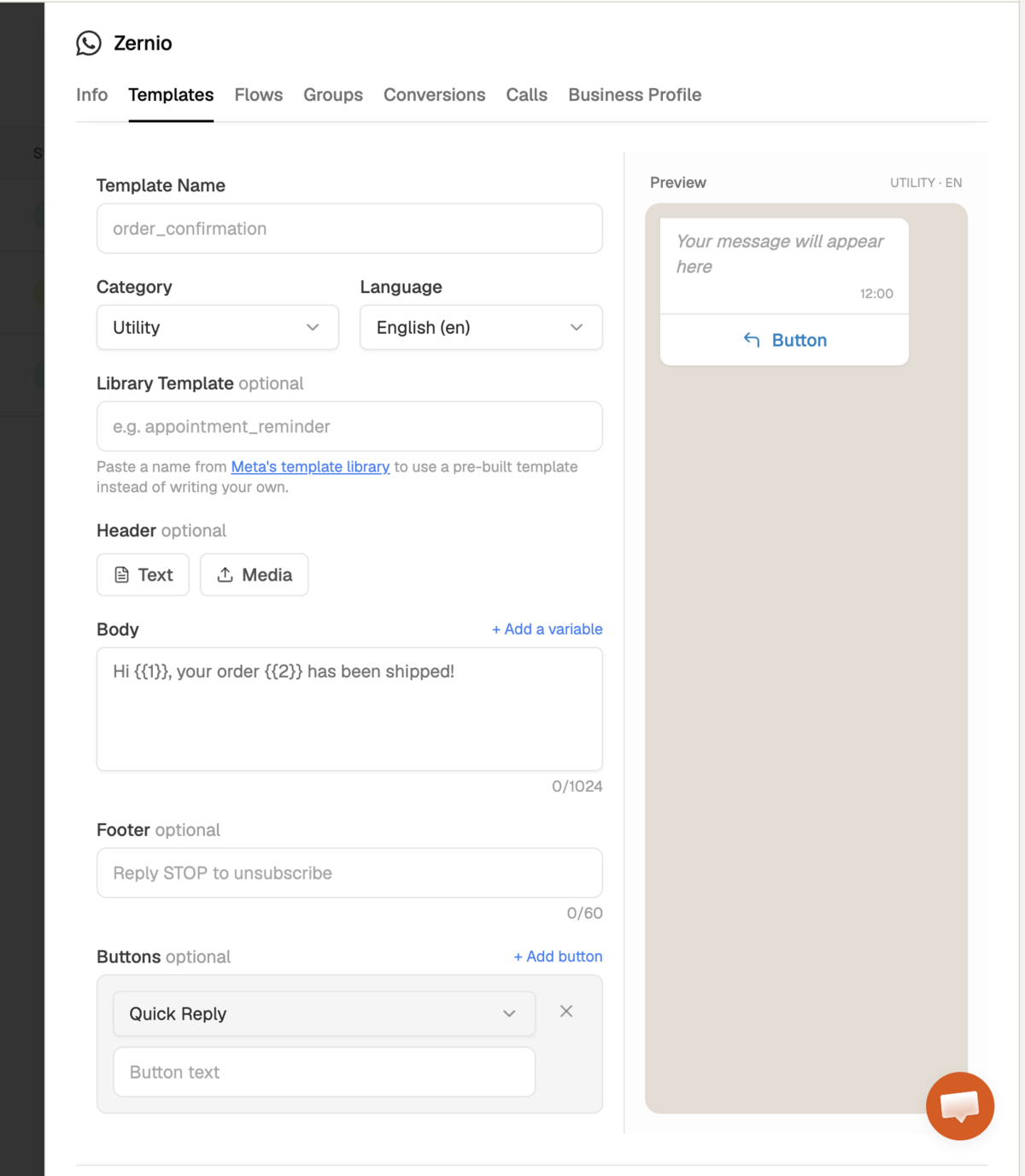
You may need to wait up to 24 hours for Meta to approve your template. Once approved, you can start sending messages to your customers or contacts via your dashboard and Zernio WhatsApp API.
Zernio vs WhatsApp Business API: Pros and Cons
The table below highlights the differences between Zernio and the WhatsApp Business API:
| Category | WhatsApp Business API | Zernio API |
|---|---|---|
| Setup | Requires Meta Business setup, app configuration, and (in many cases) Business Solution Provider onboarding | Quick setup with minimal configuration and no Meta app review process |
| Messaging | Template-based messaging with Meta-approved categories (Marketing, Utility, Authentication) | Built-in support for WhatsApp Marketing and Utility templates. Focused on messaging features such as direct messaging, group and broadcast messaging, and flows. |
| Call Support | Supports inbound and outbound WhatsApp calling via the WhatsApp Business Calling API in supported regions | Supports inbound and outbound voice calls and number provisioning in 50+ countries |
| Automation | Supports automation via APIs, but requires custom backend development | Built-in trigger-based automation with support for 8 SDKs, MCP, CLI and automation tools, such as n8n, Zapier, Make, and OpenClaw |
| Pricing | Per-message pricing, which can be unpredictable for teams processing a high volume of messages | Zernio platform fees and Meta messaging fees. Zernio subscription covers unlimited access (API, broadcasts, contacts, templates, inbox). Meta bills your credit card directly through your WABA for message delivery fees. |
| Webhook Reliability | Webhooks silently fail with no replay, no logs, and minimal error feedback. | Reliable webhook delivery with built-in retries, activity logs, and job queues. |
| Multi-Platform Support | WhatsApp-only integration | Unified API for WhatsApp and 14 other social media platforms |
| Maintenance | Ongoing maintenance and API version updates may require changes to existing endpoints and integrations | No maintenance required. Zernio handles API version updates and infrastructure changes, so you integrate once and continue using the service. |
Conclusion
The WhatsApp Business API is a powerful solution for businesses that want to communicate with customers at scale through messaging and calls. It supports a wide range of use cases, but also requires significant setup, configuration, and ongoing maintenance, which can slow down teams building across multiple communication channels. This is where Zernio stands out.
Zernio is an infrastructure layer built on top of the WhatsApp Business API to remove setup complexities. It is the only social media API platform that enables SaaS applications and developers to manage publishing, engagement, and automation across 15 platforms via both a dashboard and API integration.
If your goal is to launch faster, manage, and integrate WhatsApp and other social media platforms through a single integration, Zernio is an excellent choice.