WhatsApp is a popular messaging platform with over 3 billion monthly active users who use it to communicate and stay connected with friends, family, and businesses. To help businesses engage customers effectively, WhatsApp offers two solutions: the WhatsApp Business App and the WhatsApp Business API, each with different levels of functionality, automation, and scalability.
Many growing businesses find it difficult to choose between the WhatsApp Business App and the WhatsApp Business API, or determine when it is the right time to upgrade as their customer conversations, team size, and sales enquiries continue to grow.
So we decided to break down the key differences between both solutions, including features, pricing, limitations, and use cases, to help you decide which one is right for your business. We’ll also look at how WhatsApp Business API providers offer better automation tools and enable you to ship WhatsApp API integrations in minutes, without the complexity of building everything from scratch.
Let’s begin.
WhatsApp Business API vs WhatsApp Business App: Overview
The WhatsApp Business App extends the functionality of the WhatsApp messaging app to help businesses communicate more effectively with customers. It includes features such as business profiles, product catalogs, automated greetings, away messages, and basic messaging analytics to help manage customer conversations. It is best suited to small businesses that want to communicate directly with customers via a mobile app.
The WhatsApp Business API, on the other hand, is built for businesses that need to communicate at scale by connecting WhatsApp to their software systems. It supports scalable messaging, automation, multi-user access, integrations with CRM and business tools, and advanced communication workflows across customer support, marketing, and sales channels.
While the WhatsApp Business App is built for simple, manual communication and is best suited for small businesses, the WhatsApp Business API supports scalable, automated, and system-driven customer engagement, making it ideal for growing businesses and enterprises that manage large volumes of customer conversations across multiple teams and touchpoints.
WhatsApp Business API vs WhatsApp Business App: Feature Comparison
The table below highlights the key differences between them:
| Feature | WhatsApp Business App | WhatsApp Business API |
|---|---|---|
| Best For | Small businesses and sole proprietors | Growing businesses, enterprises, SaaS platforms, and support teams |
| Device Access | Limited to your primary phone and up to 4 additional devices (5 total devices) | Supports multi-agent access through API integrations and shared inbox solutions |
| Setup | Install the app and verify a phone number | Requires a WhatsApp Business Account (WABA) and API setup |
| Automation | Greeting messages, away messages, and quick replies | Advanced automation, chatbots, AI agents, and workflow automation |
| Broadcast Messages | Supports up to 256 saved contacts per list | Approved templates for unlimited contacts |
| API Access | Not available | Full API access for custom integrations |
| Message Templates | Not supported for large-scale messaging | Supports approved marketing, utility, authentication, and catalog templates |
| Analytics | Basic messaging insights | Detailed messaging, conversation, template, and engagement analytics |
| Cost | Free to use | Pay-as-you-go pricing based on message volume, recipient’s country, and the template category |
WhatsApp Business App
The WhatsApp Business App is a free messaging application for businesses that prefer to manually handle customer communication from a phone or a small number of connected devices.
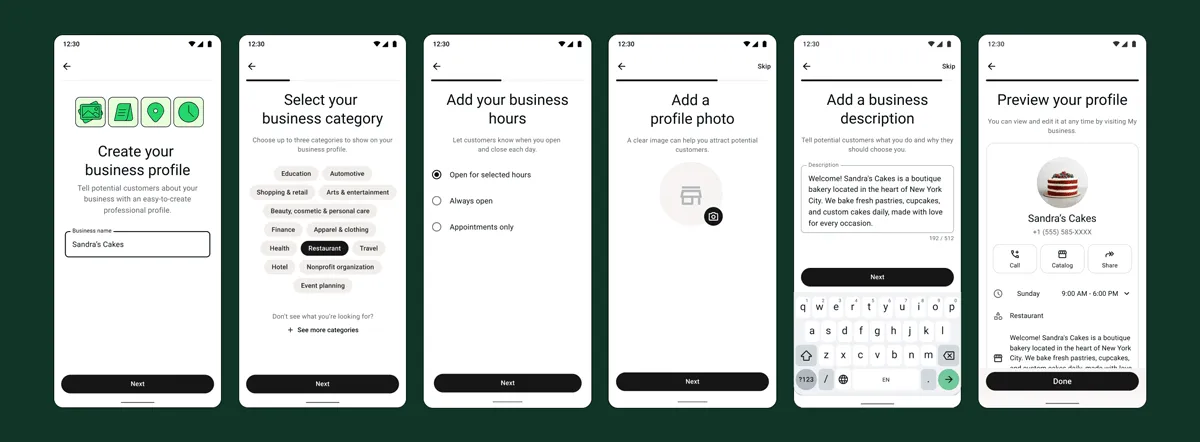
Some of its key features include:
Business Profile
Create a professional business profile with your company name, description, website, address, email, and operating hours to help customers learn more about your business without leaving WhatsApp.Product Catalogs
Showcase products and services directly within WhatsApp to enable customers to browse items, view pricing and descriptions, and enquire about products.Messaging
Send and receive text messages, images, videos, documents, voice notes, contacts, and location information. Businesses can also use quick replies to respond faster to common customer questions.Automated Greetings and Away Messages
Automatically welcome new customers with greeting messages and respond to enquiries outside business hours using away messages. This helps businesses maintain responsiveness even when staff are unavailable.Calls
Make and receive WhatsApp voice and video calls with customers. This provides a convenient way to handle enquiries, consultations, and customer support conversations directly within WhatsApp.24-Hour Status Update
Share updates, announcements, promotions, product launches, and behind-the-scenes content through WhatsApp Status. Status updates automatically disappear after 24 hours, making them useful for time-sensitive communications.Broadcast Lists
Send the same message to 256 contacts simultaneously without creating a group. Recipients receive the message as a private conversation, helping businesses share promotions, updates, and announcements efficiently.Group and Community Management
Create and manage groups and communities to engage customers, share updates, organise discussions, and build customer communities around your products, services, or brand.Multi-Device Support
Access the same WhatsApp Business account across 5 linked devices (1 primary phone and up to 4 companion devices). This allows team members to view and respond to messages without relying on a single phone.
Pricing
The WhatsApp Business App is free to download and use on Android and iOS devices, and can also be accessed on desktop devices through WhatsApp Web.
When You Should Use the WhatsApp Business App
The WhatsApp Business App is best suited for small businesses and freelancers that manage a relatively low volume of customer conversations and do not require advanced automation, CRM integrations, multi-user collaboration, or API access.
WhatsApp Business API
The WhatsApp Business API is the official solution for businesses that need to automate customer communication, integrate WhatsApp into their software systems, and manage customer interactions at scale. Unlike the WhatsApp Business App, the API supports advanced automation, multi-user access, CRM integrations, and large-scale messaging workflows across sales, marketing, and customer support teams.
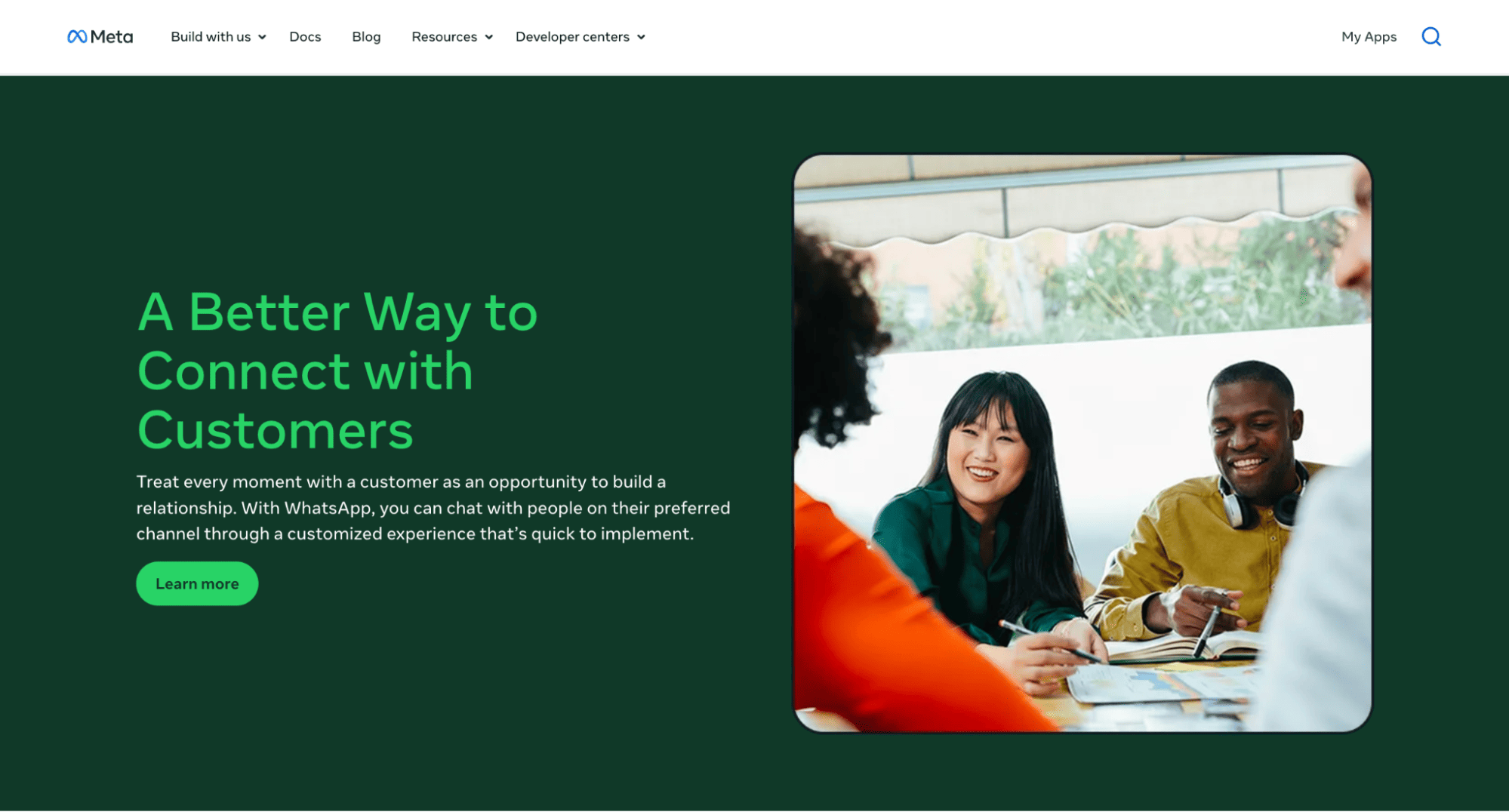
Some of the key features of the WhatsApp Business API include:
Messaging and Message Templates
Send and receive WhatsApp messages programmatically through APIs. Businesses can use Meta-approved message templates for marketing campaigns, transactional notifications, authentication messages, appointment reminders, and customer engagement workflows.Calling
The WhatsApp Business Calling API enables businesses to make and receive voice calls through WhatsApp. Businesses can use the same number for both messaging and calling, providing customers with a seamless communication experience.Group Messaging and Management
Businesses can create and manage WhatsApp groups programmatically, control group settings, manage participants, and facilitate communication across multiple users and communities. However, access to group functionality is currently limited to businesses with an Official Business Account (OBA). Features such as authentication messages, disappearing messages, view-once messages, message editing, message deletion, and group calling are not currently supported through the Groups API.Click-to-WhatsApp Ads
Integrate WhatsApp with Meta advertising platforms so customers can start conversations directly from Facebook and Instagram ads. This helps businesses generate leads, qualify prospects, and drive conversions through WhatsApp.Analytics
Access detailed messaging and engagement metrics, including message delivery rates, read rates, conversation volumes, template performance, and customer interaction data to optimise communication strategies.
Pricing
Unlike the WhatsApp Business App, the WhatsApp Business API is not free. Messaging costs vary depending on usage volume, the recipient’s country, and the category of message templates being sent.
For calls, user-initiated calls are free, while business-initiated calls are charged based on call duration, the recipient’s country code, and volume tier (based on total minutes used within a calendar month).
Read more: WhatsApp Business API Pricing and How It Is Calculated
When You Should Use the WhatsApp Business API
The WhatsApp Business API supports growing businesses and enterprises that need scalable, automated, and system-driven customer communication. Unlike the WhatsApp Business App, it enables advanced integrations with CRM, ERP, and other business systems, making it suitable for managing high volumes of conversations across teams and touchpoints.
Common use cases that require automation, integration, or large-scale messaging include:
- Lead generation and automated lead qualification through workflows and integrations
- WhatsApp OTP delivery and authentication flows.
- Automated reminders, order confirmations, shipping updates, and other transactional notifications triggered by systems
- AI agents, chatbots, and conversational automation integrated into business systems
- Multi-agent customer service workflows with shared access and routing across teams
Why Businesses Choose WhatsApp Business API Providers
Many businesses choose a WhatsApp Business API provider instead of using the Business API directly because it speeds up onboarding, integration, and deployment of WhatsApp solutions. These providers also offer additional features such as unified conversation management, team collaboration tools, and easier integration with CRM systems and other business tools.
Some other reasons include:
Faster API Setup and Onboarding
Setting up the WhatsApp Business API involves creating and configuring a WhatsApp Business Account, connecting a phone number, configuring webhooks, and creating message templates for business-initiated conversations. Many API providers simplify this process through Embedded Signup, guided onboarding, and prebuilt integrations, allowing businesses to go live in minutes instead of weeks.
Access to Virtual and International Phone Numbers
WhatsApp Business API providers help businesses acquire and manage phone numbers across different countries and regions, making it easier to expand internationally and engage customers locally. However, availability varies by provider and supported regions, so businesses should always confirm country coverage and number availability before choosing a solution. For example, Zernio supports 54 countries.
Shared Inbox for Contacts and Conversation Management
The WhatsApp Business API does not include a full interface for managing conversations across chats. As a result, many providers offer a shared inbox, where team members and AI agents can manage chats from a single WhatsApp number. Common features include conversation assignment, internal notes, tagging, routing rules, and performance tracking,
Multi-Channel Communication and Integrations
Businesses often communicate with customers across multiple channels, not just WhatsApp. Many API providers support additional platforms, such as Instagram, Facebook Messenger, Telegram, email, and SMS, as a unified inbox. They may also offer integrations with CRMs, help desks, e-commerce platforms, and custom applications, enabling businesses to manage all customer interactions from a unified interface.
Analytics, Reporting, and Performance Tracking
Most providers extend the WhatsApp Business API with dashboards and reporting tools that help businesses track conversation volumes, response times, campaign performance, AI agent productivity, and customer engagement metrics. These insights help businesses optimise customer support, improve marketing performance, and increase overall operational efficiency.
Reduced API Maintenance
Working directly with the WhatsApp Business API often requires businesses to own webhook reliability configuration, API updates, security, and troubleshooting. WhatsApp API providers reduce this technical burden by managing much of the underlying infrastructure, allowing businesses to focus on customer communication and product development instead of maintaining messaging systems.
AI-Powered Automation and Chatbots
Many providers extend the core WhatsApp business API with automation tools that help businesses handle customer interactions at scale. These tools can automate lead qualification, answer frequently asked questions, provide order updates, schedule appointments, and route conversations to human agents when necessary. Modern providers also support WhatsApp workflows and automations that interact with customers and connect to business systems to retrieve real-time information.
Stop building WhatsApp from scratch.
One API for numbers, messaging, calling, and automation on the official WhatsApp Business API.
Zernio: The Complete WhatsApp Business API Provider
Zernio gives you everything you need to build and scale on WhatsApp. From API access and instant WhatsApp number provisioning (across 50+ countries) to messaging workflows, approved templates, a unified conversation inbox, CLI tool and MCP support for managing and deploying WhatsApp agents.
For businesses using WhatsApp, Zernio eliminates the complexity of configuring and maintaining the WhatsApp Business API, and handles rate limits automatically with built-in smart queuing and retry mechanisms to ensure reliable message delivery at scale.
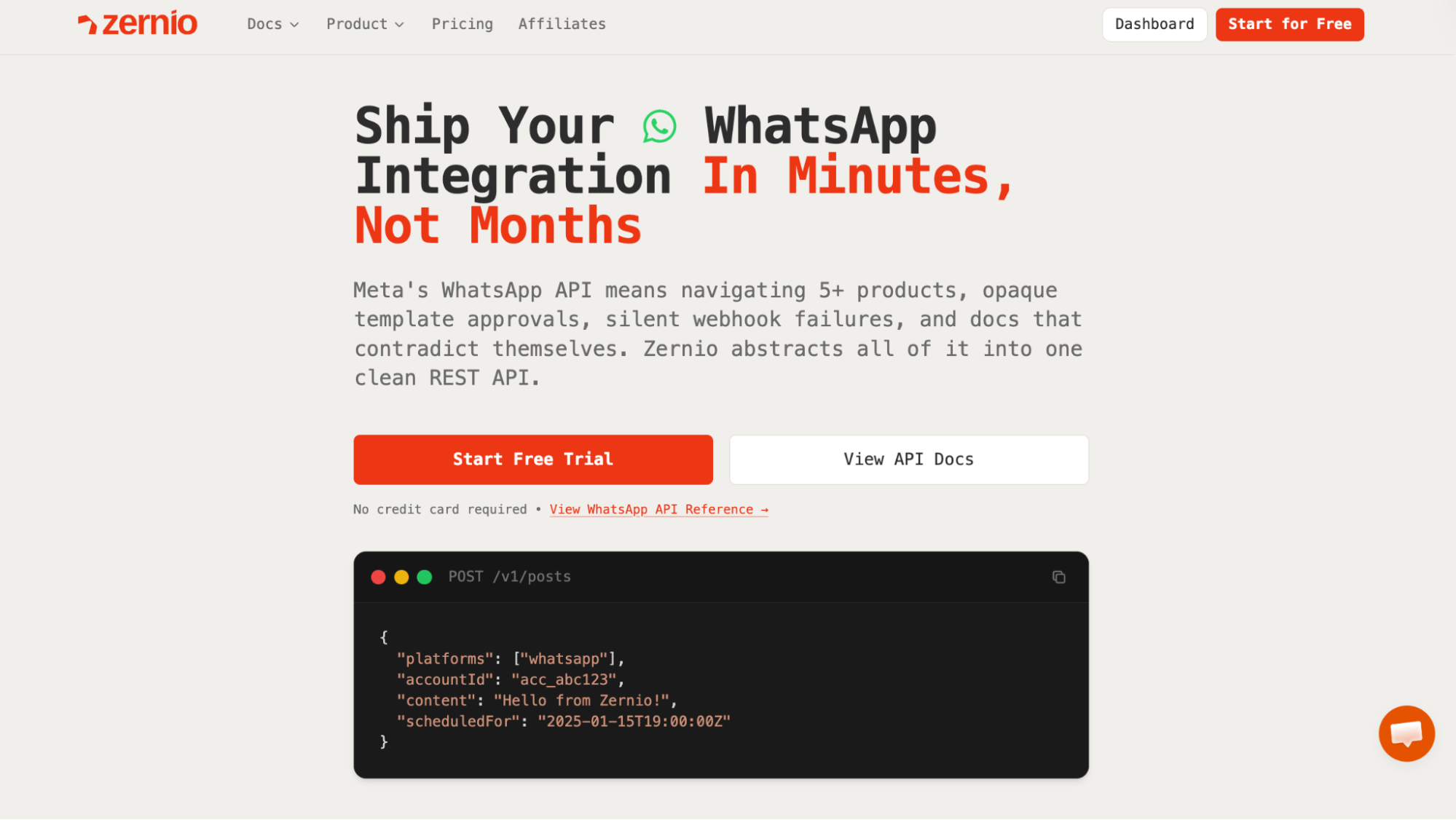
Zernio is an all-in-one social media management and messaging platform that supports messaging, content scheduling, analytics, and advertising across 15 social media platforms, including WhatsApp, Telegram, Discord, Threads, Facebook, and Instagram, through a unified dashboard and API. With a single integration, you can connect your multiple social accounts and interact with them through a dashboard or single API endpoint, eliminating the need to manage multiple APIs, authentication flows, and platform-specific implementations.
Why Businesses Choose Zernio Over the WhatsApp Business API
Many businesses choose Zernio over using the WhatsApp Business API directly because it removes the complexity of building, configuring, and maintaining WhatsApp infrastructure from scratch. Zernio also offers other features, such as:
Dedicated WhatsApp Business Numbers in multiple countries
Zernio lets you purchase and set up a dedicated WhatsApp Business number in 54 countries directly within the platform. You can select a country, and Zernio handles number provisioning, verification, and WhatsApp connection for both messaging and calling, allowing businesses to establish a local presence with improved response rates and customer engagement in their target regions.Quick WhatsApp API setup with no approval delays
Zernio is designed to help developers and businesses get started quickly, without the delays associated with the WhatsApp Business platform. With Zernio, you don’t need to go through multiple approval steps, business verification flows, or Meta app review processes before integrating WhatsApp into your application, so the move from development to production happens in minutes, not weeks.Unified social inbox for multi-platform messaging
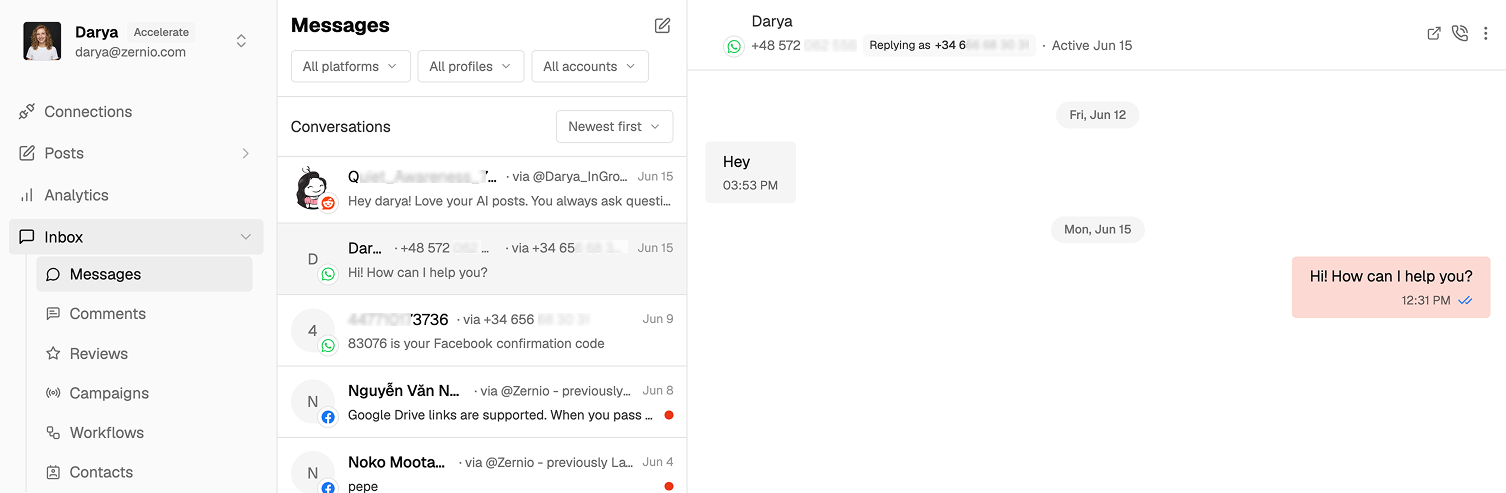
Managing customer conversations across different channels can quickly become fragmented when using multiple social media tools or APIs. Zernio brings all WhatsApp conversations into a single unified inbox, together with messages from other social media platforms (Telegram, Instagram, Facebook, X, Bluesky, Reddit), enabling teams to view, respond to, and manage messages in one place.
Built-in message template management
The WhatsApp Business API requires approved templates for sending structured messages. Zernio simplifies this by providing built-in support for template messages, making it easier to send OTPs, order updates, reminders, and marketing messages. Once you create a template, Zernio handles the approval process and notifies you when it is ready for use.WhatsApp calling support (Inbound & Outbound)
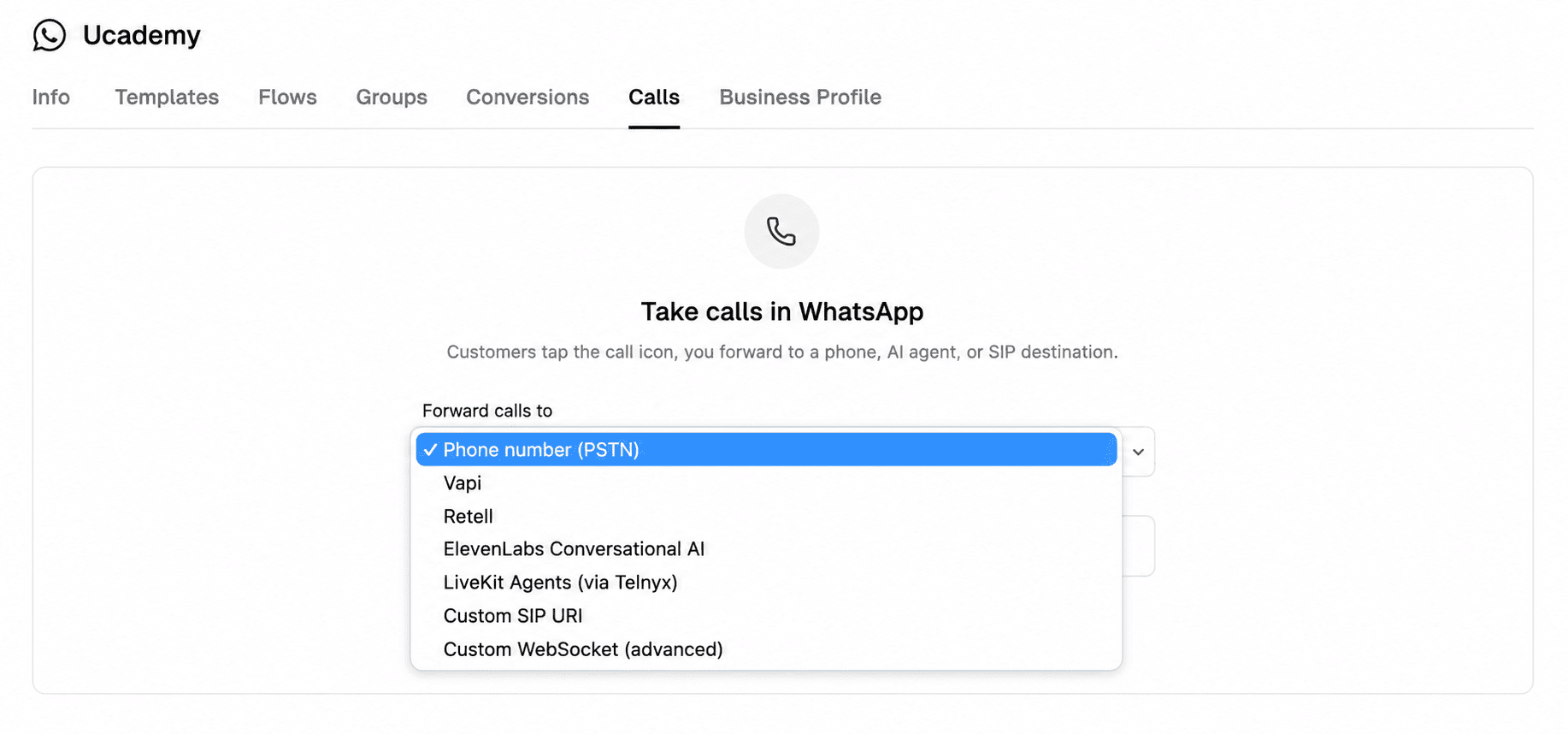
Zernio supports WhatsApp voice calls, allowing you to place and receive calls and route to phone numbers, SIP endpoints, or AI voice agents. You can also enable or disable calling and call recording, configure forwarding destinations, initiate outbound calls, and view call history directly via its Calling API endpoint. WhatsApp voice calls are supported by default on Zernio’s pricing plan, and Meta bills outbound calls separately at per-minute rates based on the recipient’s country and volume tier.
Reliable webhook delivery with automatic retries
Zernio improves reliability by handling webhook delivery with built-in retry logic and failure recovery mechanisms, ensuring that events are still delivered even during temporary network or service interruptions. It also provides an activity log that monitors your API activity, enabling you to debug errors faster.Multi-platform support for AI agents and business automation workflows
Zernio supports communication across 15 social media channels, including WhatsApp, Facebook, Instagram, Threads, LinkedIn, X (Twitter), TikTok, YouTube, Pinterest, Telegram, Reddit, Bluesky, Google Business, Snapchat, and Discord. This makes it possible to build AI agents and automation systems that handle tasks, such as content scheduling and publishing, direct messaging, and ad management across multiple platforms through a single unified API integration.Messaging automation and trigger-based workflows

Zernio supports workflow automation that responds to incoming messages, enabling businesses to build trigger-based workflows that automatically send WhatsApp messages in response to user actions or system events. These workflows can be used for onboarding, engagement campaigns, transactional notifications, and customer lifecycle communication without requiring heavy backend engineering.
Pricing
Zernio offers a free plan that includes access to WhatsApp and features such as WhatsApp Business calling, AI voice agent routing, unified social inbox (messages, comments, and reviews), interactive forms using WhatsApp Flows, sequences, and broadcast messaging. Paid plans start at $6/month for 3 social accounts (the per-account rate drops with volume).
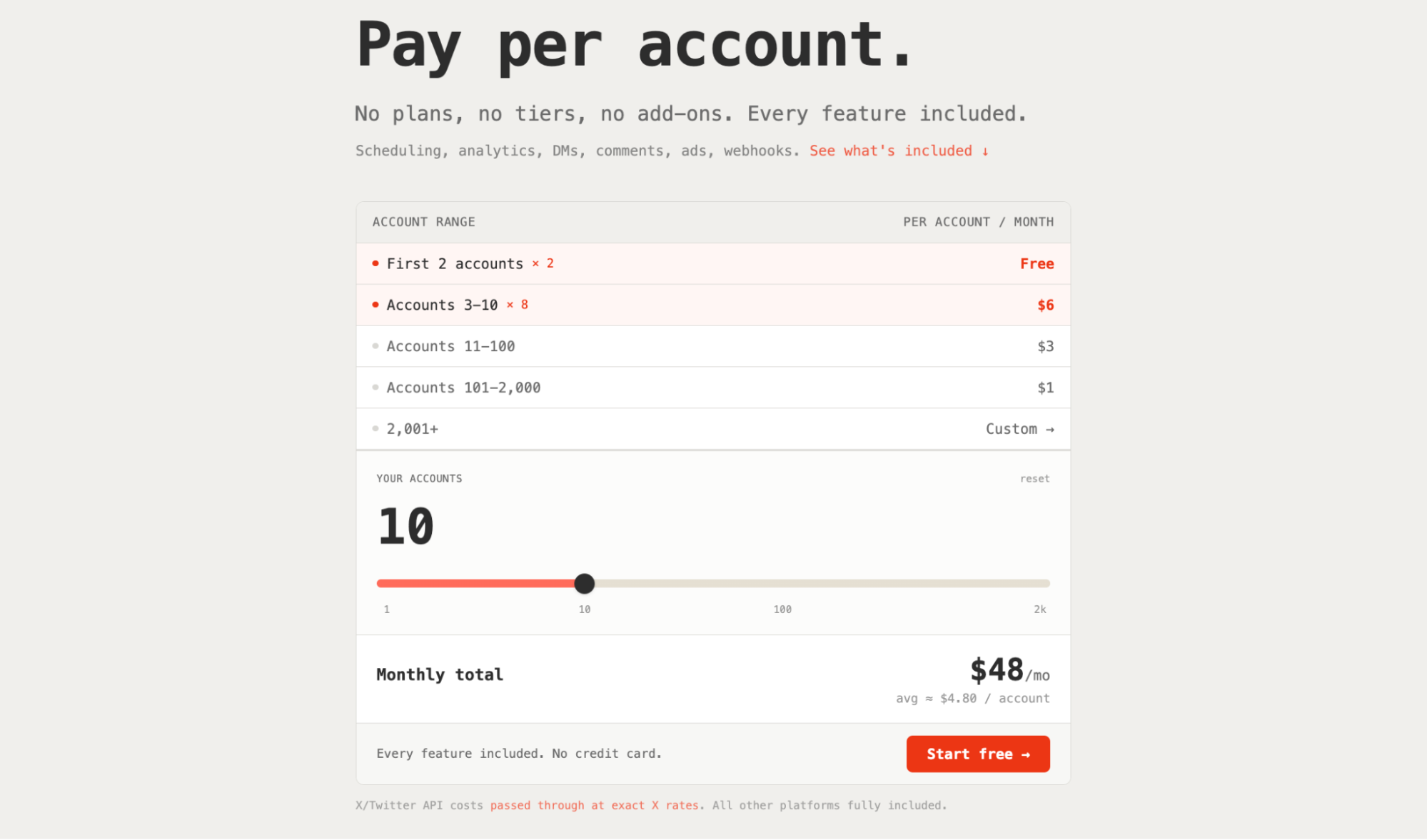
Zernio charges you for monthly platform access only and does not include any markup or additional charges. Meta bills you directly through your WhatsApp Business Account (WABA).
For example, when you send template messages via Zernio, Zernio does not add any additional fees. You only pay Meta’s per-message charges directly through your WhatsApp Business Account, based on your country, messaging volume tier, and template category.
Similarly, when you make calls using the Zernio API, Zernio bills the carrier connection, plus an optional recording surcharge, with zero markup. Meta bills the per-minute outbound calling rate directly to your WhatsApp Business Account, depending on the destination country, just as it does for template messaging.
If you need an international phone number, you can also purchase and verify WhatsApp phone numbers from 54 countries directly through the platform, with pricing starting at $3 per month and varying by country.
Zernio vs Direct WhatsApp Business API Integration
The table below highlights the differences between Zernio and the WhatsApp Business API:
| Category | WhatsApp Business API | Zernio API |
|---|---|---|
| Setup | Requires Meta Business setup, app configuration, and (in many cases) Business Solution Provider onboarding | Quick setup with minimal configuration and no Meta app review process |
| Messaging | Template-based messaging with Meta-approved categories (Marketing, Utility, Authentication) | Built-in support for WhatsApp Marketing and Utility templates. Focused on messaging features such as direct messaging, group and broadcast messaging, and flows. |
| Call Support | Supports inbound and outbound WhatsApp calling via the WhatsApp Business Calling API in supported regions | Supports inbound and outbound voice calls and number provisioning in 50+ countries |
| Automation | Supports automation via APIs, but requires custom backend development | Built-in trigger-based automation with support for 8 SDKs, MCP, CLI and automation tools, such as n8n, Zapier, Make, and OpenClaw |
| Pricing | Per-message pricing, which can be unpredictable for teams processing a high volume of messages | Zernio platform fees and Meta messaging fees. Zernio subscription covers unlimited access (API, broadcasts, contacts, templates, inbox). Meta bills your credit card directly through your WABA for message delivery fees. |
| Webhook Reliability | Webhooks silently fail with no replay, no logs, and minimal error feedback. | Reliable webhook delivery with built-in retries, activity logs, and job queues. |
| Multi-Platform Support | WhatsApp-only integration | Unified API for WhatsApp, Instagram, Facebook, LinkedIn, X (Twitter), TikTok, YouTube, Pinterest, Reddit, Bluesky, Threads, Telegram, Google Business, Snapchat, and Discord |
| Maintenance | Ongoing maintenance and API version updates may require changes to existing endpoints and integrations | No maintenance required. Zernio handles API version updates and infrastructure changes, so you integrate once and continue using the service. |
| Rate Limiting and Scaling | Developers must implement throttling, retries, and scaling logic manually | Built-in smart queuing, rate-limit handling, and retry mechanisms |
| Team Collaboration | Not natively supported | Unlimited team member access with a unified inbox for managing messages, comments, and reviews across WhatsApp and 14 other platforms. |
Summary
The WhatsApp Business App is best suited for businesses that want a simple way to manage customer conversations, handle day-to-day communication, run basic promotions, and engage customers directly from a primary device. However, it becomes limiting as message volume increases and the need for automation and team collaboration grows.
The WhatsApp Business API is designed for businesses that require structured, large-scale communication across systems and teams, with support for automated and programmatic messaging workflows that go beyond manual chat management. However, it also introduces additional complexity in terms of setup, maintenance, and integration across different systems. This is where Zernio comes in.
Zernio eliminates this complexity and allows you to integrate the WhatsApp Business API into your software applications in minutes. It also enables you to manage messaging, automation, and engagement across WhatsApp and 14 other social media platforms from a unified API and dashboard.
FAQs
1. What is the difference between WhatsApp Business App and WhatsApp Business API?
The WhatsApp Business App is designed for small businesses that manage customer conversations manually from a mobile device, while the WhatsApp Business API is built for larger teams that need automation, integrations, and scalable communication across systems and multiple users.
2. When should a business upgrade from the WhatsApp Business App to the API?
A business should upgrade when it starts receiving more messages than it can handle manually, needs multiple team members to manage conversations, or wants to integrate WhatsApp automation, like chatbots and workflows, into CRM systems or other business tools.
3. Why do businesses use WhatsApp API providers instead of integrating Meta’s API directly?
Businesses use WhatsApp API providers because they are faster and easier to implement and offer tools such as shared inboxes, automation workflows, and integrations that are not included in the raw WhatsApp Business API.
4. What is a WhatsApp Business API provider?
A WhatsApp Business API provider is a platform that allows businesses to send, receive, and manage WhatsApp messages at scale through APIs or dashboards. These providers simplify onboarding, message automation, and integration with tools like CRMs, chatbots, and analytics systems, without requiring businesses to build the infrastructure from scratch.
4. Do WhatsApp API providers support automation and chatbots?
Yes, Zernio supports chatbots, AI agents, and workflow automation.
5. Can I run Click-to-WhatsApp ads with WhatsApp Business API providers?
Yes, Zernio offers native support for converting Meta ads into WhatsApp conversations, helping businesses generate and manage leads directly from Facebook and Instagram campaigns.