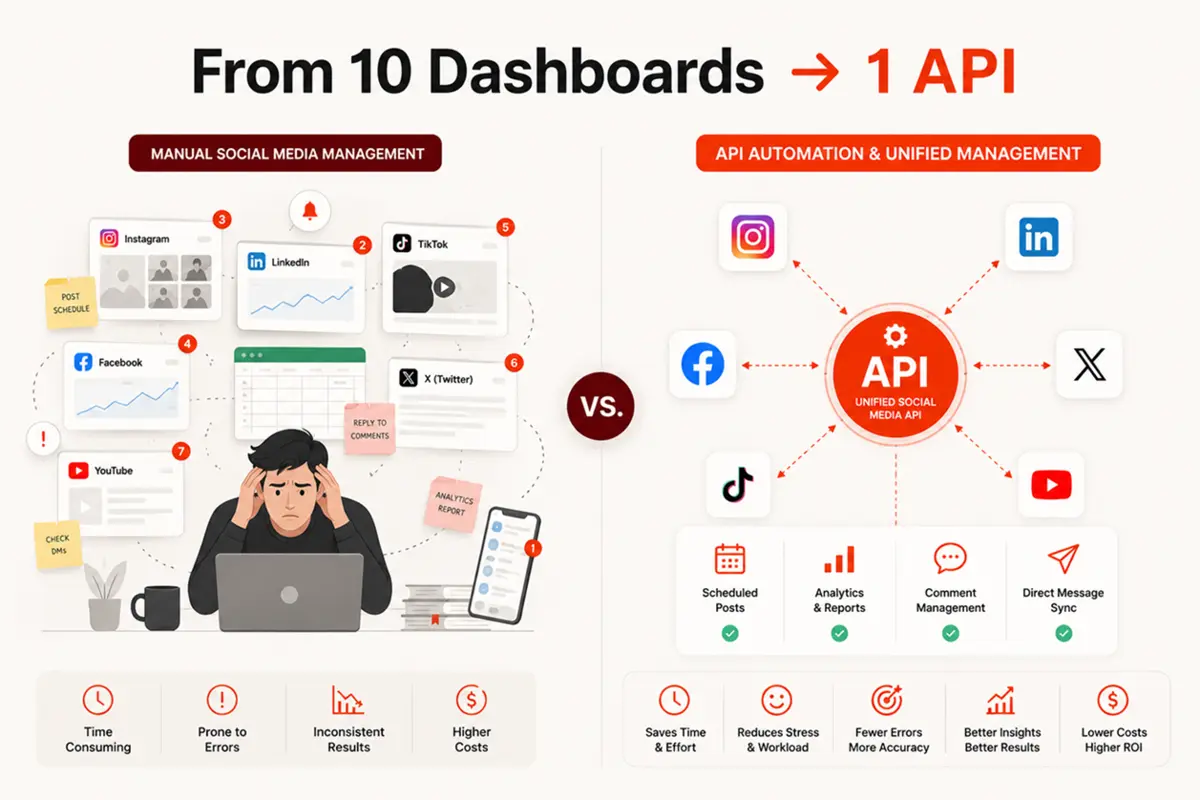
If you're building a product that publishes content, or running social at scale across multiple brands or clients, you've already hit the wall: 10+ platforms, 10 different dashboards, no way to connect any of it to your other tools. An API for social media is the technical layer that fixes that. It lets your software publish, read, and manage social media programmatically, so the work that used to take a person hours runs in the background in seconds.
Table of contents
- What is API for social media?
- How does a social media API actually work?
- Why does your business need a social media API?
- How to choose the right social media API
- A simple guide to social media API integration
- Common social media API challenges (and how to handle them)
- FAQ
What is API for social media?
A social media API is a programmatic interface that lets your code interact with social platforms: creating posts, reading comments, sending DMs, pulling analytics, and more. Instead of a person logging into Instagram or LinkedIn and clicking "publish," your software does it through an API call, and the platform responds instantly.
There are two types. Native platform APIs are published by the platforms themselves (Meta, X, TikTok, LinkedIn). Each one has its own authentication system, data formats, and rate limits. Unified social media APIs (like Zernio) sit on top of all those native APIs and expose one consistent endpoint. You write your code once; the unified layer handles everything per platform.
What a social media API isn't: it's not a social media management tool you log into, not a plugin you install, and not a scraping tool. It's infrastructure your software calls.
| Function | What it does | Example |
|---|---|---|
| Authentication | Securely connect user accounts | A user links their TikTok without sharing their password |
| Publishing | Create, schedule, and post content | A tool automatically posts to LinkedIn at a scheduled time |
| Comments | Read, reply to, and moderate comments | A support platform pulls Instagram comments into one inbox |
| Messaging (DMs) | Send and receive direct messages | A CRM triggers a WhatsApp DM when a new lead is created |
| Analytics | Pull impressions, reach, engagement, and follower data | A dashboard shows cross-platform performance without manual exports |
How does a social media API actually work?
When you schedule a post in any social media tool, here's what's happening under the hood.
Your tool sends an API call: a structured request to the social platform's server. That request includes the content (text, image, video), the target account, the publish time, and a set of credentials proving your app has permission to act on the user's behalf.
The platform processes the request and sends back a response. If it worked, you get a confirmation with the post ID and any relevant data. If something went wrong (wrong media format, rate limit hit, token expired), you get an error code and a message explaining why.
That's the whole loop. Request, response, done.
What does authentication look like in practice?
Platforms use a protocol called OAuth to handle this securely. Instead of asking users for their passwords, OAuth issues your app a temporary token representing the user's permission. The token only allows the specific actions the user approved (posting, not deleting, for example). The user can revoke it any time without changing their password.
For developers, this means handling a separate OAuth flow for every platform they support. Instagram's auth setup alone takes a few days. A unified API handles all of this behind one bearer token.
What can you access through a social media API?
Capabilities vary by platform, but most social APIs cover:
- Publishing: text posts, images, video, carousels, stories, and reels
- Comments: read and reply to comments across platforms
- DMs: send and receive direct messages where platforms allow it
- Analytics: impressions, reach, engagement, follower growth
- Ads: boost posts, create campaigns, sync audiences
What are rate limits, and why do they matter?
Every platform caps how many API calls you can make in a given time window. Twitter/X has specific limits per endpoint per 15 minutes. Instagram and TikTok have their own, different limits.
For a small project, this rarely causes problems. For a product serving hundreds of users, rate limits become a real engineering constraint. You either build retry logic per platform or use a unified API that manages rate limits for you automatically.
Why does your business need a social media API?
If you're asking this question, you're probably already feeling the friction. Social media at scale, without an API, is mostly manual work dressed up with tab-switching.
Publishing content across platforms without duplicating effort
The most immediate use case: instead of logging into each platform and re-posting the same content, one API call sends it everywhere at once. For a team publishing daily content across Instagram, LinkedIn, TikTok, and X, that's hours back per week.
For SaaS products, this is even more significant. If your users expect to publish from inside your product, building that natively means integrating each platform separately. With a unified API like Zernio, one integration covers all 15 platforms.
Managing comments and DMs from one place
Inbound engagement is the piece most teams forget to plan for. Posts go out through automation, but comments and DMs still come in through 10+ different native apps.
A social comments API and a DMs API pull all of that into one place: a unified inbox, your CRM, or your support tool. When a customer comments on your Instagram post, your support team sees it alongside their email queue, not buried in a separate app.
For products that want to automate replies, the API enables that too. A user comments a keyword, the API detects it and triggers a DM automatically.
Tracking analytics without manual exports
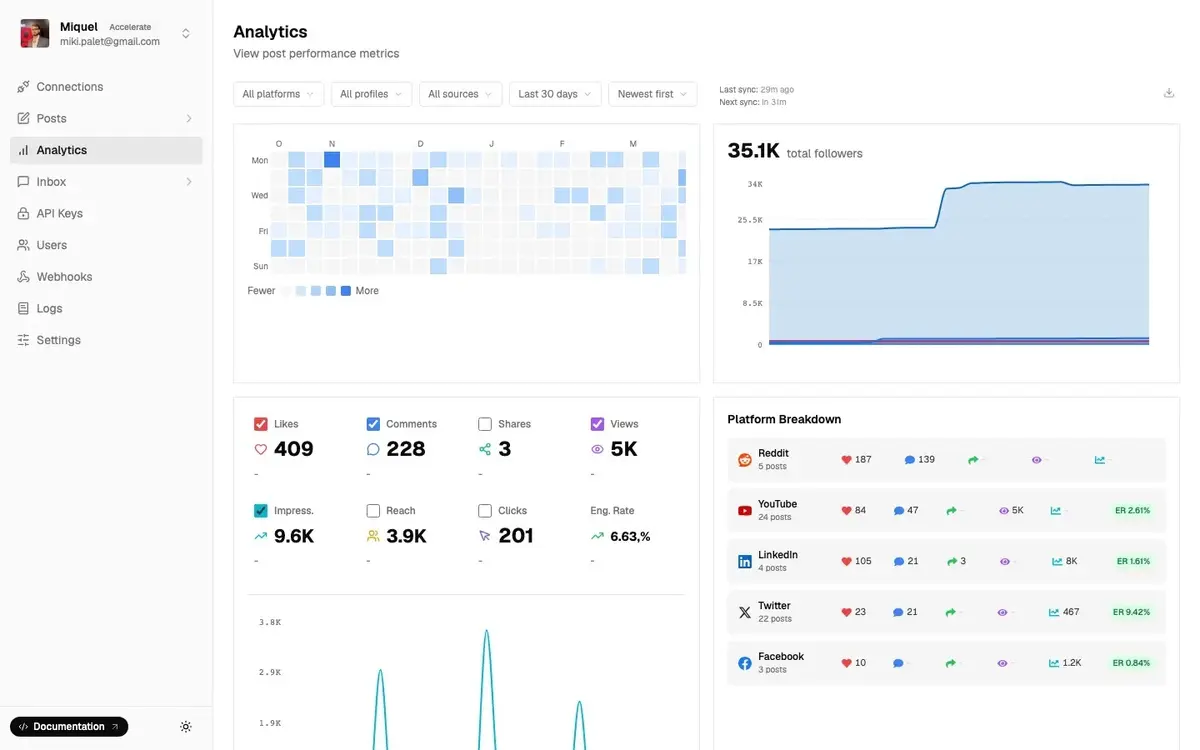
Native platform dashboards show you data for one platform at a time. Pulling a cross-platform report manually means logging into 5 apps, exporting 5 CSVs, and stitching them together in a spreadsheet. Every week.
A social media analytics API gives your code direct access to performance data: impressions, reach, engagement, follower trends. You can build your own dashboard, pipe it into your data warehouse, or surface it inside your product for your users.
Embedding social publishing into your product
If you're building a SaaS, a CRM, or an AI content tool, your users probably expect social publishing to be part of it. Adding that feature yourself means 6 to 12 months of engineering work to publish to all social media at once.
Running social for multiple clients (agency use case)
For agencies managing 20, 50, or 200 client accounts, the economics of dashboard tools get painful fast. Per-seat and per-account pricing means every new client directly increases your infrastructure cost.
A social media API lets you build your own workflow: bulk scheduling via CSV, client-specific content calendars, white-labeled reporting, and programmatic engagement management. Your clients never see the tool underneath.
Stop building social integrations from scratch.
One API call to publish, schedule, and manage posts across 16 platforms.
How to choose the right social media API
If you want the full technical comparison with pricing breakdowns and rate limits for every major option, we've covered that in our guide to social media APIs for developers. This section covers what to evaluate at the decision-making stage before you go that deep.
How many platforms do you actually need?
Start here. If you only need two or three platforms, native APIs may be worth the setup effort. If you need six or more, the integration time compounds fast and a unified API almost always makes more sense.
Platform coverage also varies between providers. Not all unified APIs support the same networks. Zernio covers 15: Twitter/X, Instagram, TikTok, LinkedIn, Facebook, YouTube, Threads, Reddit, Pinterest, Bluesky, Google Business, Telegram, Snapchat, WhatsApp, and Discord.
Posting-only vs. the full social layer
Most products start with a publishing API. Most end up needing more.
Comments, DMs, analytics, and ads are separate API surfaces on native platforms. A unified API that covers all of them means one integration. When evaluating options, check what's actually included: many providers charge extra for analytics or DMs, or don't offer them at all.
Zernio covers the full social operation (publishing, comments, DMs, analytics, and ads) through one endpoint.
Reliability and what "uptime" actually means in production
Your product's reputation depends on this API working. Look for a public status page (not just a self-reported number), documented incident history, and webhook confirmation so you know when a post actually goes live.
Zernio runs at 99.7% uptime, processes over 200,000 posts per week, and publishes live production data at zernio.com/open.
Documentation and developer experience
Bad documentation is a tax on every developer who touches the integration. Good documentation means clear setup instructions, working code examples in the languages your team uses, and explicit notes on rate limits and error handling.
Zernio has SDKs in 8 languages (Node.js, Python, Go, Ruby, Java, PHP, .NET, Rust) and a CLI for testing. Most teams have a working integration in under an hour.
A simple guide to social media API integration
Here's how a social media API integration works from start to finish.
Step 1: Define your use case and platforms
Before touching any API, be specific about what you need. Publishing content? Managing comments? Pulling analytics? Each capability is distinct, and knowing what you need determines which API to evaluate and what permissions you'll request.
Decide which platforms matter for your users. This shapes whether native APIs are realistic or whether a unified API is the right path.
Step 2: Choose between native APIs and a unified API
Native APIs give you direct access to each platform and maximum depth, at the cost of building and maintaining a separate integration for each one. Unified APIs give you one integration covering all supported platforms.
For most products, a unified API is faster to ship and lower to maintain. For products whose value depends entirely on one platform's most advanced features (e.g., LinkedIn's recruiter tools), native may be worth the complexity.
Step 3: Get your credentials and authenticate
Sign up with your chosen API provider, get your API key, and follow the authentication setup. With a unified API, this is one process. With native APIs, this is one process per platform, often including app review and approval that lasts for months.
Step 4: Make your first API call
Your first call is usually a simple test: publish a post to one platform. This confirms your authentication works and that the API understands your request.
API call example:
curl -X POST https://zernio.com/api/v1/posts \
  -H "Authorization: Bearer YOUR_API_KEY" \
  -H "Content-Type: application/json" \
  -d '{
    "content": "Hello from Zernio API!",
    "scheduledFor": "2026-03-15T10:00:00Z",
    "timezone": "America/New_York",
    "platforms": [
      {"platform": "twitter", "accountId": "acc_123"},
      {"platform": "linkedin", "accountId": "acc_456"},
      {"platform": "instagram", "accountId": "acc_789"}
    ]
  }'
A basic publish call includes:
- The content (text, plus any media file or URL)
- The target account(s)
- The publish time (immediate or scheduled)
- Your bearer token in the request header
The API returns a response confirming the post was accepted, or explaining what failed.
Step 5: Handle responses and build from there
Most API calls either succeed (200 OK plus the relevant data) or return an error with a code and explanation. Build your integration to handle both: log errors, set up retry logic for transient failures, and test edge cases like expired tokens or oversized images.
Once your first integration is working, expanding to additional platforms or features uses the same patterns. Comments, DMs, and analytics follow the same request-response structure as publishing.
Common social media API challenges (and how to handle them)
1. Rate limits
Every platform caps your API usage in a given time window. Hitting a rate limit means your requests start failing until the window resets.
The fix is exponential backoff: when a request fails with a rate limit error, wait before retrying. Double the wait time on each subsequent failure. This prevents hammering the API and getting temporarily blocked.
Caching also helps. If you're fetching the same profile or post data repeatedly, store it locally and only refresh when necessary. You'll use a fraction of your rate limit allowance.
With a unified API, rate limit management is handled for you. Zernio manages platform-level limits internally, with intelligent retry logic built in.
2. Platform policy changes and deprecations
Instagram's Basic Display API shut down in 2024. Twitter's v1.0 API was retired in 2023. Any code written directly against those endpoints broke when they did.
The practical defense: subscribe to developer changelogs for every platform you use, build your integration to degrade gracefully when an endpoint stops responding, and stay close to your API provider's communication. Unified API providers typically absorb these changes before they reach your code.
3. Media format differences across platforms
A video that posts fine on TikTok may fail on LinkedIn because of codec requirements, aspect ratio, or file size limits. Instagram reels have different specs from Instagram feed posts. YouTube has its own encoding requirements.
Example of error handling at Zernio:
{
  "post": {
    "status": "partial",
    "platforms": [
      { "platform": "twitter", "status": "published", "platformPostUrl": "https://twitter.com/..." },
      { "platform": "instagram", "status": "failed", "error": "Media processing failed: video too short for Reels" }
    ]
  }
}
Managing this across 15 platforms manually is a real engineering problem. Unified APIs handle format normalization: you send the file, the API validates and transcodes it per platform before posting.
4. Data privacy and compliance
When you use a social media API, you're handling user data under both the platform's developer policy and applicable privacy law. GDPR in Europe has real consequences for mishandling this.
For European companies or products with European users, work with an EU-based, GDPR-native provider. Zernio is headquartered in Spain, GDPR-compliant by default, and SOC 2 certified. Details at trust.zernio.com.
Key takeaway
A social media API is the difference between managing social media manually across 10+ platforms and having your software handle it programmatically. For teams building products with social features, running agencies at scale, or connecting social media to the rest of their stack, it's less of a nice-to-have and more of a foundation.
Zernio covers 15 platforms through one REST endpoint, with posting, comments, DMs, analytics, and ads all included from account one. First two accounts are always free.
FAQ
Can I use one API for all social networks?
Yes, through a unified social media API. Zernio covers 15 platforms through one endpoint. You write your integration once and it works across Twitter/X, Instagram, TikTok, LinkedIn, Facebook, YouTube, WhatsApp, Threads, Reddit, Pinterest, Bluesky, Telegram, Google Business, Snapchat, and Discord.
Is a social media API free to use?
Most platforms offer free API access with usage limits. Unified API providers typically offer a free tier for testing and charge based on usage at scale. Zernio's first 2 connected accounts are always free, with no credit card required.
What's the difference between a social media API and a social media management tool?
A social media management tool (Buffer, Hootsuite, Later) is software your team uses directly through a dashboard. A social media API is infrastructure you embed in your own software or automate through code. An API gives you programmatic control; a management tool gives you a pre-built interface.
How secure is API access?
API access through social platforms uses OAuth 2.0, which issues your app a temporary access token instead of storing the user's password. The token only allows specific, pre-approved actions. Users can revoke access at any time without changing their credentials.