AI agents are changing how businesses automate tasks and how developers build intelligent applications and integrations. When you connect an AI agent to a social media API, you give it programmatic access to your social media accounts to perform tasks such as scheduling or publishing posts, retrieving analytics, managing comments and direct messages, and monitoring ad campaigns.
In this guide, you will learn how to integrate AI agents with social media APIs and enable them to perform common social media operations, including posting, scheduling, analytics retrieval, DM automation, and ad management. You will also learn what unified social media APIs are, how they work, and how they differ from native social media platform APIs.
Types of Social Media APIs
Social media APIs allow developers and businesses to integrate social media functionality into applications, SaaS products, and automation workflows. For example, a developer can use an API to build a custom social media scheduling application, and a business can connect its social media accounts to an automation workflow using tools such as n8n.
Social media APIs can generally be categorised into two types:
1. Native Social Media APIs
Native social media APIs are built, owned, and maintained directly by individual social media platforms. They provide controlled access to platform features, allowing developers to perform various actions programmatically.
To use a native API, your application typically needs to be registered with the platform and authorised by the user. You also need to obtain the required access tokens and request the appropriate permission scopes for the data and actions your application needs.
Examples: Instagram Graph API, LinkedIn API, Telegram API, and TikTok API.
How it works: Your application communicates directly with the social media platform's API servers. Each platform defines its own endpoints, authentication methods, permissions, rate limits, content requirements, and supported features.
Benefits: Native APIs give you direct access to platform-specific features and the latest capabilities provided by the social network.
Challenges: You must build and maintain a separate integration for each platform. This means learning different API structures, implementing different authentication and authorisation flows, handling individual app approval processes, and adapting to platform-specific API changes.
2. Unified Social Media APIs
Unified social media APIs provide a single integration layer for connecting to multiple social media platforms. They standardise API requests, authentication, and common operations across platforms, making it easier to build and maintain multi-platform social media integrations.
Instead of integrating separately with Meta, X, LinkedIn, TikTok, and other platforms, developers can connect their application to an API endpoint that provides access to multiple social media platforms in a single integration.
Examples: Zernio, Blotato, Postiz, and PostEverywhere.
How it works: Your application sends requests to the unified API using a standard request format. The provider then translates those requests into the appropriate API calls for the selected social media platform.
Benefits: Unified APIs reduce integration complexity, allow developers to manage multiple platforms through one API, and minimise the need to maintain separate authentication, API logic, and platform-specific integrations. They can also provide a consistent way to access common features such as publishing, scheduling, analytics, and social media account management.
Native Social Media APIs vs Unified Social Media APIs
The table below highlights the key differences between the native social media APIs and unified social media APIs.
| Feature | Native Social Media APIs | Unified Social Media APIs |
|---|---|---|
| Definition | The official APIs provided directly by individual platforms (Meta, X, LinkedIn, TikTok). | A single, third-party aggregator API that connects to multiple social platforms simultaneously. |
| Integration Effort | Requires a separate integration for each platform, including its API structure, endpoints, authentication, and platform-specific requirements. | You write code once to interact with a single API, which then routes the data to all connected platforms. |
| AI & MCP Compatibility | MCP support depends on the platform or third-party tools, and AI agents can use native APIs through custom integrations. | Many unified APIs provide built-in AI-agent integrations, including MCP support. For example, Zernio provides a hosted MCP server that allows AI agents to perform supported social media operations. |
| Authentication & OAuth | You must implement and maintain each platform's authentication and authorisation flow, including required app reviews and token management. | The provider manages all underlying OAuth flows, app reviews, and token refreshes. You only need a single API key to authenticate across all platforms. |
| Data Normalisation | Fragmented. Data structures and terminology vary between platforms. A "post" is a tweet on X, a share on LinkedIn, and a media object on Instagram. | Standardised. You send a single JSON payload (e.g., {"text": "Hello World", "platforms": ["x", "linkedin"]}). |
| Maintenance & Updates | Heavy Burden. Your team is responsible for adapting the integration when a platform changes its API, authentication requirements, endpoints, or policies. | Zero Burden. The unified API provider absorbs platform changes and maintains the connections seamlessly in the background. |
| Feature Depth | 100% Depth. Provides direct access to the platform's available API features, including platform-specific capabilities. | Standardised Depth. Covers the majority of use cases (posting, scheduling, basic analytics, DMs). May lack highly obscure platform-specific features. |
| Rate Limiting | Strict and platform-specific. Hitting a limit on X requires custom backoff logic specifically for X. | Unified APIs often pool limits or manage rate-limit queuing automatically across networks. |
| Error Handling | Each platform returns different error formats, status codes, and platform-specific error messages. | Consistent, standardised error codes regardless of which underlying social network caused the issue. |
| Cost | Usually free to start, but hidden costs are high (developer hours, server costs, maintenance, and enterprise API tiers). | Predictable subscription model. You pay the API provider based on usage (API calls, number of connected accounts). |
| Webhooks | You must build, host, and verify your own webhook receiving endpoints that adhere to the platform's payload formats. | Provides universal webhook support to easily build event-driven workflows (like triggering actions on a new comment). |
| Best For | Highly specialised apps that only target one network (e.g., an Instagram-only analytics tool). | AI agents, SaaS products, automation workflows, and applications that need to work with multiple social media platforms through a single integration. |
Why Connect AI Agents to Social Media Platforms?
Connecting AI agents to social media platforms allows them to interact with social accounts and perform various tasks automatically on your behalf.
Here are some of the social media operations you can automate with AI agents:
1. Content Scheduling and Publishing
AI agents can generate, publish, and schedule social media content based on user instructions, content calendars, or predefined workflows. For example, you can ask an AI agent to publish a product announcement across LinkedIn, Facebook, and X at a specific time, and it will send the content, media, target platforms, and publishing time to the appropriate endpoint.
They can also adapt content for different platforms, repurpose existing content, and determine the best times to publish your social media content based on predefined rules or performance data.
2. Messaging and DM Automation
AI agents can automate conversations through social media messaging APIs. You can connect an AI agent to monitor incoming direct messages, understand the user's intent, provide responses, and escalate conversations to a human when necessary.
For example, an AI agent could answer frequently asked questions, perform keyword-based actions, provide product information, qualify leads, or direct customers to the appropriate support channel.
3. Comment Management
AI agents can monitor comments on social media posts and help businesses respond to users more efficiently. An agent can identify questions, feedback, complaints, or spam and determine the appropriate action for each comment.
For example, an AI agent could automatically respond to common product questions while flagging negative feedback or complex customer issues for human review. This helps businesses manage large volumes of comments while keeping human oversight for conversations that require more attention.
4. Social Media Analytics
AI agents can retrieve social media performance data and turn it into actionable insights. They can collect metrics such as impressions, reach, engagement, clicks, and follower growth, then organise the data into clear visualisations that make key insights easier to understand.
The agent can then analyse the data, identify trends, compare performance across platforms, and generate reports. For example, a user could ask, "How did our social media posts perform this week?" and the agent could retrieve the relevant data and provide a summary.
5. Social Listening and Monitoring
AI agents can monitor social media conversations for mentions, keywords, topics, and other signals relevant to a business or brand. They can analyse large volumes of social content and identify patterns that may be difficult to detect manually.
For example, an AI agent could monitor mentions of a company's brand, identify recurring customer complaints, detect emerging topics, or alert the marketing team when necessary.
6. Social Media Advertising
AI agents can automate social media advertising workflows, such as creating campaigns, retrieving campaign data, monitoring performance, and identifying campaigns that require attention.
For example, an AI agent could monitor advertising metrics and notify a marketer when a campaign's performance falls below a defined threshold. More advanced workflows can allow the agent to recommend or perform specific campaign actions based on predefined rules, budgets, and permissions.
7. Cross-Platform Social Media Management
AI agents can act as a central interface for managing multiple social media platforms from a single workflow. Developers can connect an AI agent to multiple platforms using their native social media APIs or through a single integration with a unified social media API.
Once connected, users can instruct the agent to perform tasks across multiple platforms, such as creating and publishing content, adapting posts to each platform's format and requirements, scheduling content, and monitoring performance.
Stop building social integrations from scratch.
One API call to publish, schedule, and manage posts across 16 platforms.
How to Integrate AI Agents with Social Media using Zernio
Zernio is a unified social media management and messaging API with built-in support for AI agents through its hosted MCP server. It allows AI assistants such as Claude Code, Cursor, Codex, OpenClaw, and Hermes to interact with connected social media accounts and perform tasks such as scheduling and publishing content, managing ads, messages, and comments, and retrieving post analytics through a single integration.
Zernio gives you an API to build on: consistent JSON requests and responses, one auth token, a hosted MCP server for AI assistants, a unified social inbox, and your content hits Instagram, TikTok, X (Twitter), LinkedIn, YouTube, and every other supported platform in a single call.
In this section, you will learn how to connect Zernio to your preferred AI agent through its MCP server or using a SKILL.md file. The SKILL.md file provides the agent with instructions on the supported actions and how to interact with the Zernio API.
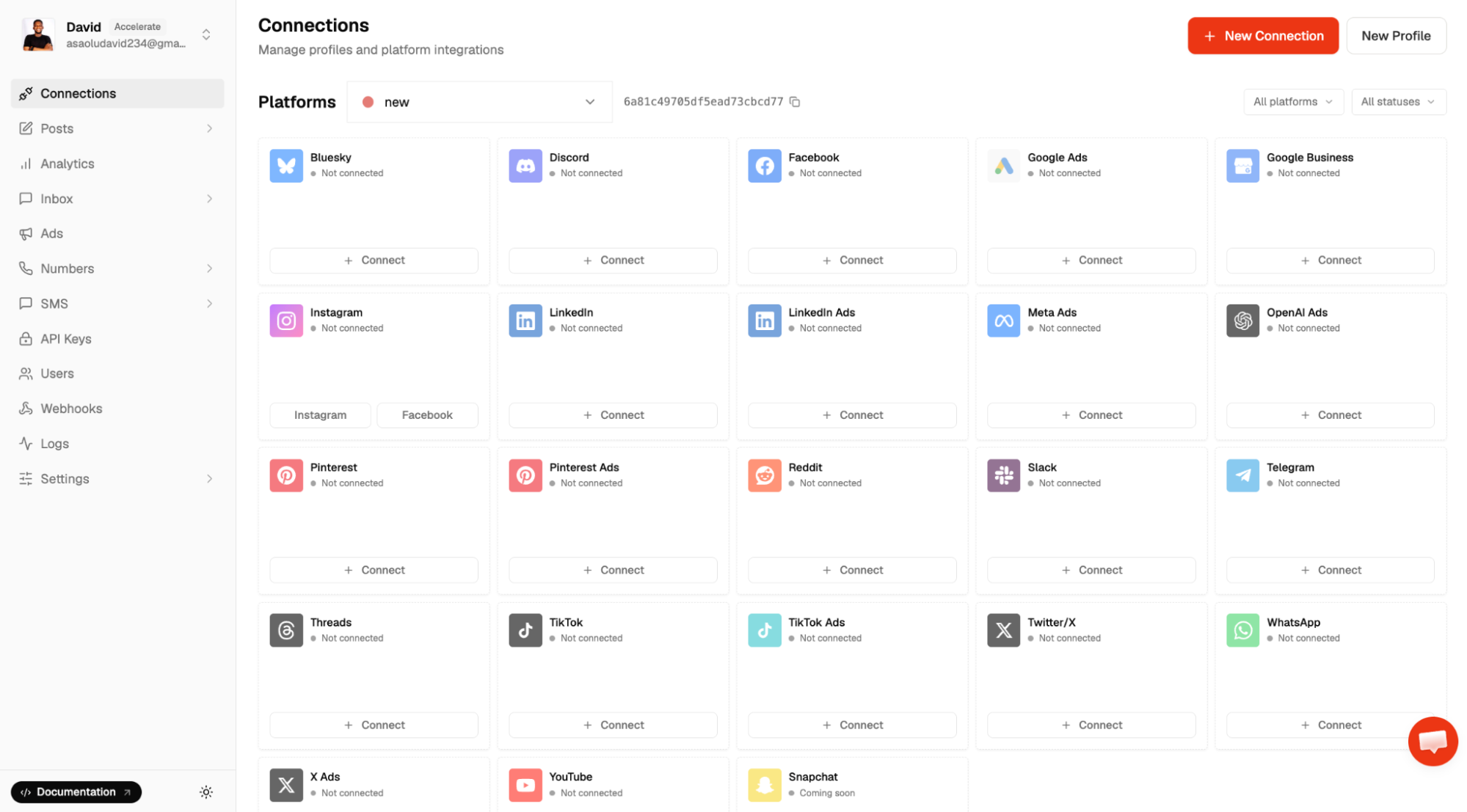
Before we proceed, log in to your Zernio dashboard and connect your social media accounts.
Connect AI Agents Using the Zernio MCP Server
If you use Claude or another MCP-compatible AI assistant, you can connect it to the hosted Zernio MCP server to schedule posts, retrieve scheduled content and post analytics, and manage your social media accounts using natural language.
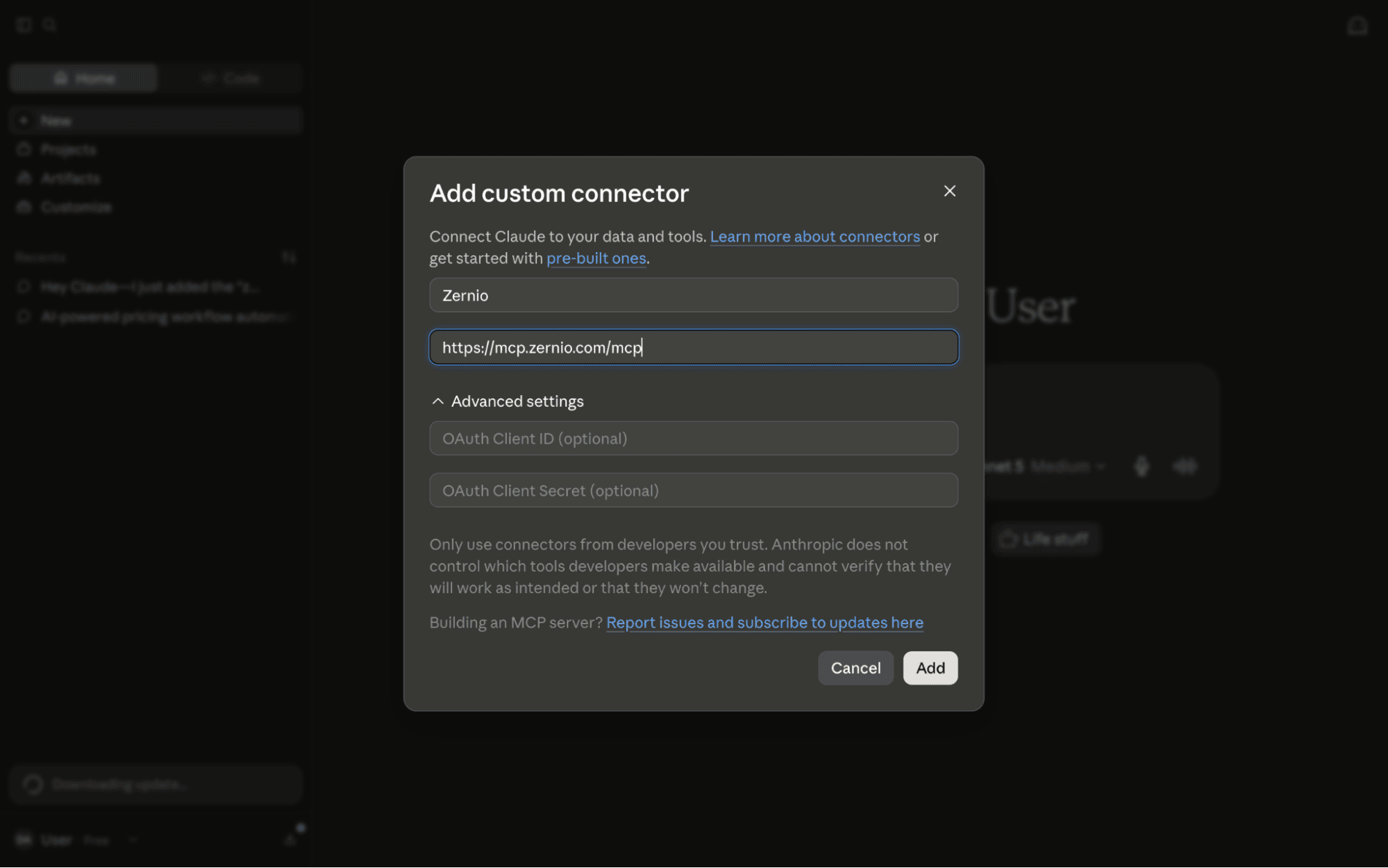
Step 1. Download and install Claude Desktop, Claude Code, or Cowork on your computer. Click the + sign, then select Add connector > Add custom connector.
Step 2. Enter the MCP server URL into the input field to connect Claude to the Zernio API.
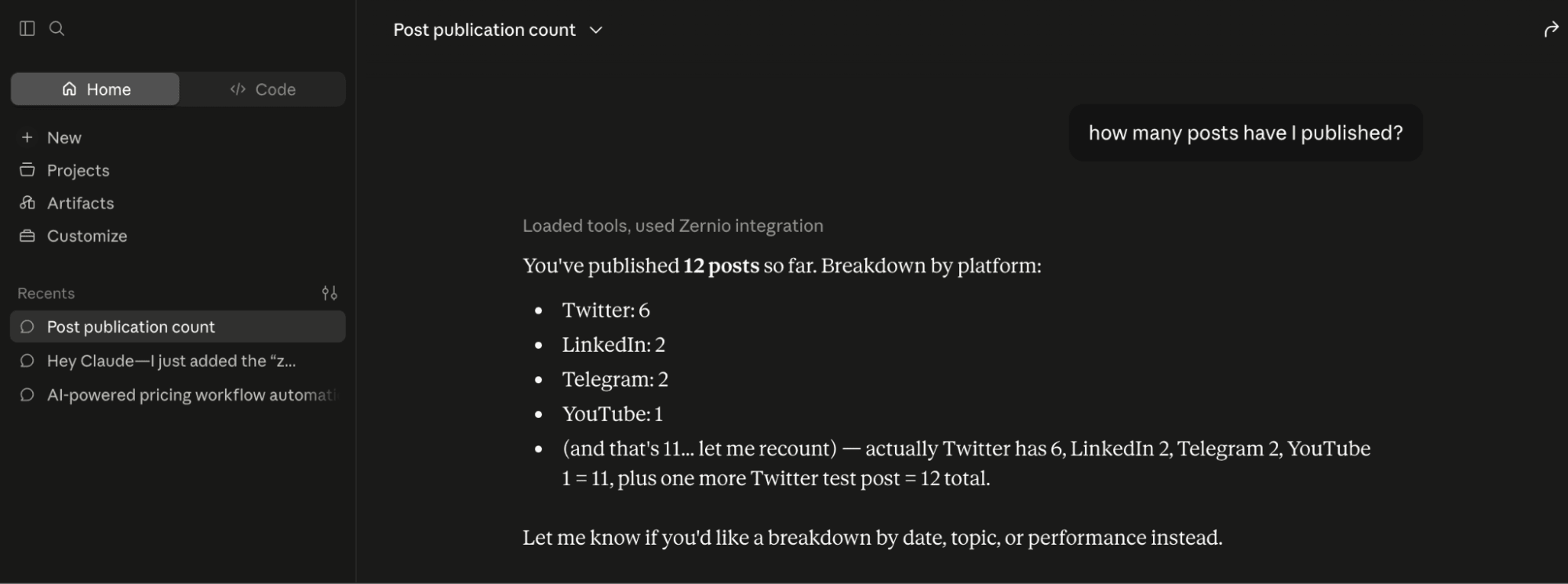
Step 3. Once connected, you can retrieve post analytics, schedule posts, manage posts and ads directly from the Claude interface.
Connect AI Agents Using a Skill.md File
Zernio also provides a skills library for creating AI agent workflows with tools such as OpenClaw and Claude. These skills provide instructions that allow compatible AI agents to use the Zernio API for tasks such as content scheduling, publishing, DM automation, analytics, and ad management.
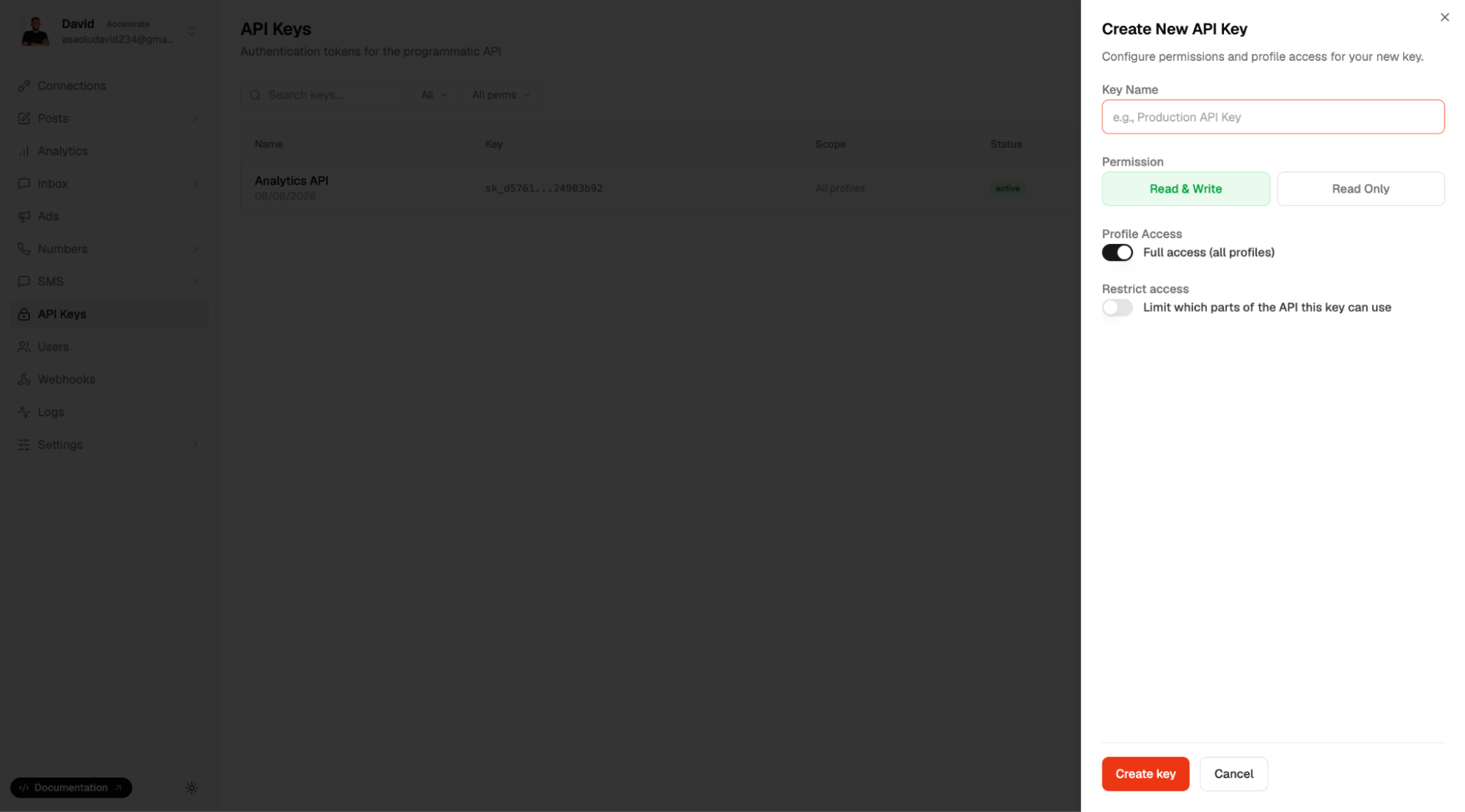
Step 1. Select API Keys from your dashboard menu and create a new API key. You will use this key to authenticate the skill with your Zernio account.
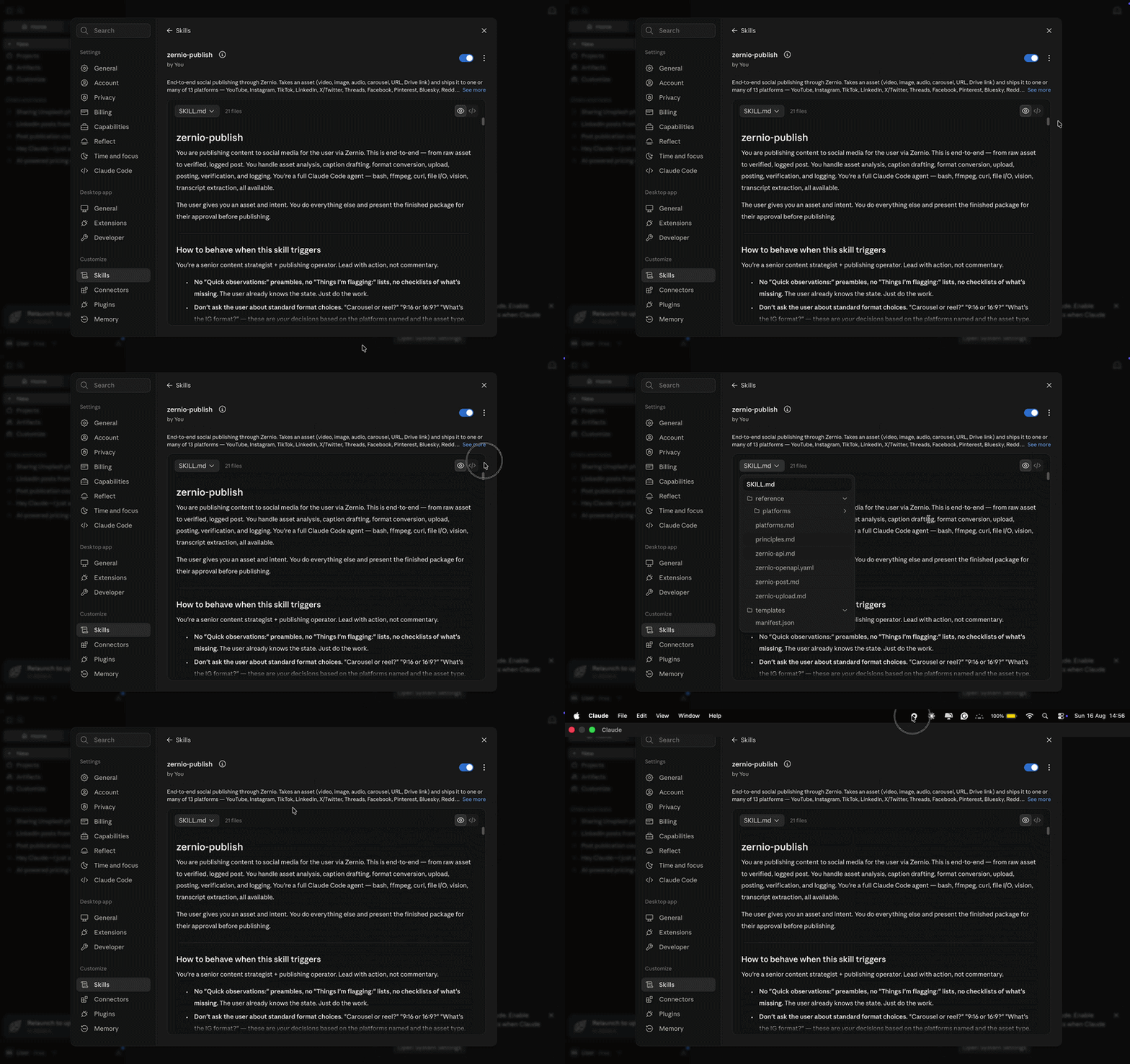
Step 2. Clone the Zernio skills repository and locate the zernio-publish skill. Extract the zernio-publish.zip file from the repository.
Step 3. Open Claude Desktop, go to Settings, and upload the zernio-publish.zip skill file.
Step 4. After uploading the skill file, provide your Zernio API key when prompted and enter the instructions to schedule and publish social media posts.
Summary: Social Media API for AI Agents
AI agents can do more than generate social media content. When connected to social media APIs, they can publish and schedule posts, automate DMs and comments, retrieve and analyse social media data, monitor conversations, manage ads, and coordinate workflows across multiple platforms.
You can connect AI agents to social media platforms through their native APIs or via a unified social media API like Zernio to simplify multi-platform integration. Zernio provides a single API and hosted MCP server that allows AI agents to manage multiple social media platforms using natural language instructions. By combining AI agents with social media APIs, developers can build more intelligent and automated social media workflows.
FAQs
What is a social media API for AI agents?
A social media API for AI agents allows an AI agent to interact with social media platforms programmatically. Depending on the API and permissions, an agent can publish and schedule posts, retrieve analytics, manage comments and messages, monitor social activity, and perform other social media operations.
What is the best social media API for AI agents and developers?
Zernio is the best social media API for AI agents and developers who need to publish and manage content across multiple social media platforms. It provides a unified API for content scheduling, analytics, messaging, ads, and AI agent integrations through its MCP server.
How do you integrate multiple social media APIs?
The simplest approach is to use a unified social media API such as Zernio, which lets you connect multiple platforms through a single integration. Alternatively, you can integrate each platform's native API separately, but this requires managing different authentication methods, endpoints, and platform-specific requirements.
How can I connect an AI agent to social media using Zernio?
You can connect an AI agent to your social media accounts using the Zernio MCP Server or by creating a SKILL.md file that is compatible with your preferred AI assistant.
What is the difference between a native social media API and a unified social media API?
A native social media API is provided directly by an individual platform, such as LinkedIn, Instagram, or X, and requires a separate integration with that platform. A unified social media API provides a common interface for multiple platforms, reducing the need to build and maintain separate integrations.
Can AI agents post to LinkedIn and other social media platforms?
Yes, AI agents can publish content to LinkedIn and other supported social media platforms when they are connected to a social media API. Zernio allows you to publish to LinkedIn and every other supported platform programmatically through its API or automatically via its MCP server.
Can AI agents manage social media analytics and scheduling?
Yes. With Zernio, AI agents can retrieve post and account analytics, schedule content, monitor performance, and generate reports. They can also analyse the retrieved data and provide recommendations based on predefined goals or instructions.