TikTok Content Posting API: The Complete Guide
At first, manually uploading videos works. However, as soon as you need to schedule posts, manage multiple accounts, or integrate TikTok into a product, the process quickly becomes complex. You're then faced with an important decision: build directly on top of the TikTok API, or use a third-party platform like Zernio.
The TikTok API provides direct access to TikTok's platform, allowing your application to manage content and interact with user accounts programmatically. This means you are responsible for handling authentication, video uploads, and scheduling logic.
Zernio make this much easier by handling the technical work. With Zernio, you no longer need to manage complex setup and maintenance processes of your content posting workflow.
In this guide, I'll walk you through integrating TikTok's APIs and developer kits into your application, building a reliable content-posting workflow, and simplifying the process with Zernio. We'll also compare both approaches to help you decide which best fits your needs.
Understanding TikTok APIs and Developer Kits
TikTok offers a suite of APIs and developer kits that enable applications to integrate with its platform in various ways. Whether you want to allow users to log into your app using their TikTok credentials, publish videos directly from your software and automation workflows, or embed TikTok content on your website, these tools make it possible.
With the TikTok Developer platform, you can easily tap into TikTok's highly engaged user base to build dynamic digital experiences for your users.
1. Login Kit
The TikTok Login Kit is a secure, OAuth 2.0-based authentication tool that allows users to sign into your third-party web or mobile application using their existing TikTok credentials.
Instead of forcing users to create a new username and password, they can easily click a "Log in with TikTok" button to sign into your application. Once the user grants permission, your app securely receives basic profile information, such as their display name, avatar, and profile link.
Common Use Cases:
Dating apps, gaming platforms, and social media management tools that need a quick, recognisable sign-up method.
2. Share Kit (Share to TikTok)
The Share Kit allows users to share videos and images from your app directly to TikTok. If a user creates or edits a video within your application, the Share Kit allows them to export that content directly to TikTok with a single tap. It opens the TikTok app with the media already loaded, allowing the user to add TikTok-native filters, sounds, and text before posting.
You can also programmatically attach specific hashtags to the content being shared and include a backlink to your app on the published TikTok video, driving organic user acquisition.
Common Use Cases:
Third-party video editing software (like CapCut), AR camera apps, and mobile games where players want to share their highlights.
3. Content Posting API (Direct Post)
Unlike the Share Kit, which requires the user to open the TikTok app before posting the content, the Content Posting API allows platforms to publish videos directly to a user's TikTok account from another server.
With the user's explicit permission, developers can upload video files, add captions, set privacy settings (Public, Friends, or Private), and publish, without the user ever opening the TikTok app.
Common Use Cases:
Enterprise social media management platforms (like Hootsuite or Sprout Social), influencer marketing dashboards, and desktop video editing suites.
4. Commercial Content API
This API is built specifically for brands, agencies, and marketing platforms to manage advertisement workflows, creator collaborations, and organic business content. It acts as a bridge between TikTok's advertising infrastructure and third-party marketing tools, enabling software applications to manage Spark Ads (boosting organic content), pull analytics, and enhance the creator-brand collaboration process.
Common Use Cases:
Ad-tech platforms, agency campaign management software, and influencer CRM tools.
5. Data Portability API
This is a privacy-first tool designed to comply with global data regulations, allowing users to securely export their TikTok data to external services. If a user wants to transfer their data from TikTok to another platform, this API facilitates the transfer securely.
It can include profile data, video history, and engagement metrics, depending on the permissions. This API adhere to strict international data privacy laws and helps in user data control, especially in regions with strict data regulations.
Common Use Cases:
Personal data backup services, digital portfolio creators, and cross-platform profile synchronisation tools.
6. Display API (and Embeds)
The Display API enables developers to bring the TikTok viewing experience out of the app and into external websites and applications. It allows you to fetch metadata about specific TikTok videos or profiles and embed them directly into your software applications.
The Display API helps in displaying videos natively and providing interactive, rich media content, rather than just showing a raw URL.
Common Use Cases:
News media websites embedding viral videos into articles, e-commerce sites showing user-generated content (reviews) of their products, and brand landing pages showcasing TikTok campaigns.
Getting Started with the Content Posting API
The Content Posting API enables you to upload and publish videos directly to TikTok from your application. It is the core API used for building automation tools, content schedulers, and content publishing workflows.
In this section, you'll learn how to configure the Content Posting API and integrate it into your application or automation workflow to publish content programmatically.
To get started, visit the TikTok Developer Portal and create an account.
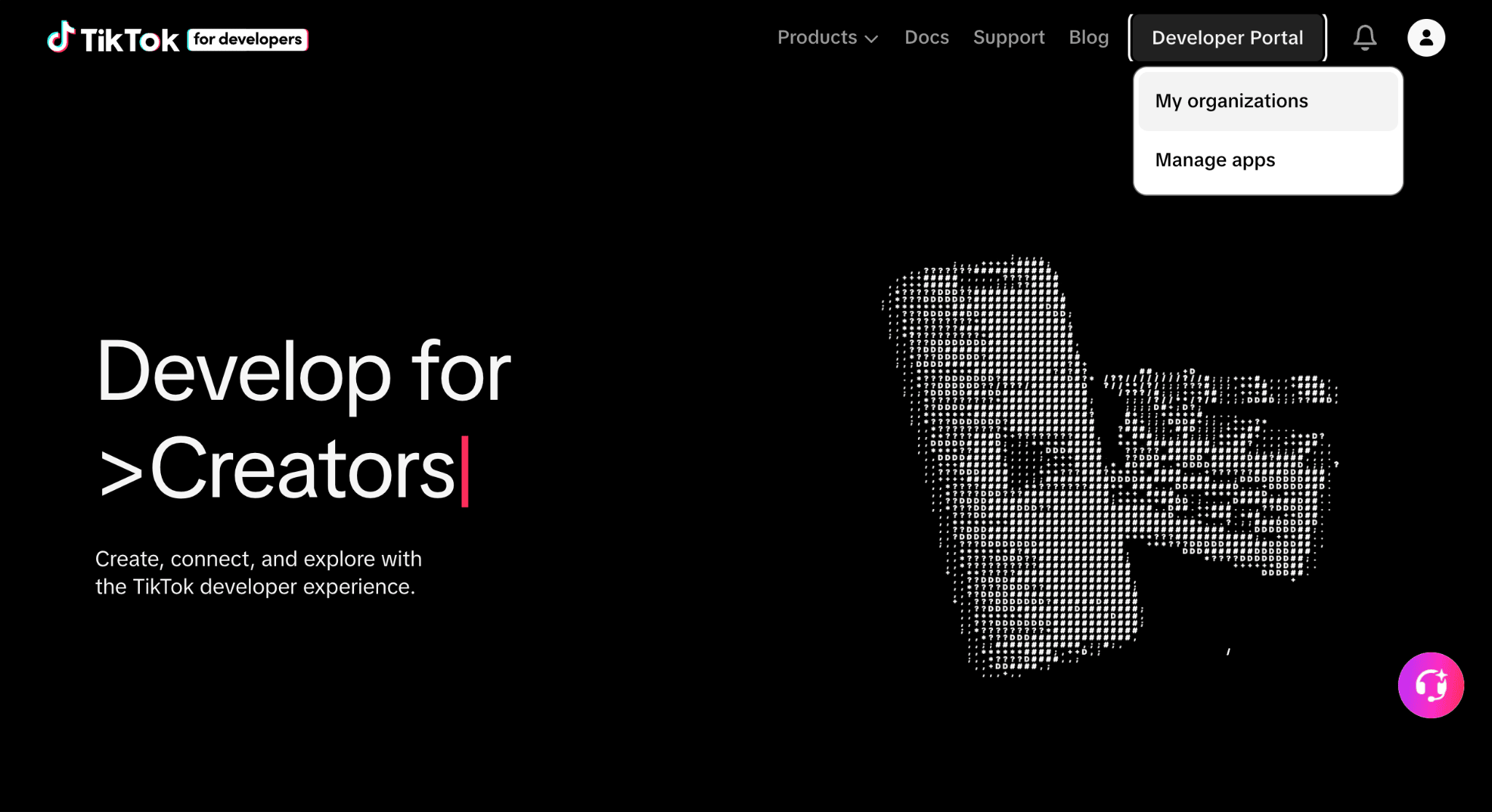
Sign in to your account and create a new organisation that manages your applications.
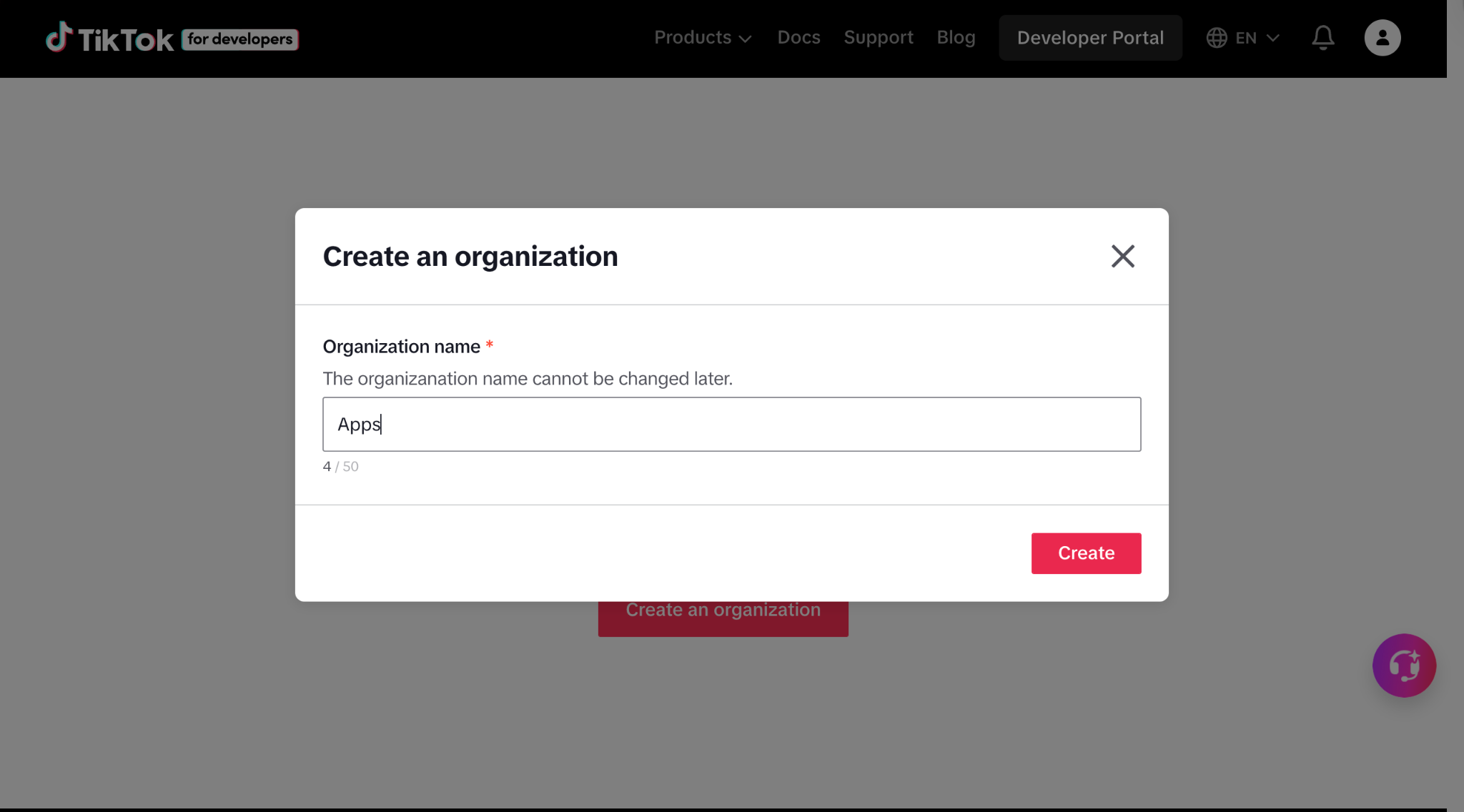
Next, add a new TikTok app within the newly created organisation.
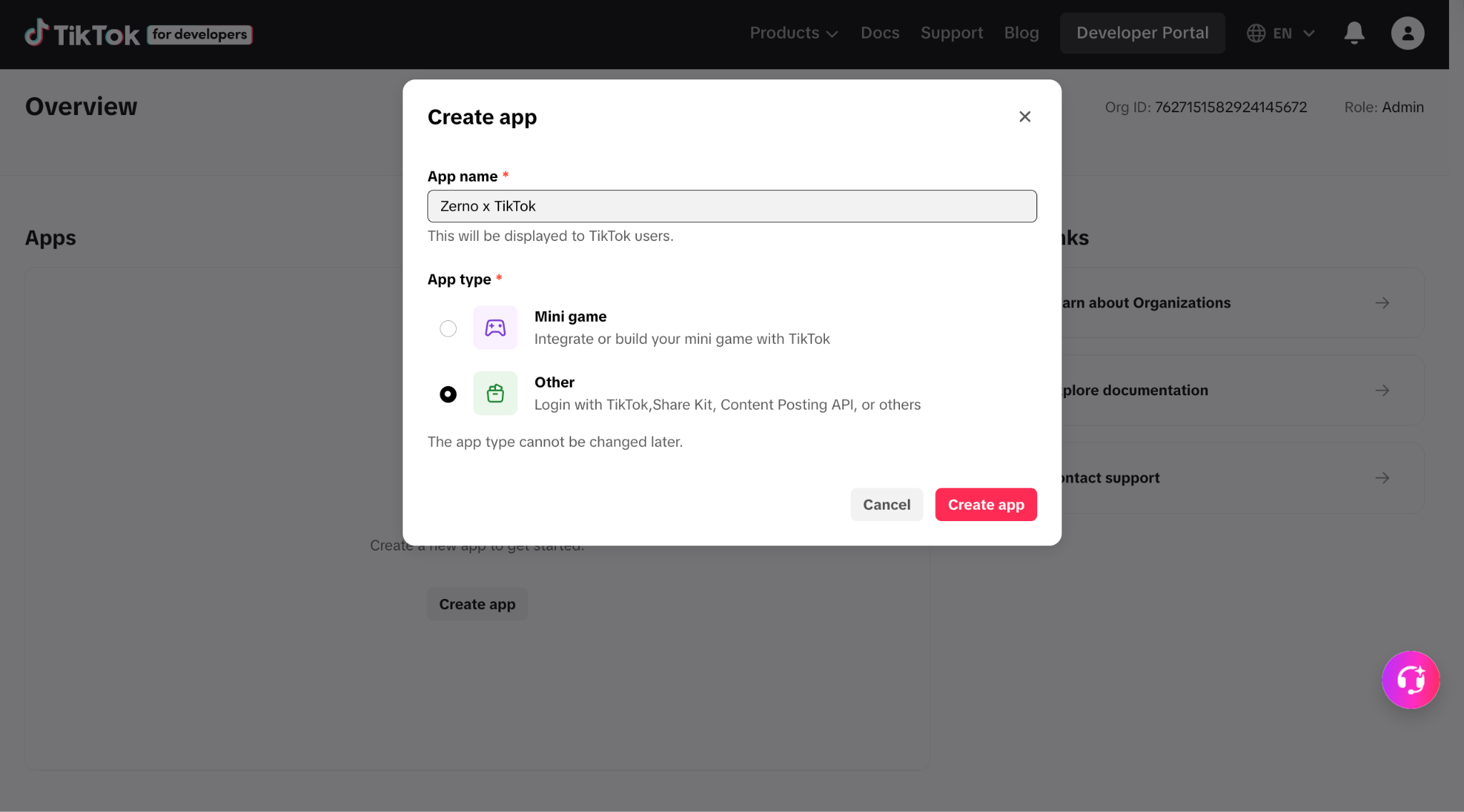
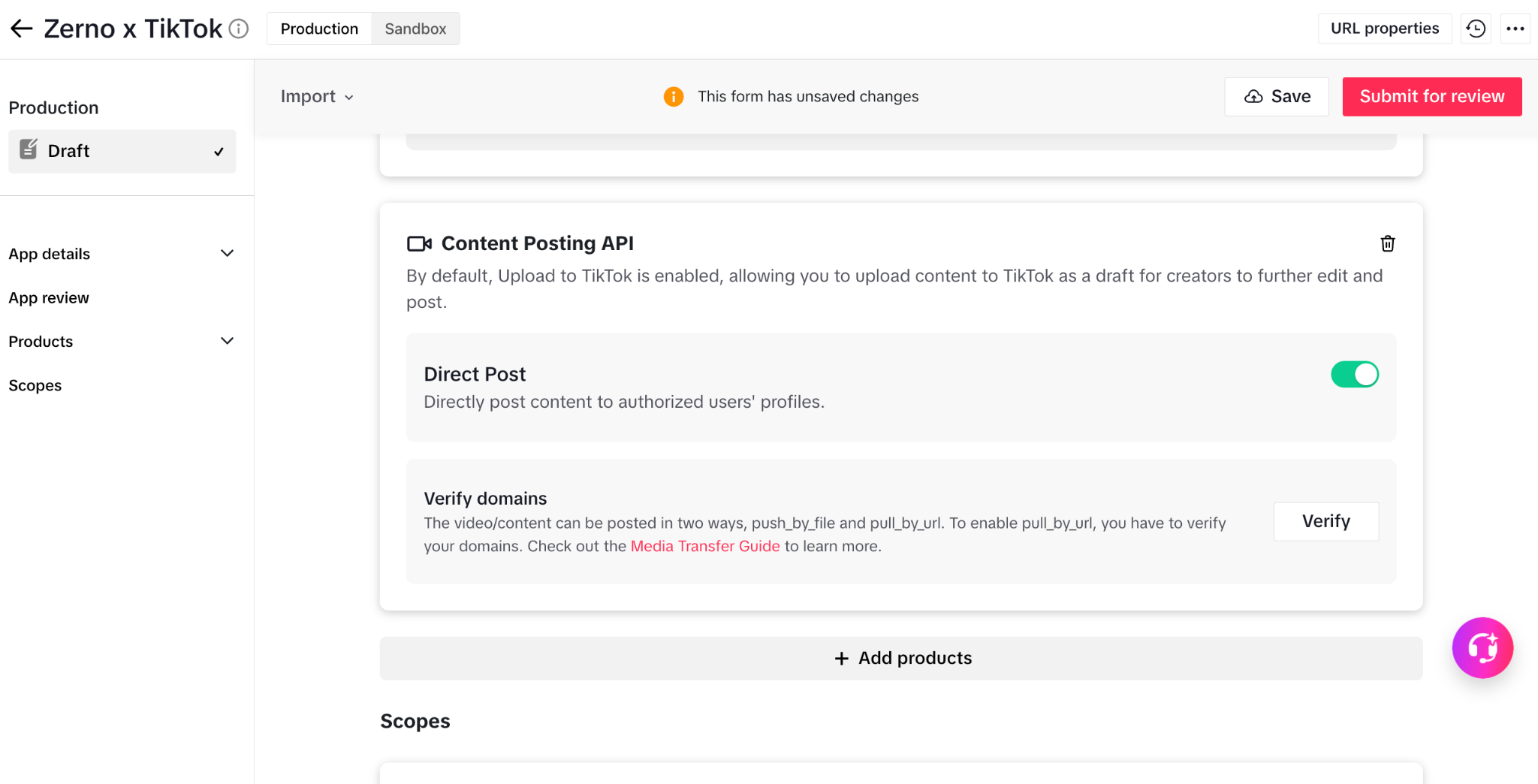
After creating a new app, you will be assigned a Client Key and Client Secret. Enter your app details into the required fields as shown below, and add the Login Kit and Content Posting API as products.
Ensure that the Direct Post feature is enabled under the Content Posting API, then submit your app for review. The review process can take anywhere from a few days to up to two weeks after submission.
Once your app is approved, you can start integrating the API into your application or content automation workflows using your preferred programming language.
If you encounter any issues, refer to the official documentation to resolve configuration problems.
Integrating the TikTok Content Posting API in Node.js
First, create a folder to hold your project files.
mkdir tiktok-api
cd tiktok-api
Create a .env file and copy your access token into the file.
TIKTOK_ACCESS_TOKEN=<your_tiktok_access_token>
Run the following code snippet to create a package.json file within the project folder.
npm init -y
Next, install the project dependencies. We will use Axios for making HTTP requests to the TikTok API and Dotenv for managing environment variables securely.
npm install axios dotenv
Create an index.js file within the project folder and copy the following code snippet into the file.
require("dotenv").config();
const axios = require("axios");

async function queryCreatorInfo() {
  const response = await axios({
    url: "https://open.tiktokapis.com/v2/post/publish/creator_info/query/",
    method: "post",
    headers: {
      Authorization: `Bearer ${process.env.TIKTOK_ACCESS_TOKEN}`,
      "Content-Type": "application/json",
    },
  });
  console.log(response.data);
}
queryCreatorInfo();
The queryCreatorInfo function retrieves the latest information about the authenticated creator from TikTok. This step is required before publishing content, as it provides important metadata, including the creator's posting capabilities, privacy options, and feature availability.
The TikTok Content Posting API allows you to upload images and videos to TikTok. To upload videos from a URL, use the code snippet below:
// 👇🏻 Post from URL
async function publishVideoFromUrl() {
  const response = await axios({
    url: "https://open.tiktokapis.com/v2/post/publish/video/init/",
    method: "post",
    headers: {
      Authorization: `Bearer ${process.env.TIKTOK_ACCESS_TOKEN}`,
      "Content-Type": "application/json",
    },
    data: JSON.stringify({
      post_info: {
        title: "this will be a funny #cat video on your @tiktok #fyp",
        privacy_level: "MUTUAL_FOLLOW_FRIENDS",
        disable_duet: false,
        disable_comment: true,
        disable_stitch: false,
        video_cover_timestamp_ms: 1000,
      },
      source_info: {
        source: "PULL_FROM_URL",
        video_url: "https://example.verified.domain.com/example_video.mp4",
      },
    }),
  });
  console.log(response.data);
}
publishVideoFromUrl();
The publishVideoFromUrl function initialises a video publishing request using the TikTok Content Posting API and allows you to upload and publish a video directly from a publicly accessible URL.
TikTok fetches the video file from the provided video_url and processes it for publishing. The request also includes metadata such as the video title, privacy settings, and engagement controls (duet, stitch, and comments).
Finally, you can publish images using the function below:
async function photoPublish() {
  const response = await axios({
    url: "https://open.tiktokapis.com/v2/post/publish/content/init/",
    method: "post",
    headers: {
      Authorization: `Bearer ${process.env.TIKTOK_ACCESS_TOKEN}`,
      "Content-Type": "application/json",
    },
    data: JSON.stringify({
      post_info: {
        title: "funny cat",
        description: "this will be a #funny photo on your @tiktok #fyp",
        disable_comment: true,
        privacy_level: "PUBLIC_TO_EVERYONE",
        auto_add_music: true,
      },
      source_info: {
        source: "PULL_FROM_URL",
        photo_cover_index: 1,
        photo_images: [
          "https://tiktokcdn.com/obj/example-image-01.webp",
          "https://tiktokcdn.com/obj/example-image-02.webp",
        ],
      },
      post_mode: "DIRECT_POST",
      media_type: "PHOTO",
    }),
  });
  console.log(response.data);
}
photoPublish();
The photoPublish function initialises a request to publish image content using the TikTok Content Posting API. It allows you to create a photo post by providing one or more image URLs.
If you run into any issues, feel free to check out the complete documentation for more detailed guidance.
Scopes: Defining TikTok API Permissions
When you connect your application to the TikTok API, you don't automatically gain access to everything a user can do on TikTok. For security and privacy reasons, the API uses a permission-based system known as scopes.
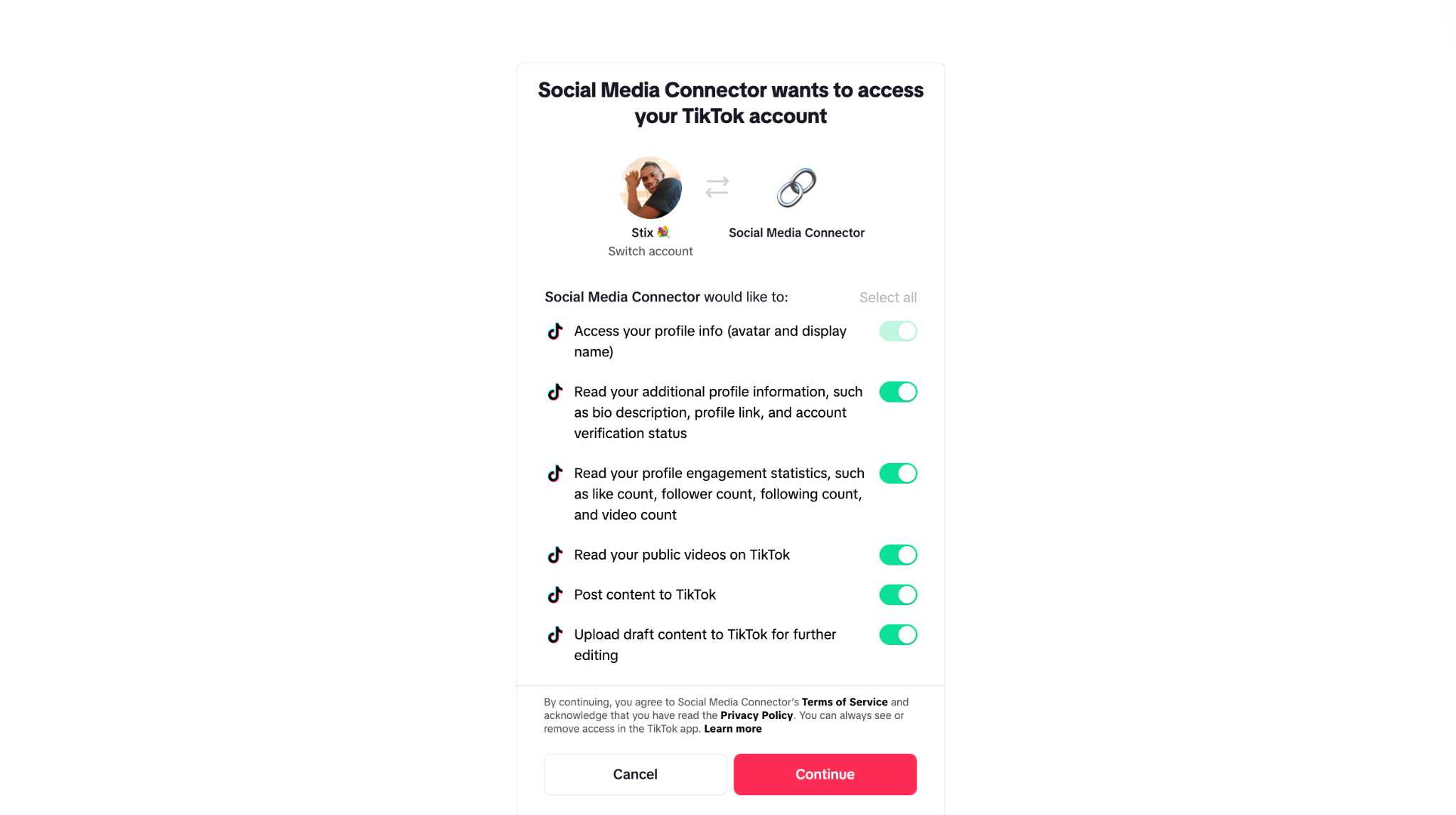
Scopes define exactly what data your application can access and what actions it can perform on behalf of an authenticated user. When a user connects their account, they are presented with a consent screen that lists the permissions your app is requesting.
TikTok categorises scopes based on the specific APIs and Kits your application integrates with.
For example:
user.info.basic(Login Kit): The most fundamental scope. It grants read-only access to a user's public profile information, including theiropen_id, display name, and avatar URL. This scope is required for most API integrations.video.upload/video.publish(Content Posting API): These scopes allow your application to upload video files to TikTok's servers and publish them directly to the user's feed or save them as drafts.video.list(Display API): Grants read-only access to a user's publicly available videos. This is useful for applications that display or embed TikTok content, such as portfolios or content aggregators.share.video.create(Share Kit): Allows your application to transfer a video from your platform to the TikTok app, where the user can edit and publish it manually.
Pros and Cons of the TikTok API: Connecting Directly
Connecting directly to the TikTok API gives you full control over how your application interacts with the platform. However, this approach comes with both advantages and trade-offs that should be carefully considered.
The Advantages (Pros)
1. Full control over your integration
Using the TikTok API directly gives you complete control over the entire workflow, from user authentication to content upload, processing, and publishing. This is essential when you need fine-grained control over logic, timing, or user experience.
2. Access to the full TikTok API and developer kits
You can leverage the full suite of TikTok APIs and developer kits, including Login Kit, Share Kit, and the Content Posting API. This enables you to build comprehensive applications that combine authentication, content sharing, and publishing within a single system.
3. Immediate access to new features
Working directly with TikTok's official API enables you to adopt new features and updates as soon as they are released, without depending on third-party platforms to support them.
The Disadvantages (Cons)
1. Rigorous App Review and Approval Process
TikTok enforces strict privacy and security standards. You cannot simply obtain API access and start posting or retrieving data immediately. Applications must go through a detailed review process, and access to certain scopes (such as video publishing) requires a clearly defined and approved use case, which can significantly slow down development timelines.
2. API Rate Limits and Quotas
Like all major platforms, TikTok imposes rate limits (a cap on how many requests your app can make to their servers within a specific timeframe). If your application scales quickly or handles a massive volume of users, you will need to architect your software to queue requests properly so you don't hit these limits and experience downtime.
3. Higher development effort
Building directly on the TikTok API requires significant engineering effort. You are responsible for implementing core functionality, such as media uploads, scheduling, retries, and workflow orchestration. Additionally, as the API evolves, your team must continuously adapt to changes in endpoints and features. This increases both development time and complexity.
4. Ongoing maintenance and updates
When integrating directly, you must actively monitor for updates, deprecations, and breaking changes, and update your implementation accordingly to maintain stability.
5. Error handling and reliability
Since you control the entire pipeline, you also need to handle failures (such as upload errors, network issues, or failed publishing attempts). Building a reliable system requires proper logging, retries, and fallback mechanisms.
Stop building social integrations from scratch.
One API call to publish, schedule, and manage posts across 15+ platforms.
How the Zernio TikTok API Works
Zernio (formerly Late) is an all-in-one social media management platform that supports multimedia content across 14 channels, including TikTok, YouTube, Twitter (X), and Instagram.
Instead of writing separate integrations for each platform, Zernio abstracts the complexity behind one API, allowing you to focus on your product while ensuring consistent upload workflows, reliable scheduling, and centralised error handling.
Zernio acts as a middleware layer between your application and TikTok's native infrastructure. Rather than interacting directly with TikTok's APIs, your application communicates with Zernio using simple REST API requests and SDKs. Zernio then handles the underlying processes, such as translating, routing, and executing those requests on TikTok.
Key Features of Zernio TikTok Integration
1. Cross-Platform Posting
With a single API call, you can publish content to TikTok and multiple platforms simultaneously, allowing you to manage all your social media content from one place. Zernio simplifies complex TikTok workflows, such as OAuth setup and media uploads, into a single request.
With Zernio, you don't need to register a TikTok developer app to get started. You can send a request containing a video URL and caption, and Zernio will automatically format and publish it to TikTok and other platforms, including Instagram Reels and YouTube Shorts (if specified).
2. Built-in Content Scheduling Support
Zernio enables you to create, schedule, or publish TikTok posts through a single API endpoint. You can specify exactly when your content should go live, and Zernio will handle the rest automatically.
With built-in timezone support, scheduled posts are executed accurately according to the intended local time, ensuring your content is published at the right moment regardless of where your users are located. This removes the complexity of handling time conversions and scheduling logic on your own.
3. Automated Media Handling
TikTok enforces strict media requirements, but Zernio automatically processes and optimises your videos to meet those standards.
Instead of implementing complex upload logic such as file chunking, you simply provide a public video URL. Zernio handles the entire file validation, processing, and uploading tasks behind the scenes.
4. Multi-Account Management
Zernio enables you to connect and manage multiple TikTok accounts through a single platform, making it easy to handle various users, creators, or brands without needing separate integrations for each account.
5. Native TikTok Metadata Control
Despite being a third-party layer, Zernio preserves access to TikTok's native content settings. Through its API parameters, you can programmatically:
- Set privacy levels (public, friends, private / only_me)
- Enable or disable comments, duets, and stitches
- Automatically append hashtags to video descriptions
Limitations of the Zernio TikTok API
Because Zernio relies on TikTok's official public API infrastructure, it inherits TikTok's native API limitations. As a result, certain features available in the TikTok app are not supported when posting programmatically.
1. TikTok Sound and Music Library Access
Due to licensing and copyright restrictions, third-party applications cannot directly access or attach sounds from TikTok's native music library.
Videos uploaded via the API must have all audio fully embedded before upload. While TikTok may automatically add music for certain formats (such as photo posts using auto_add_music), manual selection of trending sounds is not supported.
2. Duets and Stitches
The API does not support creating duets or stitches. These interactive formats rely on TikTok's in-app video rendering system, which combines multiple videos on the client side. However, users can still duet or stitch videos posted via the API within the TikTok app itself.
3. Live Streaming
TikTok Live cannot be initiated or managed through the API. All live broadcasts must be started manually within the TikTok application.
4. Effects and Filters
TikTok's built-in effects, filters, AR tools, and beauty enhancements are not available via the API. All media must be fully edited and rendered before uploading, as processing is not performed on TikTok's side for API uploads.
5. Post Editing After Publishing
Once a post is published via the API, it cannot be modified programmatically. If changes are required, the content must be updated within the TikTok app or deleted and re-uploaded via the API.
6. Limited Analytics Access (FYP Data)
The API does not provide detailed "For You Page" analytics such as distribution, reach, or algorithmic exposure metrics.
7. Playlist Management
Creating or managing TikTok Creator Playlists is not supported via the API. Playlist organisation must be done manually within the TikTok app.
8. Comments and Engagement
The API does not support reading, posting, or moderating comments on TikTok videos.
9. Direct Messages (DMs)
Messaging functionality is not available through the API, including sending and receiving direct messages. For privacy and security reasons, TikTok does not expose DM data to third-party publishing integrations.
10. Text-Only Posts
TikTok requires media content for all posts created via the API. Text-only posts are not supported. Each request must include either a video file or a set of images for a photo carousel.
Getting Started with Zernio TikTok API
In this section, you will configure Zernio for TikTok content integration and learn how to create, schedule, and send messages using its API and SDKs.
First, create a Zernio account and log in to your dashboard.
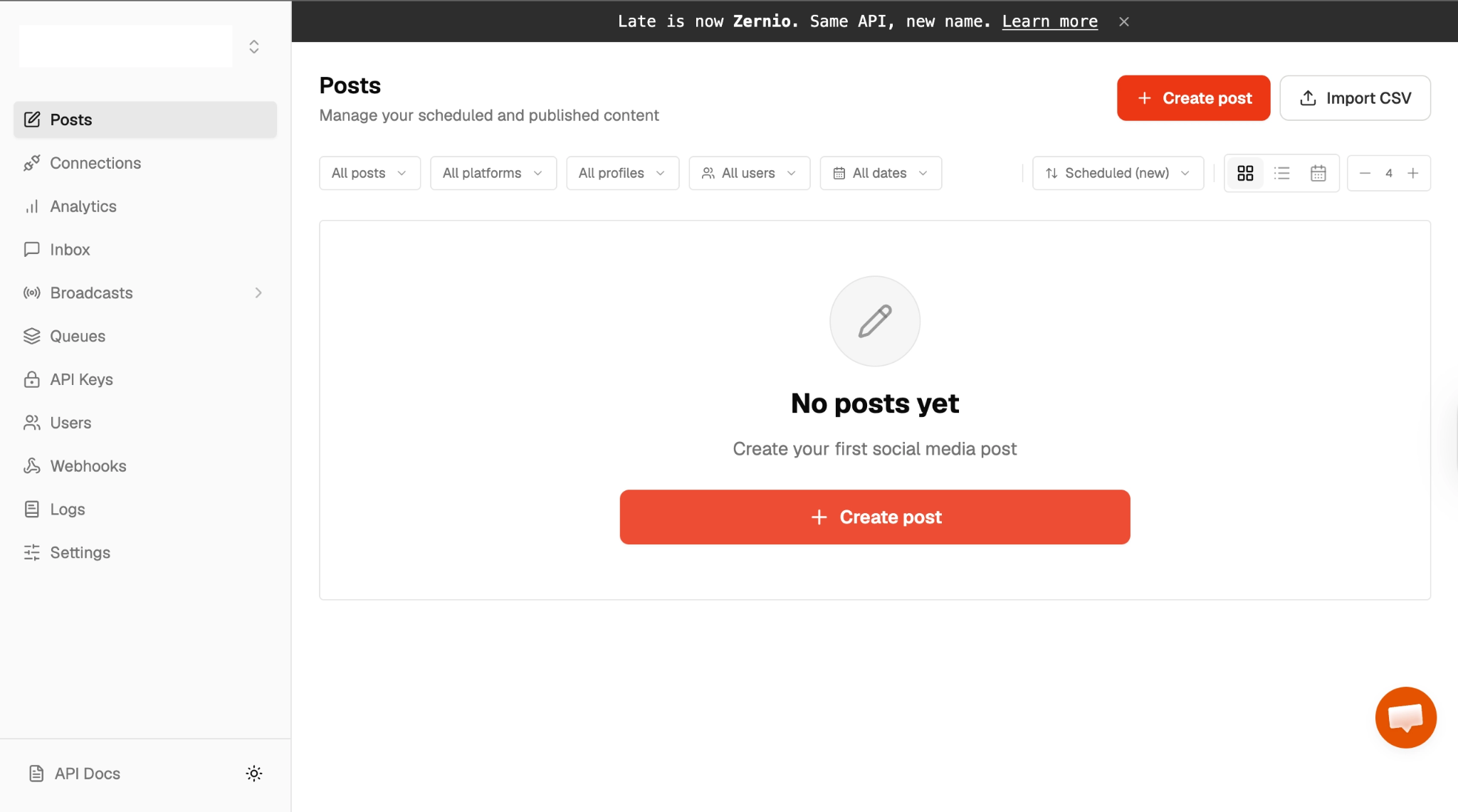
Select Connections from the sidebar menu and connect your TikTok account to Zernio.
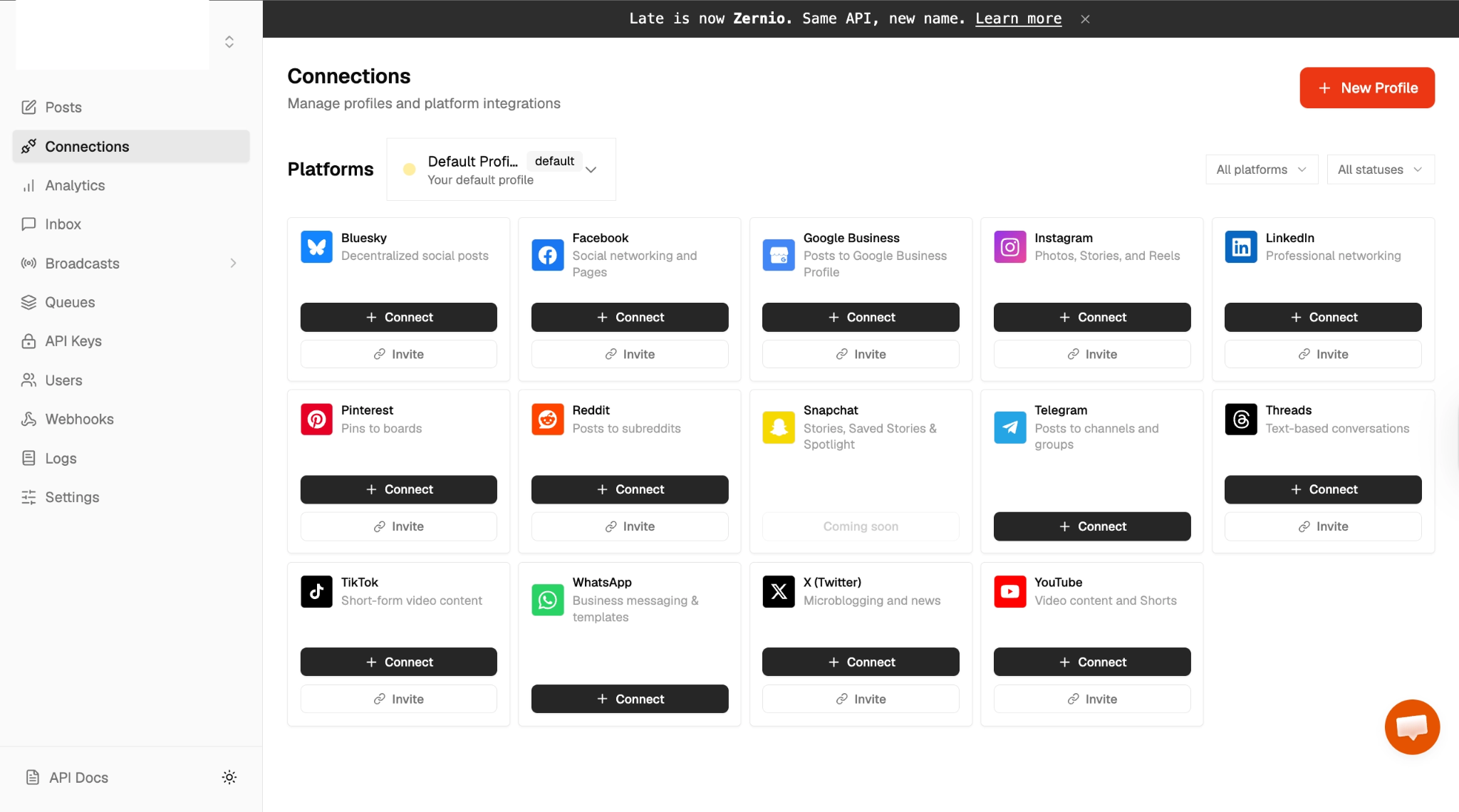
After clicking the TikTok Connect button, you will be redirected to the OAuth consent page, where you can grant Zernio permission to access and connect your TikTok account.
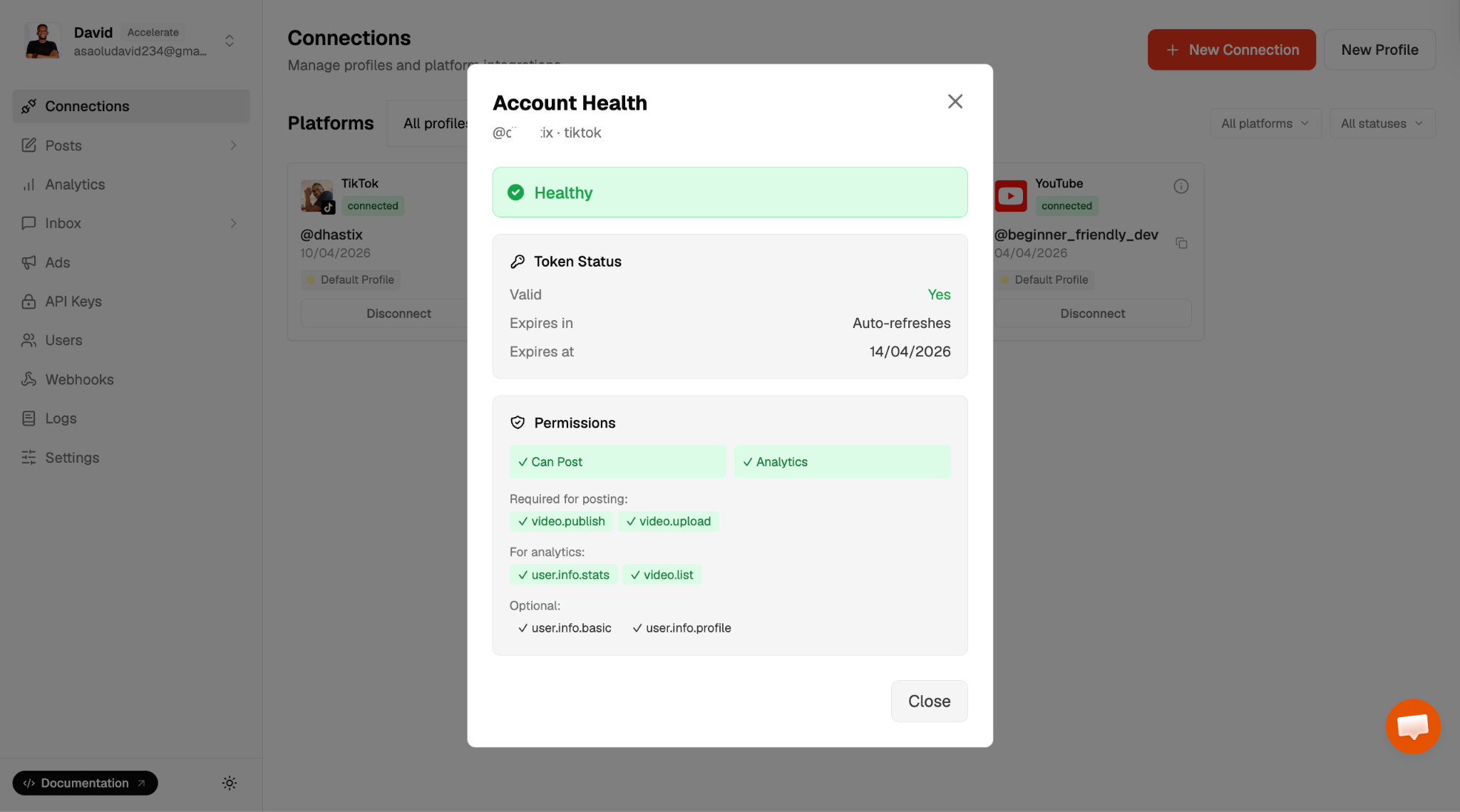
Finally, you can now schedule and publish videos and images directly to your TikTok account using Zernio.
Using the Zernio TikTok API
With Zernio, you can easily schedule and publish video and image content to TikTok directly from your dashboard, as well as through its SDKs and HTTP API endpoints. In this section, you will learn how to publish content using the Zernio HTTP API.
Before we proceed, copy your Zernio API key and TikTok account ID into the .env file within your tiktok-api project directory.
ZERNIO_API_KEY=sk_*********
ZERNIO_TIKTOK_ACCOUNT_ID=69d9************
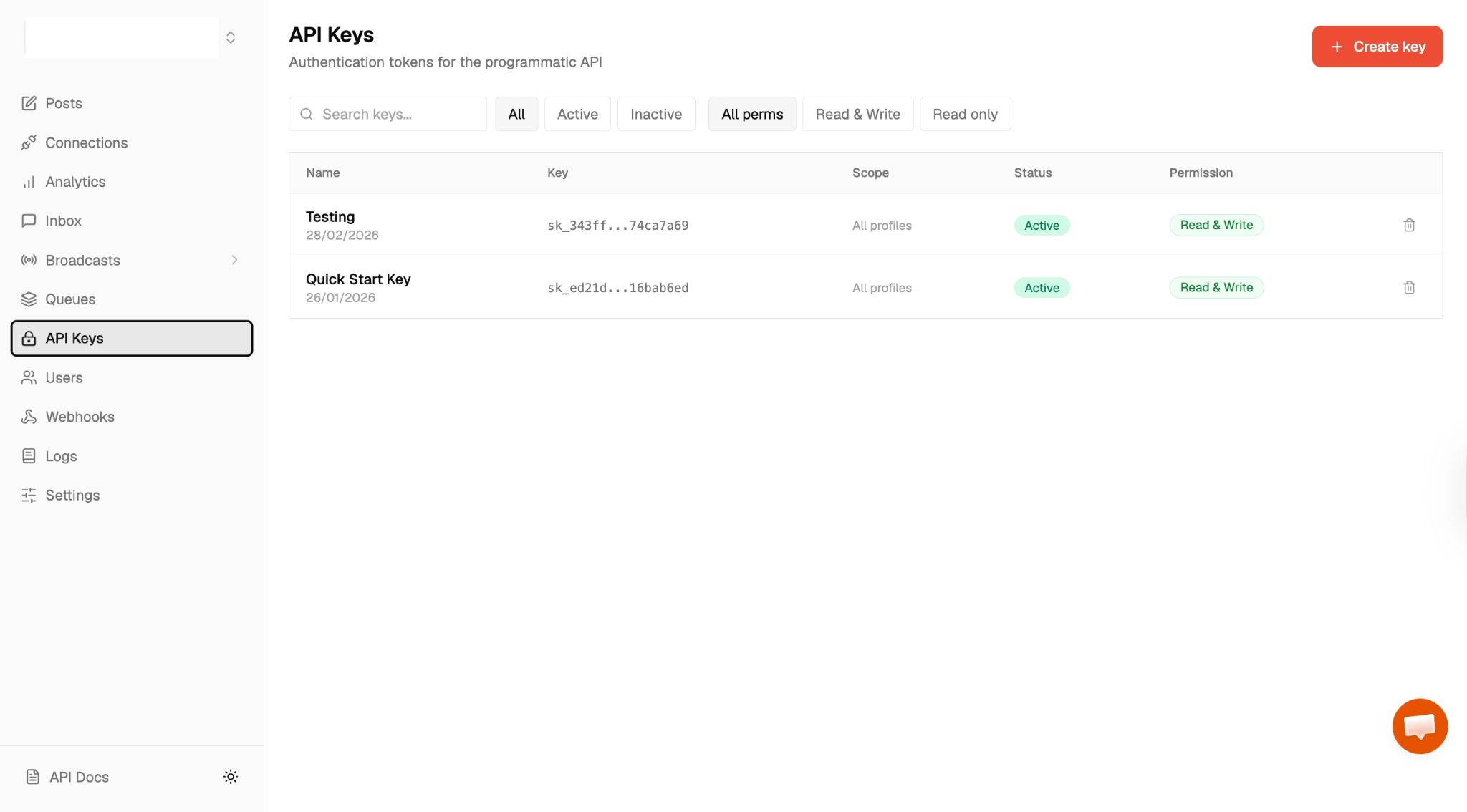
Select API keys from the sidebar menu to create a new API key.
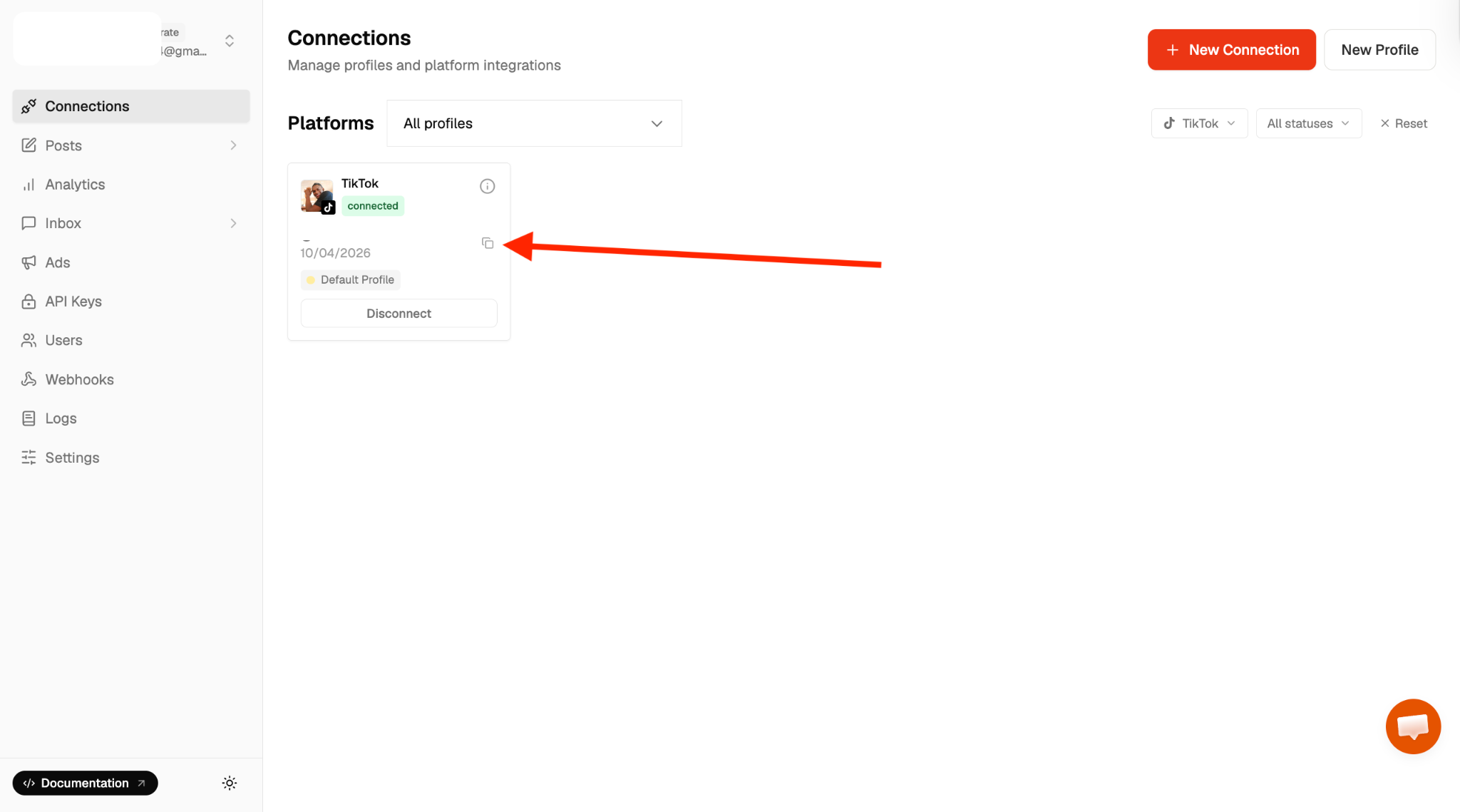
Copy your account ID from the Connections tab into the .env file.
Add the following code snippet to the index.js file to retrieve the connected TikTok user's information.
async function getCreatorInfo() {
  const response = await axios({
    url: `https://zernio.com/api/v1/accounts/${process.env.ZERNIO_TIKTOK_ACCOUNT_ID}/tiktok/creator-info`,
    method: "get",
    headers: {
      Authorization: `Bearer ${process.env.ZERNIO_API_KEY}`,
    },
    params: {
      mediaType: "video",
    },
  });
  console.log(response.data);
}
getCreatorInfo();
To publish video content to TikTok, copy the code snippet below:
async function publishVideoPost() {
  const response = await axios({
    url: "https://zernio.com/api/v1/posts",
    method: "post",
    headers: {
      Authorization: `Bearer ${process.env.ZERNIO_API_KEY}`,
      "Content-Type": "application/json",
    },
    data: JSON.stringify({
      content: "Check out this amazing sunset! #sunset #nature",
      mediaItems: [
        {
          type: "video",
          url: "https://cdn.example.com/sunset-video.mp4",
        },
      ],
      platforms: [
        {
          platform: "tiktok",
          accountId: process.env.ZERNIO_TIKTOK_ACCOUNT_ID,
        },
      ],
      tiktokSettings: {
        privacy_level: "PUBLIC_TO_EVERYONE",
        allow_comment: true,
        allow_duet: true,
        allow_stitch: true,
        video_cover_image_url: "https://cdn.example.com/teaser-cover.jpg",
        content_preview_confirmed: true,
        express_consent_given: true,
      },
      publishNow: true,
    }),
  });
  console.log(response.data);
}
The publishVideoPost function creates and publishes a video post to TikTok using the Zernio API. It sends a structured payload that includes the post content, media file, target platform configuration, and TikTok-specific publishing settings.
In this example, the mediaItems array defines the video source URL, while the platforms field specifies that the post should be published to a connected TikTok account. The tiktokSettings object allows you to control key publishing options such as privacy level, comment permissions, duet and stitch settings, and the cover image.
Lastly, you can also publish an image carousel TikTok using the following code snippet.
async function publishPhotoPost() {
  const response = await axios({
    url: "https://zernio.com/api/v1/posts",
    method: "post",
    headers: {
      Authorization: `Bearer ${process.env.ZERNIO_API_KEY}`,
      "Content-Type": "application/json",
    },
    data: JSON.stringify({
      content: "My travel highlights",
      mediaItems: [
        { type: "image", url: "https://cdn.example.com/photo1.jpg" },
        { type: "image", url: "https://cdn.example.com/photo2.jpg" },
        { type: "image", url: "https://cdn.example.com/photo3.jpg" },
      ],
      platforms: [
        {
          platform: "tiktok",
          accountId: process.env.ZERNIO_TIKTOK_ACCOUNT_ID,
        },
      ],
      tiktokSettings: {
        privacy_level: "PUBLIC_TO_EVERYONE",
        allow_comment: true,
        media_type: "photo",
        photo_cover_index: 0,
        description:
          "Full trip recap from our weekend adventure across the coast. These are the best moments we captured along the way! #travel #roadtrip #adventure",
        auto_add_music: true,
        content_preview_confirmed: true,
        express_consent_given: true,
      },
      publishNow: true,
    }),
  });
  console.log(response.data);
}
The publishPhotoPost function creates and publishes a photo carousel post to TikTok using the Zernio API. It allows you to upload multiple images as a single post, which will be displayed as a swipeable gallery on TikTok.
You can learn more about the Zernio TikTok API, including common errors and troubleshooting steps, in the official documentation.
TikTok API vs Zernio Comparison
| Feature | Direct TikTok API | Zernio API |
|---|---|---|
| Setup Complexity | High (requires strict app review, building custom OAuth 2.0 flows, and webhook validation) | Low (simplified integration, abstracted OAuth flow) |
| Development Time | Longer (takes weeks or months to build and test infrastructure from scratch) | Faster (takes days; utilises pre-built infrastructure and standardised payloads) |
| Multi-Platform Support | No (connects exclusively to TikTok) | Yes (write once, post to TikTok, Instagram Reels, YouTube Shorts, etc.) |
| Scheduling | Not built-in (you must implement your own database queues and cron jobs) | Built-in (pass a future timestamp, and Zernio holds or posts it automatically) |
| Maintenance | High (your team must monitor API version changes, manage rate limits, and build retry logic) | Low (Zernio manages API updates, rate-limit buffering, and automated retries) |
| API Coverage | Comprehensive (full access to all TikTok tools, including deep Commercial and Ads APIs) | Focused (tailored for content publishing) |
| Best For | Enterprise apps requiring highly specific, TikTok-exclusive features (e.g. Ad-tech platforms) | Lean teams, omnichannel social tools, and developers prioritising fast time-to-market |
Conclusion
Integrating TikTok into your application unlocks powerful opportunities for automating content publishing and building engaging social media experiences. With the TikTok Content Posting API and Zernio API, you can design highly customised workflows tailored to your product needs.
Zernio abstracts the complexities of authentication, media processing, scheduling, and rate limits, allowing you to focus on building product features rather than infrastructure. It simplifies content scheduling, publishing, multi-account management, and cross-platform distribution, making it ideal for teams that want to move quickly and reduce development.
Check out more tutorials on how to integrate social media features with Zernio:
- Build Multi-Platform Chatbots with One Integration
- How to Post to Social Media Using OpenClaw: Step-by-Step Guide
- Instagram DM API for SaaS Apps: The Complete Guide
- n8n Workflow Examples: 5 Cross-Platform Automation Tips
Thank you for reading!