Someone types "GUIDE" under your Instagram reel and a DM lands in their inbox forty seconds later with the link. That's comment-to-DM automation, and every creator tool on the market sells a version of it.
This guide is written for the person those tools don't fit: you're building a social product, running client accounts at scale, or plugging an AI agent into Instagram, and you need that mechanic as an API call rather than someone else's dashboard.
What follows is how the Meta side actually works, the keyword rules that break most setups, a working request you can paste into a terminal, and the cost difference between owning the feature and renting it per contact.
What is comment-to-DM automation?
Comment-to-DM automation sends someone a direct message the moment they comment a keyword on your post or reel. The comment is the opt-in or a trigger for the automation. While the DM is where the link, the discount code, or the booking form lives.
Two things fire, and people mix them up constantly. There's the public comment reply everyone can see, and there's the private DM that only the commenter gets. They're separate messages with separate rules, and you can send both from one automation.
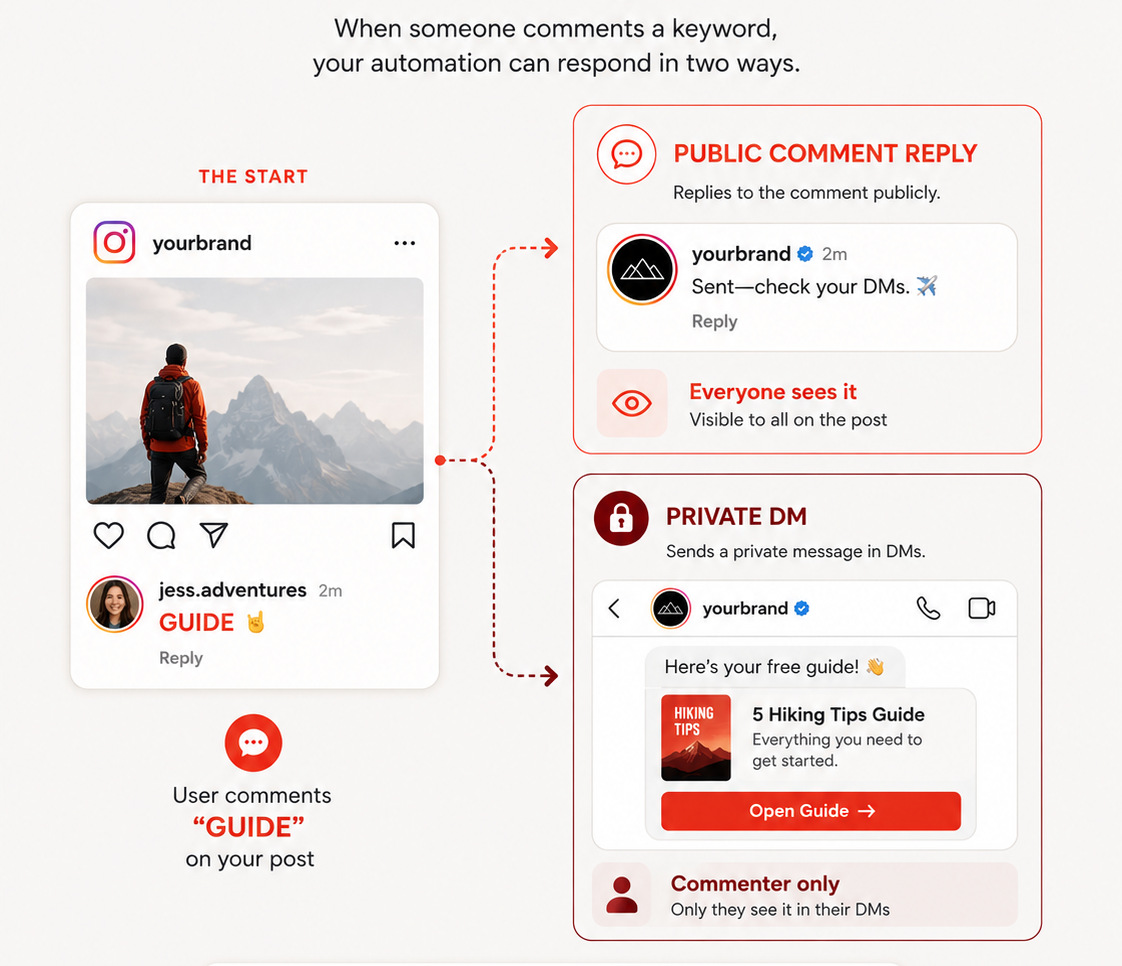
It works on Instagram and Facebook. Not TikTok, not LinkedIn, not X. Meta is the only platform family that exposes a private-reply-to-comment API, so anyone advertising comment-to-DM on other networks is doing something else and calling it the same thing.
| Public comment reply | Private DM (private reply) | Story reply DM | |
|---|---|---|---|
| Who sees it | Everyone on the post | The commenter only | The person who replied |
| How many | Multiple allowed | One per comment, ever | Governed by the messaging window |
| Window | Standard comment rules | 7 days from the comment | 24 hours |
| Good for | Social proof, "check your DMs" | The actual payload | Story-driven drops |
If you're already handling comments and DMs through an API, comment-to-DM is the rule engine that connects them.
How does Instagram comment-to-DM automation actually work?
Five steps, start to finish:
- An Instagram Business account or Facebook Page connects through OAuth.
- Meta fires a comment webhook to your endpoint the moment someone comments.
- Your keyword matching runs against the comment text.
- On a match, a private reply goes out, plus an optional public reply on the post.
- The messaging window opens and normal DM rules take over.
Step three is where almost everyone gets burned. Below, we’ll show how Zernio’s comment-to-DM API works and how you can use it to build custom workflows.
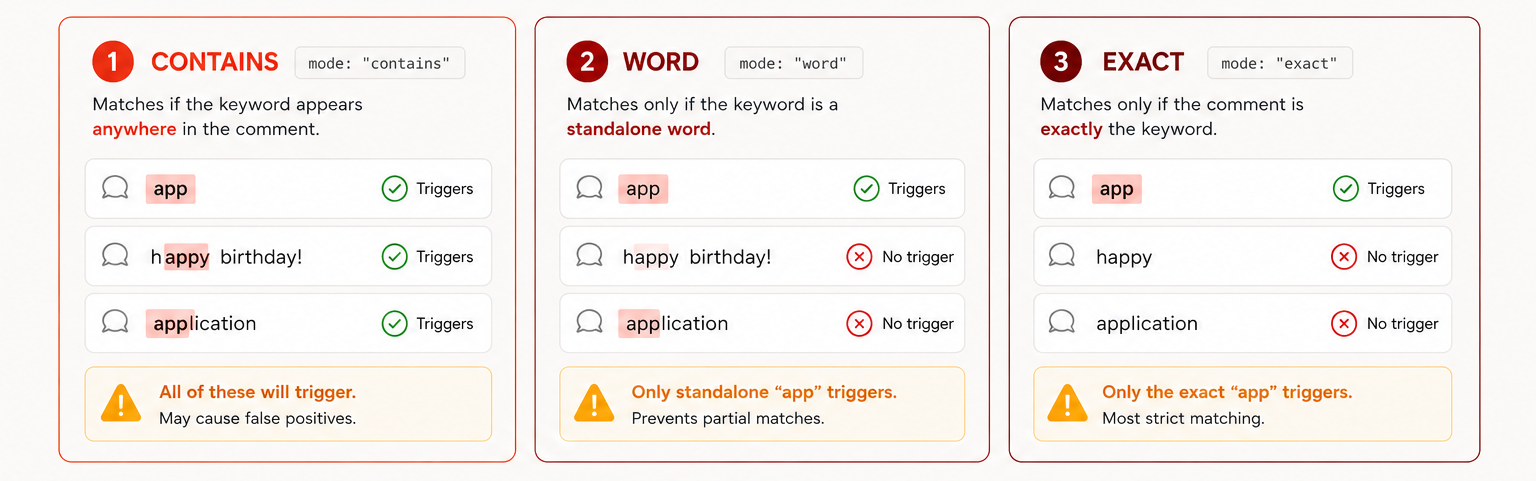
Default keyword matching is substring matching, which sounds fine until you set the keyword app and your automation starts DMing everyone who typed "happy birthday." I've seen this exact failure enough times that it's worth three modes instead of one:
matchMode | What it does | Reach for it when |
|---|---|---|
contains (default) | Matches anywhere, including inside other words | Broad campaigns with long, distinctive keywords |
word | Matches the keyword only as a standalone word | Almost every production setup |
exact | The whole comment has to equal the keyword | High-intent drops with one code word |
So here is an example of how the keyword match works:
Two fields do the rest of the cleanup. excludeKeywords blocks comments containing certain words, even if a trigger keyword also matches. This helps keep things like "not interested" or "how much" out of the same funnel. typoTolerance (word mode only) catches close misspellings: one edit for keywords 4–7 characters long, and two edits for 8+.
What else can trigger the DM besides a comment?
Comments are the default for Meta automation, and that's what companies usually build first. But there are two other paths worth considering.
Story replies. Set trigger: story_reply and the automation answers people who reply to your Instagram story with a keyword. Point platformPostId at a specific story media id, or leave it out and match replies to any story you post. Nobody in the creator-tool space has written meaningfully about this yet, which is odd given how much of Instagram's conversation volume sits in story replies.
Inbound DMs. Set alsoMatchInDms: true on a comment automation and the same keyword logic answers people who DM the word instead of commenting it. Deduplication runs per source, so someone who comments and DMs "GUIDE" gets one of each rather than two identical messages. This needs at least one keyword defined, and it doesn't apply to story-reply automations.
Then there's scope, which is the part agencies care about.
Per-post automations bind to a single platformPostId. One active per-post automation per post, no stacking.
Account-wide automations skip the post id entirely and evaluate every comment on every post on the account. You can stack as many of these as you want, each with its own keyword set, all running independently. A per-post automation takes priority on its own post.
That stacking behavior is the difference between running one funnel and running twelve. Most dashboard tools cap you well before twelve.
How do you stop the wrong people from getting the DM?
Say you're gating a lead magnet behind a follow. You want only followers to get the link and everyone else to get an invitation to follow first.
Three fields handle it, Instagram only:
audience.followerStatus:any,follower, ornon_followeraudience.minFollowerCount: skip accounts below a size thresholdaudience.whenUnknown:send,skip, orverify
That third field exists because of a quirk nobody documents properly. Instagram only reveals whether someone follows you if they've already messaged your account. For everyone else, follow status comes back as unknown, and unknown never means "no." It means Instagram won't say.
So whenUnknown decides the fallback. Set it to verify and the automation sends a one-tap confirmation DM (your followGate copy) and then delivers the real message automatically once they tap through. Nobody gets silently dropped and nobody gets the link for free.
A few smaller controls that matter more than they first sound:
dmDelaySecondsandcommentReplyDelaySecondsaccept anything from 0 to 86400 seconds, so you can set up the time delay for comment-to-dm automation. A DM that arrives in under a second reads as a bot to a human. Forty seconds reads as a person who was on their phone.dmMessageVariationsandcommentReplyVariationsrotate alternate copy at random, so a post with 400 triggers doesn't fill its comment section with 400 identical "sent!" replies.
And when something doesn't fire, GET /v1/comment-automations/{id}/logs returns a misses object: how many comments reached the automation and matched nothing, with recent samples. That's how you fix a keyword set instead of guessing at it. Log statuses include pending and gated, plus an audienceOutcome field (passed, blocked, gate_sent, gate_passed, gate_failed) and nextDueAt for anything sitting in the queue.
Stop building social integrations from scratch.
One API call to publish, schedule, and manage posts across 17 platforms.
What does the API call look like for comment-to-dm automation?
One POST creates the whole thing.
curl -X POST https://api.zernio.com/v1/comment-automations \
  -H "Authorization: Bearer $ZERNIO_API_KEY" \
  -H "Content-Type: application/json" \
  -d '{
    "profileId": "prof_8f2a91",
    "accountId": "acc_ig_4b91c7",
    "name": "Reel drop - pricing guide",
    "trigger": "comment",
    "platformPostId": "17912345678901234",
    "postId": "post_2c7d40",
    "keywords": ["guide", "send it"],
    "matchMode": "word",
    "excludeKeywords": ["not interested"],
    "typoTolerance": true,
    "alsoMatchInDms": true,
    "commentReply": "sent, check your DMs",
    "dmMessage": "Here is the pricing guide you asked for.",
    "buttons": [
      { "type": "url", "title": "Open the guide", "url": "https://example.com/guide" }
    ],
    "dmDelaySeconds": 40,
    "audience": {
      "followerStatus": "follower",
      "whenUnknown": "verify"
    },
    "followGate": {
      "message": "Follow first and tap below, I will send it right over.",
      "buttonLabel": "Done, send it"
    }
  }'
Instead of plain text, you can also send a template in the DM, that is usually an image with a title and buttons for a more dynamic experience. Get a full API reference to set up comments to DM automation.
Should you build comment-to-DM or buy Manychat?
Depends entirely on what you’re trying to achieve and what you’re building.
| You are | Use | Why |
|---|---|---|
| A creator running your own account | Manychat or a similar tool | You want a visual builder and templates, not a bearer token. Writing this yourself is a bad use of a week. |
| An agency running client accounts | An API, like Zernio | Per-contact billing scales with your clients' audience size, the one number you have no control over. |
| Building a product or an agent | An API, like Zernio | The automation has to live inside your UI, under your brand, in your database. |
Manychat is good at what it does and has been for years. The thing worth examining is the billing model, because it behaves differently than most people expect.
Manychat bills Active Contacts, which its pricing page defines as "a real person you interact with during a monthly billing period." One person equals one Active Contact for the month regardless of message volume. Here's the ladder, at annual billing rates as of August 2026:
| Plan | Price (annual) | Contacts included | Per extra contact |
|---|---|---|---|
| Free | $0 | 25 | n/a |
| Essential | $14/mo | 250 | $0.082 |
| Pro | $29/mo | 2,500 | $0.038 |
| Business | $69/mo | 7,500 | $0.018 |
| Advanced | $139/mo | 25,000 | $0.0028 |
Now run one viral reel through it. A reel that pulls 40,000 keyword comments in a week creates 40,000 Active Contacts. On Pro, that's 37,500 over the included allowance at $0.038 each, so roughly $1,425 on top of the $29. The automation worked perfectly. That's what makes it expensive.
Zernio social media API bills connected accounts instead. First two are free, then $6 each for accounts 3 through 10, $3 for accounts 11 through 100, and $1 from 101 up with no ceiling. A hundred client accounts costs $318 a month, and triggers on those accounts are unmetered. The same viral reel changes your Manychat bill and doesn't change your Zernio bill.
To be fair on one point: Manychat has an API. The distinction is what sits behind it. Theirs is an interface onto their product, so your automations live in their account structure and your users see their data model. Zernio is the Manychat alternative when you need a layer underneath, which is what you want when the feature has to appear inside your own app with your own branding.
Can an AI agent set these up for you?
Yes, and this is where the API framing pays off in a way a dashboard can't match.
Zernio runs a hosted MCP server at mcp.zernio.com covering every endpoint across 496 tools, exposed as a core set of roughly 50 with on-demand search for the rest so an agent's context window survives the introduction.
Point Claude Code at it and the workflow looks like this: "find my best-performing reel from last week and set up a comment automation on it with the keyword LINK." The agent pulls analytics, picks the post, calls the create endpoint, and reports back with the automation id. You didn't open a browser.
FAQs
Does comment-to-DM automation work on TikTok or LinkedIn?
No. Instagram and Facebook are the only platforms that expose a private-reply-to-comment API. Comments and DMs on other networks are handled as separate operations.
Is comment-to-DM automation against Instagram's rules?
No. It's an official Meta capability with published limits: one private reply per comment, a seven-day window to send it. Accounts get flagged for spammy content, not for automating.
What's the best Manychat alternative for developers?
Zernio, if what you need is comment-to-DM as an API rather than as a product. Manychat is built for a creator running their own account: visual flow builder, templates, a dashboard you log into. Developers embedding the same mechanic inside their own app need the layer underneath that, where the automation is a POST /v1/comment-automations call against any connected Instagram or Facebook account and the UI is yours.
Is there a free comment-to-DM automation?
Depends what "free" has to cover. Manychat's free plan gives you 25 Active Contacts a month and puts "Powered by Manychat" on the first message you send anyone. Zernio's first two connected social channels are free, with no extra cost per post, comment or DM. So a post that pulls 30,000 keyword comments costs the same as one that pulls three.
Can I run comment-to-DM across multiple client accounts?
Yes, and this is where per-account pricing separates from per-contact pricing. Account-wide automations stack with independent keyword sets and run in parallel on the same account, while a per-post automation takes priority on its own post. On Zernio, 40 client accounts runs $138 a month with unlimited comment-to-DM automation on all of them.