You integrate Claude with Meta Ads by connecting it to a Model Context Protocol (MCP) server or a CLI that wraps the Meta Marketing API. Once connected, Claude can create, edit, pause, and analyze Facebook and Instagram campaigns in plain language.
To do that, you have three routes: Meta's official Ads CLI and MCP server, a third-party ad MCP server, or a unified social API like Zernio that covers Meta ads plus seven other ad platforms and organic posting in one integration.
If you build AI marketing tools, run an agency, or wire agents into ad ops, you already know the real bottleneck. Claude writes the ad copy in seconds. Getting that instruction to actually launch a Meta campaign, with auth, pagination, rate limits, and App Review in the way, is the slow part.
This guide covers all three integration methods, walks through Meta's new Ads CLI command by command, and shows where a single-platform ad tool stops being enough.
Give your agent Meta ads plus the full social layer with Zernio's Ads API →
What does it mean to integrate Claude with Meta Ads?
Claude has no built-in access to your ad account. Integration means giving it a tool interface, an MCP server or a CLI, that turns its instructions into Meta Marketing API calls. Claude decides what to do; the tool does it.
MCP is the Model Context Protocol, an open standard Anthropic released in late 2024 that lets AI assistants connect to external tools and data. For ads, an MCP server exposes actions like "create campaign" or "get insights" as tools Claude can call during a conversation.
There are two ways people actually use this, and they're worth separating. The first is conversational management: you chat with Claude Desktop and ask it to check performance or bump a budget. The second is agentic automation: Claude Code or an autonomous agent runs unattended, pausing losers and scaling winners on a schedule. The difference is whether a human is in the loop on every action or only at approval points.
What are the three ways to connect Claude to Meta Ads?
There are three practical routes, and they trade setup effort against how much of your social operation they actually cover.
| Method | Setup | Platform coverage | Write actions | Best for |
|---|---|---|---|---|
| Meta's official Ads CLI + MCP | Python 3.12+, Marketing API access, App Review for full quota | Meta only (Facebook + Instagram) | Almost full lifecycle, campaigns created PAUSED by default | Meta-only teams comfortable with a terminal and dev setup |
| Third-party ad MCP servers | Managed OAuth, minutes | Meta plus a few ad networks (varies by vendor) | Varies, many are read-only or draft-first | Reporting and quick single-platform tests |
| Zernio (unified social ads API) | One bearer token, one MCP server | Meta plus 7 other ad platforms | Boost organic posts, create standalone ads, campaigns, audiences, analytics | Products and agents that need ads and organic in one integration |
Meta's first-party tools give you the deepest Meta-specific control. Third-party servers get you connected fast, though many focus on pulling reports rather than launching campaigns. Zernio covers the widest surface: paid and organic, across platforms, through one API.
How do you set up Meta's official Ads CLI with Claude?
Meta shipped its official Ads CLI and Ads MCP server on April 29, 2026. The CLI packages the Meta Marketing API into one installable tool with predictable commands, which is exactly what makes it usable by an agent instead of hand-written code.
It's distributed as a Python package and needs Python 3.12 or higher, installable via pip or uv.
How Claude uses the CLI
Claude Code or an agent shells out to meta ads commands and reads the output. The CLI supports three output formats: table for humans, json to pipe into tools, and plain for tab-separated parsing. Standard exit codes let an agent recover cleanly: 0 for success, 3 for auth errors, 4 for API and rate-limit errors.
The command walkthrough
A full campaign build runs through five steps. Everything is created PAUSED by default. This is both a limitation and a good signal from Meta. On one hand, your agent doesn't have an entire automation flow to create, launch, pause, stop, and optimize campaigns programmatically. On the other hand, your campaigns don't spend until you activate them manually.
# Create a campaign with 50.00 budget (currency specified on ad account)
meta ads campaign create --name "Summer Sale" --objective OUTCOME_SALES --daily-budget 5000

# Create a corresponding adset
meta ads adset create CAMPAIGN_ID --name "My Ad Set" \
  --optimization-goal LINK_CLICKS --billing-event IMPRESSIONS \
  --bid-amount 500 --targeting-countries US

# Create a creative with an image and CTA
meta ads creative create --name "Hero Banner" \
  --page-id 111222333 --image ./banner.jpg \
  --body "50% off everything!" --title "Shop Now" \
  --link-url https://example.com/sale --call-to-action SHOP_NOW

# Connect campaigns and creative together
meta ads ad create ADSET_ID --name "Hero Banner Ad" --creative-id CREATIVE_ID

# Go live
meta ads campaign update CAMPAIGN_ID --status ACTIVE
meta ads adset update ADSET_ID --status ACTIVE
meta ads ad update AD_ID --status ACTIVE
Where the CLI fits, and where it stops
Meta's CLI is the right call for Meta-only, terminal-native ad workflows, including CI/CD pipelines. The honest limits matter though.
It's Meta only. It needs Marketing API access, and standard quota requires App Review, which typically takes 3 to 7 business days. It inherits Marketing API rate limits and returns exit code 4 when it hits them. And it does nothing for organic posting or any other ad network.
So the CLI answers one question well: how do I create Meta ads from a terminal. It doesn't answer the bigger one: how does my agent run all my paid and organic social media fully automated?
What is Zernio and how does it handle Meta Ads?
Zernio is a unified social media API for developers and AI agents. One integration covers 15 platforms for organic posting and 8 ad platforms, including Meta, through a single bearer token. The Ads API manages the full ad lifecycle, so an agent gets more than just campaign creation.
Here's what Claude can do with Meta ads through Zernio's Ads API:
| Ad capability | What it does |
|---|---|
| Boost posts | Promote an existing organic Facebook or Instagram post as an ad |
| Standalone ads | Build a net-new ad from scratch |
| Campaign management | Create, update, duplicate, and change status on campaigns and ad sets |
| Ad audiences | Create and sync custom audiences for targeting |
| Ad analytics | Pull spend, impressions, CTR, ROAS, and campaign-level performance |
| Conversions tracking | Set up conversion destinations and send conversion events (CAPI) |
| Lead forms | Create and manage lead-generation forms and pull the leads |
| Click-to-WhatsApp ads | Launch ads that open a WhatsApp conversation |
The same API reaches Meta, Google, TikTok, LinkedIn, Pinterest, X, and ChatGPT. So the agent you wire up for Meta ads already works for the other seven ad platforms and for organic posting, without a second integration.
Because posts go through official Meta Ads APIs, end-users never see Zernio in the OAuth flow.
Stop building social integrations from scratch.
One API call to publish, schedule, and manage posts across 16 platforms.
How do you connect Claude to Meta Ads with Zernio?
Zernio ships a hosted MCP server with 280+ tools, so Claude can call the Ads API in plain language to boost posts, create standalone ads, manage campaigns, sync audiences, and pull ad analytics. You don't self-host anything: the server lives at a hosted endpoint and works with Claude Desktop, Cursor, Claude Code, and any MCP-compatible client.
The chain stays simple: Claude calls a tool on Zernio's MCP server, Zernio calls the official Meta Marketing API, and the campaign gets created. Claude never touches Meta's API directly.
Setup in four steps
-
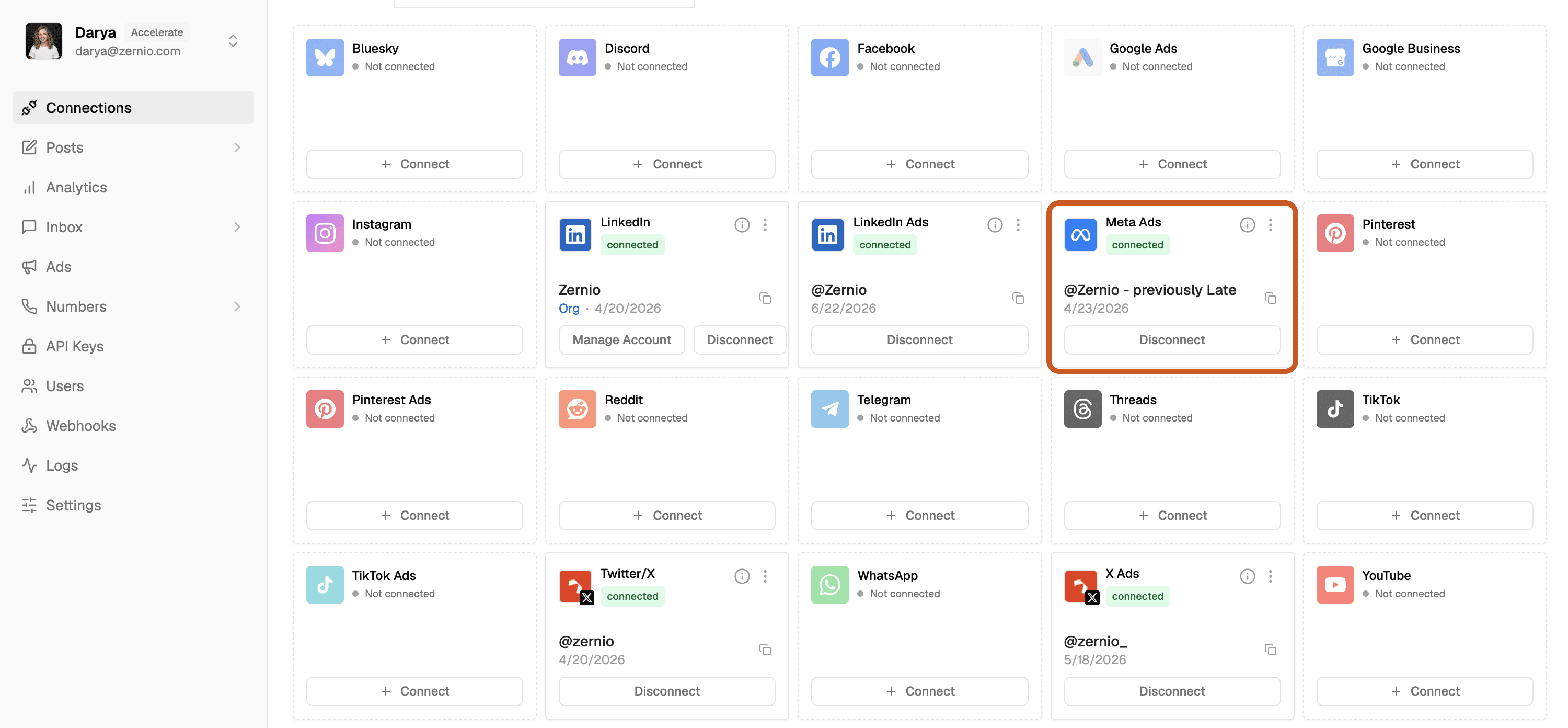
Create a Zernio account and connect your Meta ad account through OAuth-as-a-service. You don't build or submit your own Meta developer app.
-
Add Zernio's MCP server to Claude Desktop, Cursor, or Claude Code.
-
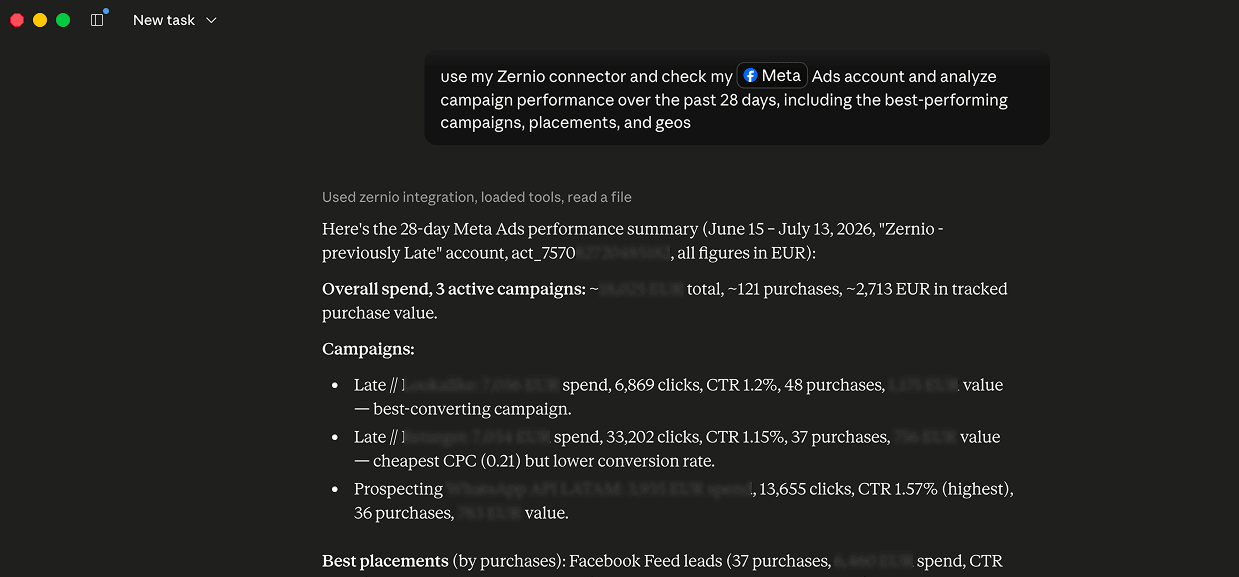
Ask Claude in plain language, for example: "Boost my top Instagram post from last week with $50 over three days." Or start with the performance report.
-
Claude calls the relevant Zernio Ads tool, Zernio calls the Meta Marketing API, and the ad goes live.
Prefer the terminal? Zernio ships a CLI with structured JSON output that agents can parse the same way they use Meta's CLI, except it spans every platform Zernio supports.
npm install -g @zernio/cliZernio's Ads API covers the full ad lifecycle: boosting organic posts, creating standalone ads, campaign and ad set management, ad audiences, conversions tracking, lead forms, and click-to-WhatsApp ads. It reaches Meta, Google, TikTok, LinkedIn, Pinterest, X, and ChatGPT through one bearer token.
Meta's Ads CLI vs Zernio: which should you use?
Use the tool that matches how much of your operation the agent needs to touch.
Use Meta's official CLI or MCP if you only run Meta ads, you're comfortable with the developer setup and App Review, and you don't need organic posting or other ad networks. For a Meta-only shop, the first-party tool gives you the deepest control with no middle layer.
Use Zernio if your product or agent needs Meta ads plus the organic loop, publish, measure, then promote the winner, and if you want other ad platforms through one integration. This is where a single-network ad tool leaves you stitching together separate integrations for posting, analytics, and each additional network.
How much does each option cost?
Both methods are free to start.
Meta's official CLI and MCP server are free first-party tools. You don't pay Meta to use them. What you do need is Marketing API access, and reaching standard quota means going through App Review. Beyond that, your only cost is the ad spend itself. The catch is scope: the tools only touch Meta, so covering other ad networks or organic posting means adding and paying for separate tools on top.
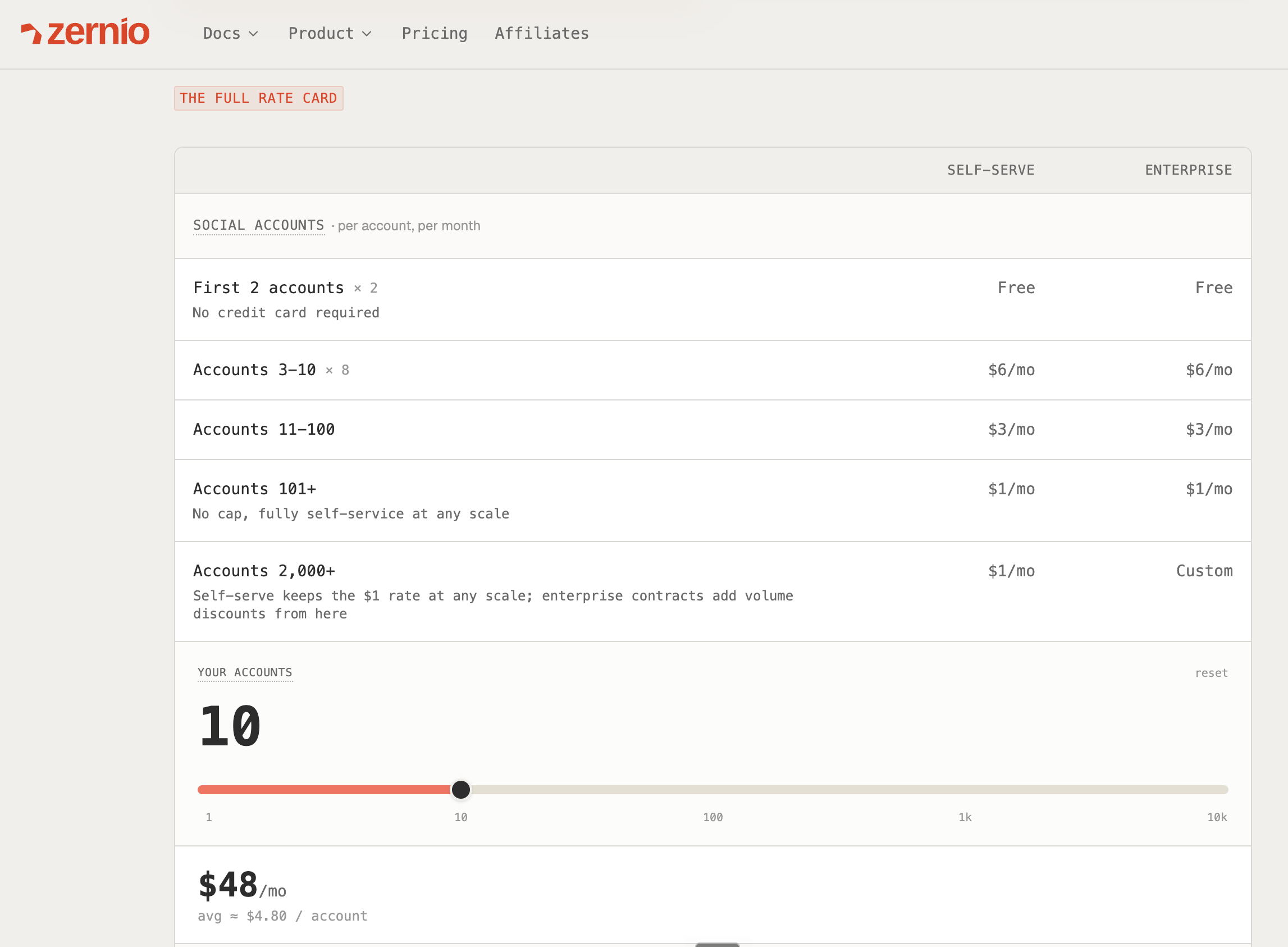
Zernio uses pay-per-account pricing with every feature included from the first account, ads among them. The first two ad accounts are free, then the per-account rate drops as you grow.
What can Claude actually do with Meta Ads once connected?
Once Claude has a tool bridge to your ad account, a few use cases become routine.
Auto-boost the best organic post. Claude reads engagement from the analytics API, finds last week's top performer, and boosts it with a set budget. This closes the publish-measure-promote loop without a human touching the dashboard.
Stop and scale on performance. Claude pauses ad sets under a ROAS threshold and raises budgets on winners. Rapid changes can trip abuse detection.
Launch from a brief, hold for approval. Claude turns a short brief into a creative and campaign, left PAUSED so a person approves before the spend starts.
Report on a schedule. Claude pulls a weekly performance summary through the Ads and Analytics APIs and drops it wherever your team reads updates.
Frequently asked questions
Can Claude create and launch Meta ad campaigns on its own?
Yes, through an MCP server or CLI that wraps the Meta Marketing API. New campaigns default to PAUSED, so a human can approve before any budget is spent.
Do I need a Meta developer app to connect Claude to Meta Ads?
Meta's official CLI needs Marketing API access, and standard quota requires App Review. Zernio's OAuth-as-a-service connects your ad account without you building your own developer app.
What's the difference between the Meta Ads MCP and the Meta Ads CLI?
The MCP server is a hosted endpoint for chat and desktop agents like Claude Desktop. The CLI is a terminal tool that agents shell out to. Both call the same Meta Marketing API underneath.
Can Claude manage ads on platforms other than Meta?
Not with Meta's own tools, which are Meta only. Zernio's unified Ads API covers Meta, Google, TikTok, LinkedIn, Pinterest, X, and ChatGPT through one integration.
Is it safe to automate Meta Ads with Claude?
Yes, within limits. Respect Meta's rate limits, such as 4 budget changes per ad set per hour, keep human approval for going live, and avoid rapid bulk changes that can trigger abuse detection.