Imagine you run a business that handles customer conversations through the WhatsApp Business app. As your customer base grows, you need an API to automate replies, assign conversations to team members, and integrate WhatsApp messaging into your application.
Traditionally, using the WhatsApp Cloud API meant you could no longer use the same phone number with the WhatsApp Business app. WhatsApp Coexistence changes that. It allows you to use both with the same number while keeping your chats and contacts synchronised across them.
In this guide, you will learn how WhatsApp Coexistence works, how to set it up, how it differs from the standard WhatsApp Cloud API setup, and how to fix common onboarding errors. You will also learn how to integrate WhatsApp Coexistence into your applications using the Zernio API.
How does WhatsApp Coexistence work?
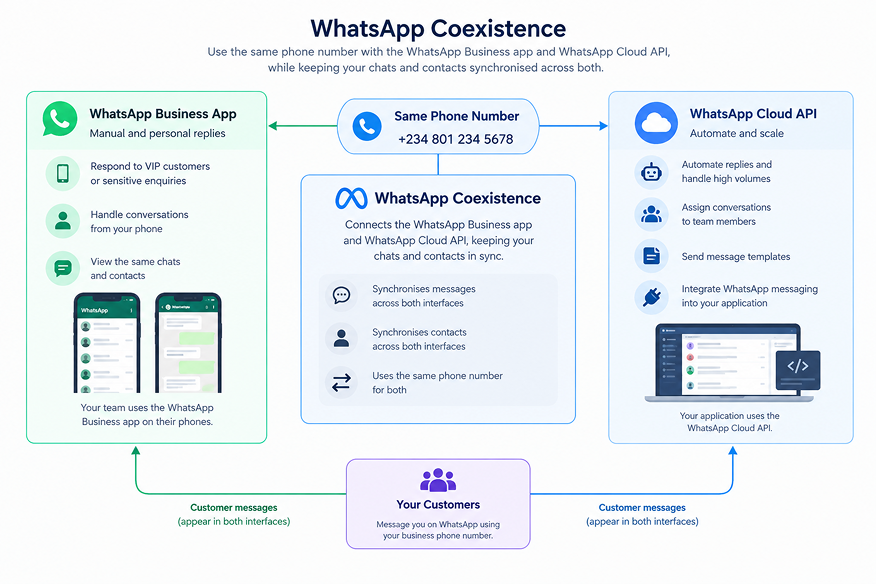
WhatsApp Coexistence is a Meta feature that allows businesses to send and receive messages using the same phone number through the WhatsApp Business app and the WhatsApp Cloud API.
For example, a business can use the Cloud API to handle a high volume of customer enquiries, assign conversations to team members, and send message templates. At the same time, its staff can use the WhatsApp Business app on their phones to respond personally to high-value customers or handle conversations that need a human touch.
WhatsApp Coexistence must be configured through Meta's Embedded Signup flow. Before integrating it into your application, you must meet the relevant technical requirements. Your customers must also meet the eligibility requirements and complete the necessary onboarding steps to connect their WhatsApp Business accounts.
Requirements for setting up WhatsApp Coexistence
To integrate WhatsApp Coexistence into your application, you must meet Meta's technical requirements. Your business customers must also meet specific eligibility criteria to access WhatsApp Coexistence through your application.
Your application requirements are:
- Become a Meta Solution Partner or Tech Provider with a verified Meta app, the WhatsApp use case, and a connected business portfolio.
- Implement Embedded Signup with session logging.
- Integrate the WhatsApp Cloud API into your application to send and receive messages and make calls.
- Configure your webhook callback to receive and process required events.
Your customers must complete the following checklist before connecting their WhatsApp Business accounts through Embedded Signup:
- Use an updated WhatsApp Business app running version 2.24.17 or later.
- Have an active WhatsApp Business number registered in the WhatsApp Business app.
- Do not have an Official Business Account associated with the phone number.
- Disconnect from any previous provider if the existing connection prevents Coexistence onboarding.
- Turn off the two-step verification PIN before onboarding. If required, re-enable it after setup.
Once your application and your customers meet the applicable requirements, you can proceed with the Embedded Signup flow to onboard eligible WhatsApp Business accounts for Coexistence.
How to set up WhatsApp Coexistence
In this section, you will learn how to onboard WhatsApp Business app users for WhatsApp Coexistence in your application.
Before you proceed, ensure you have integrated Meta's Embedded Signup flow into your application with the required permissions.
Common permissions include:
whatsapp_business_management: Allows your application to manage WhatsApp Business account settings and message templates.whatsapp_business_messaging: Allows your application to send and receive messages through the WhatsApp Cloud API.whatsapp_business_manage_events: Supports access to relevant business messaging events where required by your integration.
Once your application is configured, your business customers can complete the following steps to connect their existing WhatsApp Business accounts.
Step 1: Select the existing WhatsApp Business account
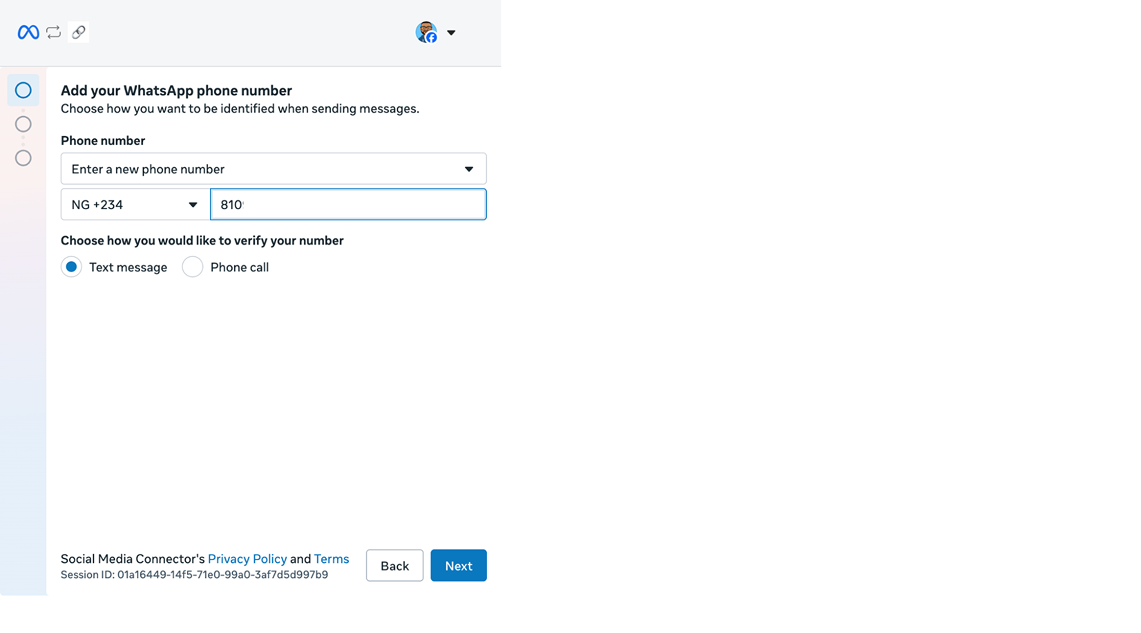
When a business customer launches Embedded Signup, they must select the appropriate Meta business portfolio and WhatsApp Business Account, then enter the phone number they already use with the WhatsApp Business app to begin the Coexistence onboarding process.
Step 2: Scan the QR code
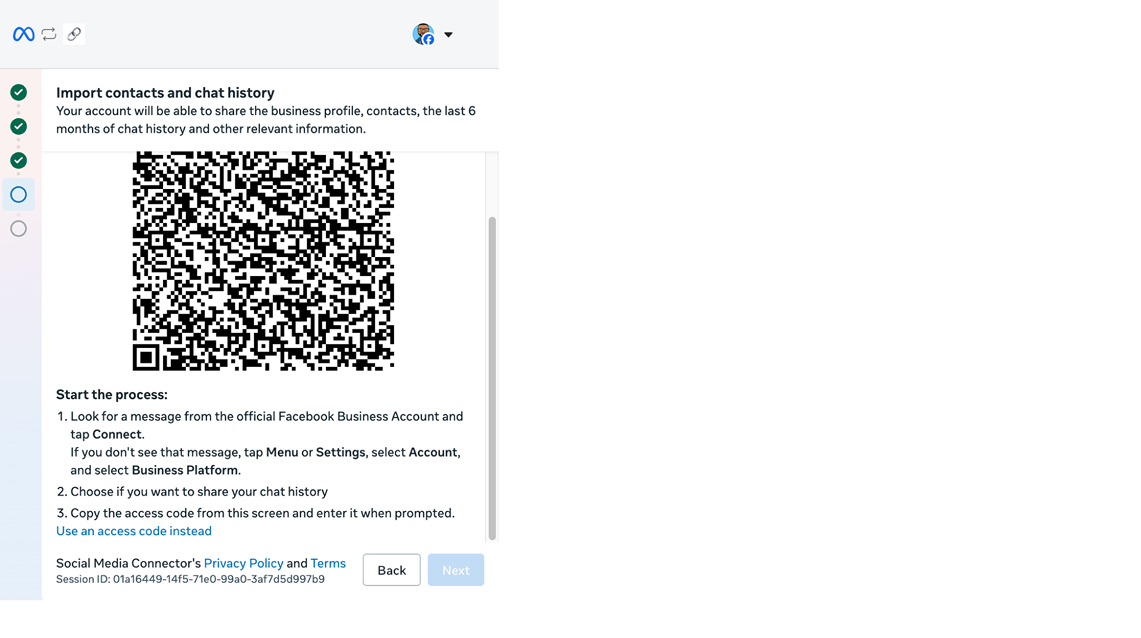
After the customer enters their existing phone number, Meta displays a QR code. The customer must scan it using their WhatsApp Business app to link the account and authorise the requested data synchronisation.
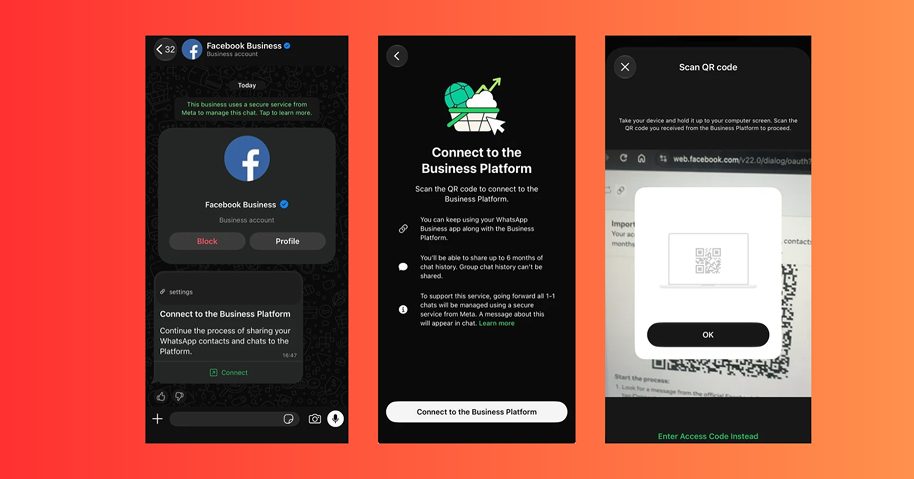
Meta sends an automated message prompting the customer to connect their WhatsApp Business app or navigate to Settings → Linked devices.
Step 3: Confirm the connection in WhatsApp Business
After scanning the QR code and completing the required prompts, the customer receives confirmation in the WhatsApp Business app that their account is connected to the WhatsApp Business Platform.
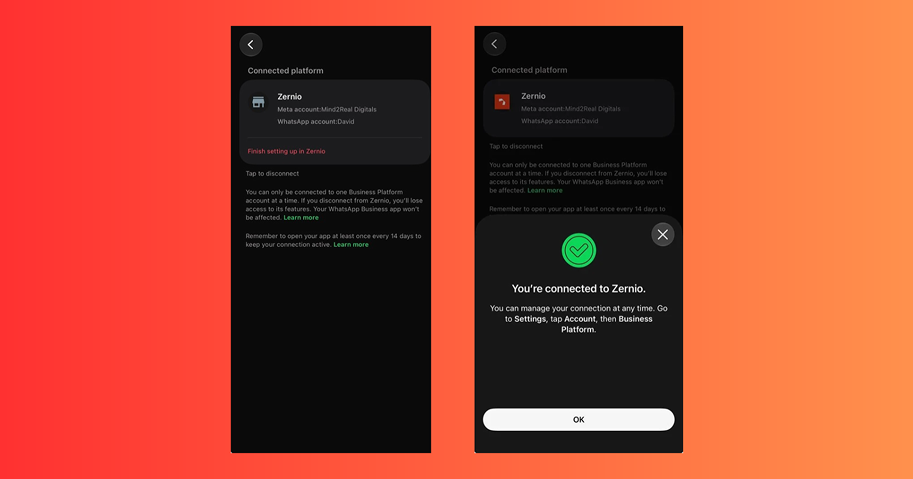
Step 4: Complete Embedded Signup
Once the customer completes the remaining onboarding steps, Embedded Signup returns the identifiers your application needs to work with, including:
waba_id: The WhatsApp Business Account ID.business_id: The Meta business portfolio ID.phone_number_id: The ID of the connected phone number.
Store and use these identifiers as required by your integration to configure the customer's WhatsApp messaging capabilities.
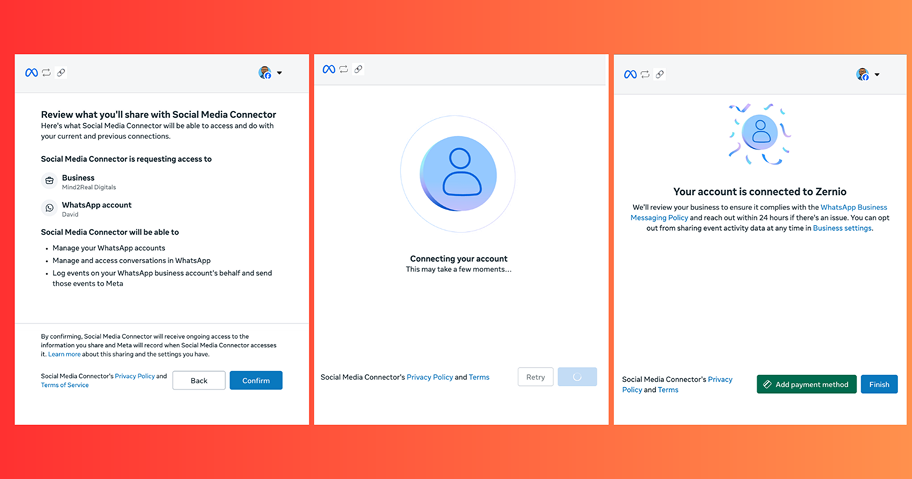
What to know about WhatsApp Coexistence
Before deploying WhatsApp Coexistence, inform your business customers of the following.
- Open the WhatsApp Business app at least once every 14 days to maintain the Coexistence connection.
- Onboarding may unlink existing companion devices, which customers may need to link again.
- When a customer messages the business, a 24-hour customer service window opens, allowing free-form replies during that period.
- You must give up WhatsApp Coexistence to obtain the green checkmark for an Official Business Account.
- Phone numbers using both the WhatsApp Business app and Cloud API have a fixed messaging throughput of 20 messages per second.
- Messages sent through the WhatsApp Business app remain free, while messages sent through the Cloud API are subject to Meta's Cloud API pricing.
WhatsApp Coexistence vs Cloud API
The WhatsApp Cloud API enables programmatic messaging and automation, while Coexistence lets businesses use the API alongside the WhatsApp Business app without giving up its everyday features. Cloud API limitations do not necessarily disable features in the WhatsApp Business app.
The table below compares their capabilities, supported features, and key limitations.
| Feature | WhatsApp Coexistence | WhatsApp Cloud API |
|---|---|---|
| Individual chats | Supports messaging through the WhatsApp Business app, with messages mirrored to the API | Supports programmatic messaging through the API |
| Message history | Eligible one-to-one chat history from up to 6 months can be synchronised during onboarding | Receives synced history and mirrored messages through Coexistence |
| Contacts | Contacts can be synchronised | Contact synchronisation is available through Coexistence |
| Group chats | Available in the WhatsApp Business app | Not supported |
| Disappearing messages | Disabled for individual chats | Not supported |
| View once messages | Disabled for individual chats | Not supported |
| Live location | Disabled for individual chats | Not supported |
| Broadcast lists | Disabled; existing lists become read-only | Cannot create new broadcast lists |
| Voice and video calls | Available in the WhatsApp Business app | Not supported |
| Business tools, such as catalogues and orders | Remain available in the app | Not supported through the Cloud API |
| Messaging tools, such as greeting messages, away messages and quick replies | Remain available in the app | Not supported through the Cloud API |
| Business profile | Remains available in the app | Not supported through the Cloud API |
| Channels | Remain available in the app | Not supported through the Cloud API |
Stop building social integrations from scratch.
One API call to publish, schedule, and manage posts across 16 platforms.
Common errors during WhatsApp Coexistence onboarding
During WhatsApp Coexistence onboarding, you may encounter errors that prevent a business from connecting its WhatsApp Business account. These errors can result from existing account connections, permission issues, Meta restrictions, or message synchronisation problems. The table below explains what each error means and how to resolve it.
| Error code | Error message | What it means | How to resolve it |
|---|---|---|---|
| #2494064 | Already registered to a WhatsApp account | Either it's an Official Business Account, or the number is still tied to an old WABA or Page, often via an agency | Contact Meta Support or the party managing the existing account connection. |
| #2655093 | Already shared with a partner | Leftover connection from a previous provider, even when your settings show none | Disconnect the previous provider or contact the provider for help. |
| #3441038 | No permission | The number is attached to an old WABA that is pending deletion | Wait for the deletion process to finish, or contact Meta Support. |
| #3441061 | Linked to automatic events | Click-to-WhatsApp ads created automatic lists on the number | Check Business tools → Lists. |
| #2655115 | Error on the API path | You picked the wrong onboarding branch. Start again in the Coexistence one | Restart onboarding and select the WhatsApp Coexistence flow. |
| #4563004 | Resource limit | Meta has temporarily limited the pairing attempt | Wait, unlink unused companion devices, and retry. |
| #131037 | Message rejected | The display name is still under review | Wait for Meta to review the display name. |
| #131031 / #141010 | Account locked / Not verified | The account is restricted or requires verification | Check the account status and contact Meta Business Support if needed. |
| #2593109 | Messaging history sharing is turned off by the business | History sharing was declined during onboarding, so past messages will not be synchronised | Restart Coexistence onboarding and enable history sharing when prompted. |
| #131060 | This message is unavailable | The message failed to synchronise to the API because it came from an unsupported companion device, such as WhatsApp for Windows or WhatsApp for WearOS | Switch to a supported device or check the primary phone and refresh the integration. |
Zernio API: WhatsApp Coexistence made easy
Zernio is marketing infrastructure for products and AI agents. It supports WhatsApp Coexistence for businesses and developers through a unified API for managing WhatsApp communications at scale. Businesses can also connect their existing WhatsApp Business accounts and enable Coexistence directly from the Zernio dashboard.
Zernio provides a single API endpoint for Embedded Signup, reliable webhooks for incoming and outgoing messages, and built-in event verification, deduplication, and automatic retries. It also supports international phone number purchase and verification, with no additional platform fees on top of WhatsApp's per-message charges.
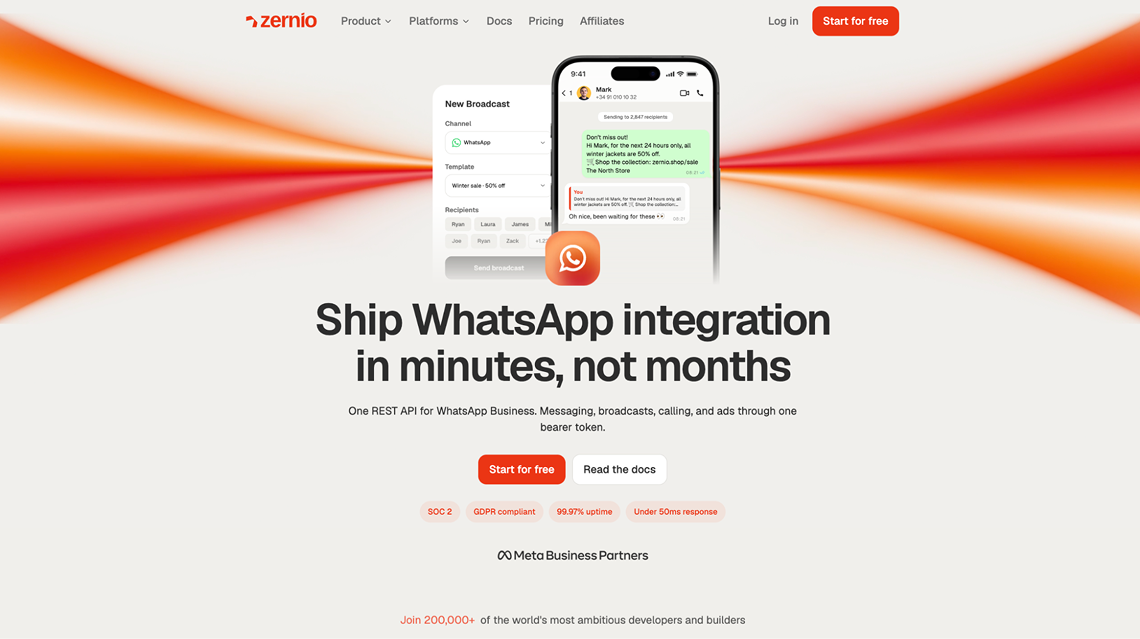
What Zernio offers
1. Managed WhatsApp integration
Zernio handles much of the infrastructure required to integrate WhatsApp, including Meta app setup and review requirements, Embedded Signup, token management, and webhooks. It acts as an abstraction layer over Meta's infrastructure, reducing the technical work required to integrate WhatsApp Coexistence and API messaging into your application.
2. Supports the Embedded Signup flow
Zernio provides a single API endpoint for integrating Meta's Embedded Signup flow into your products without requiring the Facebook JavaScript SDK. Its WhatsApp API documentation covers both Cloud API onboarding and WhatsApp Coexistence, so businesses can connect new numbers or keep using their existing WhatsApp Business app with the API.
3. Supports message templates, broadcasts and history sync
Zernio supports WhatsApp message templates, broadcasts, contact management, and message history synchronisation through its platform and API endpoints. Businesses can send free-form replies within the 24-hour customer service window or use approved message templates for notifications, reminders, and other messages outside that window. Eligible chat history is also synchronised during WhatsApp Coexistence onboarding.
4. Phone number purchase and verification
Zernio supports phone number purchase and verification across 55 countries, with prices starting at $3 per month, depending on the country. Numbers purchased or ported through Zernio are pre-verified for Embedded Signup and support SMS and voice calls.
5. Reliable webhook delivery
Zernio provides reliable webhooks for incoming and outgoing messages, with built-in event verification, deduplication, and automatic retries. Developers can create webhook endpoints to receive messaging notifications and respond to lifecycle events, such as changes in message status. Zernio attempts to deliver each event up to 7 times, including the initial attempt. If all attempts fail, the event moves to a dead-letter queue and automatic retries stop.
6. Zero markup on WhatsApp fees
Zernio does not add a markup to Meta's WhatsApp messaging fees. Its own outbound message meter is generous: the first 10,000 messages each month are free, then $1 per 10,000 messages. You also get WhatsApp broadcasts, sequences, flows, the unified inbox, and the MCP server on both free and paid plans.
7. Unified inbox across multiple channels
Zernio offers a unified inbox for managing DMs, comments, reviews, and replies across channels including WhatsApp, SMS, iMessage, Facebook, Instagram, LinkedIn, Threads, YouTube, Telegram, X, TikTok, Bluesky, Reddit, Slack, and Google Business Profile. Its inbox API allows developers to integrate messaging into their SaaS products and automate conversations using AI agents.
8. AI agent integration
Zernio offers a hosted MCP server that connects compatible AI agents to your accounts through a unified interface. Agents can publish and schedule text, image, and video content across supported platforms, retrieve post and account analytics, automate DMs and comments, interact with customers through voice agents, and create or manage advertising campaigns across supported ad networks. The Zernio MCP server supports AI tools such as Grok Bot, Claude Code, Meta Muse, Codex, and other compatible clients.
How to set up WhatsApp Coexistence with Zernio
In this section, you will learn how to set up WhatsApp Coexistence by connecting your existing WhatsApp Business app to the Cloud API through Zernio.
Step 1: Log in and connect your WhatsApp Business account
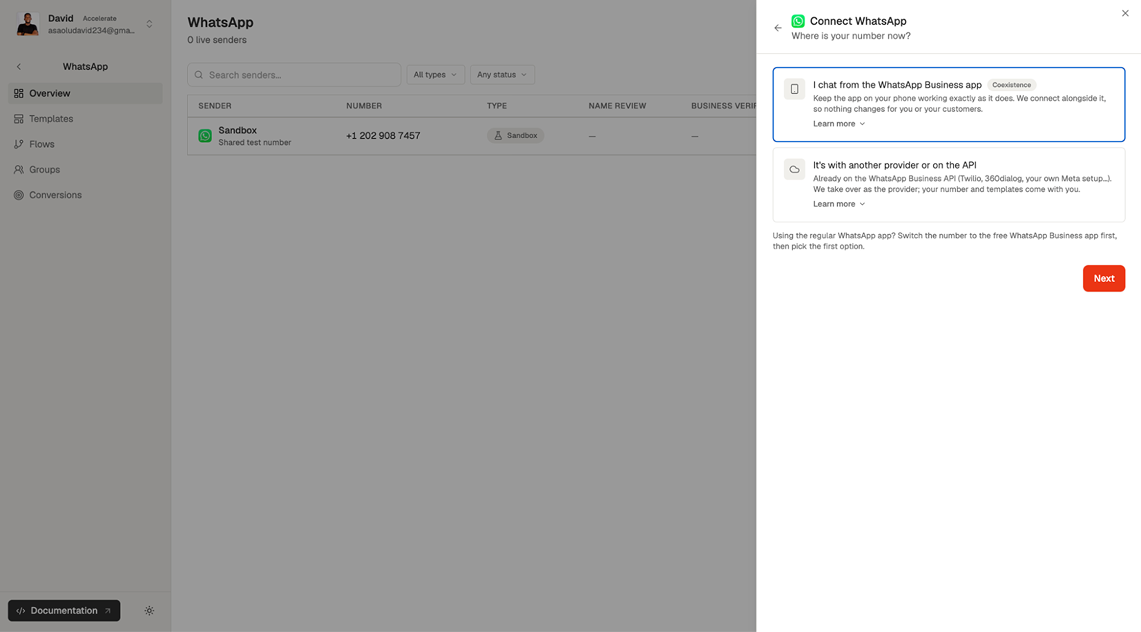
Create a Zernio account or log in to your existing account. Select WhatsApp from the sidebar menu to connect your existing WhatsApp Business phone number or purchase a new number through Zernio.
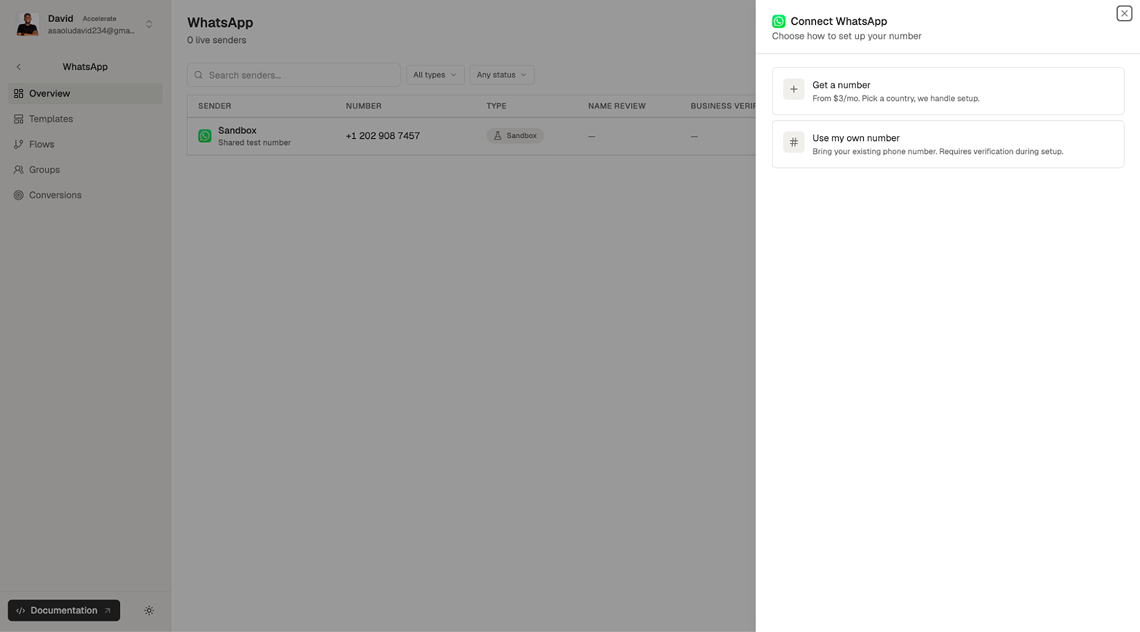
Step 2: Select WhatsApp Coexistence
Select "I chat from the WhatsApp Business app" to connect your existing account using Coexistence. Zernio also supports phone numbers already connected to the WhatsApp Business API through another provider and takes over as your provider.
Step 3: Onboard your WhatsApp Business phone number
Click Continue to WhatsApp setup to start onboarding. Zernio redirects you to Meta to connect and authorise your WhatsApp Business number for Coexistence.
Once complete, you can send messages through both the WhatsApp Business app and the Cloud API via Zernio.
Zernio also offers comprehensive documentation for developers who want to integrate WhatsApp Coexistence into their applications without building the entire Meta Embedded Signup, verification, and approval process themselves.
Summary: WhatsApp Coexistence explained
WhatsApp Coexistence helps businesses use the same phone number with the WhatsApp Business app and the WhatsApp Cloud API, enabling them to automate customer replies, manage conversations at scale, and integrate WhatsApp messaging into their applications while retaining access to the Business app's features.
Setting up WhatsApp Coexistence requires Meta's Embedded Signup flow, the appropriate permissions, and a WhatsApp Business account. Developers must also meet technical requirements, including session logging and reliable webhook delivery. Managing these requirements alongside Meta's onboarding and approval processes can be time-consuming. This is why you should choose Zernio.
Zernio offers a unified API that handles much of the integration work for you. It supports Embedded Signup, reliable webhook delivery with automatic retries, message template creation and management, and contact and chat history synchronisation. Its hosted MCP server also connects compatible AI agents to your accounts, helping businesses automate messaging and customer interactions.
FAQs
What is WhatsApp Coexistence?
WhatsApp Coexistence is a Meta feature that allows businesses to use the same phone number with the WhatsApp Business app and the WhatsApp Cloud API. It lets teams continue using the Business app while integrating API-based messaging and automation.
What are the requirements for WhatsApp Coexistence?
Application requirements: You must be a Meta Solution Partner or Tech Provider with a verified Meta app, the WhatsApp use case, and a connected business portfolio. Your application must implement Embedded Signup with session logging, integrate the WhatsApp Cloud API, and configure webhooks.
Customer requirements: Customers must use WhatsApp Business app version 2.24.17 or later with an active phone number, have no Official Business Account associated with that number, disconnect any previous provider if required, and turn off two-step verification before onboarding.
How do I set up WhatsApp Coexistence?
Complete Meta's Embedded Signup process, select your existing WhatsApp Business account and phone number, scan the QR code using the WhatsApp Business app, and follow the authorisation steps.
With Zernio, businesses can set up WhatsApp Coexistence by connecting an existing WhatsApp Business number through the dashboard. Developers can also use Zernio's API and documentation to integrate the onboarding process into their own applications.
Does WhatsApp Coexistence synchronise chat history?
Yes. Chat history from up to 6 months is synchronised during onboarding, provided the business enables history sharing and completes the required steps.
What should I know before using WhatsApp Coexistence?
Keep the WhatsApp Business app active by opening it at least once every 14 days. Onboarding may unlink existing companion devices, which you may need to reconnect. Customer messages open a 24-hour service window for free-form replies. Messaging throughput is limited to 20 messages per second, and you must give up Coexistence to obtain the Official Business Account green checkmark. Messages sent through the WhatsApp Business app remain free, while Cloud API messages follow Meta's pricing.
What are the limitations of WhatsApp Coexistence?
WhatsApp Coexistence supports messaging through the WhatsApp Business app, with messages mirrored to the API, one-to-one chat history synchronisation for up to 6 months, and contact synchronisation. However, some features are restricted, including disappearing messages, view-once media, and live location sharing, which are disabled in individual chats. Broadcast lists become read-only, while other WhatsApp Business app features remain available.
What permissions are required for WhatsApp Coexistence?
The relevant permissions depend on your integration. Common permissions include whatsapp_business_management for managing WhatsApp Business account settings and templates, whatsapp_business_messaging for sending and receiving messages, and whatsapp_business_manage_events for relevant messaging events where required.
Why is my WhatsApp Coexistence onboarding failing?
Common causes include an existing provider connection, an ineligible account, missing permissions, a pending WhatsApp Business Account deletion, resource limits, or disabled chat history sharing. Check the error code and message to identify the cause, then follow the relevant resolution steps.
Can I automate WhatsApp messages using AI agents?
Yes. Zernio's hosted MCP server connects AI agents to WhatsApp to manage messages and customer interactions. Its built-in visual workflow builder also lets you build chatbots and set up automatic replies across multiple messaging platforms.