Today we're launching creator campaigns on the Zernio API. If you're building a clipping, UGC or creator marketing product, you can now run the whole campaign through the same API you already use to publish and measure posts.
You invite creators, Zernio reads every post's views straight from the platforms' APIs, scores each post's authenticity, and you pay everyone with one card charge. Pay creators on views, store sales, retainers or ad results, and run the best posts as Meta or TikTok ads.
Until now, that stack meant a marketplace you don't control or a spreadsheet full of screenshots and invoice management per creator. Now your product and your creators run on one integration.
Built for clipping, UGC and creator products
Creator campaigns pay people for posts that perform. Use them to build:
- Post performance tracking and reporting inside your own product, with Zernio as the API that reads verified views and engagement for every creator post
- A clipping marketplace for your niche, with your own brand, rates and creator pool
- An "earn from clips" tab inside an AI clipping or video editing tool
- A UGC platform that pays per verified view instead of per video
- An agency dashboard that runs campaigns for many clients
- A brand's own creator program, inside its app or community
Nine blocks to build your next UGC campaign
Creator campaigns ship as nine building blocks. Here's how they fit together when you build a clipping or UGC product:
| Step | What happens in your product | Zernio building block |
|---|---|---|
| 1. Launch a campaign | A brand picks how creators earn (per 1,000 views, a retainer, commission on sales or ad results), the budget and platforms | Campaign (POST /v1/creator-campaigns) |
| 2. Invite creators | Each creator gets a personal link, or a branded link for a public campaign | Invite links |
| 3. Creators join | Creators connect TikTok, Instagram, YouTube and more read-only, then paste their post URL | Hosted join page and read-only connections |
| 4. Track every post | Views are read from the platform for 30 days by default (up to 90), with every reading kept | Tracking windows |
| 5. Score for authenticity | Each post gets a 0–100 authenticity score with reasons, plus flags like duplicate posts or ad-driven views | Authenticity score and flags |
| 6. Review | The brand approves clean posts and rejects others with a reason the creator sees. Zernio never rejects on its own | Review queue |
| 7. Track what's owed | Earnings move from accrued to owed (approved) to payable (after a 10-day hold) to settled | Ledger |
| 8. Pay creators | One card charge pays every payable creator, by hand or automatically every day or week, or you pay through your own rails and record it | Payout batches |
| 9. Run posts as ads | Approved posts launch as Meta ads or TikTok Spark Ads, and creators are ranked by spend, ROAS or purchases | Ads launch (POST /v1/creator-campaigns/{id}/ads/launch) |
Webhooks fire at every step (creator joined, draft submitted, post flagged, sample requested, budget exhausted, payout settled), so your UI stays in sync without polling.
The creator campaigns currently support creators on the following platforms: TikTok, Instagram, YouTube, Facebook, X, Threads and Pinterest.
You can use all nine blocks as they come, or swap in your own pieces. Keep your own join page and use Zernio for verified views and fraud scoring.
Stop building social integrations from scratch.
One API call to publish, schedule, and manage posts across 18 platforms.
How to embed your first UGC campaign, step by step
Here's a full campaign from setup to payout. Every step works from the API or the Zernio dashboard.
1. Create the campaign
A campaign is made of these settings:
- Platforms where creators can post
- Pay model: per 1,000 views or engagements, a pool split by views, a weekly or monthly retainer, commission on store sales, or a share of ad results
- Rate and the minimum views (or engagements) to start earning
- Maximum payout per clip and total budget
- Start date and maximum post age
- Organic views only, so ad-driven views don't earn (available for YouTube and X)
- Settlement: Zernio pays creators, you pay through your own rails, or Zernio only keeps the records
- A connected Shopify or WooCommerce store, for sales commission and product samples
Note: I'll show how each payout option works in step 6 and in the pricing section below.
Set the platforms, the rate and the budget in one call. This one pays $1 per 1,000 views, with a 1,000-view minimum and a $1,000 budget.
curl -X POST https://zernio.com/api/v1/creator-campaigns \
  -H "Authorization: Bearer $ZERNIO_API_KEY" \
  -H "Content-Type: application/json" \
  -d '{
    "profileId": "PROFILE_ID",
    "name": "Launch clips",
    "brandName": "Acme",
    "platforms": ["tiktok", "instagram"],
    "settlement": "treasury",
    "economics": { "type": "cpm", "ratePer1kCents": 100, "minViewsToEarn": 1000, "budgetCents": 100000 }
  }'
2. Activate it and share the invite link
The campaign starts as a draft. Activate it, then send each creator a personal link or post one open link anywhere.
The join link is yours to shape. You decide who gets in, how many, and what they see:
- Personal links for invited creators, or one open link you can post on your site, in a Discord or in a newsletter
- Manual approval for open-link joiners, so you accept or turn down each creator before they can submit
- Caps on how many creators can join and how many accounts each one can connect
- Your brand on the join url. Or your own join page, if you'd rather build it: every step behind the hosted page is an API call, so the whole flow can live inside your product
3. Creators join and submit a post
Creators open the link and connect their account read-only. No Zernio login, and Zernio can never post for them. Then they attach their work right on the same page:
- Upload a draft of the video before posting, if you turn on draft approval. You approve it, reject it, or request a revision with notes pinned to exact moments in the video.
- Submit the published post URL, linked to the approved draft, so tracking starts.
- On a sales campaign, share their own discount code and tracking link, and earn commission on the orders they bring in.
4. Watch views come in and check the score
Only real views earn. Because creators connect their accounts, Zernio reads each post's views straight from the platform's API for its tracking window (30 days by default).
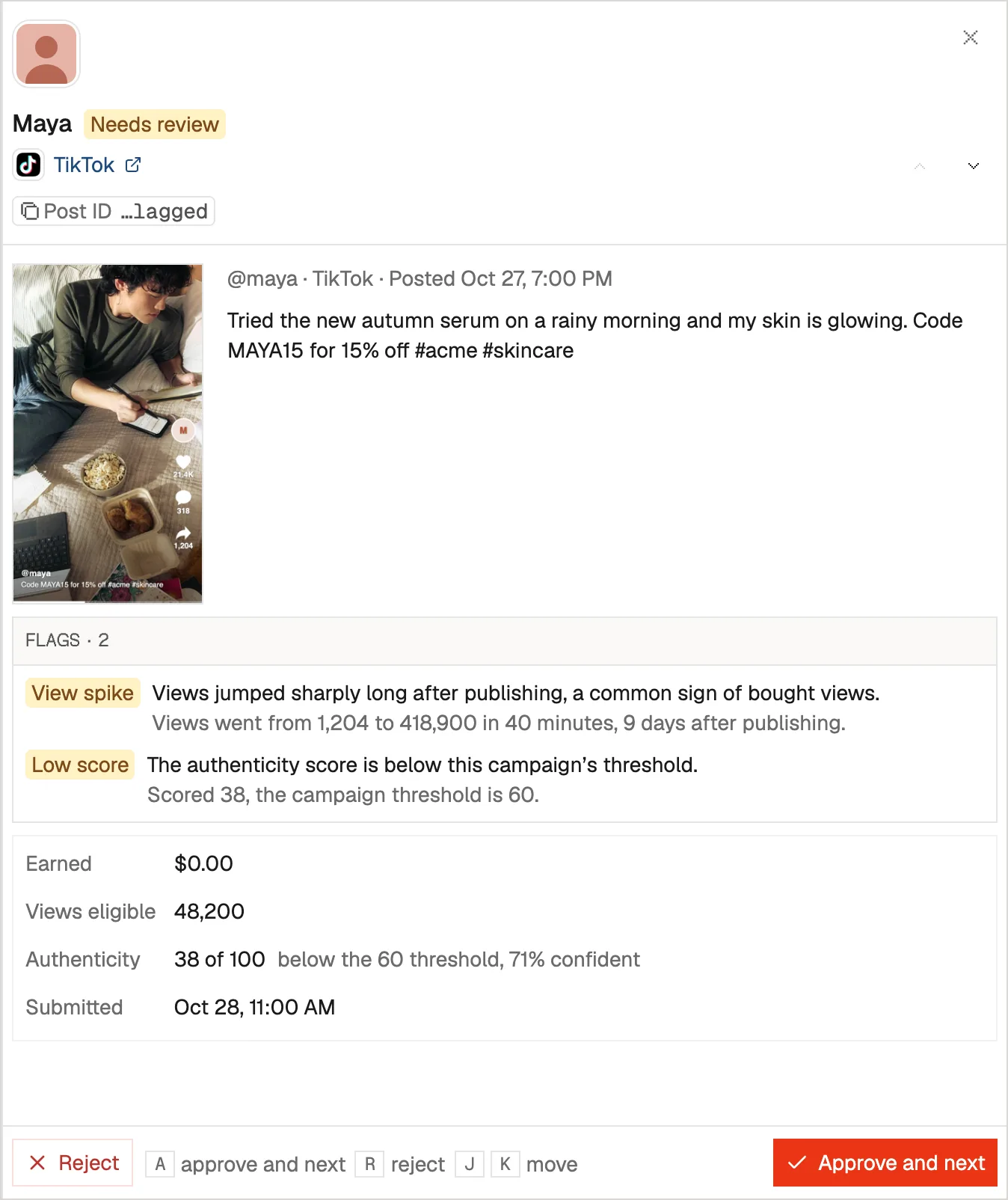
On top of that, every post gets an authenticity score from 0 to 100. The higher the score, the more the view pattern looks like organic viewing. Each label below lowers the score and tells you why:
| Label | What it means |
|---|---|
late_block | One big jump in views long after publishing, instead of gradual growth |
flat_engagement | Likes, comments and shares far too low for the number of views |
view_follower_gap | Views far above the account's follower count, with no shares |
cap_seeking | Views that keep landing just under a payout cap |
prior_flags | The account has had posts flagged before |
no_watch_signal | The platform shares no watch-time data, so the score is less certain (no penalty) |
Zernio also flags a post submitted twice or to two campaigns (duplicate_post), and views driven by the creator's own ads (paid_views) on organic-only campaigns.
5. Approve the posts you want to pay for
Approve clean posts, or reject with a reason the creator sees. Zernio flags suspicious ones but never rejects anything on its own.
6. Pay everyone in one charge
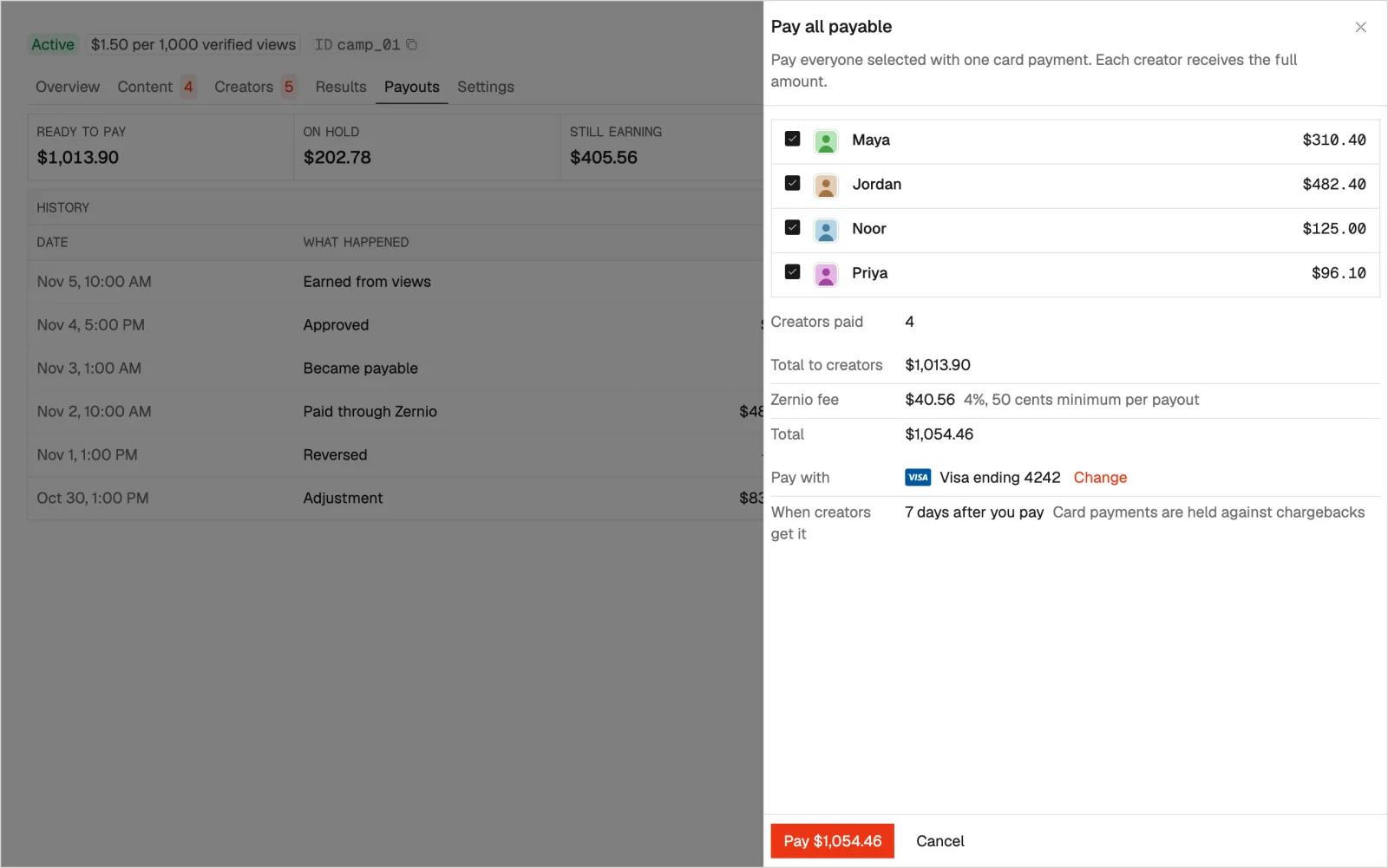
Approved earnings are held for 10 days by default, then become payable. What happens next depends on the setup you picked when you created the campaign:
- Zernio pays creators. Preview the batch, confirm, and one card charge pays every payable creator, or just the ones you pick. Funds are held 7 days against chargebacks, then Zernio pays each creator through Stripe. You get one invoice for the whole batch, and creators can download a statement for each payout.
- Zernio pays creators automatically. Turn on daily or weekly payouts, and every ready creator is paid in one batch on your saved card, with the same fee and invoice.
- You pay through your own rails. Zernio keeps the ledger of who's owed what. You pay creators with your existing stack, such as Dub, PayPal or bank transfer, and record each payout against the ledger so balances stay correct.
- Records only. Zernio tracks views, earnings and approvals, and you settle completely outside Zernio.
7. Run your best posts as ads
Approved posts can run as paid ads without anyone re-uploading a file. Launch them as Meta ads into an existing ad set, or as TikTok Spark Ads once the creator pastes the post's Spark code on their campaign page. Ad launch needs ads access on your workspace.
Then rank creators by spend, ROAS or purchases to see whose content sells. You can also pay creators on those results: a share of spend or purchase value, or a set amount per purchase, click or 1,000 impressions (Instagram, Facebook and TikTok).
How pricing works
What you pay depends on how you pay creators. Tracking, verified views, authenticity scores, review, the ledger and the hosted join page are free either way.
| Creators are paid through Zernio | You pay creators yourself | |
|---|---|---|
| Payout fee | 4% per payout ($0.50 minimum), added on top | None |
| Creator accounts | Free | Billed as connected accounts: first 2 free, then $6, $3 or $1 per account per month by band |
| How creators get paid | One card charge per batch, paid through Stripe after a 7-day hold | Your own stack, recorded against the ledger |
The 4% fee is the same whatever the campaign pays on: views, retainers, commission on sales or ad results.
Full details are on the creator payout pricing page.
Start today
Creator campaigns are live for every workspace on usage-based billing. Create your first campaign today, and pay creators only when they've earned it.