A white label social media scheduler is a branded scheduling tool your clients log into as if it's yours. You have two ways to get one: buy a SaaS platform and put your logo on it, or build your own on top of a social media API. If you're a developer or an agency that wants control over the product and the margins, the API path is where Zernio lives: 15 platforms, your brand on the front, and posts that publish through the official platform APIs so your clients never see a third party.
This guide covers both paths, when each one makes sense, and how to build the API version without spending six months wiring up OAuth flows.
What is a white label social media scheduler?
It's a scheduling platform built by one company and resold under another company's brand. Your clients see your logo, your colors, and your domain. The engine underneath (the part that queues posts and pushes them to Instagram, TikTok, LinkedIn, and the rest) belongs to someone else.
There are two versions of "white label," and they're very different products:
| Type | What you rebrand | Who it's for | Control |
|---|---|---|---|
| Rebranded SaaS | A finished dashboard with your logo swapped in | Agencies that want a client-ready tool fast | Low: you're stuck with the vendor's UI and features |
| API-built | A scheduler you build on a social media API | Developers and SaaS teams that want their own product | High: you own the UX, features, and pricing |
The rest of this guide focuses mostly on the API-built version, because that's where you get a real product instead of a reskin, and it's the path that scales without the vendor's per-seat pricing working against you.
Here are the core pieces either version needs:
| Component | What it does | Why it matters |
|---|---|---|
| Custom branding | Your logo, colors, and domain across the whole experience | Your brand feels consistent across the product |
| Account connection (OAuth) | Lets each client securely link their social accounts | Nothing works until accounts are connected; it has to feel native and safe |
| Scheduling engine | Queues and publishes posts across platforms | The core job: posts go out on time, every time |
| Analytics | Tracks reach, engagement, and follower growth | Proves your work to clients with real numbers |
| Client workspaces | A separate, walled-off space per client | Keeps accounts and content from crossing over |
| API access | Programmatic control over the whole thing | Lets you embed scheduling and other functionalities inside your own app |
Should you buy a white-label SaaS or build with an API?
This is the real decision, and it comes down to how much control you need and how you plan to grow.
Buying a rebranded SaaS gets you live in days. You pick a vendor, upload your logo, point a subdomain at it, and hand clients a login. You don't need developers. The trade-off: you're renting someone else's product. You can't change the interface or add features your niche needs. You're limited by what the product supports, not by what the social platforms actually allow.
Building your SaaS on social media API takes a bit of engineering time or knowledge of working with AI agents, but you own the result. The scheduler becomes part of your product, matches your brand exactly, and does the specific things you and your clients need.
| Question | Buy a rebranded SaaS | Build on an API |
|---|---|---|
| Time to launch | Days | Days to weeks with the right API |
| Engineering needed | None | Some (frontend plus API calls) |
| Control over UX and features | Limited to the vendor's roadmap | Total |
| Pricing model | Often per seat and volume based | Depends on the API (Zernio is pay-per-account) |
| Fits inside your own product | No, it's a separate tool | Yes, embedded natively |
| Best for | Agencies wanting a fast branded tool | Developers and SaaS teams building a product |
If you just need a branded login to hand clients this quarter, a rebranded SaaS is fine. If you're building a product and want the scheduler to feel native, keep reading.
How do you build a white label scheduler for your clients?
The old objection to building was that connecting to 15 platforms meant 15 OAuth flows, 15 sets of media rules, and 15 ways things break. A unified social media API removes that. With Zernio social media API you integrate once, and the whole flow comes down to three steps.
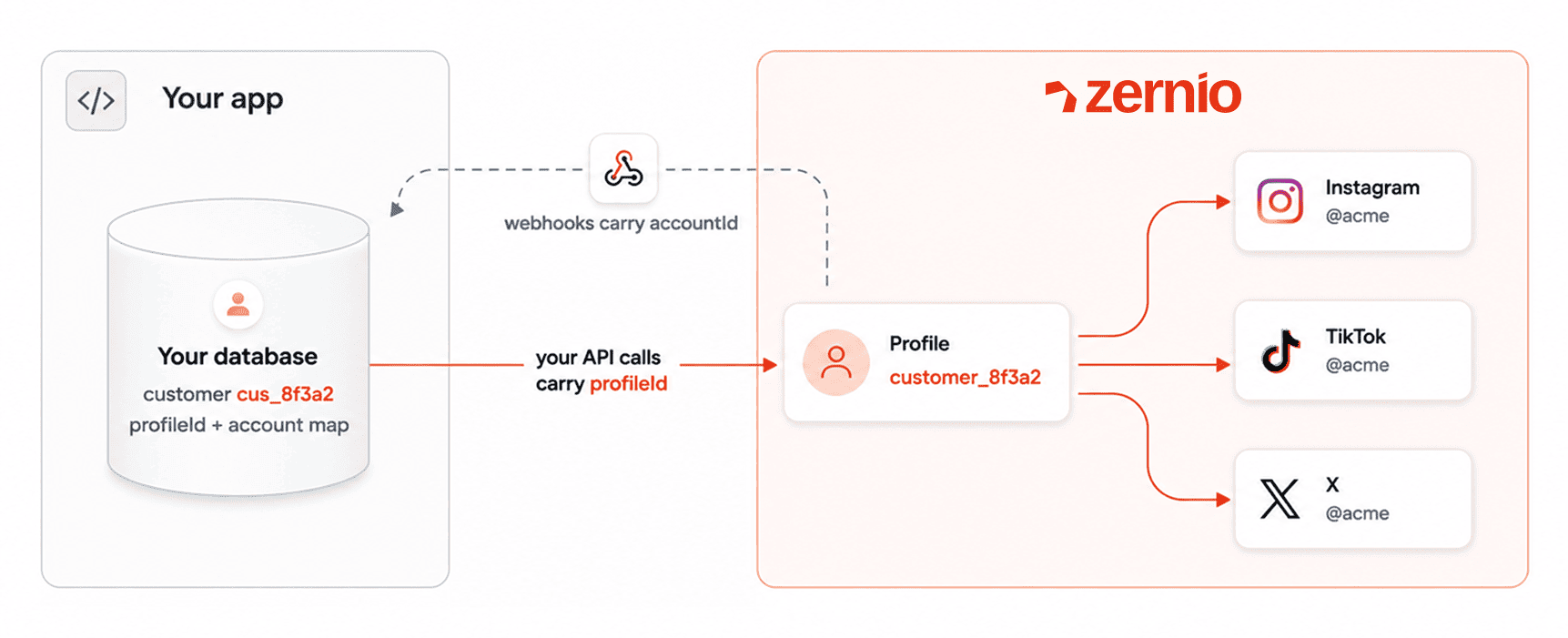
Step 1: Create a profile for each client.
When a customer signs up in your app, create their profile and store the returned profile._id on your customer record.
const { data } = await zernio.profiles.createProfile({
  body: {
    name: 'customer_8f3a2', // unique per team
    description: 'Acme Corp',
  },
});
// Store data.profile._id on your customer record
Each client's connected accounts live in their own profile, so nothing crosses over.
Step 2: Let clients connect their accounts (fully white-label).
Start the OAuth flow with the client's profileId. Headless mode keeps the whole thing inside your UI, with no Zernio-branded screens:
curl "https://zernio.com/api/v1/connect/instagram?profileId=PROFILE_ID&redirect_url=https://your-app.com/callback"   -H "Authorization: Bearer YOUR_API_KEY"
# → { "authUrl": "..." } — redirect your customer's browser there
The account lands in that client's profile. Your clients authorize through the official platform (Instagram, in this case) and come back to your app. They never see Zernio.
Optional: Subscribe to the account.connected webhook to learn about new connections server-side:
{
  "event": "account.connected",
  "account": {
    "accountId": "665f1c2e8b3a4d0012345678",
    "profileId": "664a0b1c2d3e4f0011223344",
    "platform": "instagram",
    "username": "acmecorp"
  }
}
Step 3: Schedule and publish.
One POST publishes across every connected platform.
const { data } = await zernio.accounts.listAccounts({
  query: { profileId: customer.zernioProfileId },
});

await zernio.posts.createPost({
  body: {
    content: 'Posted from your app!',
    platforms: data.accounts.map((a) => ({
      platform: a.platform,
      accountId: a._id,
    })),
    publishNow: true,
  },
});
That's the core of a scheduler. Zernio normalizes the media and copy for each platform, handles the rate limits, and returns a platformPostUrl for each published post.
There are 8 SDKs (Node.js, Python, Go, Ruby, Java, PHP, .NET, Rust), so you build in whatever your stack already uses.
Stop building social integrations from scratch.
One API call to publish, schedule, and manage posts across 16 platforms.
What does a social media scheduler's architecture look like?
A production scheduler is more than a "post" button. If you build every layer yourself, you're signing up for months of work and permanent maintenance. Here's what the system actually needs, and what a unified social API like Zernio takes off your plate:
| Layer | What it does | Build it yourself | With Zernio |
|---|---|---|---|
| Account connection | Let users link their social accounts | Register a developer app per platform, implement and refresh 15 OAuth flows, store tokens securely | One OAuth-as-a-service flow, headless white-label mode, tokens managed for you |
| Content normalization | Fit media and copy to each platform's specs | Reformat per platform, handle aspect ratios, character limits, video specs | Auto-transforms content for each platform |
| Scheduling engine | Queue posts for future publish times | Build a job queue, workers, timezone handling, and retries | Scheduling and queue built in |
| Publishing | Push posts to each network | Maintain 15 API integrations and their rate limits | One POST to /posts |
| Reliability | Keep posts going out when platforms change | Monitor and patch breaking API changes yourself | Zernio absorbs breaking changes, 99.7% uptime, under 50ms response |
| Analytics | Report reach, engagement, growth | Pull and normalize metrics from each platform | Unified Analytics API |
| Engagement | Manage comments and DMs | Separate integrations per platform | Comments and DMs APIs included |
| Multi-tenancy | Isolate each client's data | Build workspace isolation and permissions | Profiles: one per client |
Building on an API means you write the frontend and the business logic that make your product yours, and skip the rest. For a deeper look at the posting layer, see the social media posting API breakdown.
How does white-labeling work with a social media API?
This is the part that trips people up. If your scheduler posts to Instagram, does Instagram show that a third-party tool did it?
With Zernio, no. Posts publish through the official platform APIs, and Zernio is an official partner (Meta Business Partner, TikTok Marketing Partner, LinkedIn Marketing Partner, Pinterest Partner, X Official Partner). There's no Zernio branding on the posts and none in the OAuth screens when you use headless connect. Your clients connect their accounts inside your app, see your brand the whole way through, and the posts appear as native platform activity.
That matters for a few common cases:
- Agencies managing talent or client brands who need every touchpoint to look like the agency, not a tool.
- SaaS products embedding scheduling as a feature, where a competitor's logo showing up would be a problem.
- Teams that keep each client's voice and accounts separate and can't risk one client seeing another's setup.
Profiles handle that last one: each client gets an isolated workspace, so you can manage dozens of accounts, including multiple LinkedIn or Instagram accounts, without them ever touching.
What features do agencies need in a white-label scheduler?
Whether you buy or build, these are the features that separate a real agency tool from a rebranded posting box:
| Feature | Why it's critical | Impact |
|---|---|---|
| Multi-tenant workspaces | Keeps each client's accounts, content, and analytics separate | High: no cross-posting accidents, clean client separation |
| Roles and permissions | Draft, approve, and view-only access for team and clients | High: junior staff draft, seniors approve, clients sign off |
| Approval workflow | Clients approve or reject posts in the tool | High: kills the email back-and-forth |
| White-labeled reporting | Reports carry your brand, not the vendor's | Medium: reinforces that the results are your work |
| Bulk scheduling | Upload hundreds of posts at once | High: loads a full content calendar in one pass |
| Comment and DM management | Handle engagement, not just posting | High: engagement is where clients feel the value |
The last row is where most posting tools stop and a full social layer keeps going. Zernio covers comments and DMs through the same integration as posting, so engagement isn't a second project. See the comments API and analytics API for what's included.
Key takeaway
Buy a rebranded SaaS when you need a branded client login fast and don't have developers. Build on an API when you want to own the product, match your brand exactly, and keep your margins as you scale. For the build path, Zernio gives you 15 platforms, white-label posting through official APIs, comments and DMs in the same integration, and pricing that gets cheaper per account as you grow.
FAQ
Can clients tell I'm using a third-party tool?
No. Posts publish through the official platform APIs, and with headless connect there's no Zernio branding on the posts or in the OAuth screens. Your clients see your brand start to finish.
How long does it take to build a white-label scheduler with an API?
With Zernio social media scheduler API, the first integration works in under an hour: connect an account, then POST to publish across platforms. Building the same coverage from scratch across 15 platforms is a 6-month-plus engineering project.
Which platforms can a white-label scheduler post to?
With Zernio, 15: X/Twitter, Instagram, TikTok, LinkedIn, Facebook, YouTube, WhatsApp, Threads, Pinterest, Reddit, Bluesky, Telegram, Google Business, Snapchat, and Discord.
How do you build a social media scheduler SaaS architecture?
You need eight layers: account connection (OAuth), content normalization, a scheduling engine and queue, publishing, reliability and retries, analytics, engagement, and multi-tenant isolation. Building all of it yourself across 15 platforms takes months. A unified social API like Zernio handles the auth, normalization, publishing, and breaking changes, so you build the frontend and business logic and skip the plumbing.
How do I build a white label social media scheduling tool for my clients?
Three steps. Create a profile for each client (an isolated workspace), let them connect their accounts through headless OAuth so they only ever see your brand, then POST to publish or schedule across every connected platform. The first working integration takes under an hour with Zernio.
How do leading social media marketing tools compare in scheduling features?
The split is API-built versus dashboard-only. Dashboard tools like Buffer are hosted products you use directly. Social APIs like Zernio let you build scheduling into your own product. Zernio covers 15 platforms with posting, comments, DMs, analytics, and ads in one integration. Compare the options on the compare page.