Google's official Google Ads MCP connects Claude to your ad account for reporting only — it reads campaigns, spend, and conversions, but can't launch or edit a single ad. To have Claude actually manage campaigns, you need a write-enabled route instead: build your own server on the Google Ads API, or connect through a unified ads API like Zernio, which skips the developer token and reaches six other ad platforms too.
If you build AI marketing tools, run an agency, or wire agents into ad ops, this is the decision you're weighing. Here's how each route works, why the developer token is the real bottleneck, and what you can build yourself if you'd rather.
Create Google Ads campaigns from Claude through Zernio's MCP server →
What is the Google Ads MCP, and what can Claude do with it?
An MCP server is a connector that gives Claude access to your Google Ads account through the Google Ads API. Claude decides what to do; the server does it. What Claude can actually do depends entirely on which server you pick.
MCP is the Model Context Protocol, an open standard Anthropic released in late 2024 that lets AI assistants connect to external tools and data. For ads, an MCP server exposes actions like “run this query” or “create this campaign” as tools Claude can call during a conversation.
Google's official MCP server is read-only, so “connect Google Ads MCP to Claude” means two very different things depending on what you need. If you want to ask Claude questions about your spend, that's one route. If you want Claude to launch or adjust campaigns, that's another.
What are the ways to connect Google Ads to Claude?
There are four practical routes, and they trade setup effort against what Claude can actually do.
| Method | Setup | Read / write | Coverage | Developer token | Best for |
|---|---|---|---|---|---|
| Official Google Ads MCP | Self-host (pipx or Cloud Run), GCP project, OAuth | Read only (3 tools) | Google Ads only | You supply your own | Reporting, GAQL queries, dev-comfortable teams |
| Third-party reporting MCP | Hosted, minutes | Mostly read, some write | Google Ads plus some networks | Usually managed | Plain-language reporting, quick setup |
| Build your own | You write and host it | Whatever you build | Whatever you wrap | You supply your own | Custom rules, compliance perimeters, per-client isolation |
| Zernio (unified ads API) | One bearer token, one MCP server | Write (Search + Display) and read | Google plus 6 ad platforms | Not needed | Products and agents that act on Google Ads and other platforms |
Google's first-party server gives you the cleanest read access to your own data. Third-party reporting tools get you connected fast, though most focus on pulling reports rather than launching campaigns. Building your own gives you total control and total maintenance. Zernio covers the widest surface: write access to Google Ads plus six other ad platforms, through one integration.
How do you set up the official Google Ads MCP with Claude?
Google's Ads API team released a first-party MCP server on April 28, 2026 at github.com/googleads/google-ads-mcp.
It exposes three tools: list_accessible_customers, search (which runs GAQL queries), and get_resource_metadata. All three read. None of them write.
Setup runs like this:
- Get a Google Ads developer token from your account.
- Create a Google Cloud project.
- Set up OAuth credentials (a client ID and secret, or application default credentials).
- Install the server locally with pipx, or deploy it to Cloud Run.
- Add the server to Claude Desktop and run your first GAQL query.
Once you already hold the developer token, the technical setup takes under 15 minutes. The server works great at what it does: querying campaign performance, budgets, and conversions in plain language, no CSV exports.
The limits are: it's read-only, so it can't launch or pause campaigns, change bids, or execute other performance optimization tasks. It has no Google-hosted endpoint, so you self-host. And it needs your own developer token, which is where most people actually get stuck.
Why is the developer token the real bottleneck?
The slow part of connecting Google Ads to Claude isn't the MCP setup. It's getting a Google Ads developer token approved for production.
Google has three Google Ads API access tiers:
| Tier | Accounts | Daily ops | Review target |
|---|---|---|---|
| Test | Test accounts only | 15,000 | Instant |
| Basic | Production | 15,000 | 2 business days |
| Standard | Production | Unlimited | 10 business days |
Zernio skips this entirely. It runs under its own approved developer token and supports the official Google Ads API. That's the single biggest reason teams reach for a universal Ads API here instead of standing up their own server.
How do you connect Claude to Google Ads with write access?
To have Claude create and manage Google Ads campaigns, point its MCP client at Zernio's hosted MCP server, authenticate once, and connect your Google ad account. From there Claude can call the Google Ads API to launch Search and Display campaigns and pull performance, for Google plus six other ad platforms.
The setup:
-
Create a Zernio account and connect your Google ad account with OAuth. No developer token, no MCC, no Standard Access application.
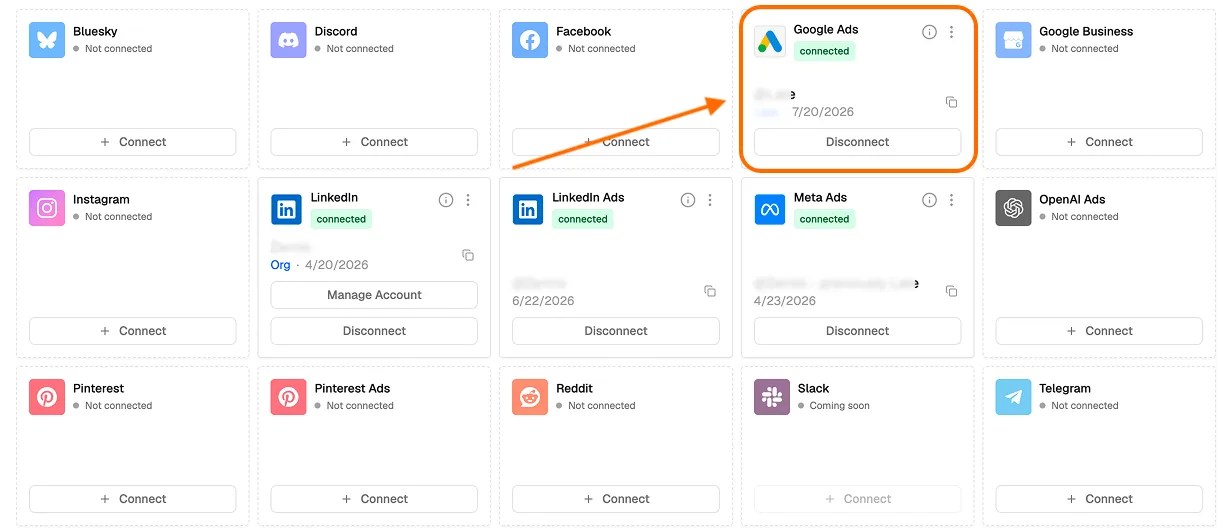
Add Zernio's MCP server to Claude Desktop, Cursor, or Claude Code.
-
Ask Claude in plain language: “Launch a Google Search campaign, 0 a day, these keywords, this landing page.” Or start with the performance report asking for Google Ads analytics export.
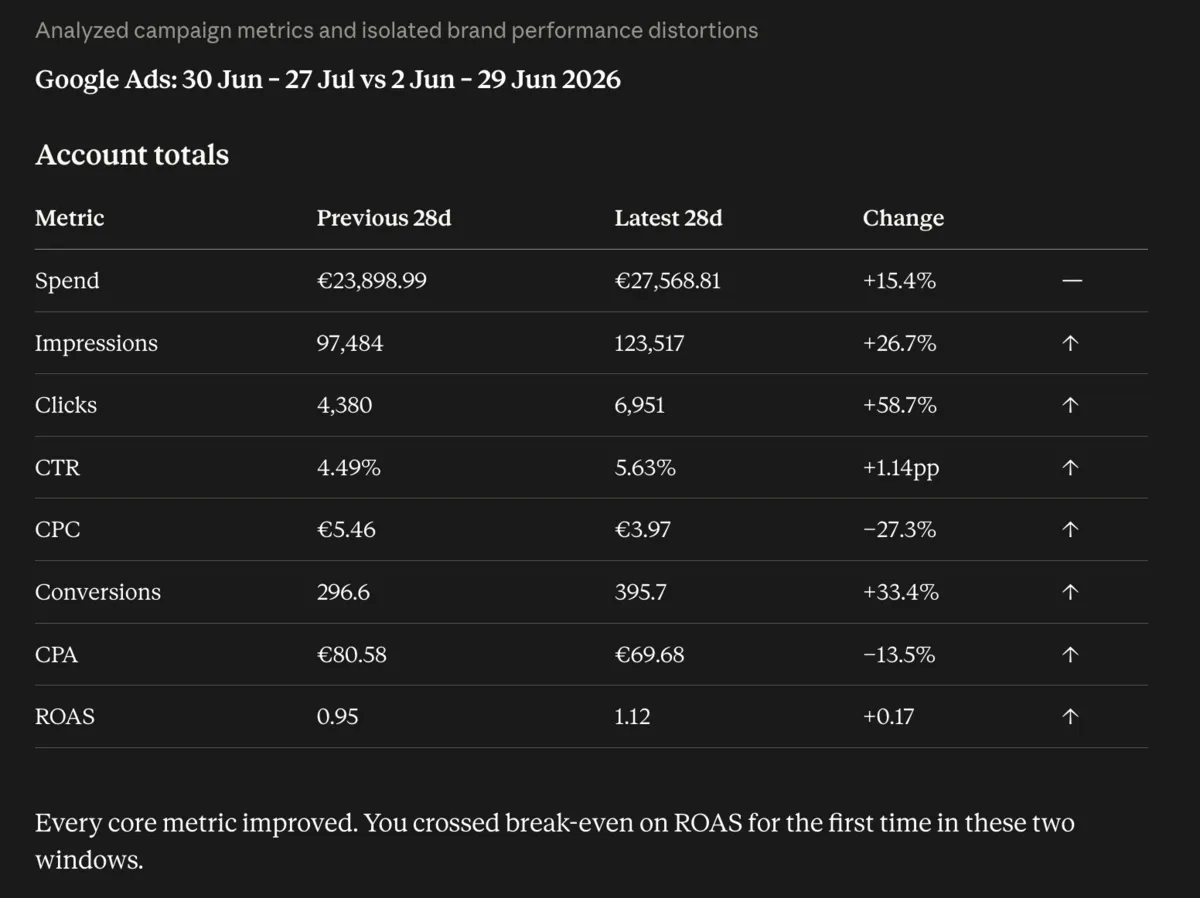
Claude calls the Zernio Ads tool, Zernio calls the Google Ads API, and the campaign is created.
Prefer the terminal for agentic work? The Zernio CLI (npm install -g @zernio/cli) outputs structured JSON that an agent can parse and act on.
Here's the full Google Ads surface Claude can reach through Zernio's Google Ads API, all under the same /v1/ads endpoints:
| Action | Endpoint | What Claude can do |
|---|---|---|
| Create | POST /v1/ads/create | Launch a Search or Display campaign |
| Read | GET /v1/ads/{id} | Pull campaign, ad group, or ad details and current spend |
| Update | PUT /v1/ads/{id} | Change status, budget, bidding strategy, or schedule |
| Delete | DELETE /v1/ads/{id} | Remove a Google Ads entity |
| Analytics | GET /v1/ads/{id}/analytics | Get impressions, clicks, CTR, CPC, and CPM per ad, ad group, or campaign |
| List | GET /v1/ads/campaigns | List every campaign across connected Google Ads accounts |
| Targeting | GET /v1/ads/interests | Browse geo, language, and keyword targeting criteria |
Two things Zernio absorbs so you don't: Google ships a new major API version (v22, v23, v24) twice a year with big changes, and it enforces per-token and per-account quotas. Zernio handles the version migrations and pools rate limits across customers, retrying on 429 / RESOURCE_EXHAUSTED with backoff, so your integration keeps working without you tracking any of it.
One Google-specific detail worth knowing: Responsive Display Ads need both a landscape image (1.91:1, for example 1200x628) and a square one (1:1, for example 1080x1080). Send only one and Google rejects it. Zernio documents and handles that requirement so your Display campaigns don't fail on upload.
Google Ads is one of seven ad platforms Zernio's Ads API covers, and the same tools and bearer token work across all of them. So the moment you've wired Zernio to Google Ads, you can also connect TikTok Ads and Meta Ads to Claude to make sure your product supports all surfaces of paid advertising.
| Ad platform | What Claude can create through Zernio |
|---|---|
| Google Ads | Search and Display campaigns, standalone ads |
| Meta Ads (Facebook + Instagram) | Boost posts, standalone ads, multi-creative ad sets, campaigns |
| TikTok Ads | Spark Ads (boost an organic video), standalone ads, campaigns |
| LinkedIn Ads | Single Image and Single Video ads (Direct Sponsored Content) |
| Pinterest Ads | Standalone ads, campaigns |
| X Ads | Standalone ads, campaigns |
| ChatGPT Ads | Chat Card Campaigns |
Stop building social integrations from scratch.
One API call to publish, schedule, and manage posts across 16 platforms.
What can you build on the Google Ads MCP and API?
Connecting Google Ads to Claude opens up real marketing automation you can run inside your own AI agent: it launches campaigns, shifts budgets, and reads performance without you ever touching the Ads dashboard.
Having the Google Ads API under your product goes further than that. Once you can call it programmatically, which is exactly what Zernio's unified Ads API gives you, you can build on top of it: white-label ad-management platforms, SaaS tools, and AI agents that run campaigns for your own users. Here's the range of what teams build.
| What you can build | Example |
|---|---|
| Reporting and analytics SaaS | Client-facing dashboards that pull live spend, CPC, and conversions instead of manual CSV exports |
| AI marketing assistants | “Chat with your ad account” tools where a user asks questions and gets answers, charts, and recommendations |
| Campaign automation | Rules engines that pause underperformers, scale winners, and pace budgets on a schedule |
| Cross-channel ad managers | One dashboard that runs Google alongside Meta, TikTok, and LinkedIn from a single interface |
| Autonomous ad agents | Agents that plan, launch, and optimize campaigns end to end, with human approval at go-live |
| Internal ad-ops tooling | Governance layers with approval workflows, budget guardrails, and per-client isolation for agencies |
| Vertical SaaS with ads built in | A product in real estate, e-commerce, or local services that lets its own users run ads without leaving the app |
Should you use the official MCP, build your own, or a unified API?
Three clear paths, depending on what you're actually trying to do.
Use the official Google Ads MCP if you only need to read and analyze Google Ads data, you're comfortable self-hosting, and you already have a developer token or don't mind waiting for one. It's free and first-party.
Build your own if you need custom tool-level business rules, compliance data perimeters, or per-client token isolation, and you're willing to own OAuth, token approval, and Google's breaking-change cycle. This is the right call when the rules matter more than the setup time.
Use Zernio if you need Claude or an agent to act on Google Ads, you want to skip the developer token, or you need other ad platforms through one integration. Or you're building a SaaS platform that needs an ad functionality built in, and then you'd like to have the full Google Ads API access.
What can Claude do with Google Ads once connected?
Once Claude has a connector to your Google Ads account, a few workflows become routine.
Auto-launch from a brief. Claude turns a short brief into a Search or Display campaign, left paused so a human approves before any budget is spent.
Stop and scale on performance. Claude pauses campaigns below a ROAS threshold and raises budgets on winners. Rapid changes can trip abuse detection, so keep human sign-off for large moves.
Report on a schedule. Claude pulls a weekly performance summary through the Analytics API and drops it wherever your team reads updates.
Cross-platform loop. Publish an organic post, measure which platform got the best engagement, then boost it as a paid ad on Google or wherever it performed. Zernio's unified API makes all three steps one integration.
Key takeaway
Connecting Google Ads to Claude comes down to read versus write. Google's official MCP reads your data and stops there. To have Claude create and manage campaigns, you either build your own server (and own the developer token, OAuth, and maintenance) or use a unified ads API like Zernio that writes to Google Ads with no developer token and covers six other ad platforms in the same integration. Use the official server for reporting, build your own for custom control, and Zernio when your agent needs to act across platforms.
FAQ
Can Claude create Google Ads campaigns, or only read data?
Google's official MCP is read-only. To create or manage campaigns, use a write-enabled third-party server or use Zernio's Ads API, which launches Google Search and Display campaigns.
Do I need a Google Ads developer token to connect Claude to Google Ads?
For the official server and most build-your-own setups, yes, and approval can take weeks. Zernio's Google Ads API provides you connection to Claude in two clicks, so you don't apply for or manage one.
Can Claude manage ads on platforms besides Google?
Not with Google's own tools. Zernio's Ads API covers Google, Meta, TikTok, LinkedIn, Pinterest, X, and ChatGPT through one integration.