Ayrshare is a popular social media posting API, but it may not be the best fit for your team or business. So, we decided to find and rank the best Ayrshare alternatives in 2026.
We not only collected the best Ayrshare alternatives. We also researched why businesses move away from Ayrshare, the features that matter most when choosing a social media API, and the platforms that offer better value for different business needs.
After a deep dive, we found what you are looking for and what the best Ayrshare alternatives are for you.
Let's dive in!
Why are People Switching From Ayrshare?
In many cases, businesses are not moving away from Ayrshare because it lacks core functionality. Instead, they begin reconsidering various options as their priorities change, looking for platforms that offer greater flexibility, simpler management, or better long-term value.
Some of the most common reasons businesses move away from Ayrshare include:
Higher Cost for Smaller Teams
Pricing is a major concern. Ayrshare starts at $149/month and includes access to only one social profile or brand. Compared to many alternatives, this can feel expensive for startups, content creators, and small businesses trying to manage costs early on.
For teams that are still testing a product or building a small client base, committing to a relatively high monthly fee before reaching scale can feel like an unnecessary overhead.
In addition, since there is no free plan and payment details are required upfront, individuals may prefer platforms that allow them to experiment first before making a financial commitment.
Not Every Team Wants to Work With APIs
Ayrshare is built primarily as an API-first platform. While this works well for developers, not every business wants to manage social media through API integrations.
Some teams simply prefer a platform where they can:
- schedule posts
- monitor engagement
- manage comments
- collaborate with team members
without needing developer support to set up workflows.
Although Ayrshare provides a dashboard for monitoring API activity, scheduling content, and tracking performance, its core experience is still centred around API usage rather than day-to-day social media operations. For non-technical users, this can add an extra layer of complexity compared to traditional social media management tools.
Growing Demand for WhatsApp Business Messaging
Customer communication has become a bigger part of social media management, especially for businesses that sell directly through messaging channels.
Many teams now need:
- WhatsApp Business templates
- direct message management
- automated customer replies
- multi-channel communication
While Ayrshare supports messaging features, such as DMs and engagement tracking across platforms, it does not currently offer the same depth of WhatsApp Business integration found in some alternatives, like Zernio.
As a result, businesses that rely heavily on conversational marketing or customer support through WhatsApp often prefer platforms that treat messaging as a core feature rather than an add-on.
Usage-Based Pricing Can Become Expensive
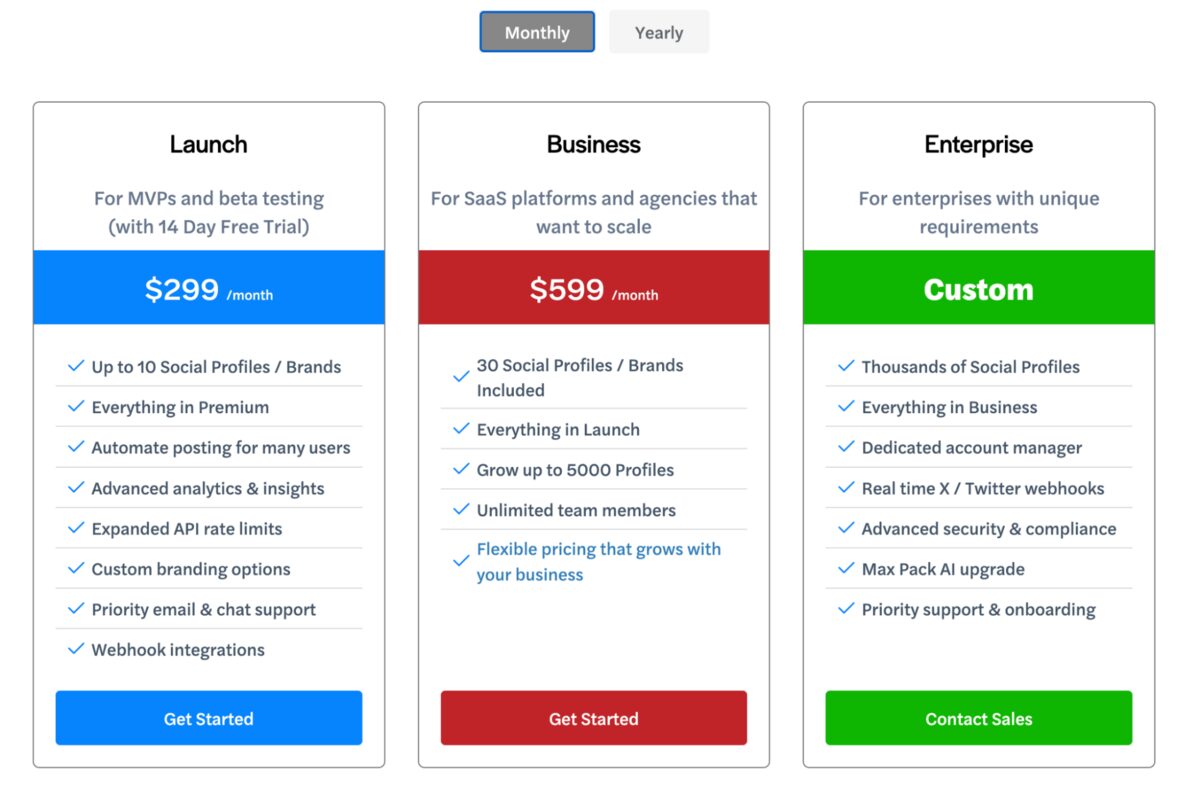
Ayrshare pricing can become expensive as the number of social profiles increases, especially for agencies and teams managing multiple clients.
For example, its business plan is priced at $599/month and includes up to 30 social profiles. Once teams exceed this limit or need to manage more accounts, additional costs may apply depending on usage and scale.
For agencies and social media managers handling:
- multiple brands
- client accounts
- regional pages
- campaign profiles
Costs can scale quickly as usage grows across accounts, posts, and connected platforms.
For teams managing many accounts, this can make monthly budgeting less predictable compared to platforms with simpler or fixed pricing models.
A quick look at the best Ayrshare alternatives in 2026
The table below highlights the key differences between these tools:
| Tool | Key Features | Pricing (Plan + Price) | Social Media API | Notable Limitations |
|---|---|---|---|---|
| Zernio | Unified API for 15+ platforms, scheduling, API + dashboard hybrid, analytics, ads, WhatsApp Business messaging, comment/DM management, workflow automation, multi-account handling, MCP server | Free (first 2 accounts); from $6/account/month | Yes | Requires setup for advanced workflows, a developer-oriented setup |
| Buffer | Simple scheduling, visual calendar, AI writing assistant, Bitly link shortening, Canva/Unsplash integration, reminders, and comment management | Free plan - $0 (3 channels) / Essentials - ~$6-$12 per channel/month | No | Limited advanced features, no WhatsApp support, weak scalability for large teams |
| Hootsuite | Multi-platform scheduling, visual content calendar, AI caption generator, Canva/Adobe integrations, inbox management, analytics, ad management, automated DMs | Professional plan - ~$99/user/month | No (limited API access) | Expensive per user, complex for beginners, advanced features locked behind higher tiers |
| Sprout Social | Advanced analytics, social listening, collaborative calendar, bulk scheduling, reporting dashboards, hashtag suggestions, image editing, comments management | Standard plan - ~$199/seat/month | No (limited API access) | High cost per seat, limited WhatsApp support, enterprise-focused complexity |
Stop building social integrations from scratch.
One API call to publish, schedule, and manage posts across 15+ platforms.
Best Ayrshare Alternatives in 2026
1. Zernio
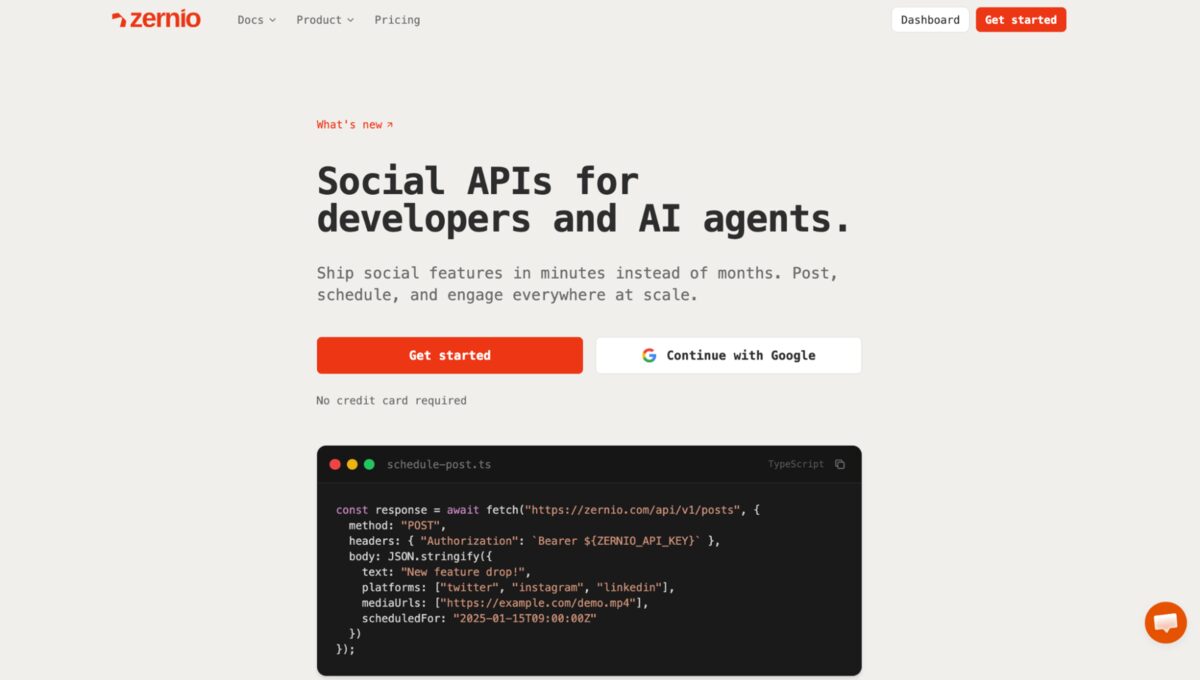
Zernio is a social media API platform that enables businesses to manage publishing, engagement, and automation across multiple platforms using both a dashboard and API integration.
Like other unified solutions, it supports content scheduling, engagement management, and advertising workflows, but places a stronger emphasis on affordability, flexibility, and scalable usage.
Key Features
- Unified API for publishing and managing content across 15 platforms
- Dashboard and API-based workflow management
- Content scheduling and bulk publishing
- Analytics and performance tracking
- Comment and direct message management
- Unified Ads API to manage paid campaigns across 7 platforms
- Multi-account and multi-brand management
- Workflow automation for scalable social media operations
- MCP support for AI assistants and agent-based automation
Pricing
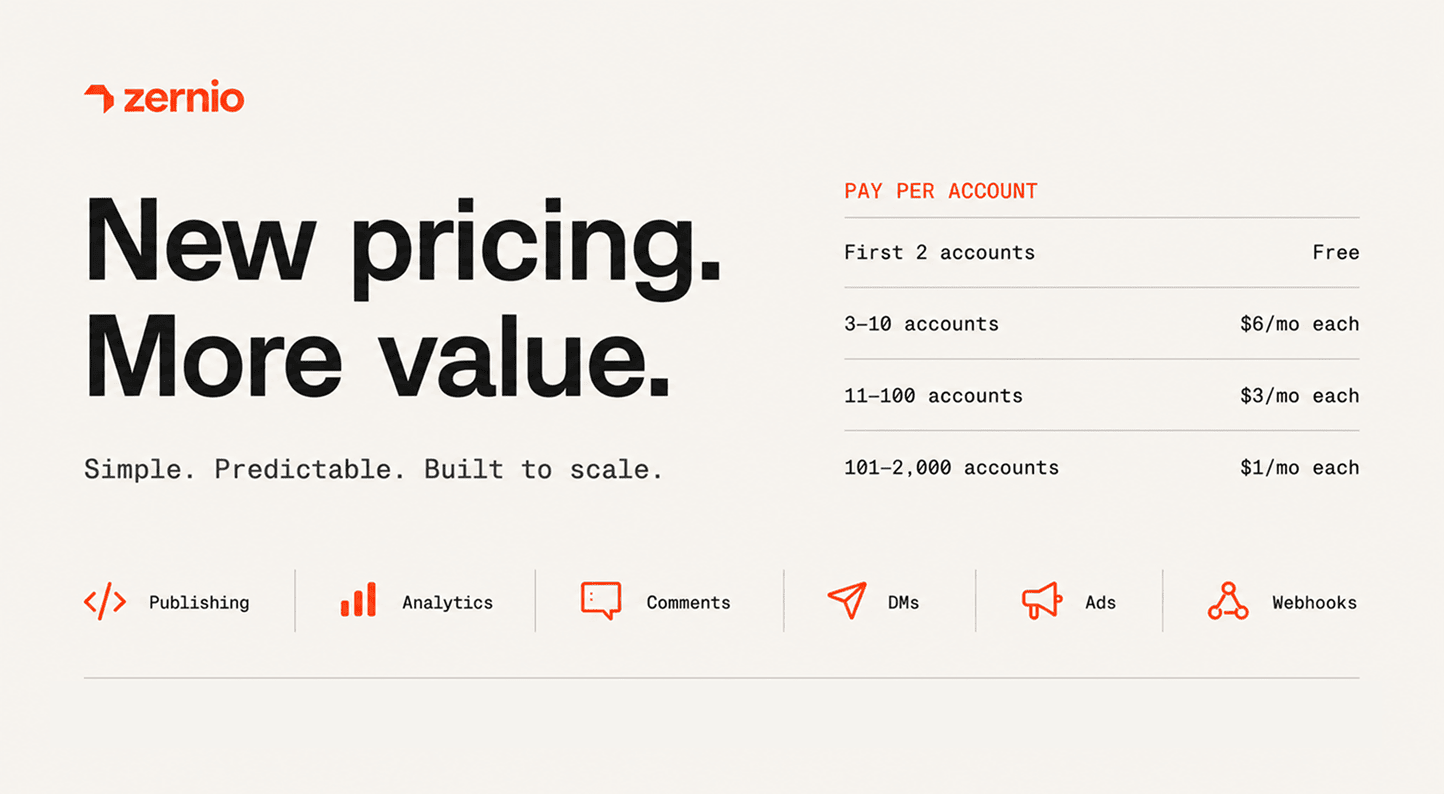
Zernio offers a free tier that includes the first 2 connected accounts with every feature included from day one.
Paid usage starts at $6/account/month for accounts 3–10, dropping to $3 for accounts 11–100 and $1 for accounts 101–2,000. There are no plans, no tiers, and no add-ons — scheduling, analytics, DMs, comments, ads, and webhooks are all included on every account. The more you scale, the lower your per-account cost.
Pros
- Free plan available for small-scale usage.
- Supports 15+ social media platforms, including WhatsApp
- Lower starting cost, compared to many API-first competitors
- Combines dashboard usability with API flexibility
- Constantly evolving to include more established enterprise platforms
- Predictable pricing structure with no per-platform fees
- Suitable for startups and scalable SaaS products
Cons
- Advanced workflows may require setup and configuration
- Best value when used in developer or automation-focused environments
Why is Zernio the best Ayrshare alternative in 2026?
Zernio is the best Ayrshare alternative because it combines developer-friendly APIs with a practical dashboard experience, offering more flexibility for both technical and non-technical users.
Compared to API-first platforms like Ayrshare, it offers more accessible pricing, built-in WhatsApp Business messaging support, and a clearer scaling path for growing teams. This makes it particularly well-suited for developers, SaaS products, and automation-focused businesses seeking a balance between control, usability, and cost efficiency.
Ready to try Zernio? Start for free - no credit card required. Connect your first social account in minutes.
2. Hootsuite
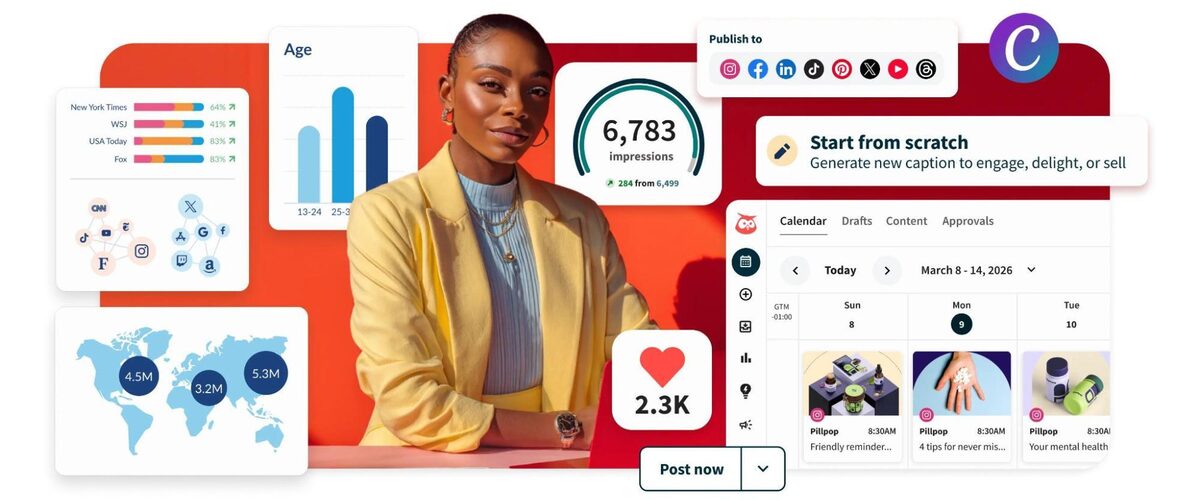
Hootsuite is one of the established social media management platforms used by marketing teams and businesses to manage multiple accounts from a single dashboard.
It is a strong option for social media managers who need scheduling, collaboration, and performance tracking in one place. However, it is less suitable for developers because API access requires registration and approval.
Key Features
- Multi-platform publishing and scheduling from one dashboard
- Visual content calendar for campaign planning and adjustments
- AI assistant for captions, hashtags, and content ideas
- Integration with Canva, Adobe Express, Giphy, and stock libraries
- Centralised inbox for managing comments and messages
- Post-performance analytics and reporting
- Link shortening and tracking
- Recommended posting times for better engagement
- Automated Instagram keyword-triggered DMs
Pricing
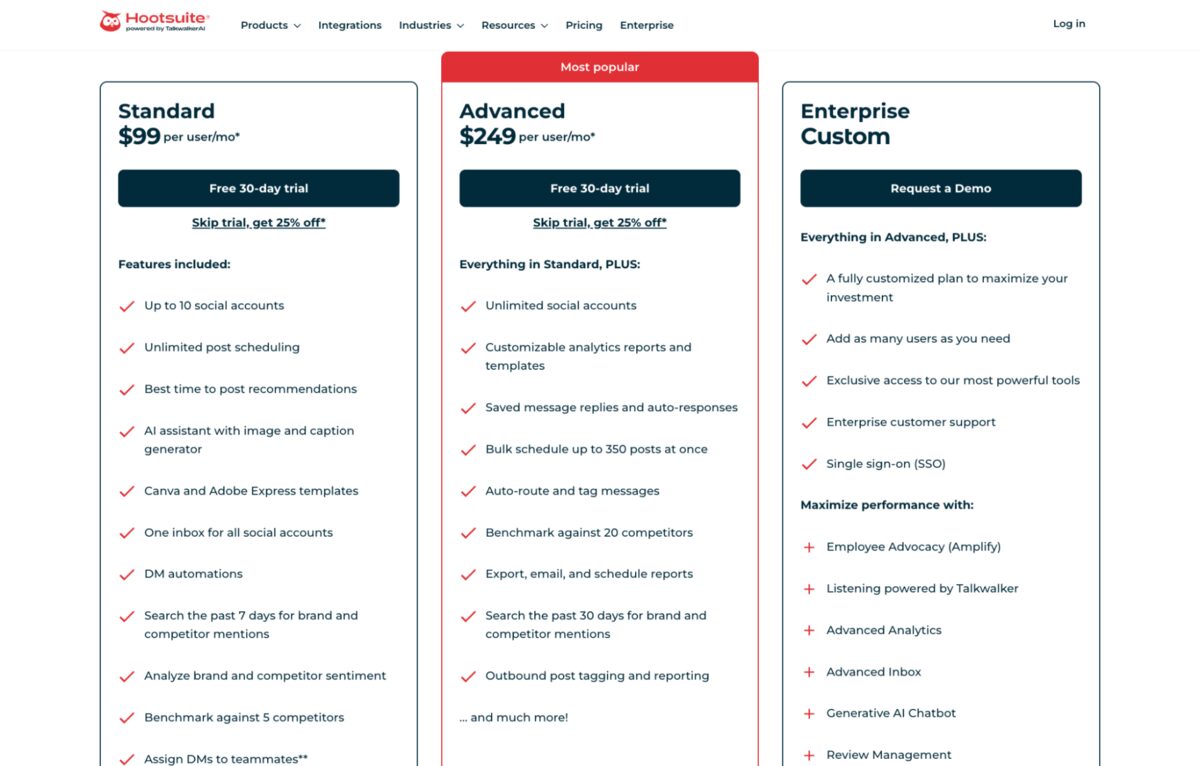
Hootsuite offers a 30-day free trial. Paid plans start at approximately $99 per user per month, with pricing increasing based on team size and feature access.
Pros
- Very mature and widely used platform
- Strong scheduling and content planning tools
- Good collaboration features for teams
- Wide range of integrations and marketing tools
Cons
- Can become expensive per user
- The interface may feel complex for beginners
- Less suitable for API-first or developer-focused workflows
- API access requires registration and approval
- Some advanced features are locked behind higher-tier plans
Why is Hootsuite the best Ayrshare alternative in 2026?
Hootsuite is a strong alternative to Ayrshare for businesses that prefer a traditional, dashboard-based approach to social media management instead of an API-first system.
It can be suitable for social media teams that need collaboration, scheduling, and analytics in a single platform without building custom integrations.
3. Sprout Social
Sprout Social is positioned toward enterprise and data-driven marketing teams that need deeper analytics, structured workflows, and advanced collaboration tools.
It is commonly used by larger organisations that prioritise reporting, social listening, and campaign coordination at scale.

Key Features
- Multi-profile publishing and collaborative scheduling
- Advanced social listening for tracking brand mentions and keywords
- Performance reporting and detailed analytics dashboards
- Collaborative content calendar with advanced scheduling across multiple dates and times
- Bulk scheduling for managing multiple posts efficiently
- Built-in image editing tools for quick content adjustments
- Hashtag suggestions to improve reach and engagement
- Comments management for handling customer feedback and interactions
Pricing
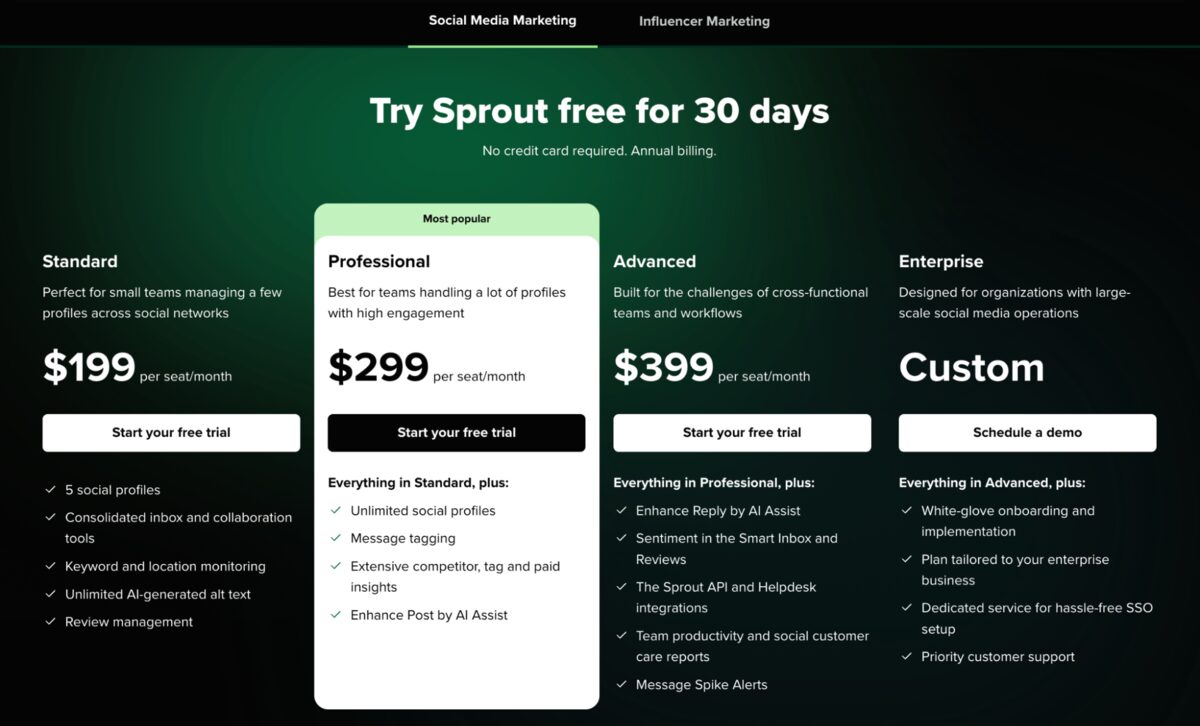
Sprout Social offers a 30-day free trial. Paid plans start at approximately $199 per seat per month, with pricing increasing based on features and team size.
Pros
- Strong analytics and reporting capabilities
- Advanced social listening tools
- Excellent for team collaboration and workflows
- Powerful scheduling and campaign planning features
Cons
- Expensive per-seat pricing
- Limited WhatsApp integration in standard plans
- It can be complex for smaller teams or beginners
Why is Sprout Social the best Ayrshare alternative in 2026?
Sprout Social is an alternative to Ayrshare for organisations that prioritise analytics, structured collaboration, and social listening over API-based integration.
It is especially suited for enterprise teams that need deeper insights into audience behaviour and campaign performance rather than developer-first social media automation.
4. Buffer
Buffer is often preferred by smaller businesses, creators, and startups that want a simple and lightweight approach to social media publishing.
It focuses on ease of use, making it a good option for teams that do not need complex workflows or advanced enterprise features.
Key Features
- Visual content calendar for planning and organising posts
- An AI writing assistant for generating captions and improving content ideas
- Comment management for handling audience engagement
- Reminder notifications for native posting when manual publishing is required
- Link shortening through Bitly for cleaner and trackable URLs
- Integrations with Canva and Unsplash for visual content creation and sourcing
- Basic scheduling and publishing tools across connected channels
Pricing
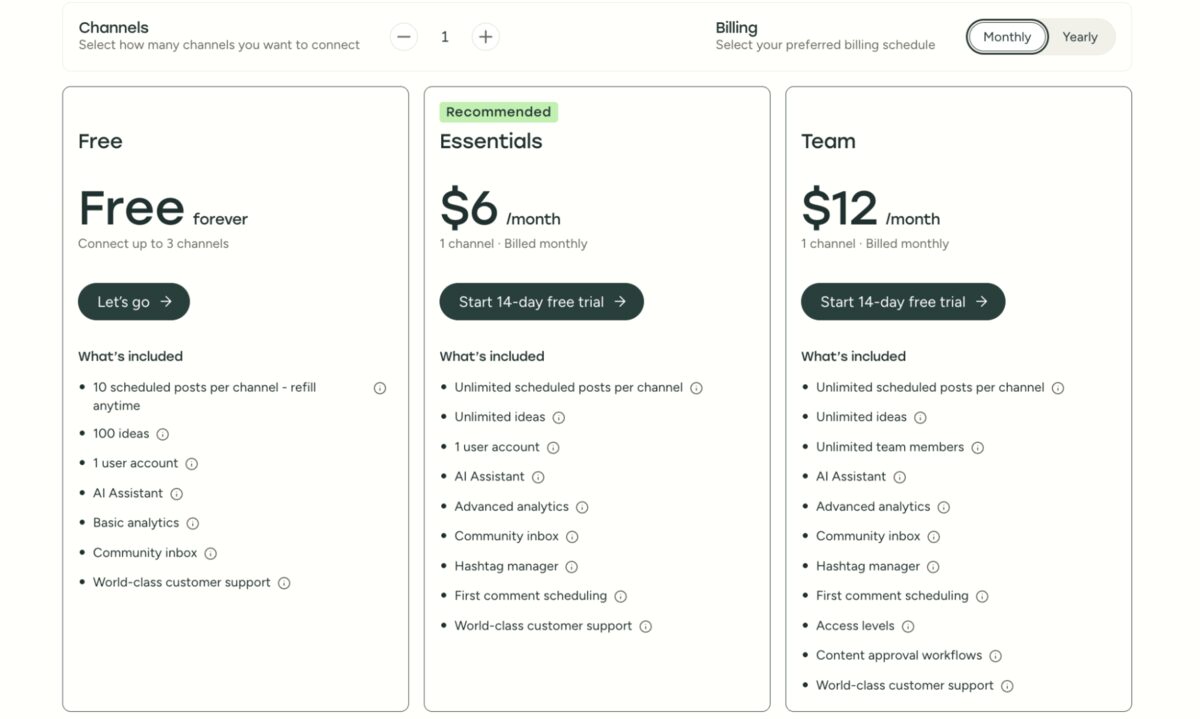
Buffer offers a free plan that supports up to 3 social channels. The free version allows up to 10 scheduled posts per channel, with paid plans available for users who need more advanced features, additional channels, and team collaboration tools.
Pros
- Very simple and beginner-friendly interface
- Free plan available for small users and creators
- Easy setup with minimal learning curve
- Good for basic scheduling and publishing needs
Cons
- No WhatsApp integration support
- Restricted functionality on the free plan
- Limited advanced features compared to enterprise tools
- Less suitable for API-first or developer-focused workflows
Why is Buffer the best Ayrshare alternative in 2026?
Buffer is a strong alternative to Ayrshare for individuals and small teams that prioritise simplicity over advanced functionality.
It is best suited for users who need straightforward scheduling and content publishing without the complexity of API integrations or enterprise-level workflows.
Summary: Best Ayrshare alternatives in 2026
The right choice comes down to what you're actually building.
If you're a developer building a SaaS product or internal tool, you need a stable, well-documented API with fast response times and clear error handling. That's what Zernio social media API is built for. It's designed around programmatic use from day one, not bolted on after the fact.
If you're running a large enterprise or agency, and you need robust governance, reporting, and multi-user collaboration with a full UI, look at Sprout Social or Hootsuite.
If you're a small team or solo creator who just needs to schedule posts without complexity, Buffer gives you intuitive interfaces and fair pricing.
For teams looking for an Ayrshare alternative that balances developer control with lower cost and modern messaging capabilities, Zernio presents a more compelling option.
You may also find these resources helpful:
- Zernio Ads API: one Social Media Ads API for Meta, LinkedIn, and beyond
- TikTok Content Posting API: The Complete Developer Guide [2026]
- How to Post to Social Media Using OpenClaw - Step-by-Step Guide
- Build Multi-Platform Chatbots with Zernio
Thank you for reading!
Stop building social integrations from scratch. One API call to publish, schedule, and manage posts across 15+ platforms.
Get started freeFAQs
1. What is the best alternative to Ayrshare in 2026?
The best alternative to Ayrshare is Zernio due to its pricing, API flexibility, dashboard access, and WhatsApp Business support.
2. Why do businesses look for Ayrshare alternatives?
Businesses switch from Ayrshare due to pricing, lack of WhatsApp Business integration, preference for non-API tools, and the need for more predictable costs when managing multiple social accounts.
3. Do all Ayrshare alternatives support WhatsApp?
No. Most traditional tools, like Hootsuite, Sprout Social, and Buffer, do not support WhatsApp Business messaging. However, Zernio includes WhatsApp messaging features such as templates and direct message management.
4. Is Ayrshare only for developers?
Yes. Ayrshare is primarily designed as a developer-first social media API platform.