Today we're releasing @zernio/chat-sdk-adapter, the vendor official Chat SDK adapter for Zernio. If you're building chatbots or automated messaging experiences, this is for you.
One adapter. Seven messaging platforms. No platform-specific code.
The Problem
Chat SDK (by Vercel) is becoming the standard for building chatbots in TypeScript. It provides a unified interface for Slack, Discord, Teams, and more. But when you need to reach users on social media DMs, things get complicated fast.
Instagram uses the Meta Graph API. Telegram has its Bot API. WhatsApp needs the Cloud API. X has its own DM endpoints. Each platform has its own auth flow, message format, webhook structure, and rate limits.
Without Zernio, building a chatbot that works across all these platforms means:
- Applying to Meta's developer program and going through App Review
- Getting WhatsApp Business verification
- Applying for X elevated API access
- Registering a Reddit OAuth app and a Telegram bot
- Setting up 6+ OAuth apps with separate credentials
- Managing token refresh for every platform independently
- Maintaining 7 separate webhook endpoints
- Writing platform-specific error handling for each one
That's months of platform bureaucracy before you write a single line of bot logic.
The Solution: One Adapter
The Zernio adapter collapses all of that into a single integration. Zernio's unified inbox API already aggregates messages from Instagram, Facebook, Telegram, WhatsApp, X/Twitter, Bluesky, and Reddit behind one REST API. Our Chat SDK adapter bridges that API to the Chat SDK framework.
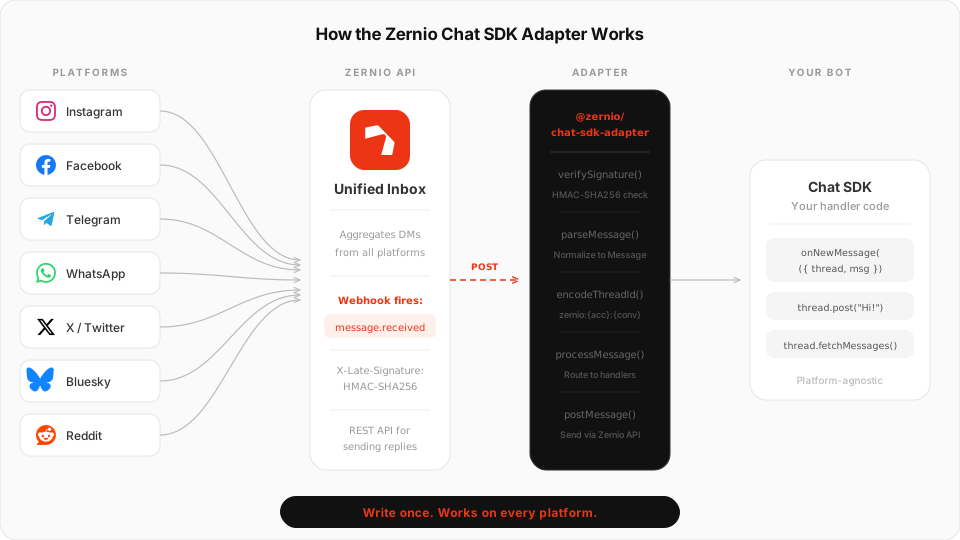
The result: you write your bot logic once, and it works everywhere.
Quick Start
Install the adapter:
npm install @zernio/chat-sdk-adapter chat
Create your bot:
import { Chat } from "chat";
import { createZernioAdapter } from "@zernio/chat-sdk-adapter";

const bot = new Chat({
  adapters: {
    zernio: createZernioAdapter(),
  },
  onNewMessage: async ({ thread, message }) => {
    const platform = message.raw.platform;
    await thread.post(`Hey! You reached us via ${platform}.`);
  },
});
Add a webhook route (Next.js example):
// app/api/chat-webhook/route.ts
import { bot } from "@/lib/bot";

export async function POST(request: Request) {
  return bot.webhooks.zernio(request);
}
Configure a webhook in your Zernio dashboard pointing to /api/chat-webhook with the message.received and comment.received events. That's it. Your bot now responds to DMs on every platform you've connected.
What You Can Do With It
Build an AI customer support agent
Connect your OpenAI or Anthropic model to your Zernio-powered bot. Customers message you on Instagram, WhatsApp, or Telegram and get intelligent responses instantly, through a single handler.
import { generateText } from "ai";
import { openai } from "@ai-sdk/openai";

const bot = new Chat({
  adapters: { zernio: createZernioAdapter() },

  onNewMessage: async ({ thread, message }) => {
    // Fetch conversation history
    const history = await thread.fetchMessages();

    const { text } = await generateText({
      model: openai("gpt-4o"),
      system: "You are a helpful support agent for Acme Corp.",
      messages: history.messages.map(m => ({
        role: m.author.isMe ? "assistant" : "user",
        content: m.text,
      })),
    });

    await thread.post(text);
  },
});
Send rich messages with buttons
Chat-sdk Card elements automatically map to native platform buttons and templates on Facebook, Instagram, Telegram, and WhatsApp:
import { Card, Button, Actions, Text, LinkButton } from "chat";

await thread.post(
  Card({
    title: "Order #1234",
    subtitle: "Total: $50.00",
    imageUrl: "https://example.com/product.jpg",
    children: [
      Text("Your order is ready for pickup."),
      Actions([
        Button({ id: "confirm", label: "Confirm", style: "primary" }),
        LinkButton({ label: "Track Order", url: "https://example.com/track" }),
      ]),
    ],
  })
);
Route messages by platform
The raw message includes the originating platform, so you can customize behavior:
onNewMessage: async ({ thread, message }) => {
  const { platform, sender } = message.raw;

  if (platform === "instagram" && sender.instagramProfile?.isVerified) {
    // Prioritize verified Instagram users
    await thread.post("Thanks for reaching out! Connecting you to our team.");
    return;
  }

  if (platform === "whatsapp") {
    // WhatsApp users often expect faster replies
    await thread.post("We received your message and will reply shortly.");
    return;
  }

  // Default handler for all platforms
  await thread.post("Hey! How can we help?");
}
Access platform-specific data
Every message carries the full Zernio payload, including platform-specific metadata:
// Instagram: follower count, verification status
message.raw.sender.instagramProfile?.followerCount
message.raw.sender.instagramProfile?.isVerified

// WhatsApp: phone number
message.raw.sender.phoneNumber

// All platforms: attachments
for (const att of message.raw.attachments) {
  console.log(att.type, att.url);
  // "image", "https://..."
}
Stop building social integrations from scratch.
One API call to publish, schedule, and manage posts across 15+ platforms.
Security Built In
Every incoming webhook is verified using HMAC-SHA256 signature verification with timing-safe comparison. Set your webhook secret in the Zernio dashboard and pass it to the adapter:
createZernioAdapter({
  apiKey: process.env.ZERNIO_API_KEY,
  webhookSecret: process.env.ZERNIO_WEBHOOK_SECRET,
})
Invalid signatures get a 401 before any message processing happens. The adapter also prevents infinite loops by filtering out outgoing message echoes (when Zernio sends back your bot's own replies via webhook).
What the Adapter Supports
| Feature | Status | Notes |
|---|---|---|
| Send messages | Supported | All 7 platforms |
| Rich messages (cards) | Supported | Buttons/templates on FB, IG, Telegram, WhatsApp |
| Edit messages | Partial | Telegram only |
| Delete messages | Partial | Telegram, X (full); Bluesky, Reddit (self-only) |
| Reactions | Partial | Telegram and WhatsApp |
| Typing indicators | Partial | Facebook Messenger and Telegram |
| AI streaming | Partial | Post+edit on Telegram; single post on others |
| File attachments | Supported | Via media upload endpoint |
| Fetch history | Supported | Full conversation history |
| Webhook verification | Supported | HMAC-SHA256 |
| Comment webhooks | Supported | comment.received routed through handlers |
Under the Hood
For the technically curious, here's how the adapter works:
- Thread IDs are encoded as
zernio:{accountId}:{conversationId}. The account ID is baked into the thread ID because every Zernio API call requires it. - Format conversion uses a markdown passthrough. Zernio's API accepts plain text, and platforms that support markdown (Telegram, Reddit) render it natively.
- Card mapping converts chat-sdk
CardElementchildren (buttons, link buttons, fields, tables) into Zernio's nativebuttons,template, andreplyMarkupfields. - Error mapping converts Zernio HTTP errors to Chat SDK error classes: 401 to
AuthenticationError, 429 toAdapterRateLimitError(withretryAfter), etc. - Streaming uses the post-then-edit pattern: posts an initial message, then edits it as tokens arrive (throttled to 500ms intervals).
The adapter is ESM-only, fully typed, and has 68 unit tests covering webhook verification, thread ID encoding, message parsing, card mapping, API client error mapping, and factory configuration.
Environment Variables
The adapter follows Chat SDK conventions with auto-detection from environment variables. Zero-config in production:
# Required
ZERNIO_API_KEY=your_api_key

# Recommended
ZERNIO_WEBHOOK_SECRET=your_webhook_secret

# Optional
ZERNIO_API_BASE_URL=https://zernio.com/api
ZERNIO_BOT_NAME=My Bot
Get Started
- npm: @zernio/chat-sdk-adapter
- GitHub: zernio-dev/chat-sdk-adapter
- Full docs: Integration guide
- Chat SDK: chat-sdk.dev
If you're already using Chat SDK for Slack or Discord bots, adding Zernio takes about five minutes. If you're building something new, this is the fastest way to get a chatbot running across Instagram, Telegram, WhatsApp, and more.
The inbox addon must be enabled on your Zernio account to receive
message.receivedwebhooks. If you don't have it yet, reach out to our team.