Before using the YouTube API in your software applications or automation workflows, it is important to understand its quota system. Think of it as a daily budget: every project starts with 10,000 quota units per day, and every API call you make spends some of those units. Once your application exceeds this limit, you'll receive a "quota exceeded" error until your quota resets or is increased.
In this guide, you'll learn why the YouTube API quota gets exhausted, how to fix the "quota exceeded" error immediately, the best strategies to avoid hitting it again, and how to integrate the YouTube API more efficiently into your software applications and content automation workflows with Zernio.
How the YouTube API Quota System Works
The YouTube Data API uses a quota system that assigns a quota cost to every API operation, and not all requests consume the same number of quota units. Simple read operations use relatively few units, while more complex actions, such as uploading videos, are significantly more expensive. Understanding how quota units are calculated helps you optimise your application and avoid exceeding your daily limit.
Here are three important things to know about the YouTube API quota system:
- Every API request consumes quota units. An invalid request still incurs a minimum quota cost of 1 unit.
- The YouTube Live Streaming API also consumes quota units, and API calls to its methods count against your project's daily quota.
- Certain API methods have request limits in addition to quota costs. For example, the
search.listandvideos.insertmethods each have a default daily request limit of 100 requests, with each request consuming 1 quota unit. If a method returns paginated results (such assearch.list), every request for an additional page also consumes the corresponding quota cost.
To monitor your daily quota usage and remaining quota units, visit the Quotas page in the Google API Console.
The table below shows the official quota breakdown for the YouTube Data API methods.
| Resource | Method | Cost |
|---|---|---|
| activities / guideCategories / i18nLanguages / i18nRegions / members / membershipsLevels / videoAbuseReportReasons / videoCategories | list | 1 |
| captions | list | 50 |
| insert | 400 | |
| update | 450 | |
| delete | 50 | |
| channelBanners / channelSections | insert | 50 |
| channels / channelSections | list | 1 |
| update | 50 | |
| channelSections | delete | 50 |
| comments / commentThreads | list | 1 |
| insert | 50 | |
| update | 50 | |
| comments | setModerationStatus | 50 |
| delete | 50 | |
| subscriptions | list | 1 |
| insert | 50 | |
| delete | 50 | |
| playlistItems / playlists | list | 1 |
| insert | 50 | |
| update | 50 | |
| delete | 50 | |
| search | list | 100 |
| thumbnails | set | 50 |
| videos | list | 1 |
| insert | 100 | |
| update | 50 | |
| rate | 50 | |
| getRating | 1 | |
| reportAbuse | 50 | |
| delete | 50 | |
| watermarks | set | 50 |
| unset | 50 |
How to Fix the "YouTube API Quota Exceeded" Error Message
Fixing a quotaExceeded error starts with understanding how your app is spending quota and identifying which operations consume the most units. The YouTube Data API enforces a strict daily limit, so the fastest and most reliable solution is to optimise how your application uses its quota.
The table below provides a quick summary of the different methods for fixing the YouTube API quota exceeded error.
| Fix Method | Goal | What It Solves |
|---|---|---|
| Check Usage in Cloud Console | Identify quota-heavy API requests | Provides insights to guide optimisation |
| Audit API Calls | Map every request and its quota cost | Reveals redundant, repetitive, or expensive operations |
| Batching and Caching | Reduce the total number of requests | Delivers the biggest and most immediate quota savings |
| Use ETags | Skip unchanged data | Lets you check for updates at zero quota cost |
| Control Request Timing | Prevent traffic spikes | Avoids early depletion of daily limits |
| Wait for Quota Reset | Temporary recovery | Useful for accidental overuse or testing loops |
| Request a Quota Increase | Support high-traffic applications | Enables long-term scaling after optimisation |
1. Monitor Your Quota Usage in Google Cloud Console
Your first step is to check the Google Cloud Console to get a complete overview of how your project interacts with the YouTube API. The dashboard displays API traffic, error trends, and quota consumption broken down by endpoint, making it easy to identify unusual spikes long before they trigger a quotaExceeded error.
For example, if the search.list method suddenly becomes the top consumer on your charts, you immediately know where to adjust your logic. This visibility is invaluable for both troubleshooting and long-term planning.
2. Audit Every API Call
Once you get the breakdown of how your application interacts with the YouTube API, perform a full audit of your API calls. Document every method your app uses and note the exact quota cost of each one.
This audit helps you identify the operations consuming the most quota and the main causes of high quota usage, such as inefficient loops, unnecessary requests, repeated data fetches, and frequent calls to high-cost endpoints. Once you've identified these bottlenecks, you can optimise or replace them to reduce overall quota usage.
3. Minimise Your Request Volume With Batching and Caching
Reducing the total number of API calls your application makes is one of the most effective ways to prevent quota exhaustion. One way to achieve this is through batching, where you combine multiple operations into a single API request. For example, if you need details for 50 videos, you can pass all their IDs in a single videos.list request instead of making 50 separate requests.
Caching prevents your system from repeatedly fetching slow-changing or static data such as subscriber counts, video metadata, or channel details. Instead of calling the API every time a page loads, fetch it once at an appropriate interval and serve the cached data until it needs to be refreshed.
4. Use ETags to Avoid Unnecessary Updates
ETags are one of the most underused features of the YouTube API. Every YouTube Data API response includes an ETag, which acts as a version identifier for the requested resource. When you request the same resource again, include the previously returned ETag in your request. If the resource hasn't changed, YouTube returns a 304 Not Modified response, which does not incur any additional quota cost.
5. Manage Request Timing
Running large sync jobs for all users concurrently can instantly drain your quota budget. A better approach is staggering operations throughout the day. By distributing requests evenly, you prevent spikes that could overload your daily limit.
If you hit the limit unexpectedly, the short-term fallback is simple: wait for the daily reset at midnight Pacific Time. Your quota automatically refreshes, and your application resumes normal operation.
6. Request a Quota Increase From Google
If your application is genuinely growing and all optimisations are already implemented, you can request a quota increase. Google evaluates requests carefully and approves those that demonstrate efficient usage and full compliance with the API policies.
Before requesting more quota, prepare the following:
- A clear audit of your current consumption
- Proof that you have optimised high-cost operations
- Evidence of proper caching, batching, and ETag usage
- A description of your use case with projected growth
- Metrics showing how many requests your app makes per day
A Smarter Way to Integrate the YouTube API with Zernio
Zernio is a unified social media management and messaging API that enables you to upload, schedule, and publish YouTube videos programmatically. It simplifies YouTube API integration by providing a single API for user authentication, automatic rate limiting and retry mechanisms, comments management, engagement and demographic analytics (age, gender, and country), webhooks, and AI agent integrations.
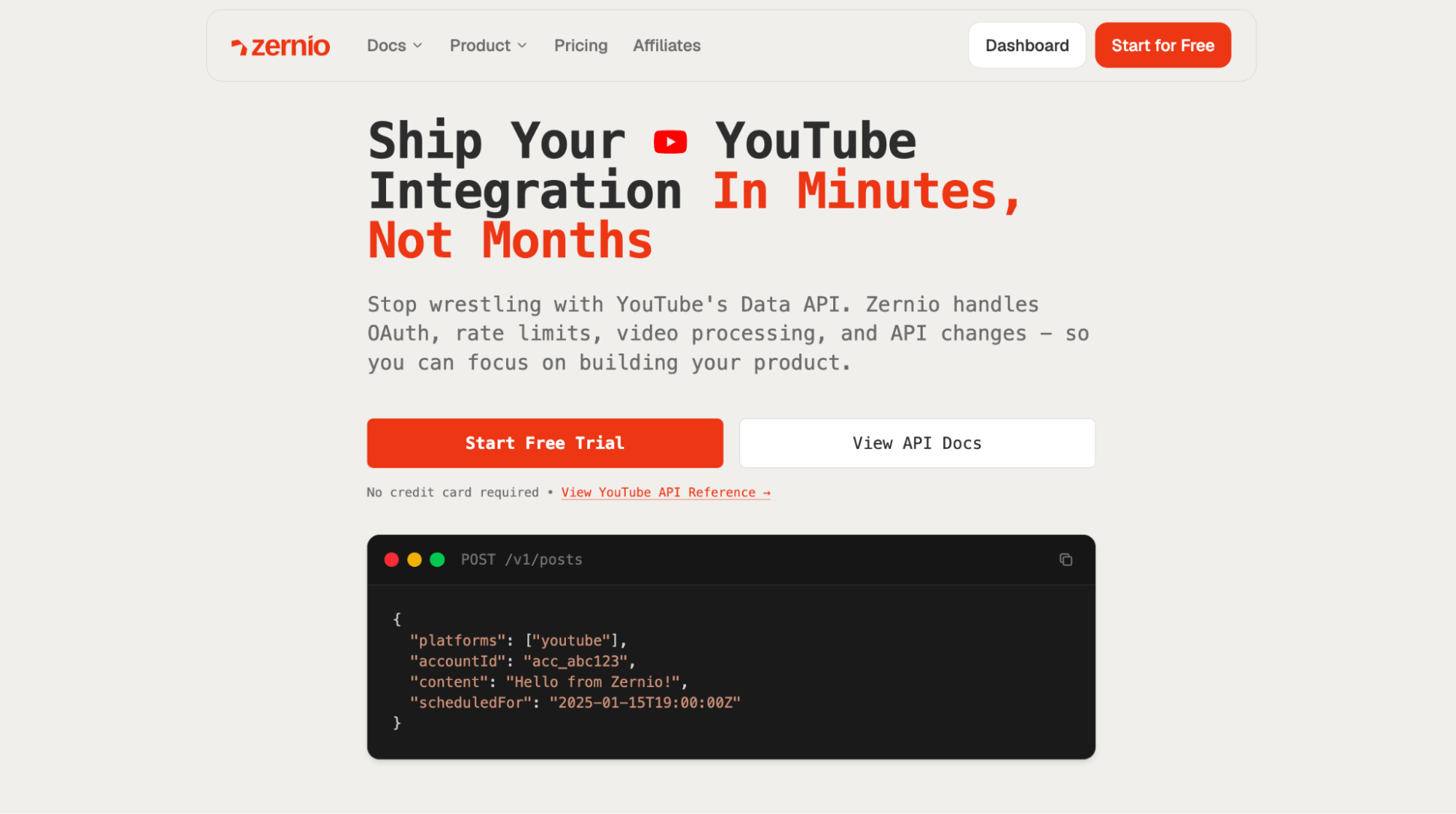
With Zernio, you can upload YouTube videos directly while the platform handles many of the complexities of the YouTube Data API for you. It automatically manages resumable uploads and their chunking logic, simplifies OAuth authentication, handles API updates and deprecations, and helps you build more reliable YouTube integrations with less implementation effort.
Zernio also provides content scheduling, ads management, messaging, and analytics across 16 channels through the same unified API. For example, if you need to cross-post content across multiple channels, like posting a video on YouTube, Instagram, and TikTok. This makes it well suited for SaaS applications and businesses that need to integrate and automate social media workflows across multiple platforms.
How to Schedule and Publish YouTube Videos with Zernio
Zernio handles the YouTube resumable upload protocol and modifies the scheduled visibility, ensuring your video is published at the specified time.
In this section, you'll learn how to schedule and publish YouTube videos through the Zernio dashboard and programmatically using the Zernio API. With a single API request, you can upload a video, add its metadata, set its visibility, schedule a future publish time, and manage thumbnails.
Using the Zernio Dashboard
The Zernio dashboard provides a central place to manage all your scheduled and published content.
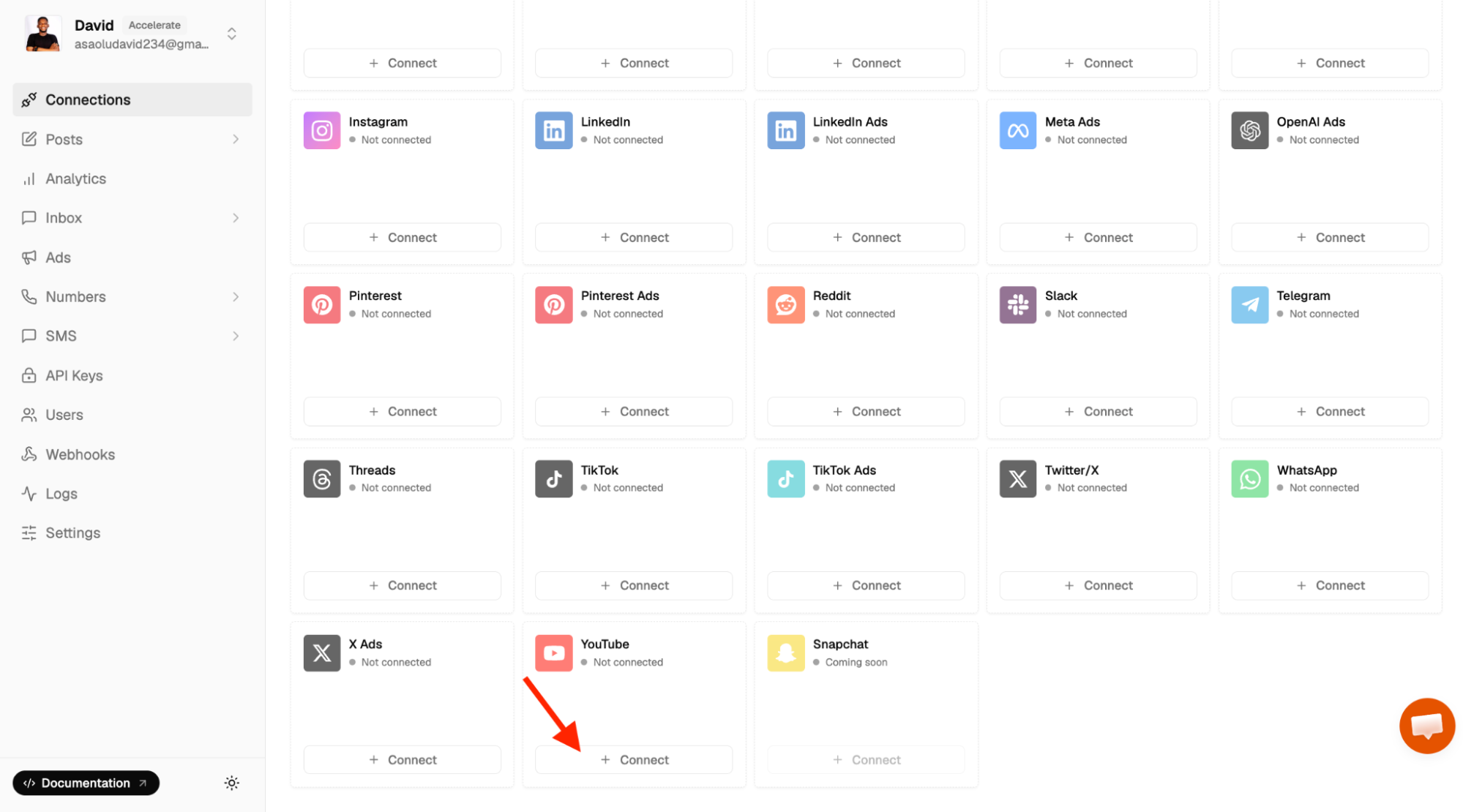
To get started, log in to your Zernio account and navigate to Connections from the sidebar. Select YouTube and connect your existing YouTube channel associated with your Google account.
If you manage multiple channels, you can connect multiple YouTube accounts by creating additional profiles.
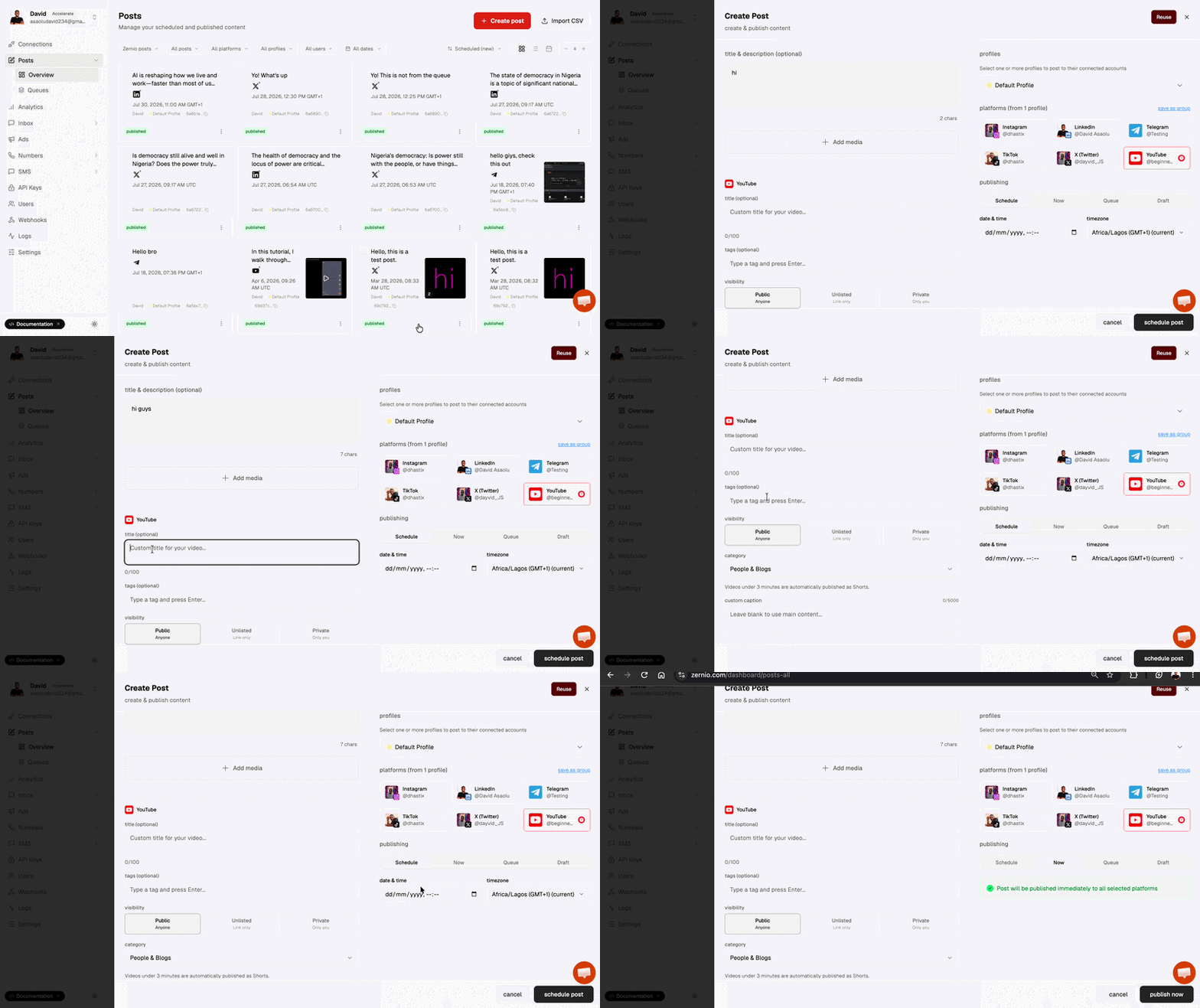
To upload and schedule YouTube videos directly from the Zernio dashboard, select Posts from the sidebar, upload your video, enter its title, description, tags, category, and visibility settings, then click Publish Now or Schedule Post.
Using the Zernio API
Step 1: Get your API key and YouTube account ID
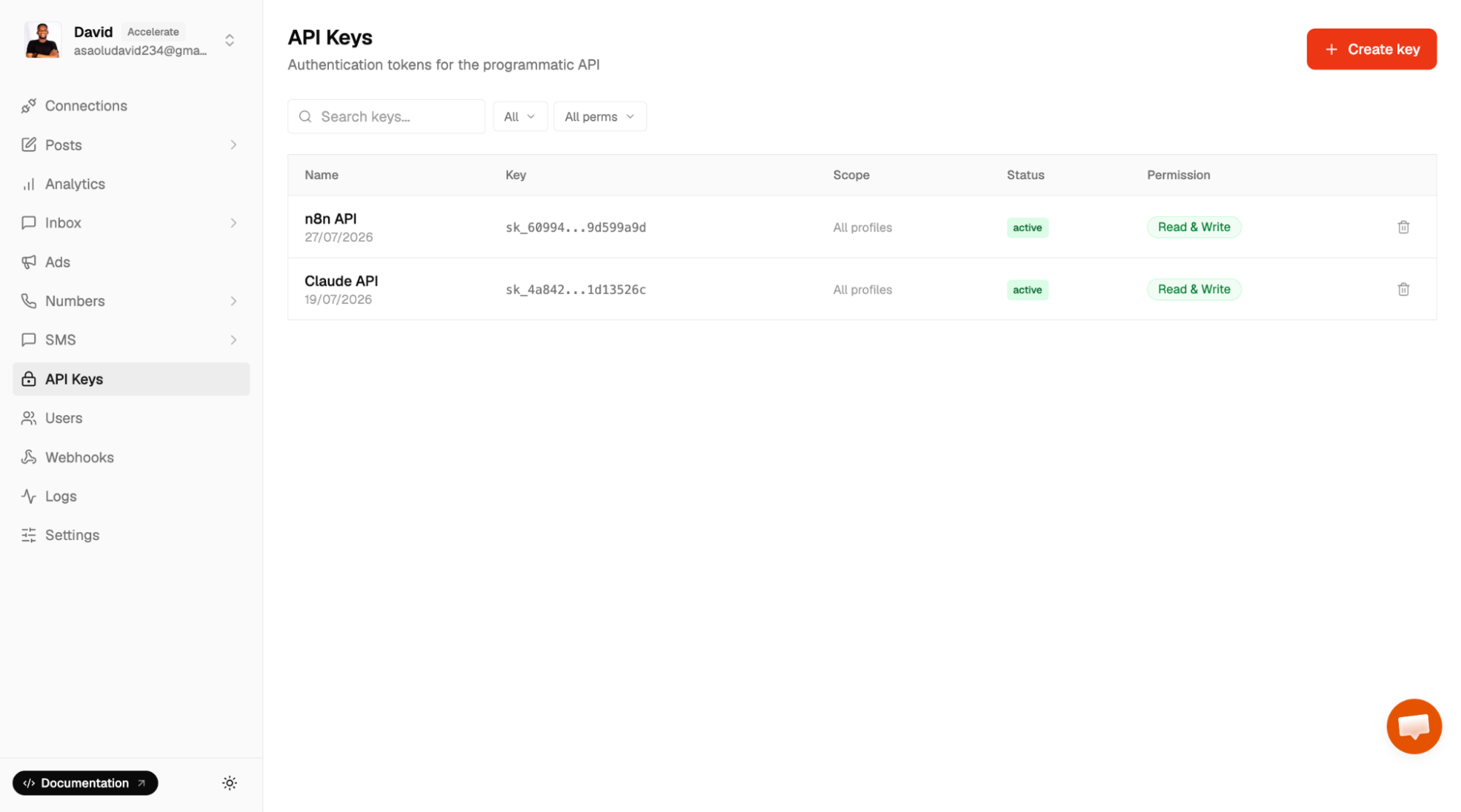
Select API Keys from the sidebar menu to create a new API key and save it somewhere on your computer. Before making API requests, ensure you've already connected your YouTube account to Zernio.
Next, return to the Connections page, locate your connected YouTube account, click the Copy icon to get your account ID, and save it.
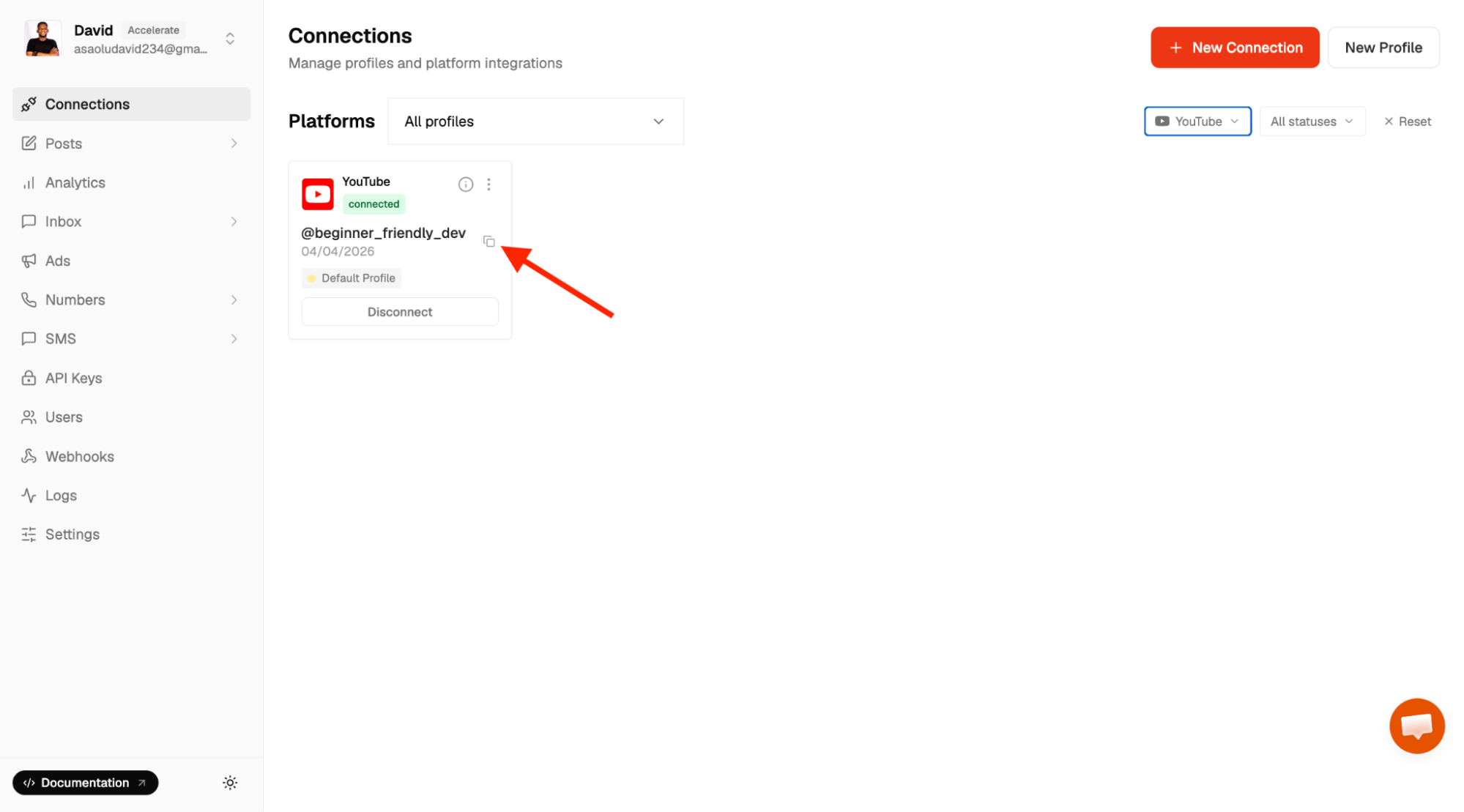
Step 2: Integrate the Zernio API to schedule and publish YouTube videos
Zernio provides official SDKs for Node.js, Python, Go, Ruby, Java, PHP, .NET, and Rust, allowing you to use the YouTube API from your preferred programming language. In this tutorial, we'll integrate directly with the Zernio API.
First, create a folder to hold your project files.
mkdir api-youtube
cd api-youtube
Next, create a .env file in the project root and store your Zernio API key and YouTube account ID.
ZERNIO_API_KEY=<your_api_key>
ZERNIO_YOUTUBE_ACCOUNT_ID=<your_youtube_account_id>
Install the required dependencies. We'll use Axios to send HTTP requests to the Zernio API and Dotenv to load environment variables from the .env file.
npm install axios dotenv
Create an index.js file within the project folder and import the required packages.
require("dotenv").config();
const axios = require("axios");
Add the following code snippet into the index.js file to publish your video to your YouTube channel.
async function publishYoutubeVideo() {
  const response = await axios({
    url: "https://zernio.com/api/v1/posts",
    method: "post",
    headers: {
      Authorization: `Bearer ${process.env.ZERNIO_API_KEY}`,
      "Content-Type": "application/json",
    },
    data: JSON.stringify({
      content: "VIDEO_DESCRIPTION",
      mediaItems: [
        {
          type: "video",
          url: "VIDEO_URL.mp4",
          thumbnail: "THUMBNAIL_IMAGE_URL",
        },
      ],
      platforms: [
        {
          platform: "youtube",
          accountId: process.env.ZERNIO_YOUTUBE_ACCOUNT_ID,
          platformSpecificData: {
            title: "Build a REST API from Scratch",
            visibility: "public",
            categoryId: "27",
            madeForKids: false,
          },
        },
      ],
      publishNow: true,
      // scheduledFor: '2024-01-15T12:00:00Z'
    }),
  });

  console.log(response.data);
}

publishYoutubeVideo();
The publishYoutubeVideo function sends a single request to the Zernio API to upload and publish a YouTube video. It uploads the video, attaches metadata such as the title, category, thumbnail, and visibility settings, and publishes the video immediately by setting publishNow to true. To schedule the video instead, replace publishNow: true with the scheduledFor field and specify the desired publication date and time.
Finally, run the following command to execute the script and publish your video.
node index.js
Congratulations! You've successfully published your first YouTube video using the Zernio API.
If you prefer AI assistants, Zernio also integrates with Claude, ChatGPT, and other MCP-compatible clients via its MCP server, allowing you to upload, schedule, publish, and manage YouTube videos using natural language directly from your AI interface.
Before deploying your integration, keep the following YouTube-specific behaviours in mind:
- YouTube automatically detects Shorts. Any video that is three minutes or shorter with a vertical (9:16) aspect ratio is automatically classified as a YouTube Short.
- Scheduled videos are initially uploaded as private. When you schedule a YouTube video, Zernio uploads it immediately with private visibility and assigns it a video URL. At the scheduled publication time, YouTube automatically updates the video's visibility to your configured setting, such as public.
- Ensure your video URL is publicly accessible. When providing a video URL, make sure it is publicly accessible and returns the actual video file rather than an HTML page. This allows Zernio to retrieve and upload the video successfully.
Stop building social integrations from scratch.
One API call to publish, schedule, and manage posts across 15+ platforms.
Zernio API vs YouTube Data API
While the YouTube Data API gives you direct access to YouTube's functionality, developers are responsible for implementing and managing OAuth authentication, resumable uploads, and API updates. Zernio abstracts this complexity by providing a unified API that simplifies YouTube integration and supports 16 channels in total.
The table below compares the two approaches:
| Feature | Zernio API | YouTube Data API |
|---|---|---|
| Platform Support | Unified API supporting 16 channels, including YouTube. | Exclusively supports YouTube. |
| Authentication | Simplified OAuth flow managed by Zernio | You must manually implement and maintain Google OAuth 2.0. |
| Video Uploads | Automatically manages resumable uploads, chunking, and network interruptions. | You must build and manage the resumable upload protocol manually. |
| Content Scheduling | Built-in scheduling system to publish content at future dates automatically. | You must build custom cron/scheduling logic to update video visibility states. |
| Rate Limits & Quotas | Automatic rate limit handling with intelligent queueing and retries. | Developers must manually implement exponential backoff and monitor quota usage. |
| API Standardisation | Uniform API request and response models across all 16 channels. | Unique, YouTube-specific JSON architecture and data models. |
| Comments Management | Standardised endpoints to read, reply, and moderate comments across all platforms. | Requires managing separate threads and replies via specific YouTube endpoints. |
| Analytics & Reporting | Bundles engagement and demographic data directly into the core API. | Requires integrating and authenticating a completely separate API (YouTube Analytics API). |
| Webhooks & Events | Built-in, standardised webhooks for real-time status and engagement updates. | Requires configuring Google Cloud Pub/Sub for push notifications. |
| AI Agent Integration | Includes a hosted MCP (Model Context Protocol) server for AI assistants like Claude and ChatGPT | No native MCP or LLM context support. |
| Best For | SaaS apps, agencies, and automation workflows that need cross-platform scale with minimal setup. | Deep integrations requiring granular, YouTube-exclusive features. |
Summary: YouTube API Quota Exceeded? Here's How to Fix It
Running into a "YouTube API quota exceeded" error can disrupt your workflows, halt automated uploads, and affect your content management systems. Understanding how the YouTube API quota system works, how each method consumes units and how the daily limit resets is the first step toward preventing these interruptions.
Zernio API provides a practical way to manage YouTube content while respecting these quota limits. By leveraging Zernio's capabilities for uploading videos, setting metadata, and scheduling content, you can optimise API calls, reduce redundant requests, and monitor usage effectively. Strategies such as batching requests, caching frequently accessed data, and using ETags can prevent unexpected quota exhaustion and maintain a smooth workflow.
FAQs
What is the default YouTube Data API quota?
Every Google Cloud project that enables the YouTube Data API receives a default quota allocation of 10,000 quota units per day. Every API request consumes quota units based on the operation performed, and the quota resets daily at midnight Pacific Time (PT).
Why do I get the "YouTube API quota exceeded" error?
This error appears when your application has consumed its daily request quota. Common causes include frequent calls to high-cost endpoints, repeated polling, unnecessary API requests, inefficient loops, or video uploads that consume significantly more quota than read operations.
Which YouTube Data API methods consume the most quota?
Different API methods have different quota costs. The following API methods cost more than others:
- captions.insert - 400 units
- captions.update - 450 units
- search.list - 100 units
- videos.insert - 100 units
How can I reduce YouTube API quota usage?
Some of the most effective optimisation techniques include:
- Auditing your API requests.
- Reducing unnecessary API calls.
- Caching responses whenever possible.
- Batching resource lookups into fewer requests.
- Using ETags to avoid downloading unchanged resources.
- Avoiding frequent calls to expensive endpoints such as search.list.
These techniques significantly reduce quota consumption without affecting application functionality.
How do I increase my YouTube API quota?
After optimising your application, you can request a quota increase through the Audit and Quota Extension Form. Google evaluates requests carefully and approves those that demonstrate efficient usage and full compliance with the API policies.
When does the YouTube Data API quota reset?
The default daily quota resets every day at midnight Pacific Time (PT). Until the reset occurs or your quota is increased, requests that exceed your allocation will continue returning quota-related errors.
Is the YouTube Data API free?
Yes. The YouTube Data API includes a free daily quota of 10,000 units per project. There is no pay-as-you-go pricing for additional quota. If your application requires more than the default allocation, you must request a quota increase from Google rather than purchasing additional quota.
Is there an alternative way to integrate the YouTube API?
Yes. Instead of implementing YouTube authentication, resumable uploads, and upload protocols yourself, you can integrate through Zernio.
Zernio provides a unified API for uploading, scheduling, and publishing YouTube videos and handles OAuth authentication, upload workflows, retries, API updates, and access to 16 channels in total.
Thank you for reading! 🎉