Twilio charges $0.005 per WhatsApp message sent or received, on top of Meta's per-template fee (between $0.0014 and $0.0499 depending on country and message category). Failed messages cost $0.001. The sandbox is free to access but every message is billed at standard rates after the $15 trial credit runs out.
If you send 100,000 utility template messages from a US number in 2026, you'll pay roughly $840 to Twilio plus Meta. That's the short answer. The rest of this guide breaks down the categories, the 2026 pricing model change, and when a flat-fee platform like Zernio costs less than Twilio.
In this guide
- How Twilio WhatsApp pricing works in 2026
- What does the Twilio WhatsApp sandbox cost?
- Twilio WhatsApp pricing by country
- Sandbox vs pay-as-you-go vs production
- What changed in Twilio WhatsApp pricing in 2026?
- When Twilio may not be the best fit
- Twilio vs Meta Cloud API vs Zernio
- FAQ
How does Twilio WhatsApp pricing work in 2026?
WhatsApp supports two kinds of messages: message templates and free-form messages, and Twilio charges differently depending on which type you send.
Message templates are structured, reusable messages that can be sent to many users. They can include variables or placeholders that let you personalise the content for each recipient.
In this section, you will learn how Twilio pricing works, when you can send a message template or a free-form message, how much Twilio charges for each type, and what happens when a message fails to deliver.
How much does Twilio charge for WhatsApp template messages?
Message templates are pre-approved WhatsApp messages you can send to users outside the 24-hour customer service window. Twilio charges for these based on Meta's template category rates, which are divided into three:
-
Marketing Templates
Used for promotional messages, offers, announcements, re-engagement messages, or anything that encourages a user to take an action or buy something. These templates usually cost more because they enable businesses to achieve a wide range of goals, from generating awareness to driving sales.
-
Utility Templates
Used for transactional or informational updates such as order confirmations, receipts, reminders, shipping updates, or payment notifications. These templates are priced lower than marketing templates because they support ongoing user actions rather than direct promotion.
Pricing depends on when the message is sent.
Outside the customer service window: Meta charges $0.0034 per message, and Twilio adds $0.005 per message.
Inside the customer service window: Both Meta and Twilio charge $0.00, since the conversation counts as an active service interaction.
-
Authentication Templates
Used for sending one-time passcodes or verification messages. Authentication templates are always business-initiated, so each message triggers a template charge. Meta charges $0.0034 per message, and Twilio adds $0.005 per message, the same rate structure as utility templates sent outside the customer service window.
The table below shows the combined Meta and Twilio WhatsApp pricing for the specified message volumes when using Utility and Authentication message templates.
| Volume | Meta Cost ($0.0034/msg) | Twilio Cost ($0.005/msg) | Total Cost ($0.0084/msg) |
|---|---|---|---|
| 1,000 | $3.40 | $5.00 | $8.40 |
| 5,000 | $17.00 | $25.00 | $42.00 |
| 10,000 | $34.00 | $50.00 | $84.00 |
| 50,000 | $170.00 | $250.00 | $420.00 |
| 100,000 | $340.00 | $500.00 | $840.00 |
| 500,000 | $1,700.00 | $2,500.00 | $4,200.00 |
When are free-form WhatsApp messages free?
Free-form messages are regular, non-template messages that can be sent to users who contacted you first. These messages are allowed within the 24-hour customer service window, and neither Meta nor Twilio charges for them during this period.
If you send free-form messages outside the customer service window, the conversation becomes business-initiated. At that point, pricing follows the template category rules for Marketing, Utility, or Authentication. Free-form messages are ideal for active support conversations, troubleshooting, FAQs, and any back-and-forth interaction that keeps customers engaged without adding costs.
Here is a comparison table for all four WhatsApp message types, including their use cases and pricing differences:
| Feature / Category | Authentication Templates | Utility Templates | Marketing Templates | Free-form Messaging |
|---|---|---|---|---|
| Purpose | Verification codes & OTPs | Transactional or informational updates | Promotional or engagement messages | Conversational replies within a 24-hour window |
| Typical Use Cases | Login verification, password reset | Order confirmations, reminders, delivery updates | Offers, announcements, re-engagement campaigns | Support chats, FAQs, customer replies |
| Initiation Type | Always business-initiated | Business-initiated (templates) | Business-initiated (templates) | User-initiated or within a 24-hour service window |
| Approval Required | Yes | Yes | Yes | No |
| Content Restrictions | Strict security-only content | Non-promotional, informational | Promotional & engagement | Free text, any valid conversational content |
| Meta Fee (Approx.)* | $0.0034 | $0.0034 (outside service window) | Varies by country | $0.00 (within 24h) |
| Twilio Platform Fee | $0.005 | $0.005 (outside service window) | $0.005 | $0.00 (within 24h) |
| Total Cost | \~$0.0084 per message | \~$0.0084 per message (outside service window) | Meta fee + $0.005 | $0.00 (within 24h) |
| When It's Free | Never | Inside a 24-hour service window | Never | Always inside a 24-hour window |
Does Twilio charge for failed WhatsApp messages?
Twilio applies a $0.001 failed message processing fee for messages that end in a "Failed" status. This fee helps cover the advanced prechecks and diagnostic tools Twilio uses to prevent unnecessary carrier charges and help businesses quickly identify why a message didn't go through.
These prechecks include validating phone numbers, enforcing country-specific messaging rules, and checking API parameters before a message is sent. However, not all failures incur the fee. Twilio does not charge when the failure is caused by Twilio's own internal errors, fraud-protection blocks, account restrictions, or Meta-level WhatsApp limits outside the customer's control.
When is Twilio not the best WhatsApp provider?
While Twilio is a flexible platform, it is not always the most practical choice for businesses that rely heavily on WhatsApp messaging. Here are some scenarios where Twilio might be less ideal:
- WhatsApp is your primary messaging channel: If your business communicates mainly through WhatsApp, the broader Twilio ecosystem (SMS, voice, email, Flex) may be unnecessary and seem like overkill. In such cases, simpler WhatsApp-focused providers may simplify operations and reduce overhead. Twilio's setup process, API integrations, and management of multiple services can introduce complexity that isn't justified if your messaging needs are limited.
- Complex pricing for high-volume messaging: Twilio's per-message fees can add up quickly, especially for message templates, free-form messages outside the 24-hour customer service window, and failed message processing fees. Predicting total monthly spend can be challenging for businesses sending tens or hundreds of thousands of messages.
- Broadcasting and scheduling campaigns: Twilio supports message scheduling and broadcasts, but these features often require additional configuration or incur higher fees per template. Platforms with built-in broadcast tools offer a more intuitive and cost-effective experience.
- Cost sensitivity at scale: For campaigns with large audiences, even small per-message fees ($0.003 to $0.015) can lead to substantial spending over time. Businesses looking for predictable monthly billing may prefer providers with flat-rate plans or simpler fee structures.
- Limited built-in WhatsApp analytics or insights: While Twilio offers reporting tools, understanding detailed message failures, delivery patterns, and customer interactions often requires additional configuration. Platforms designed specifically for WhatsApp communication provide clearer dashboards and actionable insights out of the box.
What does the Twilio WhatsApp sandbox cost?
The Twilio WhatsApp sandbox is free to access, but every message you send through it is billed at the same rate as production: $0.005 per message to Twilio plus Meta's template fee. There is no separate sandbox pricing tier.
New Twilio accounts get $15 in trial credit, which covers roughly 1,700 utility template messages or 600 marketing messages to US numbers. After the credit runs out, sandbox messages start showing up on your bill.
The sandbox has functional limits, not pricing limits: you can only message phone numbers that have opted into your sandbox by texting your join code, and you can only use a small set of pre-approved test templates. Once you move to production, those limits disappear but the per-message price stays the same.
Twilio WhatsApp pricing by country
Meta charges different rates by country. Twilio's $0.005 platform fee is the same everywhere, but the total cost per message swings significantly depending on where the recipient lives.
| Country (recipient) | Marketing (Meta) | Utility (Meta) | Auth (Meta) | Total with Twilio |
|---|---|---|---|---|
| United States | $0.0250 | $0.0034 | $0.0034 | $0.0084 to $0.0300 |
| Brazil | $0.0499 | $0.0157 | $0.0157 | $0.0207 to $0.0549 |
| India | $0.0118 | $0.0014 | $0.0014 | $0.0064 to $0.0168 |
| United Kingdom | $0.0529 | $0.0220 | $0.0358 | $0.0270 to $0.0579 |
| Germany | $0.0768 | $0.0550 | $0.0768 | $0.0600 to $0.0818 |
| Indonesia | $0.0398 | $0.0114 | $0.0271 | $0.0164 to $0.0448 |
Source: Meta WhatsApp Business Platform pricing, effective April 1, 2026. Always check Meta's rate card for the current month.
Marketing templates to Germany cost roughly 9x more than to India. If your audience is global, your monthly Twilio bill can vary by 5x depending on where your users live.
Stop building social integrations from scratch.
One API call to publish, schedule, and manage posts across 17 platforms.
Sandbox vs pay-as-you-go vs production
| Mode | Best for | Cost | Limits |
|---|---|---|---|
| Sandbox | Testing and development | $0.005 + Meta fee per message (after $15 trial credit) | Only opt-in numbers, pre-approved test templates, shared sandbox number |
| Pay-as-you-go production | Live apps without committed volume | Same per-message rate, no monthly minimum | Standard Meta template approval, your own number |
| Committed-use production | High-volume senders | Same per-message rate, no built-in volume discount | Negotiate enterprise terms directly with Twilio sales |
Twilio doesn't offer a volume discount on WhatsApp messaging by default. Whether you send 1,000 or 1,000,000 messages, the per-message rate is the same. The only way to lower it is an enterprise contract.
What changed in Twilio WhatsApp pricing in 2026?
Meta replaced conversation-based pricing with per-message billing on July 1, 2025. Before that, you paid one fee per 24-hour conversation regardless of how many messages were exchanged. Now every template message is billed individually. For most businesses this raised costs by 20 to 40%, depending on their previous message-per-conversation ratio.
Twilio passed this change through directly. Their $0.005 platform fee also applies per message now, not per conversation. If you were forecasting WhatsApp costs using 2024 numbers, multiply by 1.3 as a starting point.
India and Brazil also raised local marketing rates in January 2026. Brazil added BRL-denominated billing for eligible accounts in July 2026.
What are the alternatives to Twilio for WhatsApp API?
If Twilio's pricing or feature model doesn't align with your needs, there are other reliable ways to integrate WhatsApp into your product or workflow. Two of the most common options are direct access through Meta's Cloud API or using a purpose-built platform, such as Zernio.
1. Meta's Direct Cloud API
Meta's Cloud API is WhatsApp's official API provided directly by Meta. It gives you full control over sending messages, managing templates, and scaling your WhatsApp operations without relying on any third-party provider.
However, this option requires strong engineering capacity. You'll be responsible for everything end-to-end, including:
- Server setup and hosting
- Message routing and delivery logic
- Webhook management
- Template approvals
- Scaling and rate limits
- Ongoing infrastructure maintenance
The main advantage is cost: pricing aligns directly with Meta's base WhatsApp rates, making it more affordable than other third-party platforms. The tradeoff is that setup, maintenance, and compliance require significantly more engineering effort.
If you want to implement the Cloud API yourself, here's our full tutorial on how to integrate the WhatsApp API into your software applications and marketing workflows.
2. Zernio: the platform for every social API
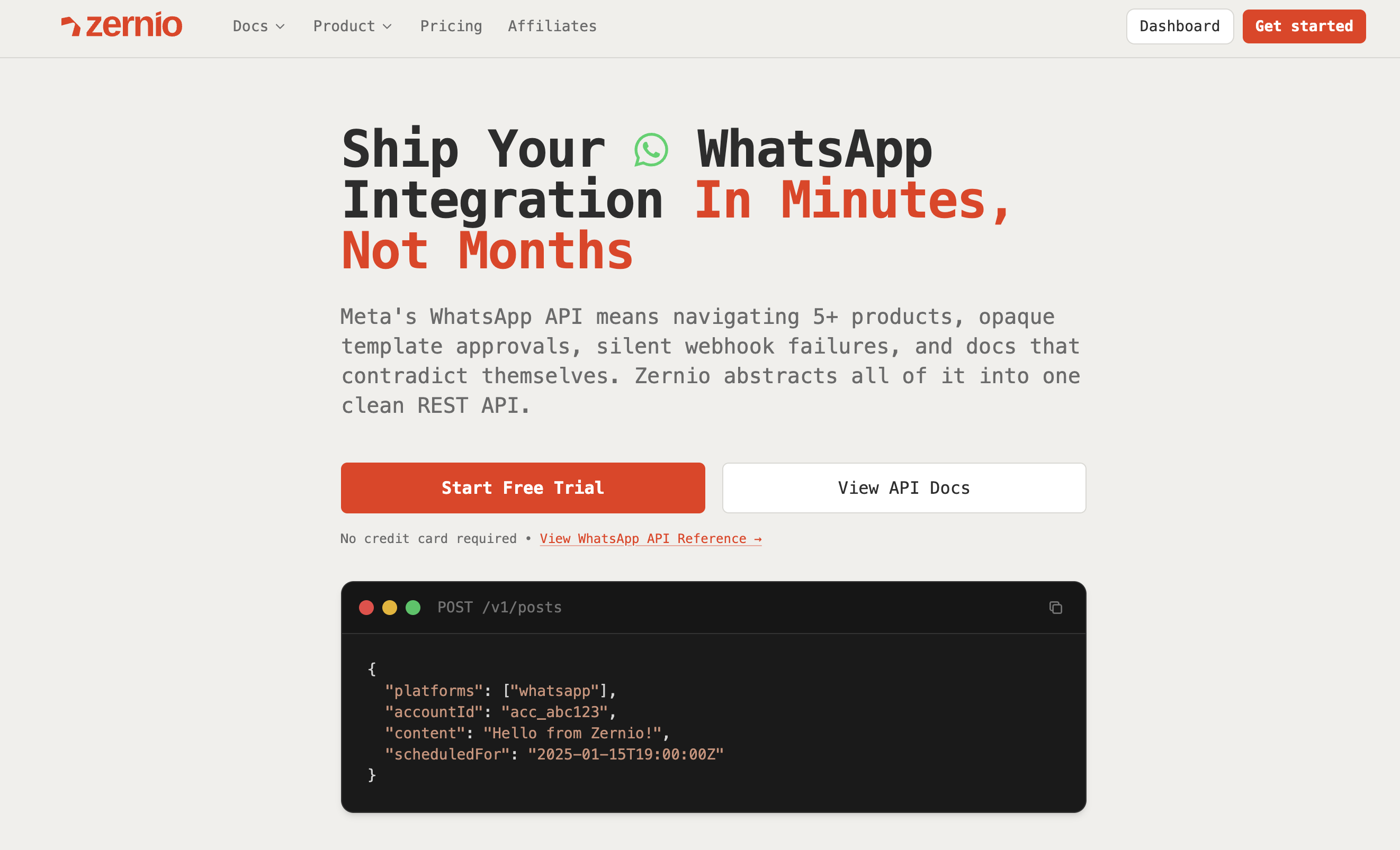
Zernio provides a managed WhatsApp API layer that removes the complexity of hosting your own Cloud API infrastructure. Compared to Twilio, Zernio offers simpler setup, more predictable pricing, and built-in tools for:
- Broadcasts and campaigns
- Automation workflows
- Message scheduling and calendar
- Multi-channel publishing
Zernio is designed specifically for social communication. Instead of managing multiple unrelated channels, like SMS or Voice, you get a unified platform purpose-built for WhatsApp and 13 other social networks.
Teams choose Zernio when they want WhatsApp capabilities without the engineering overhead of the Cloud API or the broad, enterprise-heavy structure of Twilio. It is ideal for SaaS products, marketing teams, and customer support workflows that rely heavily on social messaging.
For a complete tutorial about how Zernio compares to Twilio, see our detailed guide:
Zernio vs Twilio: complete comparison.
Twilio vs Meta Cloud API vs Zernio: features and use cases
| Twilio | Meta Cloud API (direct) | Zernio | |
|---|---|---|---|
| Best for | Teams already using Twilio for SMS, voice, or email | Engineering teams who want raw Meta rates and full control | Developers and AI agents needing WhatsApp + 14 other social and messaging platforms through one API |
| Setup time | 2 to 4 hours (account, sandbox, number, templates) | 2 to 4 weeks (infra, webhooks, hosting, compliance) | Under 30 minutes |
| Pricing model | $0.005/msg + Meta fee + $0.001 per failed msg | Meta fee only | Flat monthly plan, no per-message markup |
| Sandbox / testing | Shared sandbox, opt-in numbers only | Test number provided by Meta | Built-in test mode with your own connected account |
| Broadcast & scheduling | Requires Twilio Studio or custom code | Build it yourself | Built in: broadcasts, scheduling, calendar |
| Multi-platform | WhatsApp + SMS + voice + email | WhatsApp only | WhatsApp + Telegram + Instagram + TikTok + 10 more |
| Comments + DMs in one inbox | No native unified inbox | No | Yes |
| AI agent support | REST API only | REST API only | REST API + MCP server + CLI |
| Analytics | Basic delivery reporting | None - build your own | Built-in analytics for all platforms |
| Compliance | SOC 2, HIPAA-eligible | Your responsibility | SOC 2 + GDPR, EU-hosted |
Pick Twilio if you already use it for SMS/voice and want one bill. Pick Meta direct if you have an engineering team that wants the lowest possible per-message rate and is happy to maintain the infrastructure. Pick Zernio if you want WhatsApp plus the other 14 platforms developers and AI agents need, billed at a flat rate that doesn't punish growth.
How do you send WhatsApp messages with Zernio?
Zernio is an all-in-one social media management platform that allows you to schedule and publish multimedia content across multiple platforms, including Twitter (X), Instagram, and LinkedIn, through a single, unified API.
In this tutorial, you will configure Zernio for WhatsApp messaging and learn how to create, schedule, and send messages using its API and SDKs.
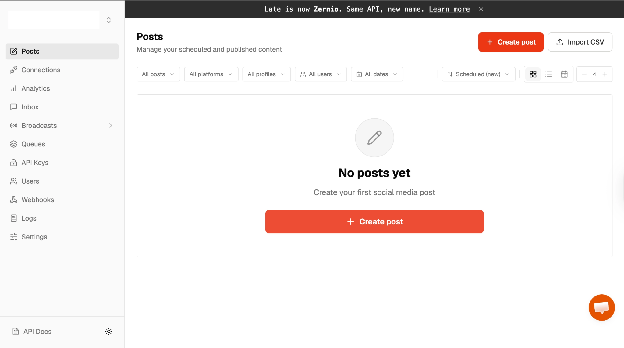
First, create a Zernio account and log in to your dashboard.
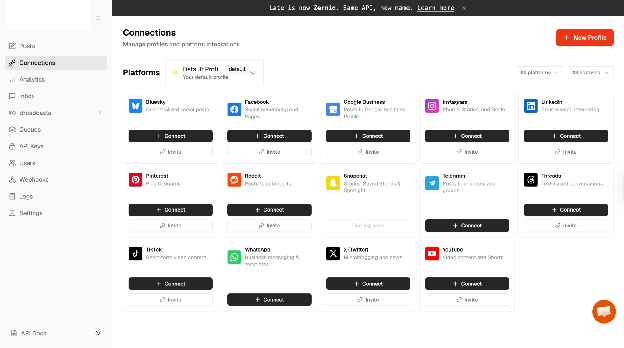
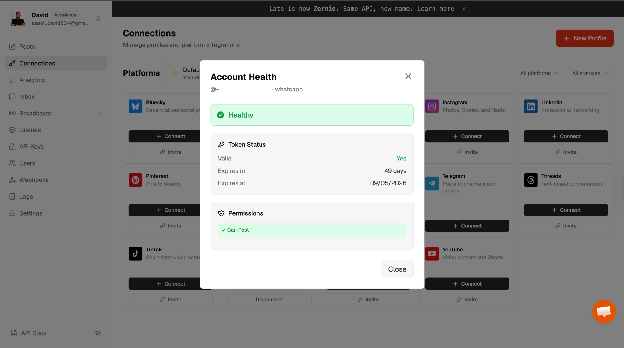
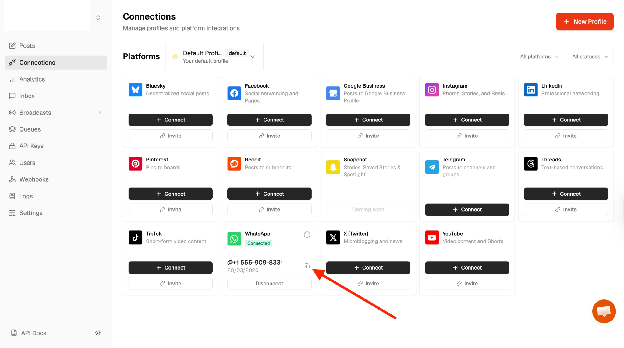
Select Connections from the sidebar menu and connect your WhatsApp account to Zernio.
After clicking the WhatsApp Connect button, a pop-up appears where you can choose between getting a US number at a flat rate of $3 per month or connecting an existing WhatsApp Business account.
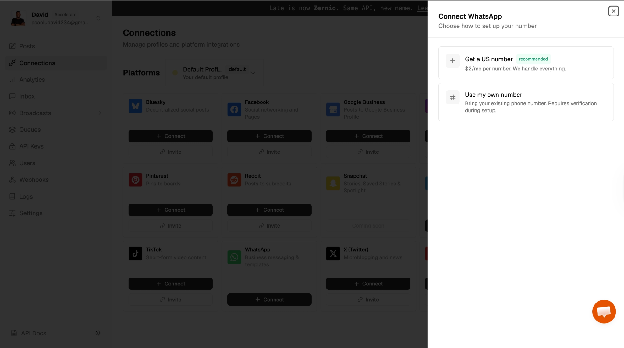
Select your preferred option and connect your WhatsApp number to Zernio.
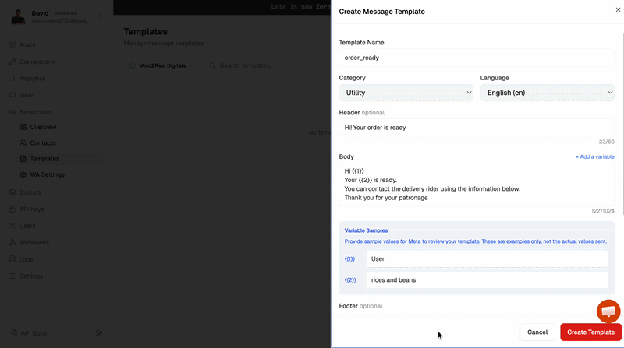
From the sidebar menu, select Broadcast > Templates to create a new WhatsApp template based on your messaging needs.
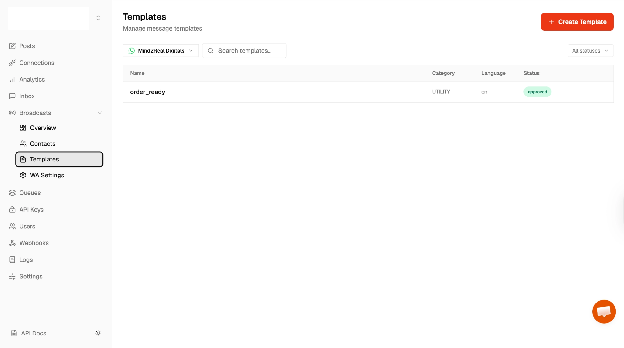
You may need to wait up to 24 hours for Meta to approve your template. Once approved, you can start sending messages to your customers or contacts.
Configuring Zernio API and Node.js SDK
Before we proceed, execute the following code snippet in your terminal to create a folder containing a package.json file.
mkdir whatsapp-api #create directory
cd whatsapp-api
npm init -y #create package.json
Copy your Zernio API key and WhatsApp account ID and store them in a .env file within the project directory.
ZERNIO_API_KEY=<your_api_key>
ZERNIO_WHATSAPP_ACCOUNT_ID=<WhatsApp_account_ID>
Select API keys from the sidebar menu to create a new API key.
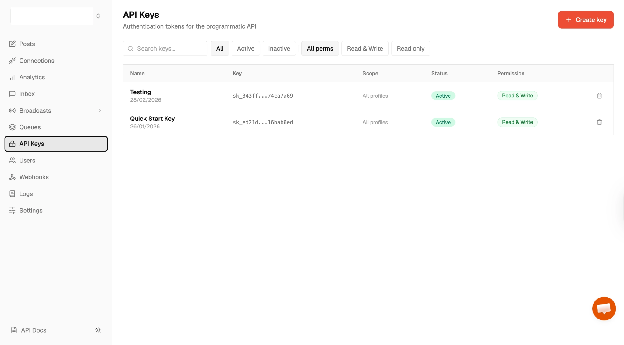
Click the Copy icon under the WhatsApp connection to copy your account ID.
Next, install Zernio Node.js SDK.
npm install @zernio/node
Finally, import it into the index.js file as shown below:
const Zernio = require("@zernio/node").default;
const zernio = new Zernio({ apiKey: process.env.ZERNIO_API_KEY });
Sending WhatsApp Messages with the Zernio SDK
Zernio allows you to group your contacts or customers into broadcast lists, making it easy to send or schedule bulk messages. This is useful for sharing updates such as new arrivals, price changes, or other important information.
In this section, you will learn how to create broadcast lists and send messages using the Zernio Node.js SDK.
Using the existing whatsapp-api Node.js project, add the following code snippet to your index.js file.
async function sendWithZernio() {
	const { data } = await zernio.whatsapp.sendWhatsAppBulk({
		body: {
			accountId: process.env.ZERNIO_WHATSAPP_ACCOUNT_ID,
			recipients: [
				{
					phone: `${process.env.WHATSAPP_RECIPIENT_PHONE_NUMBER}`,
					variables: { 1: "David", 2: "Bread and Butter" },
				},
			],
			template: {
				name: "order_ready",
				language: "en",
			},
		},
	});
	console.log(`Sent: ${data.summary.sent}, Failed: ${data.summary.failed}`);
}
sendWithZernio();
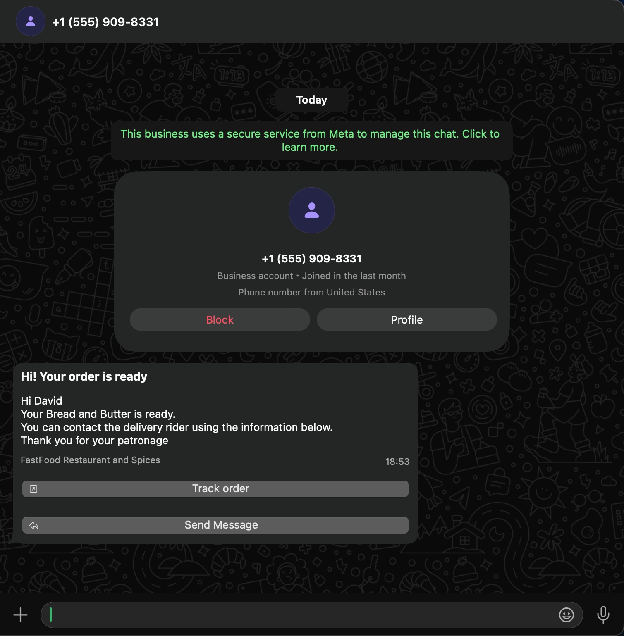
The sendWithZernio function uses the sendWhatsAppBulk method to send a template message to the phone numbers defined in the recipients array. It references the order_ready template and passes dynamic values through the variables object, which are inserted into the template before sending.
Once executed, the function sends the message to the specified contacts and logs a summary of successful and failed deliveries.
Next, let's create a WhatsApp broadcast to schedule and send messages to your contacts.
Add the following code snippet to create a new broadcast:
async function createBroadcastList() {
	const { data } = await zernio.whatsapp.createWhatsAppBroadcast({
		body: {
			accountId: process.env.ZERNIO_WHATSAPP_ACCOUNT_ID,
			name: "Monthly Newsletter",
			template: {
				name: "order_ready",
				language: "en",
				components: [
					{
						type: "body",
						parameters: [
							{ type: "text", text: "{{1}}" },
							{ type: "text", text: "{{2}}" },
						],
					},
				],
			},
			recipients: [
				{
					phone: `${process.env.WHATSAPP_RECIPIENT_PHONE_NUMBER}`,
					name: "David",
					variables: { 1: "David", 2: "Mac and Cheese" },
				},
			],
		},
	});
	console.log("Broadcast created:", data.broadcast.id);
}
The createBroadcastList function creates a new broadcast using an existing message template and a list of recipients. It assigns a name to the broadcast, defines the template to be used, and includes dynamic variables for each recipient.
When executed, the function logs the broadcast ID to the console. This ID can then be used to send or schedule messages to all recipients in the broadcast list.
Copy the following code snippet to send an instant message to the contacts in the broadcast list.
async function sendInstantMessage() {
	const { data } = await zernio.whatsapp.sendWhatsAppBroadcast({
		path: { broadcastId: "YOUR_BROADCAST_ID" },
	});
	console.log(`Sent: ${data.sent}, Failed: ${data.failed}`);
}
sendInstantMessage();
Finally, you can schedule broadcast messages by providing a scheduledAt attribute with an ISO 8601 formatted timestamp.
async function scheduleBroadcast() {
	await zernio.whatsapp.scheduleWhatsAppBroadcast({
		path: { broadcastId: "YOUR_BROADCAST_ID" },
		body: { scheduledAt: "2026-03-22T19:36:00.000Z" },
	});
	console.log("Broadcast scheduled for 2026-03-22T19:36:00.000Z");
}
scheduleBroadcast();
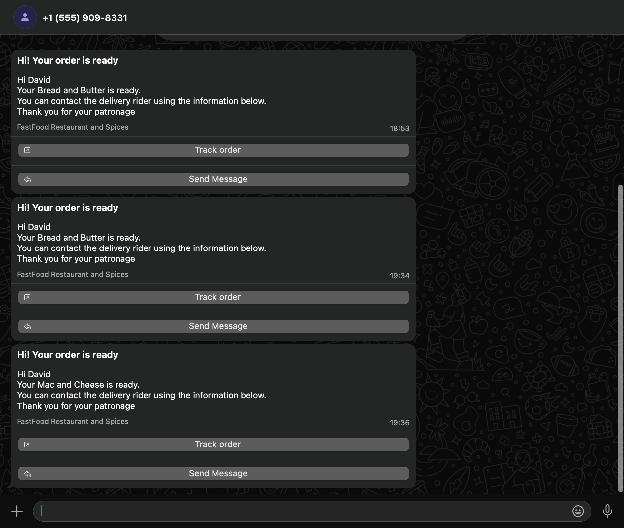
The scheduleBroadcast function schedules a broadcast using the broadcast ID and the specified time. Once executed, the broadcast will be sent automatically at the scheduled date and time, and the console logs a confirmation.
Congratulations! The source code for this tutorial is available on GitHub.
Conclusion
Choosing the right WhatsApp API provider comes down to understanding your messaging volume, automation needs, and the level of control you want over your infrastructure. Twilio remains a strong option for enterprises already invested in its broader ecosystem, but its pricing model, extra per-message fees, and lack of built-in campaign tools make it less ideal for teams that rely heavily on WhatsApp as their primary communication channel.
If you prefer a simpler, more predictable model, alternatives like Meta's Direct Cloud API or platforms designed specifically for social communication, such as Zernio, offer better long-term value. Meta's API gives you full control at base WhatsApp rates, while Zernio removes the operational burden entirely and offers flat-rate pricing, built-in automations, broadcast scheduling, and multi-platform integration out of the box, making budgeting far easier compared to Twilio's variable, usage-based billing.
Ultimately, the best choice depends on your workflow, messaging volume, and growth plans. Taking the time to evaluate your WhatsApp strategy now will help you avoid unnecessary costs and complexity as your communication needs scale.
Thank you for reading! 🎉