If you've ever looked into how to make a Discord bot, you know the drill. Create an application in the Discord developer portal. Request privileged intents. Set up a gateway connection. Handle WebSocket heartbeats, reconnect logic, and sharding once you're in more than a few thousand servers. All you wanted was to send a message to a channel.
Today we're shipping Discord API integration in Zernio's unified API. You can now send messages, embeds, polls, forum posts, and scheduled messages to any Discord server through the same /v1/posts endpoint you already use for X, LinkedIn, Instagram, Telegram, and the rest. No Discord Application to create. No gateway to host. No intents approval. One REST call, and the message lands in your channel.
This is the simplest discord bot integration I know how to build, because there's no bot to build.
What we shipped
Discord support isn't a webhook wrapper or a thin integration. It's the same full-depth treatment we give every platform - built around what developers actually need when they're shipping content to community channels at scale.
Ship announcements that look native, not bot-generated.
Most Discord bots post plain text that looks like it came from a script. With Zernio's discord bot integration, you can send rich embeds with titles, descriptions, inline fields, images, and your brand colors. Your release notes, status updates, and community announcements show up in the channel looking like they were crafted by hand, not generated by a cron job.
{
  "content": "New release shipping today!",
  "platforms": [{
    "platform": "discord",
    "accountId": "YOUR_ACCOUNT_ID",
    "platformSpecificData": {
      "channelId": "1234567890",
      "embeds": [{
        "title": "v2.3.0 Release Notes",
        "description": "Dark mode, new API endpoints, faster uploads.",
        "color": 5814783,
        "url": "https://example.com/changelog",
        "footer": { "text": "Shipped today" },
        "fields": [
          { "name": "New Features", "value": "3", "inline": true },
          { "name": "Bug Fixes", "value": "12", "inline": true }
        ]
      }]
    }
  }],
  "publishNow": true
}
Run community polls without building poll infrastructure.
Need quick feedback from your server? The Discord poll API through Zernio creates native Discord polls, the same UX members see when someone polls from the client. Up to 10 answers, durations from 1 hour to 32 days, multi-select when you want it.
For product teams running a community, this means you can send a discord message from a REST API and get structured feedback in the same call - no separate polling tool, no Google Form links dropped in a channel.
Turn your Discord forums into a programmatic knowledge base.
If your developer community uses forum channels for discussions, bug reports, or meeting notes, you can now post starter messages with applied tags directly from the API. Instead of someone on your team manually creating a thread every week for community call notes, your CI pipeline or n8n workflow does it automatically with the Discord forum post API. The thread shows up tagged, titled, and ready for discussion.
Schedule messages that Discord itself can't schedule.
Here's something most people don't realize: Discord has no native scheduling for bot messages. If you're running a traditional bot and want a message to go out at 9am EST on Monday, you need to build your own scheduler.
Zernio handles discord API scheduling messages natively - queue a post for any future timestamp with timezone support. For teams that coordinate announcements across time zones, this is a discord bot alternative for posting that saves real engineering time.
Cross-post across 15 platforms with one call
Here's the workflow that made us most excited about adding Discord. Cross-post the same content to Discord and your other platforms in one call.
One POST. Fifteen platforms. Discord gets the rich embed, X gets the text (trimmed to fit), LinkedIn gets the professional format, Telegram gets the channel message. Zernio handles the format differences for each platform.
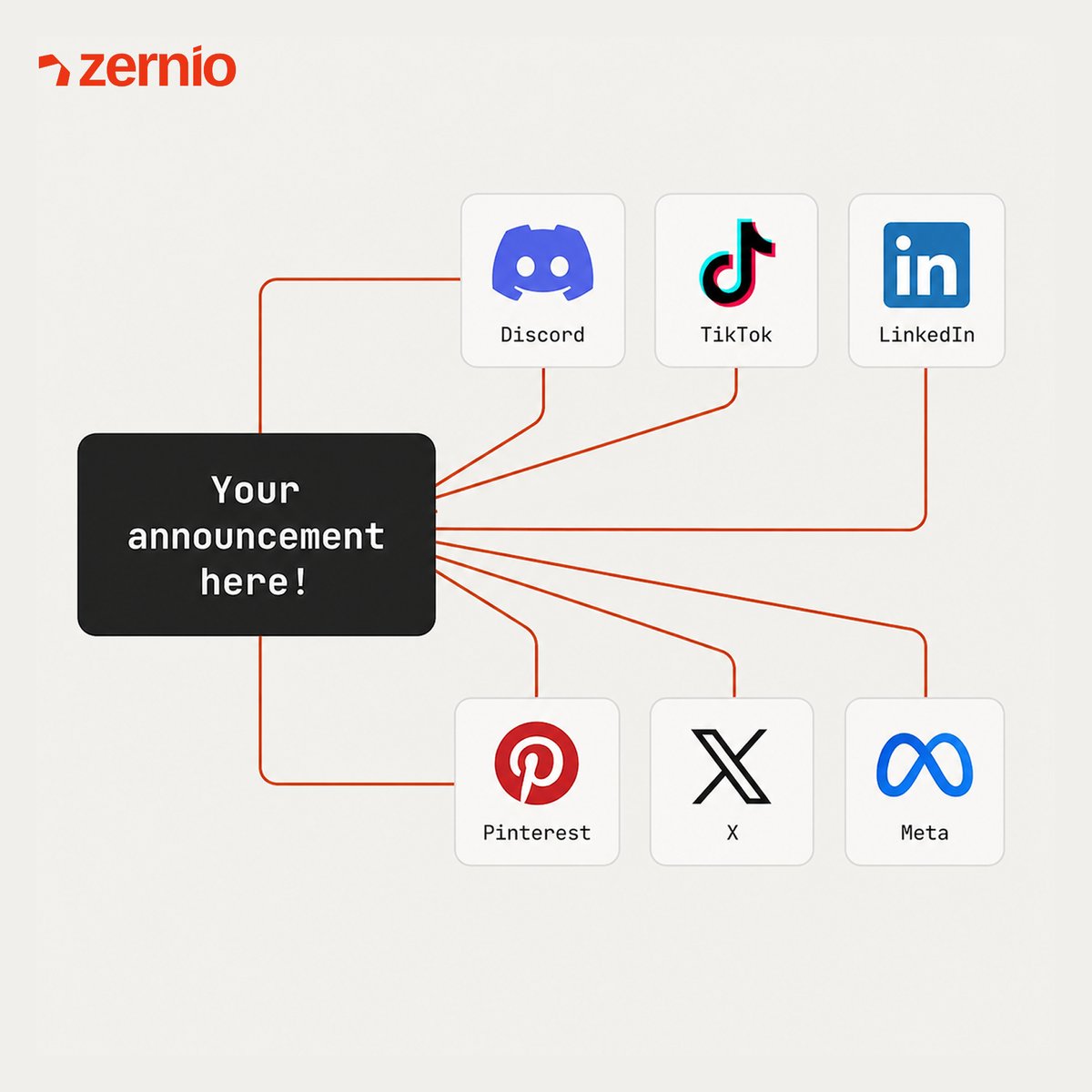
This is what a Discord API integration looks like when it's part of a unified API instead of a standalone project. You add a platform to the array. No new auth flow, no new SDK, no new error handling.
White-label the bot identity for your product.
Your users shouldn't see "Zernio" in their Discord server. Override the bot's display name and avatar with your custom settings. If you're embedding this discord api integration into a SaaS product, your announcements show up under your brand, not ours.
Threads, announcement crossposts, and message editing/deletion are also supported - see the full API reference for the complete surface area. But rather than walk through every endpoint here, let me show you how to get from zero to your first Discord message.
No discord developer portal setup. No OAuth token management. No gateway connection. You add our bot to your server once via a one-click OAuth flow, and then POST JSON to our API. That's the entire discord bot integration.
How to make a Discord bot (without making a Discord bot)
If you search "how to make a Discord bot," every tutorial starts the same way: create an application in the discord developer portal bot section, generate a bot token, configure OAuth2 scopes, request privileged intents, set up a WebSocket gateway, handle heartbeats, implement sharding. Seven steps before you send a single message.
Here's what a discord bot integration looks like through Zernio.
Step 1: Create a Zernio account and get your API key
Sign up at zernio.com/signup. No credit card required, the free plan includes 20 posts per month, and Discord is available on every plan.
Once you're in, go to the dashboard and create an API key. Copy it, this is the only credential you'll need. No discord developer portal bot token. No OAuth2 client secret. One bearer token for all 15 platforms.
Step 2: Create a profile
Profiles are how Zernio organizes your social accounts. Create one from the dashboard, or via the API.
Step 3: Add your Discord account
This is where a traditional discord developer would spend hours configuring intents and gateway connections. With Zernio, it's one OAuth click.
Click 'New Connection' and select Discord from the list of platforms. Connect the Discord server you manage and grant Zernio the required access permissions in the next step. This will complete the authorization process.
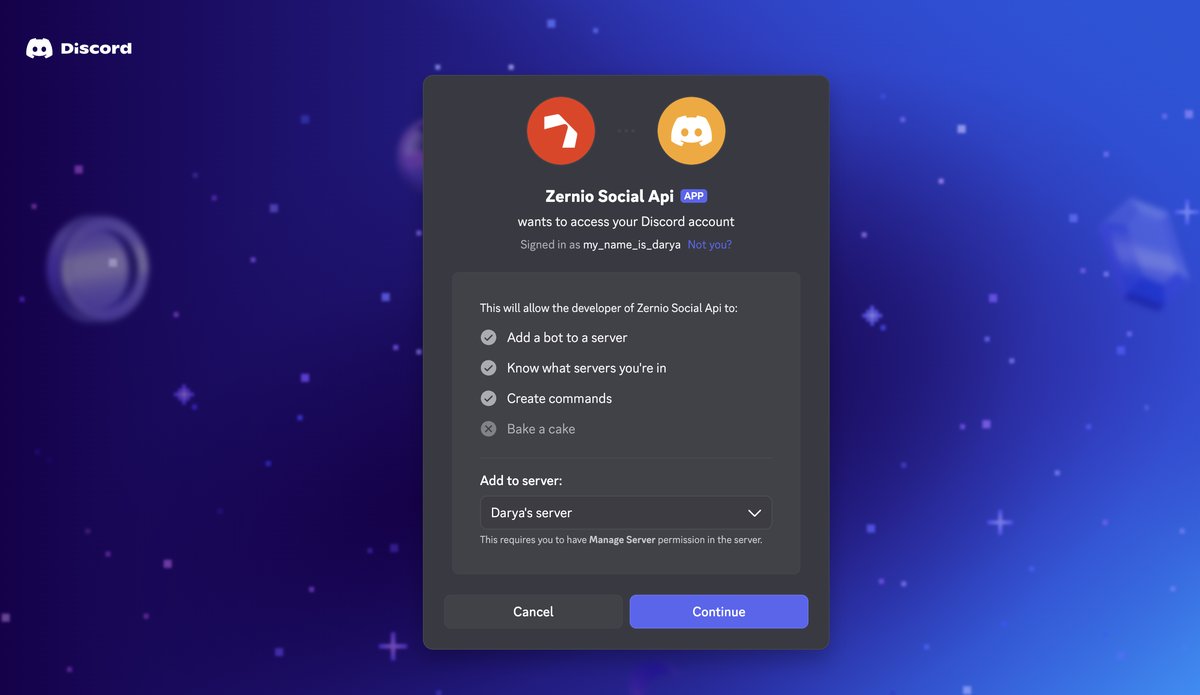
After authorization, select which channel the bot should post to via the channel selection step.
Step 3.1 (Optional): Customize your Discord bot
By default, messages sent to your Discord server appear as 'Zernio', but you can override this with a custom name and avatar if needed.
Go to 'Connections' and click 'Settings' on your connected Discord account. Then add a custom display name and avatar image to personalize how the bot appears.
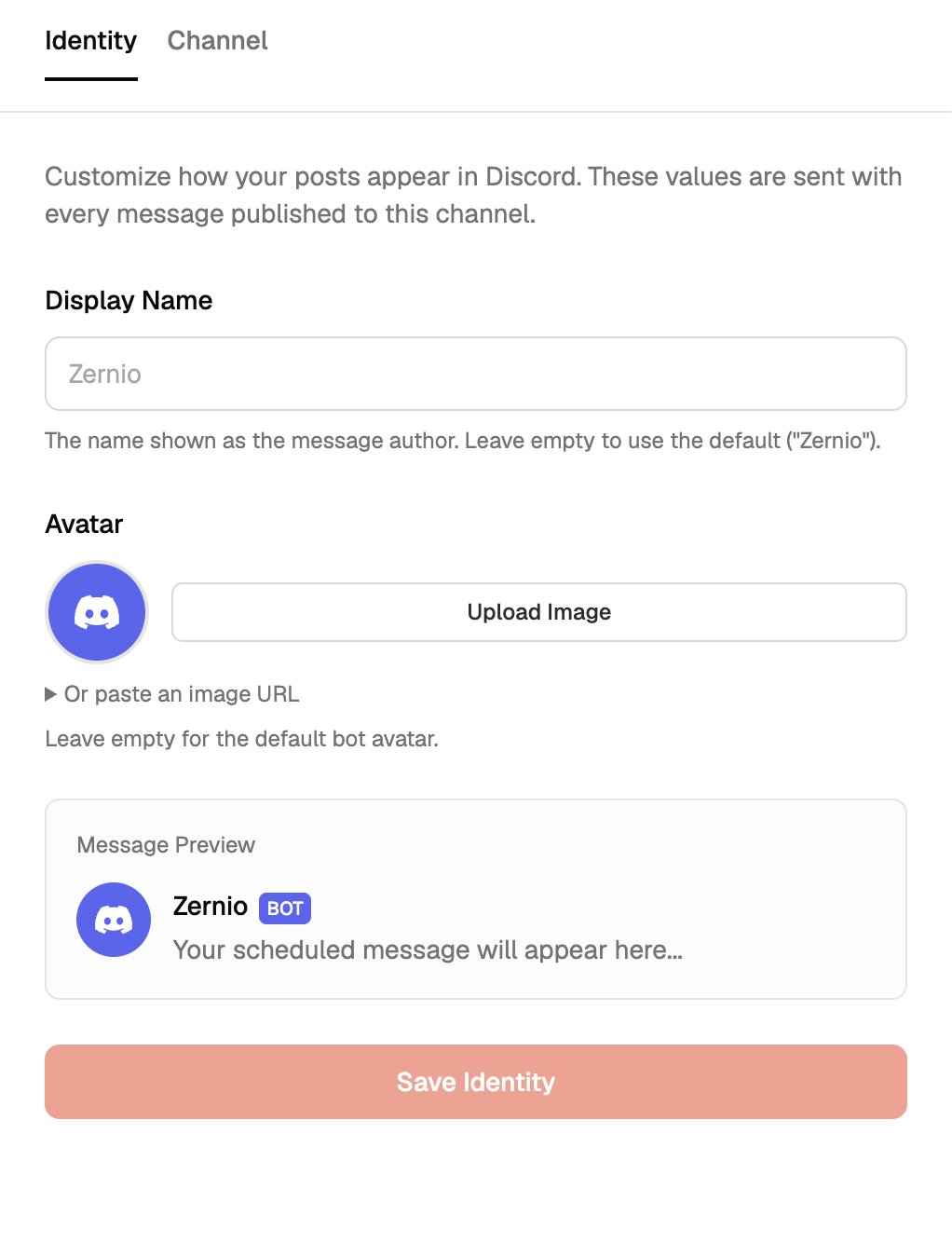
Step 4: Send your first message
Now send a Discord message from a REST API - one POST or via the Dashboard (Posts -> 'Create Post'), and it lands in your channel:
const { post } = await zernio.posts.createPost({
  content: 'Hello from Zernio API!',
  platforms: [
    {
      platform: 'discord',
      accountId: 'YOUR_ACCOUNT_ID',
      platformSpecificData: {
        channelId: '1234567890'
      }
    }
  ],
  publishNow: true
});
console.log('Posted to Discord!', post._id);
That's it. You just completed a discord bot integration without creating a bot. The response includes a platform post ID you can use for edits, deletes, or threading.
Step 5: Go further: polls, embeds, forum posts, scheduling
Once the basic Discord API integration is working, you can use the same endpoint for everything Discord supports:
Schedule a message for later (Discord API scheduling messages):
curl -X POST "https://zernio.com/api/v1/posts"   -H "Authorization: Bearer YOUR_API_KEY"   -H "Content-Type: application/json"   -d '{
    "content": "Scheduled announcement goes here",
    "platforms": [{
      "platform": "discord",
      "accountId": "YOUR_DISCORD_ACCOUNT_ID",
      "platformSpecificData": {
        "channelId": "YOUR_CHANNEL_ID"
      }
    }],
    "date": "2026-05-01T15:00:00Z"
  }'
Create a native poll (Discord poll API):
{
  "platforms": [{
    "platform": "discord",
    "accountId": "YOUR_DISCORD_ACCOUNT_ID",
    "platformSpecificData": {
      "channelId": "YOUR_CHANNEL_ID",
      "poll": {
        "question": { "text": "Ship Friday or wait for Monday?" },
        "answers": [
          { "poll_media": { "text": "Ship Friday 🚢" } },
          { "poll_media": { "text": "Wait for Monday ☕" } }
        ],
        "duration": 24,
        "allow_multiselect": false
      }
    }
  }],
  "publishNow": true
}
Post to a forum channel (Discord forum post API):
{
  "content": "Community call notes — April 28",
  "platforms": [{
    "platform": "discord",
    "accountId": "YOUR_DISCORD_ACCOUNT_ID",
    "platformSpecificData": {
      "channelId": "YOUR_FORUM_CHANNEL_ID",
      "forumThreadName": "Community Call — April 28",
      "forumAppliedTags": ["tag_id_1", "tag_id_2"]
    }
  }],
  "publishNow": true
}
Every one of these works through the same /v1/posts endpoint. Same auth, same response format, same webhook delivery confirmation. If you're a bot creator for discord and your use case is outbound content - messages, announcements, polls, forum threads - this is the fastest path to production.
For the full API reference with Node.js and Python SDK examples, see the Discord API documentation.
Stop building social integrations from scratch.
One API call to publish, schedule, and manage posts across 15+ platforms.
For AI agents and OpenClaw
If you're building AI agents that act on social media, Discord was the missing piece. Every platform in Zernio's stack was a broadcast or social channel - X, LinkedIn, Instagram, TikTok, and so on. Discord is where developer communities actually live. Now your agent can announce a product launch to your social channels and your Discord community in the same API call.
MCP server
The Zernio MCP server now includes Discord tools alongside the other 280+ social media tools. If you're using Claude Desktop, Cursor, or any MCP-compatible client, your agent can:
- Send Discord messages with embeds to specific channels
- Create polls to gather community feedback
- Post to forum channels with appropriate tags
- Schedule messages for future delivery
- Cross-post the same announcement to Discord, Telegram, X, and LinkedIn in a single action
This is the discord api integration surface that AI agent builders need. One MCP server, 15 platforms, every social action available as a tool your LLM can call.
OpenClaw Discord bot integration
If you're using OpenClaw for automation, the openclaw discord bot integration works through the same Zernio skill you've already set up. OpenClaw's chat-driven model means you can tell your assistant from Telegram or Discord itself: "Announce the new release to our Discord server, X, and LinkedIn." The assistant generates the content, you approve it (human-in-the-loop), and it publishes everywhere through Zernio's API.
The combination of OpenClaw + Zernio + Discord means a single conversational command can fan out to your entire distribution layer - social platforms and community channels, without building any custom infrastructure.
n8n Discord bot integration
For developers using n8n for workflow automation, Discord fits into the same patterns you already use with Zernio's n8n node and templates. Build an n8n discord bot integration workflow that triggers on events in your product (new release, new user milestone, support ticket resolved) and posts to your Discord server alongside your social channels. No separate Discord node or bot token needed - everything runs through the Zernio node.
Frequently asked questions
Do I need to create a Discord bot for this integration?
No. Zernio operates a centralized bot that you invite to your server via a one-click OAuth flow. There's no Discord Application to create in the discord developer portal, no intents to request, and no gateway to host. This Discord bot integration works without you building or maintaining any bot infrastructure. See the step-by-step walkthrough above; the entire setup takes five steps and about two minutes.
How is this different from Discord webhooks?
Discord webhooks work for simple one-way posting to a single channel, but they don't support scheduling, polls, forum posts, edits, deletes, or cross-platform distribution. Zernio gives you the full Discord Bot API surface - embeds, polls, threads, forum posts, announcement crossposts - with a webhook-simple REST interface. If you need a Discord bot alternative for posting that goes beyond basic webhooks, this is it.
Can I schedule messages on Discord?
Discord has no native API for scheduling bot messages, but Zernio handles Discord API scheduling messages for you. Queue messages for any future timestamp with timezone support. This works the same way as scheduling on every other Zernio platform.
Can I post to multiple Discord servers at once?
Yes. Each connected Discord account represents one server. Include multiple platform entries in a single /v1/posts call to fan out to as many servers as you need from one API request.