Google Business reviews help businesses build trust, improve local search visibility, and engage with customers. Using the Google Business Reviews API, you can retrieve, monitor, and respond to customer reviews programmatically from your own application.
In this guide, you’ll learn how to integrate the Google Business Reviews API using Google’s official APIs, including prerequisites, authentication, and code examples. You’ll also learn how to simplify the integration with Zernio, a unified API for 15 social media and messaging platforms.
Let’s get started.
Methods of Integrating the Google Business Reviews API
The Google Business Reviews API lets you programmatically manage customer reviews across Google Business locations. Whether you’re building a reputation management dashboard, automating review responses, or aggregating feedback across multiple locations, this API gives you the tools to do it at scale.
There are two major ways to integrate Google Business reviews into your application. You can either integrate directly with the Google Business Reviews API, giving you full control over authentication and API requests, or use a unified API platform such as Zernio, which handles much of the setup and API management for you.
Prerequisites
To use the Google Business Reviews API, you need to meet the following requirements before you can access the review endpoints:
- A verified Google Business Profile that has been active for at least 60 days.
- A website that represents the business associated with the Google Business Profile.
- Access to the Google Business Reviews API. To request access, complete the Google Business Profile API contact form. Once your request is approved, Google will enable the required API endpoints for your project.
Method #1. Google Business Reviews API: Direct Integration
Integrating directly with the Google Business Reviews API gives you complete control over your implementation, but it also requires more setup. You’ll need to authenticate users with OAuth 2.0, obtain an access token, retrieve the business account and location IDs, and then use those credentials to retrieve reviews, reply to reviews, update replies, and delete replies.
Note: You can’t create customer reviews programmatically using the Google Business Reviews API. To help prevent spam and automated review submissions, reviews can only be created by Google users through Google Search or Google Maps.
The integration process involves the following steps:
- Authenticate users and obtain an access token.
- Retrieve the business account ID and location ID.
- Retrieve and manage reviews using the access token, account ID, and location ID.
Challenges of Direct Google Business Reviews API Integration
When integrating directly with the Google Business Reviews API, consider the following:
- OAuth authentication
You’ll need to implement the complete OAuth 2.0 flow, securely store access and refresh tokens, and refresh expired access tokens.
- Multiple API endpoints
Before you can retrieve or manage reviews, you’ll need to retrieve the user’s account ID and location ID using separate API endpoints.
- Ongoing maintenance
You’ll need to keep your integration up to date as Google introduces new features, updates authentication requirements, or deprecates existing APIs.
- Rate limits and error handling
Your application should handle rate limits, pagination, token expiration, retries, and network errors to ensure a reliable integration.
Method #2. Zernio: Unified API Approach
Zernio is a unified API platform for social media management, messaging, authentication, advertising, analytics, and content scheduling and publishing on Google Business Profile and 14 other social media platforms. It also integrates with AI agents and automation platforms, enabling you to build workflows that retrieve reviews, respond to customer feedback, and manage multiple business profiles through a single API, instead of integrating with each platform individually.
Note: You'll still need a verified Google Business Profile to retrieve reviews, manage locations, reply to customer reviews, and publish Google Business posts through Zernio.
Why Choose Zernio for Managing Google Business Reviews?
Compared to integrating directly with the Google Business Reviews API, Zernio offers the following benefits:
- Single API for 15 platforms
You can use a single API to handle authentication, post scheduling, and review management across Google Business Profile and 14 other social media platforms.
- Simplified authentication
Zernio handles much of the authentication process, reducing the need to implement and manage complex OAuth flows and access tokens yourself.
- Less maintenance
Zernio manages API updates and compatibility changes, allowing you to focus on building your application instead of maintaining API integrations.
- Built-in reliability
Zernio automatically handles request retries, rate limits, and other common API issues to help ensure your integration remains reliable.
- Faster development
With a unified API, CLI tool, and SDKs, you can integrate Google Business reviews more quickly and spend less time writing and maintaining integration code.
- Automation and AI support
Zernio integrates with AI agents and automation platforms, making it easy to build workflows that automatically retrieve reviews, respond to customer feedback, and manage multiple business profiles.
###
Zernio API vs Google Business Reviews API: Which one to choose?
Zernio and the Google Business Reviews API let you retrieve and manage Google Business reviews programmatically, but they differ in how they approach integration. The table below compares the two methods:
| Feature | Zernio API | Google Business Profile API |
|---|---|---|
| Supported Platforms | Google Business Profile \+ 14 other social media platforms through a single API. | Google Business Profile only. |
| Authentication | Single OAuth flow managed by Zernio. Connect your Google Business account and start making requests. | Requires Google Cloud project configuration, OAuth consent screen, credentials, API enablement, and authentication flow implementation. |
| Review Retrieval | Retrieve reviews through a simplified, consistent endpoint. | Requires multiple API endpoints and OAuth access tokens. |
| Rate Limiting | Automatically handles rate limiting, retries, and request management. | Developers must detect rate limits and implement retry logic themselves. |
| API Maintenance | Zernio maintains compatibility with API updates and version changes. | Developers must monitor API deprecations, version changes, and migration requirements. |
| AI Agent Integration | Native support for AI agents, MCP servers, and workflow automation tools. | Require developers to build a custom integration before AI agents can interact with the API. |
| Best For | SaaS products, agencies, AI applications, CRM platforms, reputation management tools, and businesses managing multiple platforms. | Applications that only need direct access to Google Business Profile. |
Integrating the Google Business Reviews API with Zernio
Zernio simplifies this process by providing a unified API that handles authentication, rate limiting, request retries, and ongoing API maintenance for you. In this section, you'll learn how to connect your Google Business Profile to Zernio through the dashboard and use the Zernio API to retrieve and manage business reviews.
Connect Your Google Business Profile to Zernio
Zernio provides a unified layer on top of the Google Business Profile API, abstracting much of the complexity involved in configuring, authenticating, and interacting with the API directly.
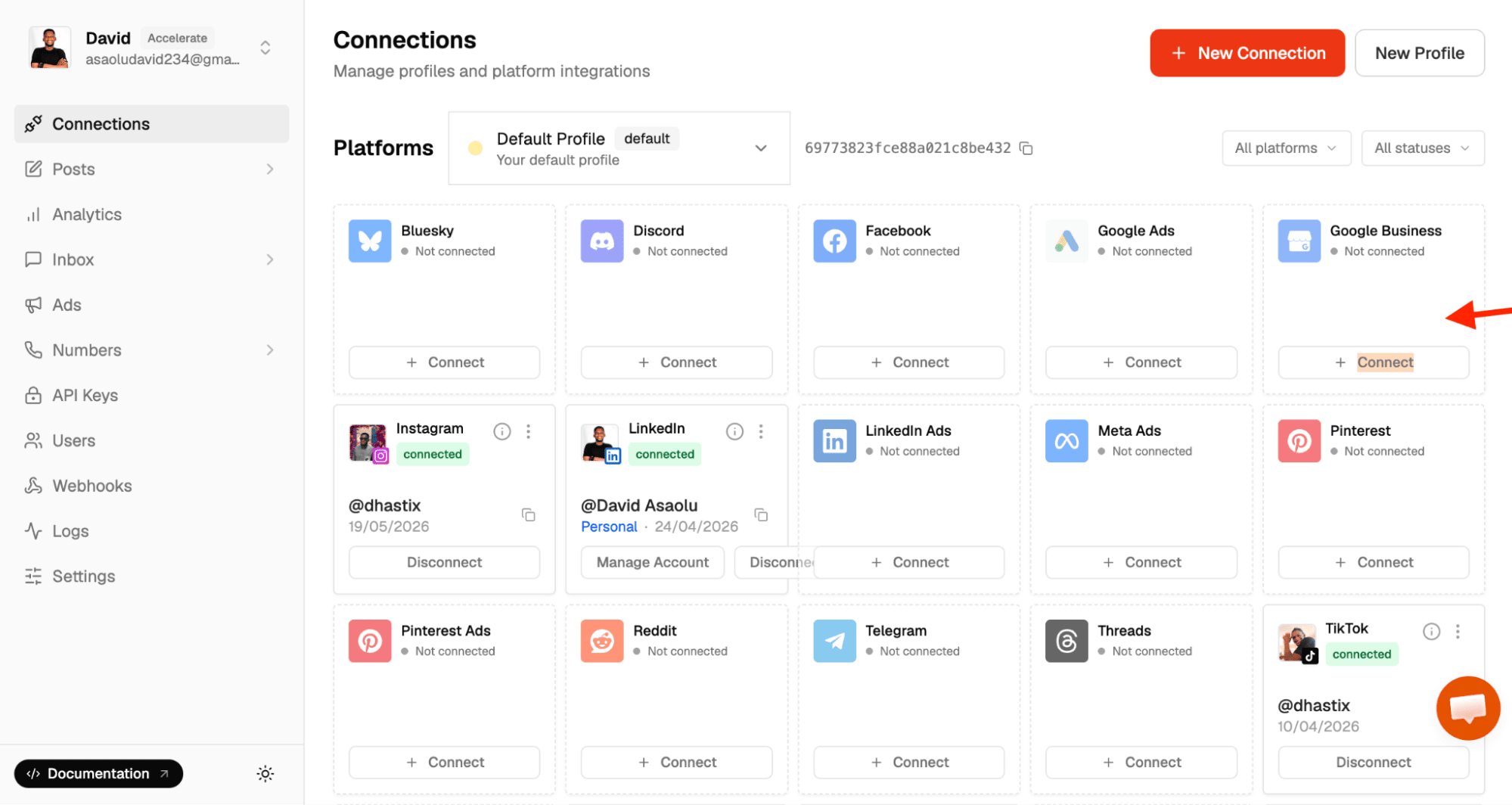
To get started, log in to your Zernio account and navigate to Connections from the sidebar menu. From there, you can connect your WhatsApp Business Account to Zernio.
Once your account has been successfully connected, it will appear in the list of connected accounts, where you can view its connection status and manage it from the dashboard.
In addition to managing reviews, Zernio also lets you create and publish Google Business posts directly from the dashboard. These posts appear on Google Search, Google Maps, and the Google Business Profile Knowledge Pane (rather than in a social media feed) and help keep your business profile active and up to date.
Integrate Google Business Reviews using the Zernio API
For developers and businesses that want to integrate Google Business into their product or SaaS applications and authenticate end users, Zernio provides a much simpler authentication method, enabling you to connect their Google Business profiles and retrieve or manage their reviews through a single API.
Start by installing the Zernio Node.js SDK:
npm install @zernio/nodeNext, copy your Zernio API key from the API Keys section of the Zernio dashboard and your Google Business Profile Account ID from the Connections page. Store them in your .env file:
ZERNIO_API_KEY=<YOUR_ZERNIO_API_KEY>
ZERNIO_GBP_ID=<YOUR_GOOGLE_BUSINESS_ACCOUNT_ID>
To authenticate a user, generate a Zernio Connect URL using the following code:
const Zernio = require("@zernio/node").default;
const zernio = new Zernio({ apiKey: process.env.ZERNIO_API_KEY });

async function connectURL() {
   const { data } = await zernio.connect.getConnectUrl({
       path: { platform: "googlebusiness" },
       query: {
           profileId: "ZERNIO_GBP_ID",
           redirect_url: "https://myapp.com/callback",
       },
   });
   // Redirect user to data.authUrl
}
After authorization, Zernio redirects the user back to your configured redirect_url, where you can complete the OAuth flow.
If you've already received an authorization code, you can exchange it using the OAuth callback endpoint:
import Zernio from "@zernio/node";
const zernio = new Zernio({ apiKey: process.env.ZERNIO_API_KEY });

const { data } = await zernio.connect.handleOAuthCallback({
   path: {
       platform: "googlebusiness",
   },
   body: {
       code: "AUTH_CODE",
       state: "string",
       profileId: "ZERNIO_GBP_ID",
   },
});
console.log(data);
Once the account has been connected, you can retrieve Google Business reviews using a single API call:
import Zernio from "@zernio/node";
const zernio = new Zernio({ apiKey: process.env.ZERNIO_API_KEY });

const { data } = await zernio.accounts.getGoogleBusinessReviews({
   path: {
       accountId: "ZERNIO_GBP_ID",
   },
});
console.log(data);
The getGoogleBusinessReviews method returns the reviews associated with the connected Google Business Profile account, eliminating the need to manually manage OAuth tokens, account IDs, location IDs, or direct Google API requests.
To reply to a customer review, use the following method:
import Zernio from "@zernio/node";
const zernio = new Zernio({ apiKey: process.env.ZERNIO_API_KEY });

const { data } = await zernio.reviews.replyToInboxReview({
   path: {
       reviewId: "REVIEW_ID",
   },
   body: {
       accountId: "ZERNIO_GBP_ID",
       message: "Hello, world!",
   },
});
console.log(data);
To delete an existing review reply, copy the following code snippet:
import Zernio from "@zernio/node";
const zernio = new Zernio({ apiKey: process.env.ZERNIO_API_KEY });

const { data } = await zernio.reviews.deleteInboxReviewReply({
   path: {
       reviewId: "REVIEW_ID",
   },
   body: {
       accountId: "ZERNIO_GBP_ID",
   },
});
console.log(data);
Zernio also lets you retrieve and manage Google Business Profile locations through the same unified API.
Stop building social integrations from scratch.
One API call to publish, schedule, and manage posts across 15+ platforms.
Integrating the Google Business Reviews API Directly
In this section, you will learn how to authenticate users directly using the Google Business Reviews API, fetch user and location IDs, and retrieve and manage reviews directly from the Google Business Reviews API
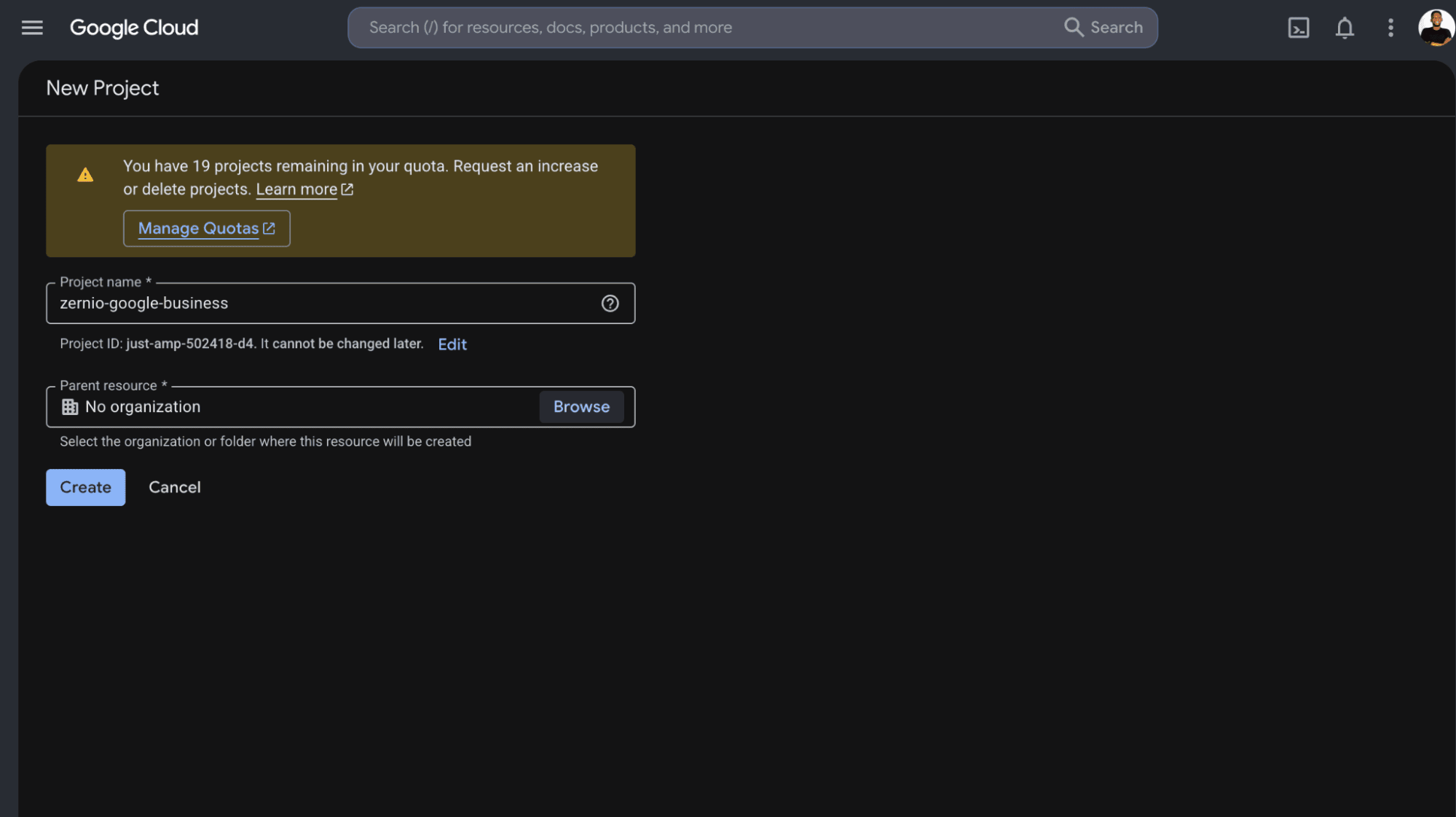
Before we proceed, sign in to the Google Cloud Console using your preferred Google account, and click New Project in the header to create a new project.
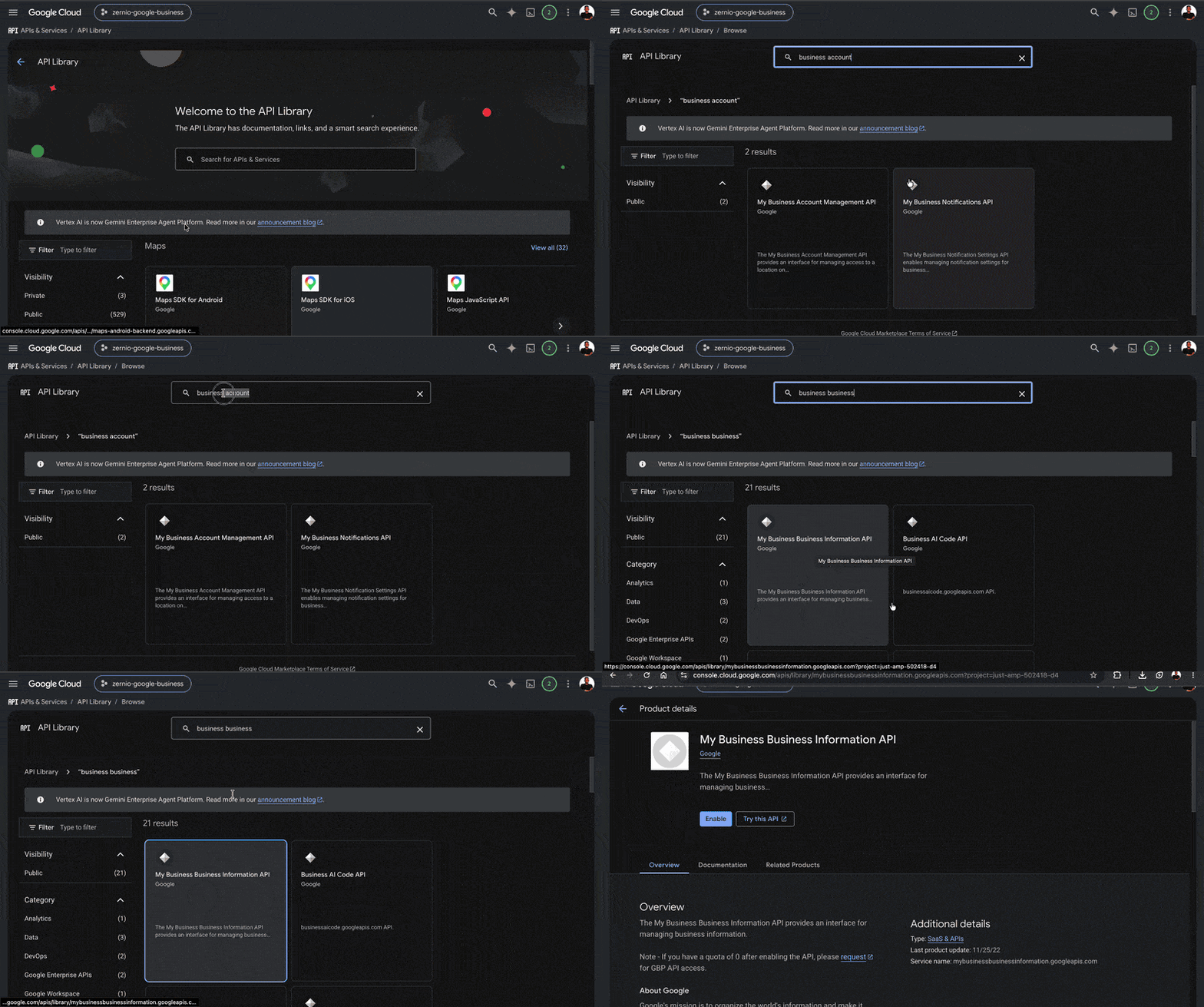
Next, enable the following APIs within your Google Cloud project: My Business Account Management API, My Business Business Information API, and My Business API v4.
To access the Google Business Reviews API, you’ll need the following credentials:
- Google access token – Authenticates the user and authorizes your application to access the Google Business Profile API on their behalf.
- Account ID – Identifies the Google Business Profile account that owns one or more business locations.
- Location ID – Identifies the specific business location whose reviews you want to retrieve or manage.
Get a Google Access Token
In this section, you’ll learn how to authenticate users with the Google Business Profile API using OAuth 2.0. The Google Business Profile API requires user authorization before your application can access or manage business reviews.
The process consists of three steps:
- Generate an OAuth 2.0 Client ID and Client Secret.
- Add your Google account as a test user for the OAuth consent screen.
- Authenticate with Google and obtain an access token.
Step 1: Generate an OAuth 2.0 Client ID and Client Secret
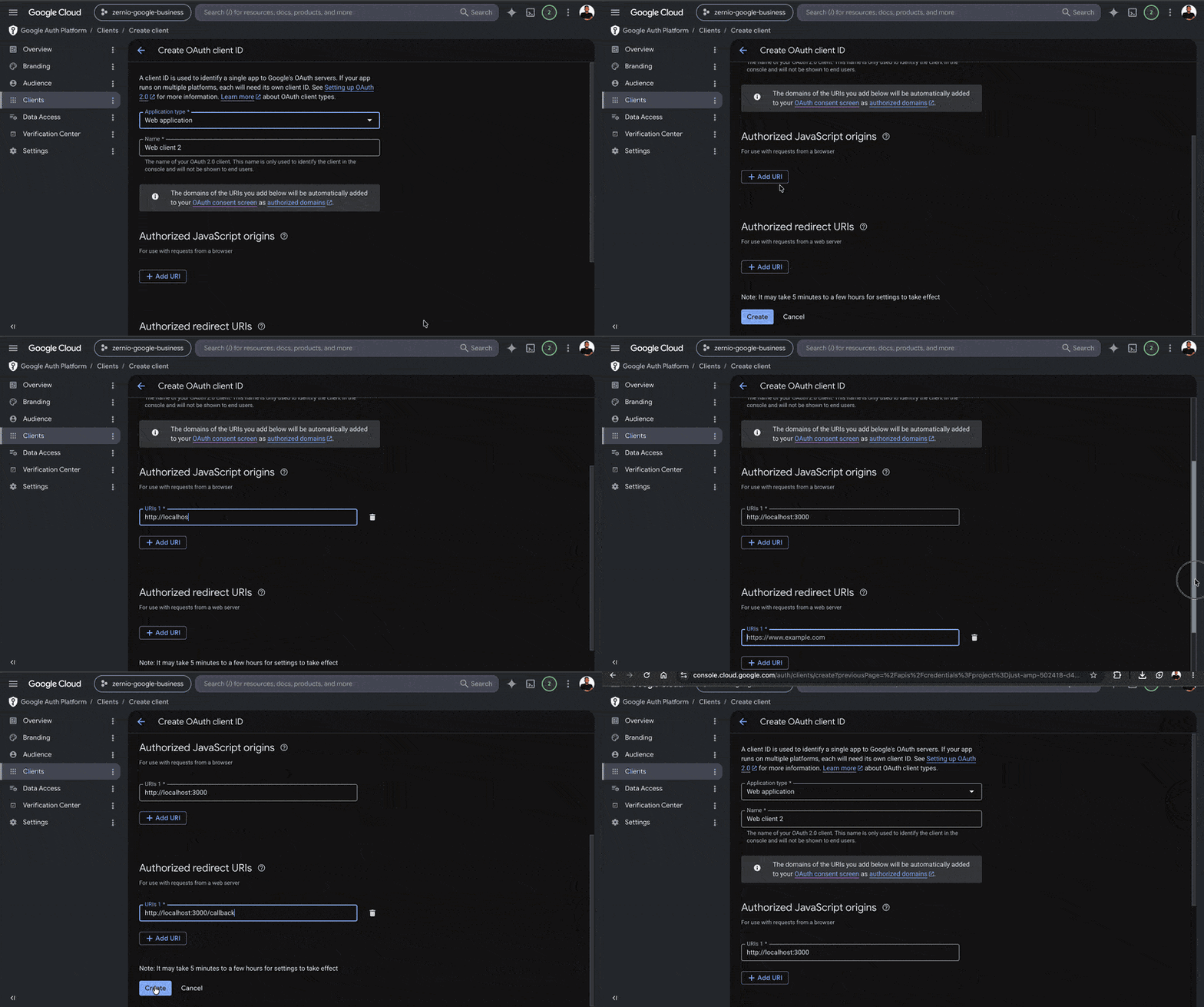
From the Credentials page in your Google Cloud Console dashboard, click Create Credentials → OAuth client ID.
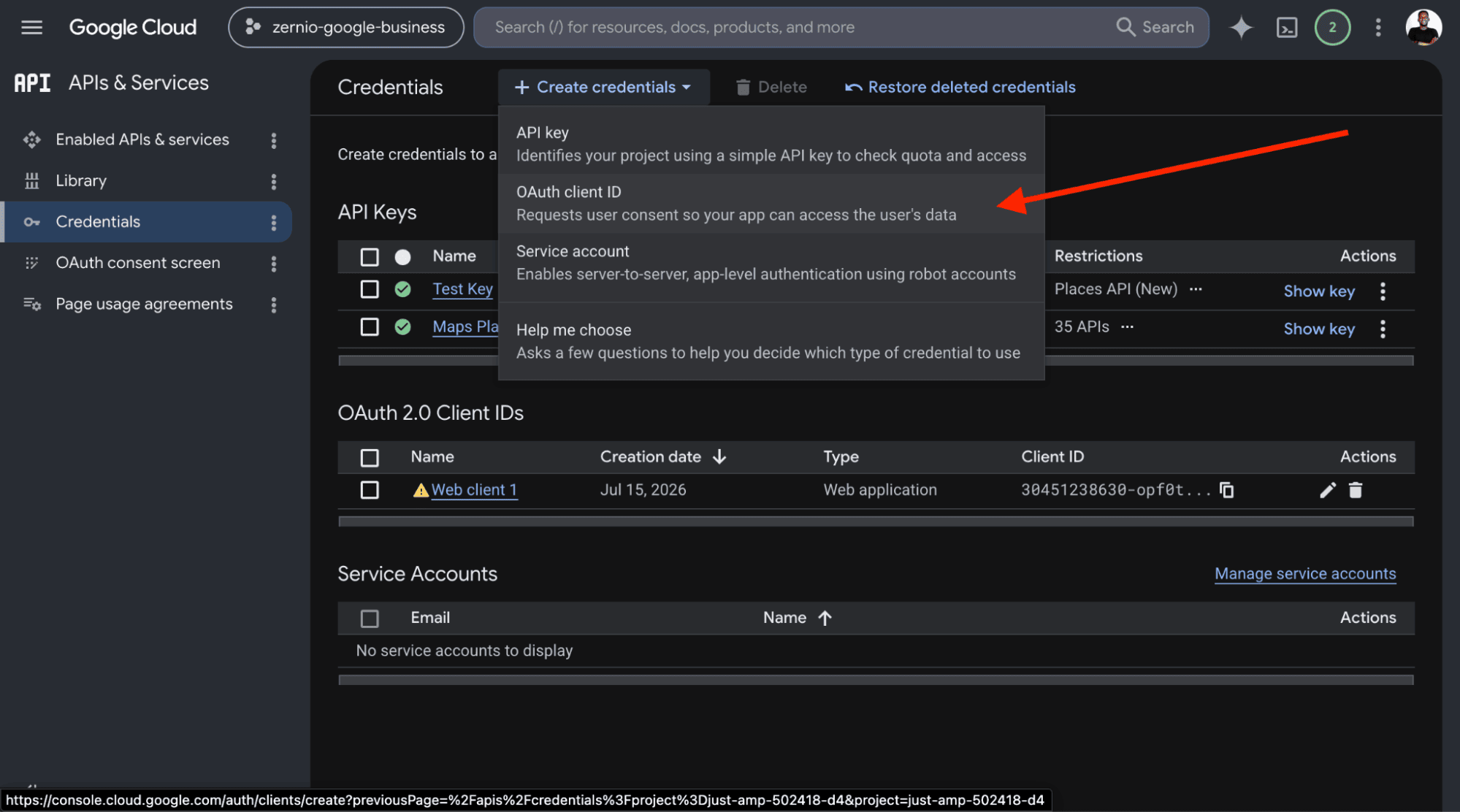
If prompted, configure the OAuth consent screen before continuing.
Select Web application as the application type, enter a name for your OAuth client, and configure the following:
- Authorized JavaScript origin: http://localhost:3000
- Authorized redirect URI: http://localhost:3000/callback
Click Create. Google will generate your Client ID and Client Secret.
Copy both credentials and add them to your project's .env file:
GOOGLE_CLIENT_ID=*********.apps.googleusercontent.com
GOOGLE_CLIENT_SECRET=GOCSPX-*******
Step 2: Add your Google account as a test user
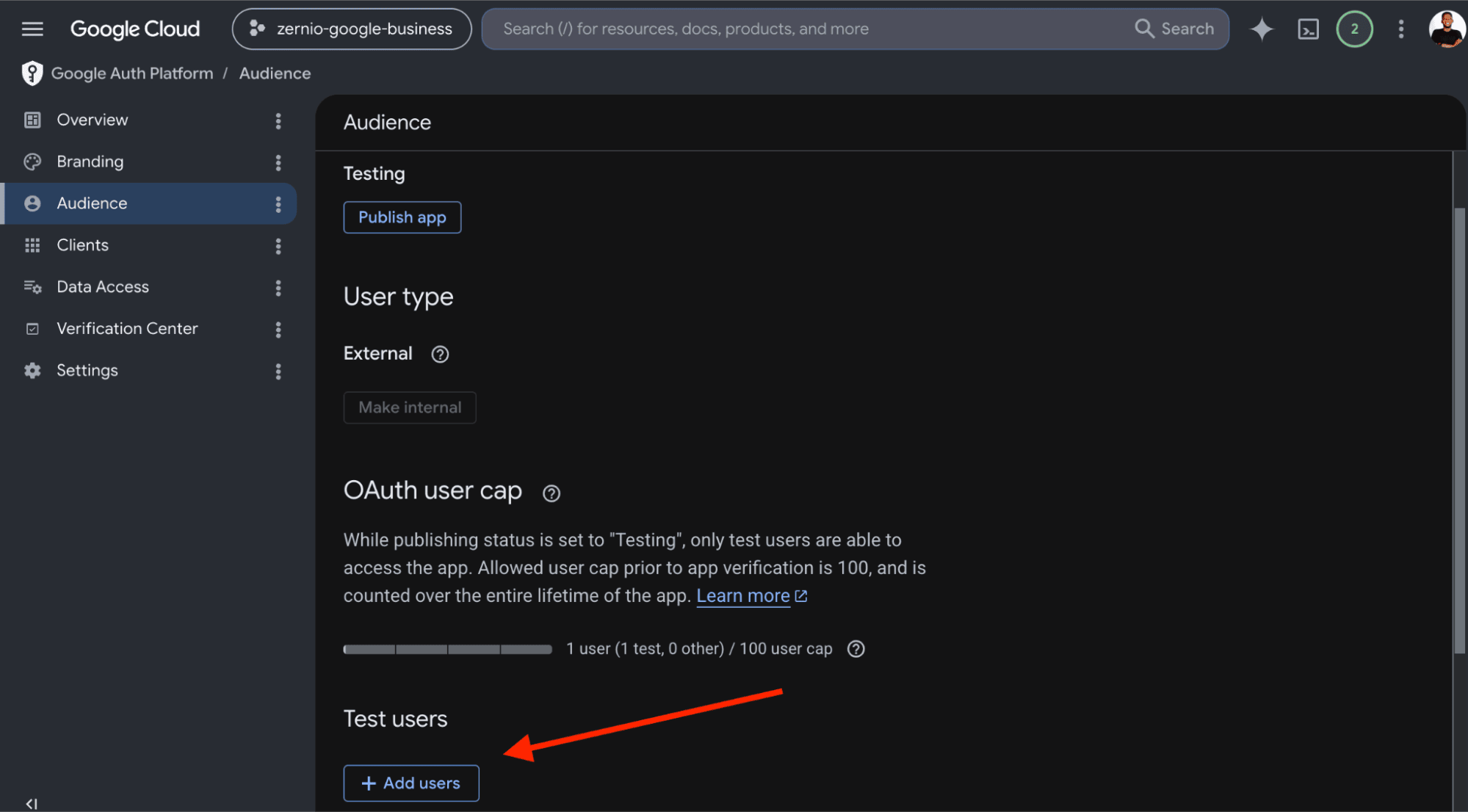
In the Google Cloud Console, select OAuth consent screen from the left sidebar, then navigate to Audience.
Under Test users, click Add users and enter the Google account you'll use to authenticate with the Google Business Profile API. Adding your account as a test user allows you to authorize your application during testing.
Step 3: Authenticate with Google and obtain an access token
Update the index.js file as follows:
require("dotenv").config();
const express = require("express");

const app = express();
const PORT = 3000;

//👇🏻 Your Google API credentials
const clientId = process.env.NEW_GOOGLE_CLIENT_ID;
const clientSecret = process.env.NEW_GOOGLE_CLIENT_SECRET;
const redirectUri = "http://localhost:3000/callback";
This code initialises Express and Dotenv, then loads your Google OAuth credentials from the .env file.
Next, add this function below the variable declarations:
async function getTokens(authCode) {
   const tokenUrl = "https://oauth2.googleapis.com/token";

   const response = await fetch(tokenUrl, {
       method: "POST",
       headers: { "Content-Type": "application/x-www-form-urlencoded" },
       body: new URLSearchParams({
           code: authCode,
           client_id: clientId,
           client_secret: clientSecret,
           redirect_uri: redirectUri,
           grant_type: "authorization_code",
       }),
   });

   if (!response.ok) throw new Error(`Token Error: ${response.statusText}`);
   return await response.json(); // Returns an object with access_token (and usually refresh_token)
}
The getTokens function exchanges the authorization code returned by Google for an object containing the access token, refresh token, token expiry information, and the granted scopes. These tokens are required to make authenticated requests to the Google Business Profile API.
Add the following Express routes below the getTokens function:
app.get("/login", (req, res) => {
   const scopes = [
       "https://www.googleapis.com/auth/business.manage",
       "https://www.googleapis.com/auth/userinfo.profile",
       "https://www.googleapis.com/auth/userinfo.email",
   ];
   const authUrl = `https://accounts.google.com/o/oauth2/v2/auth?client_id=${clientId}&redirect_uri=${redirectUri}&response_type=code&scope=${scopes.join(" ")}&access_type=offline&prompt=consent`;

   console.log("Redirecting user to Google...");
   res.redirect(authUrl);
});

//👇🏻 Google redirects here with the dynamic Auth code
app.get("/callback", async (req, res) => {
   const incomingAuthCodeFromUrl = req.query.code; // Dynamic extraction!
   let tokens = null;

   if (!incomingAuthCodeFromUrl) {
       return res.status(400).send("Error: No Authorization Code found in URL.");
   }

   try {
       console.log("\\n🚀 Starting Google Auth Pipeline...");
       tokens = await getTokens(incomingAuthCodeFromUrl);
       //👇🏻 log tokens
       console.log({ tokens });
       console.log("✅ Successfully retrieved Tokens.");
   } catch (error) {
       console.error("❌ Auth Pipeline Failed:", error.message);
   }

   if (tokens) {
       //👇🏻 Output the answers directly to your browser window
       res.json({
           message: "Authentication Successful! Here are your answers:",
           ...tokens,
       });
   } else {
       res.status(500).send("Authentication failed. Check your terminal logs.");
   }
});
The /login route redirects the user to Google's OAuth consent page, where they sign in and grant your application permission to access their Google Business Profile data. After the user grants permission, Google redirects them to the /callback route with an authorization code. The application then exchanges this code for an access token and a refresh token, which are returned in the response.
Start the Express server by adding the following code to the end of the file:
//👇🏻 Start the app
app.listen(PORT, () => {
   console.log(`\\n======================================================`);
   console.log(`🌟 SERVER RUNNING!`);
   console.log(`👉 Step 1: Open your browser and go to:`);
   console.log(`   http://localhost:${PORT}/login`);
   console.log(`======================================================\\n`);
});
The app.listen() function starts the development server and listens for incoming requests.
Run the application:
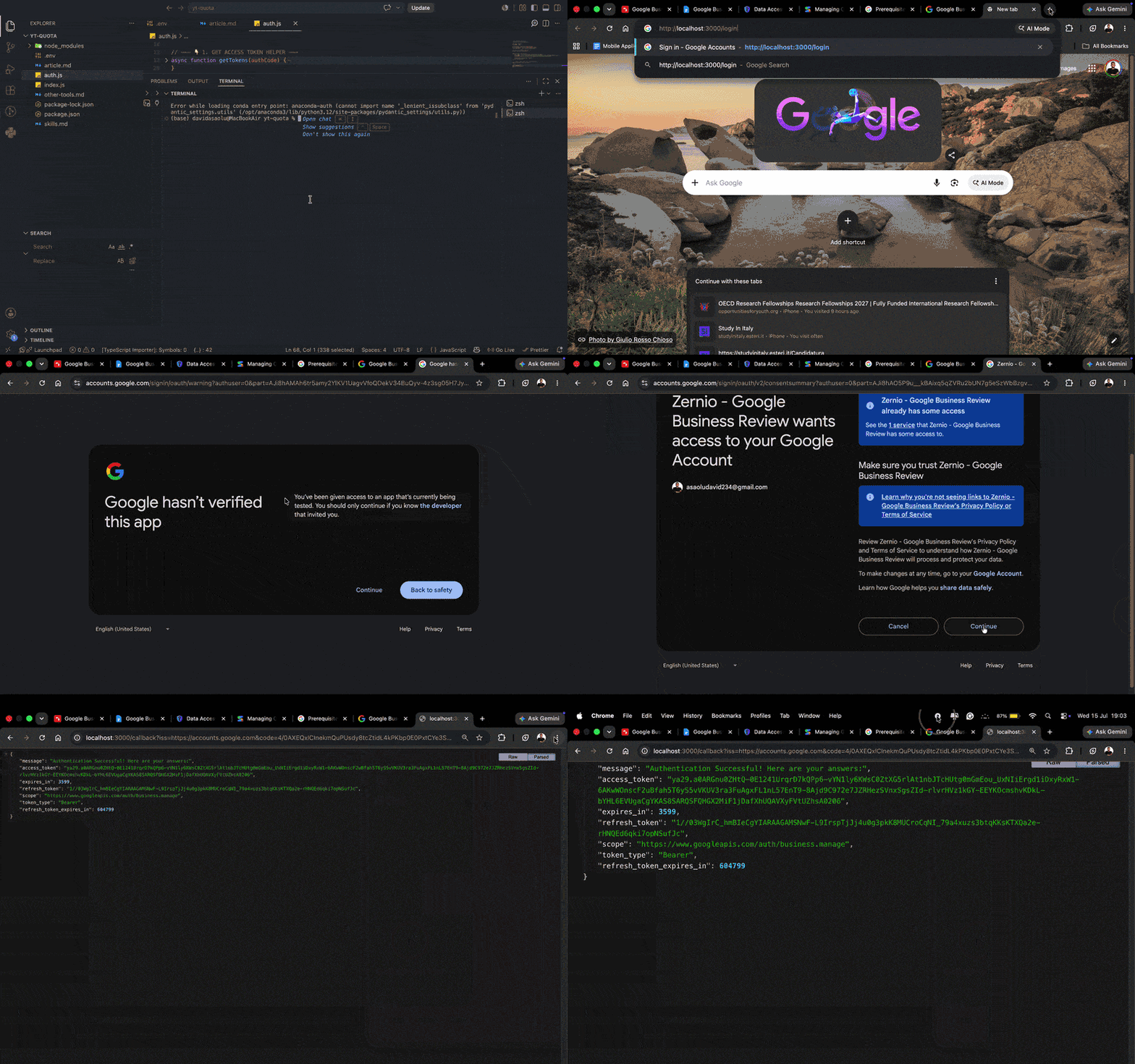
node index.jsThen, open http://localhost:3000/login in your browser. You'll be redirected to Google's OAuth consent screen, where you'll sign in with your Google account and authorize the requested permissions.
After authentication is complete, Google redirects you to the callback URL, where your access token, refresh token, granted scopes, and token expiration information are displayed.
Fetch the User Account and Location IDs
Before you can retrieve or manage reviews, you need your Account ID and Location ID. The Account ID identifies the Google Business Profile account, while the Location ID identifies the specific business location.
Use the following function to retrieve all Google Business Profile accounts associated with the authenticated user:
async function getAllAccountIds(accessToken) {
   let allAccounts = [];
   let pageToken = null;

   try {
       // Loop continues as long as Google gives us a 'nextPageToken'
       do {
           const url = new URL(
               "https://mybusinessaccountmanagement.googleapis.com/v1/accounts",
           );
           url.searchParams.set("pageSize", "100"); // Max allowed by Google
           if (pageToken) {
               url.searchParams.set("pageToken", pageToken);
           }

           const response = await fetch(url.toString(), {
               headers: { Authorization: `Bearer ${accessToken}` },
           });

           if (!response.ok) {
               throw new Error(
                   `Failed to fetch accounts: ${response.status} - ${response.statusText}`,
               );
           }

           const data = await response.json();

           // If the user has accounts on this page, map them to extract just the ID
           if (data.accounts && data.accounts.length > 0) {
               const extractedAccounts = data.accounts.map((acc) => ({
                   id: acc.name.split("/")[1], // Extracts ID from "accounts/123456"
                   accountName: acc.accountName,
                   type: acc.type,
               }));

               allAccounts.push(...extractedAccounts);
           }

           // Set the token for the next page. If undefined, the loop stops.
           pageToken = data.nextPageToken;
       } while (pageToken);

       console.log(`✅ Found ${allAccounts.length} accounts.`);
       return allAccounts;
   } catch (error) {
       console.error("❌ Error fetching accounts:", error.message);
       return [];
   }
}

// How to use it:
// const myAccounts = await getAllAccountIds(accessToken);
// console.log(myAccounts[0].id); // Get the ID of the first account
This function calls the My Business Account Management API to retrieve all accounts associated with the authenticated user. Since the API response is paginated, it continues requesting additional pages until every account has been retrieved. It then extracts the account ID from each resource name and returns the results as an array.
Next, retrieve the locations associated with an account by passing the access token and Account ID to the following function:
async function getAllLocations(accessToken, accountId) {
   const allLocations = [];
   let pageToken = null;

   try {
       do {
           // FIXED URL: Includes "accounts/" before the accountId variable
           const url = new URL(      `https://mybusinessbusinessinformation.googleapis.com/v1/accounts/${accountId}/locations`,
           );

           // readMask ensures we only download the data we actually need, saving bandwidth
           url.searchParams.set(
               "readMask",
               "name,title,storefrontAddress,websiteUri",
           );
           url.searchParams.set("pageSize", "100");

           if (pageToken) {
               url.searchParams.set("pageToken", pageToken);
           }

           const response = await fetch(url.toString(), {
               headers: { Authorization: `Bearer ${accessToken}` },
           });

           if (!response.ok) {
               throw new Error(
                   `Failed to fetch locations: ${response.status} - ${response.statusText}`,
               );
           }

           const data = await response.json();

           if (data.locations && data.locations.length > 0) {
               // Map through the locations to extract the raw ID for convenience
               const mappedLocations = data.locations.map((loc) => ({
                   ...loc,
                   id: loc.name.split("/")[1], // Extracts "987654321" from "locations/987654321"
               }));

               allLocations.push(...mappedLocations);
           }

           // Update pageToken for the next loop. If undefined, the loop breaks.
           pageToken = data.nextPageToken;
       } while (pageToken);

       console.log(
           `✅ Found ${allLocations.length} locations for account ${accountId}.`,
       );
       return allLocations;
   } catch (error) {
       console.error("❌ Error fetching locations:", error.message);
       return [];
   }
}
This function retrieves all business locations associated with the specified account. Like the previous example, it handles pagination automatically to ensure every location is returned. It also extracts each Location ID from the resource name, making it easier to use in subsequent API requests, such as listing reviews or replying to customer feedback.
Access and Manage Google Business Reviews
In this section, you’ll learn how to retrieve all reviews for your Google Business profile, reply to customer reviews, and manage those replies programmatically.
To retrieve reviews for a business location, use the following function:
async function getReviews(accessToken, accountId, locationId, options = {}) {
   //👇🏻 Extract numeric IDs if full resource names (e.g., "accounts/123456") are provided
   const accId = accountId.includes("/")
       ? accountId.split("/").pop()
       : accountId;
   const locId = locationId.includes("/")
       ? locationId.split("/").pop()
       : locationId;

   const pageSize = Math.min(options?.pageSize || 50, 50); // Max 50 per request
   const url = new URL(
       `https://mybusiness.googleapis.com/v4/accounts/${accId}/locations/${locId}/reviews`,
   );

   url.searchParams.set("pageSize", String(pageSize));

   if (options?.pageToken) {
       url.searchParams.set("pageToken", options.pageToken);
   }

   const response = await fetch(url.toString(), {
       headers: { Authorization: `Bearer ${accessToken}` },
   });

   if (!response.ok) {
       const errorBody = await response.text();
       throw new Error(`Failed to fetch reviews: ${response.status} ${errorBody}`);
   }

   const data = await response.json();

   //👇🏻 Map star rating strings to numeric values for easier front-end rendering
   const starRatingMap = {
       ONE: 1,
       TWO: 2,
       THREE: 3,
       FOUR: 4,
       FIVE: 5,
   };

   //👇🏻 Clean up and format the returned reviews array
   const reviews = (data.reviews || []).map((review) => ({
       id: review.reviewId || review.name?.split("/").pop(),
       name: review.name,
       reviewer: {
           displayName: review.reviewer?.displayName || "Anonymous",
           profilePhotoUrl: review.reviewer?.profilePhotoUrl || null,
           isAnonymous: review.reviewer?.isAnonymous || false,
       },
       rating: starRatingMap[review.starRating] || 0,
       starRating: review.starRating,
       comment: review.comment || "",
       createTime: review.createTime,
       updateTime: review.updateTime,
       reviewReply: review.reviewReply
           ? {
                   comment: review.reviewReply.comment,
                   updateTime: review.reviewReply.updateTime,
               }
           : null,
   }));

   return {
       reviews,
       averageRating: data.averageRating,
       totalReviewCount: data.totalReviewCount,
       nextPageToken: data.nextPageToken,
   };
}
The getReviews function retrieves reviews for a specific Google Business Profile location. It supports pagination, converts Google's star rating into numeric values, and returns a structured response containing the reviews, average rating, total review count, and a pagination token for the next page of results.
To retrieve all reviews, use the following helper function:
async function getAllReviews(accessToken, accountId, locationId) {
   const allReviews = [];
   let pageToken;

   do {
       const response = await getReviews(accessToken, accountId, locationId, {
           pageSize: 50,
           pageToken,
       });

       allReviews.push(...response.reviews);
       pageToken = response.nextPageToken;

       // Small delay to avoid rate limiting
       if (pageToken) {
           await new Promise((resolve) => setTimeout(resolve, 100));
       }
   } while (pageToken);

   return allReviews;
}
The getAllReviews function repeatedly calls getReviews until all pages have been retrieved. It automatically handles pagination and returns a single array containing every review for the specified business location.
To reply to a customer review, use the following function:
async function replyToReview(accessToken, reviewName, replyText) {
   // reviewName format: accounts/{accountId}/locations/{locationId}/reviews/{reviewId}
   const response = await fetch(
       `https://mybusiness.googleapis.com/v4/${reviewName}/reply`,
       {
           method: "PUT",
           headers: {
               Authorization: `Bearer ${accessToken}`,
               "Content-Type": "application/json",
           },
           body: JSON.stringify({
               comment: replyText,
           }),
       },
   );

   if (!response.ok) {
       const errorBody = await response.text();
       throw new Error(
           `Failed to reply to review: ${response.status} ${errorBody}`,
       );
   }

   return { success: true };
}
The replyToReview function creates a new reply for a review by sending a PUT request to the Google Business Profile API. If the review already has a reply, the existing reply is replaced with the new one.
To update an existing review reply, call the following function:
async function updateReviewReply(accessToken, reviewName, newReplyText) {
   // PUT request updates the existing reply
   return replyToReview(accessToken, reviewName, newReplyText);
}
Since the Google Business Profile API uses the same endpoint to create and update replies, the updateReviewReply function simply calls replyToReview with the updated reply text.
Finally, to delete a review reply, use the following function:
async function deleteReviewReply(accessToken, reviewName) {
   const response = await fetch(
       `https://mybusiness.googleapis.com/v4/${reviewName}/reply`,
       {
           method: "DELETE",
           headers: {
               Authorization: `Bearer ${accessToken}`,
           },
       },
   );

   // 204 No Content indicates successful deletion
   if (!response.ok && response.status !== 204) {
       const errorBody = await response.text();
       throw new Error(`Failed to delete reply: ${response.status} ${errorBody}`);
   }

   return { success: true };
}
The deleteReviewReply function removes an existing reply by sending a DELETE request to the Google Business Profile API.
Congratulations\! You've successfully integrated the Google Business Profile API into your application.
Summary: Integrating the Google Business Reviews API
The Google Business Profile API gives developers complete control over retrieving reviews, managing business locations, and responding to customer feedback. However, integrating it directly requires configuring OAuth 2.0, obtaining API approval, managing access tokens, handling rate limits, and maintaining the integration as Google’s APIs evolve.
Zernio abstracts much of the underlying complexity while still exposing the functionality you need to retrieve reviews, manage locations, and reply to customer feedback. It also provides a consistent developer experience across Google Business Profile and 14 other platforms, which can be especially useful for SaaS products, agencies, CRM systems, and AI-powered applications.
If you’re building a production-ready application, Zernio reduces development time, minimises maintenance, and lets you focus on building features instead of managing API infrastructure.
FAQs
1. What is the Google Business Profile Reviews API?
The Google Business Profile Reviews API is part of the Google Business Profile API. It enables verified business owners to retrieve customer reviews, reply to reviews, update review replies, and delete existing replies programmatically.
2. Can I display Google Business reviews on my website via an API endpoint?
Yes. The Google Business Profile API allows you to retrieve all reviews, reply to reviews, and update and delete review replies.
3. Where can I find the official Google Business Profile API reviews documentation?
Google provides official documentation for the Google Business Profile API, including endpoints for listing reviews, replying to customer reviews, and managing review replies.
4. Can I reply to Google Business reviews programmatically?
Yes. The Google Business Profile API lets verified business owners create, update, and delete replies to customer reviews. Unified API platforms such as Zernio also let you manage Google Business reviews programmatically, without handling much of the underlying authentication process by yourself.
5. Can I manage multiple Google Business Profile locations?
Yes. The Google Business Profile API and Zernio let you retrieve all locations associated with your business account and manage reviews for each location individually.
6. Do I need a verified Google Business Profile to use the API?
Yes. To use the Google Business Profile API, you must own a verified Google Business Profile that has been active for at least 60 days. You’ll also need to request access to the Google Business Profile API before making authenticated requests.
7. Is the Google My Business API deprecated?
Yes. Google has deprecated much of the legacy Google My Business API in favour of the newer Google Business Profile APIs. If you’re building a new integration, you should check out the latest changes.
8. How do I authenticate with the Google Business Profile API?
The API uses OAuth 2.0. You’ll need to create an OAuth Client ID and Client Secret in the Google Cloud Console, configure the OAuth consent screen, authenticate users, and exchange the authorisation code for an access token before making API requests. Alternatively, you can use a unified API platform such as Zernio, which simplifies user authentication and reduces the amount of OAuth setup and token management required.
9. Is there an easier way to integrate the Google Business Reviews API?
Yes. Zernio, which provides a unified layer on top of the Google Business Profile API. Zernio handles OAuth, token management, rate limiting, retries, and API maintenance, allowing you to retrieve reviews and manage replies through a simplified API.
10. Why can’t I access the Google Business Profile Reviews API?
The most common reasons include:
- Your Google Business Profile isn’t verified.
- Your business profile has been active for fewer than 60 days.
- You haven’t requested or received access to the Google Business Profile API.
- The required APIs aren’t enabled in your Google Cloud project.
- Your OAuth credentials or scopes are incorrectly configured.
11. Can I create Google Business reviews using the API?
No. The Google Business Profile API doesn’t allow developers or businesses to create customer reviews to prevent spam and automated review submissions. Only Google users can submit reviews through Google Search or Google Maps.